

Guide On Navigating Project Management Basics Powerpoint Presentation Slides PM CD




Try Before you Buy Download Free Sample Product
 Impress Your
 Audience
 100%
100% Editable
 Save Hours
 of Time


Project Management Basics provides the essential knowledge, tools, techniques and methodologies for effectively leading and delivering projects. Check out our professionally designed Guide on Navigating Project Management Basics PowerPoint Presentation. This PPT bundle initially covers a project managers life cycle and responsibilities within an organization. Whether youre a novice seeking to grasp the fundamentals or a seasoned professional needing a comprehensive refresher, this presentation offers a step by step guide. Additionally, the Project Management Tools PPT templates explore cutting edge Techniques and help master proven Methodologies. Unlock your potential, streamline your projects and achieve your goals with this all encompassing guide your ultimate companion in project management. Lastly, it delves into a few dashboards designed to help companies track and measure the effectiveness of project management basics. Download our 100percentage editable and customizable PowerPoint, compatible with Google Slides, and streamline your presentation process.
People who downloaded this PowerPoint presentation also viewed the following :
Content of this Powerpoint Presentation
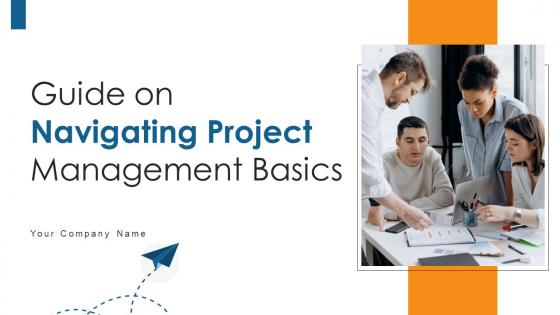
Slide 1: This slide introduces Guide on Navigating Project Management Basics. State your company name and begin.
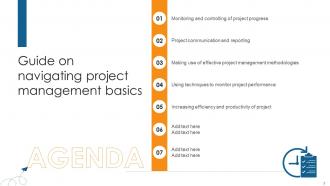
Slide 2: This is an Agenda slide. State your agendas here.
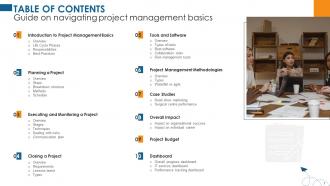
Slide 3: This slide shows Table of Content for the presentation.
Slide 4: This slide shows title for topics that are to be covered next in the template.
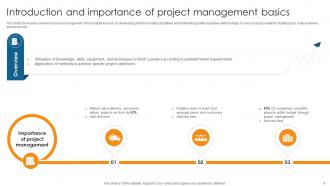
Slide 5: This slide showcases overview of project management. This template focuses on developing plans for meeting deadlines and maintaining quality objectives within budget.
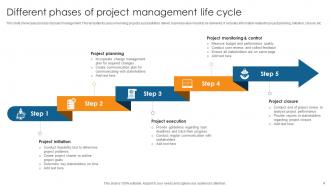
Slide 6: This slide presents the process of project management. This template focuses on running projects successfully to deliver business value meant to be delivered.
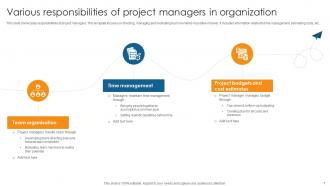
Slide 7: This slide showcases responsibilities of project managers. This template focuses on directing, managing and motivating team members in positive manner.
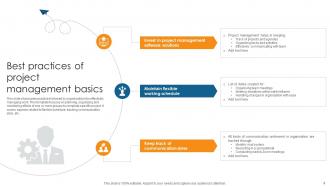
Slide 8: This slide displays practices followed by organisations for effectively managing work. This template focuses on planning, organizing and monitoring efforts.
Slide 9: This slide shows title for topics that are to be covered next in the template.
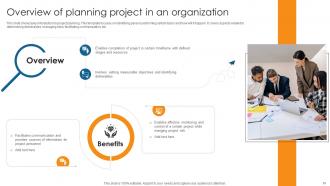
Slide 10: This slide showcases introduction to project planning. This template focuses on identifying person performing certain tasks and how will it happen.
Slide 11: This slide presents different phases of determining project scope. This template focuses on ensuring that all stakeholders have clear understanding of boundaries of project.
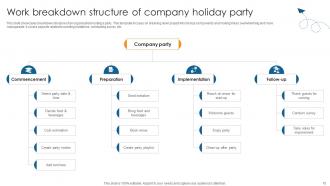
Slide 12: This slide showcases breakdown structure of an organisation hosting a party. This template focuses on breaking down project into bit-size components.
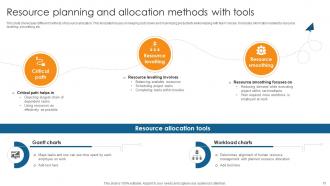
Slide 13: This slide displays different methods of resource allocation. This template focuses on keeping cists down and maximizing productivity while helping with team morale.
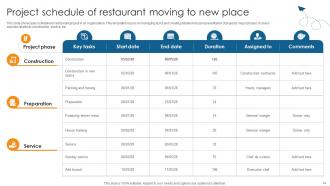
Slide 14: This slide showcases schedule for restaurant project in an organisation. This template focuses on managing tasks and creating detailed visual representation of projects major phases.
Slide 15: This slide shows title for topics that are to be covered next in the template.
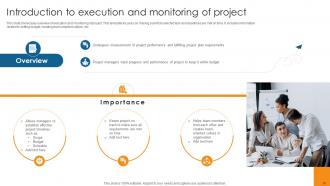
Slide 16: This slide showcases overview of execution and monitoring of project. This template focuses on making sure that selected task and deadlines are met on time.
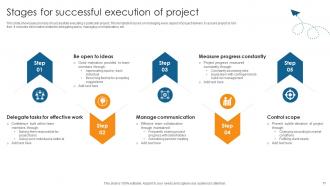
Slide 17: This slide displays the process of successfully executing a particular project. This template focuses on managing every aspect of project delivery to assure project is risk free.
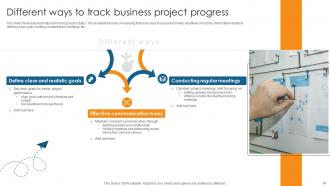
Slide 18: This slide showcases techniques for tracing project status. This template focuses on ensuring that team stays focused and meets deadlines.
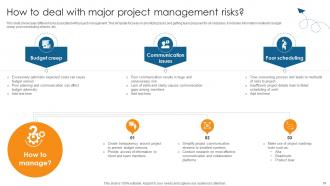
Slide 19: This slide displays different risks associated with project management. This template focuses on prioritizing tasks and getting team prepared for all obstacles.
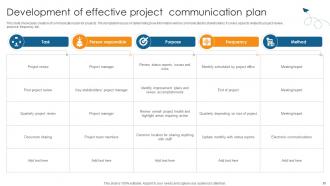
Slide 20: This slide showcases creation of communication plan for projects. This template focuses on determining how information will be communicated to stakeholders.
Slide 21: This slide shows title for topics that are to be covered next in the template.
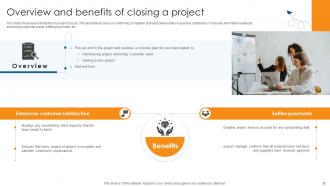
Slide 22: This slide showcases introduction to project closure. This template focuses on confirming completion of project deliverables to sponsor satisfaction.
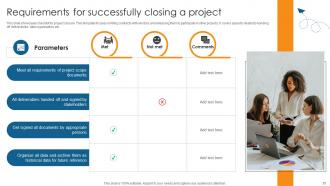
Slide 23: This slide presents checklist for project closure. This template focuses on filing contracts with vendors and releasing them to participate in other projects.
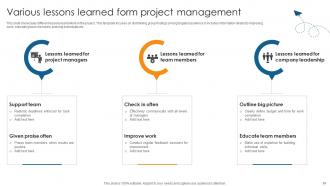
Slide 24: This slide showcases different lessons learnt while in the project. This template focuses on distributing group findings among targeted audience.
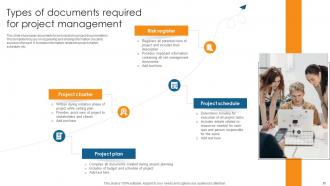
Slide 25: This slide displays documents to be included in project documentation. This template focuses on organising and sharing information crucial to success of project.
Slide 26: This slide shows title for topics that are to be covered next in the template.
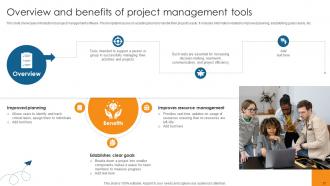
Slide 27: This slide showcases introduction to project management software. This template focuses on assisting teams to handle their projects easily.
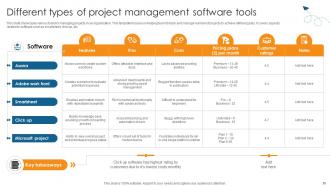
Slide 28: This slide displays various tools for managing projects in an organisation. This template focuses on helping team to track and manage number of projects to achieve defined goals.
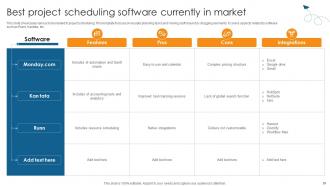
Slide 29: This slide showcases various tools related to project scheduling. This template focuses on visually planning tasks and moving stuff around by dragging elements.
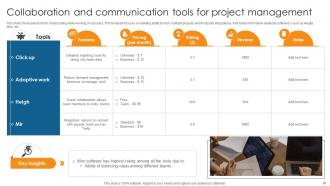
Slide 30: This slide presents tools for collaborating while working on a project. This template focuses on building ability to track multiple projects and third party integrations.
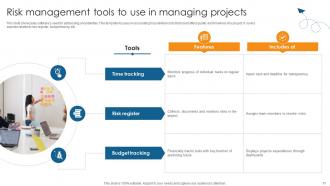
Slide 31: This slide showcases software's used for addressing uncertainties. This template focuses on accounting for potential costs that could affect quality and timelines of a project.
Slide 32: This slide shows title for topics that are to be covered next in the template.
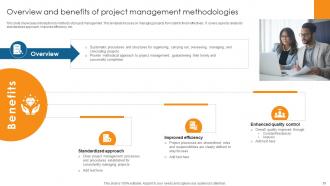
Slide 33: This slide showcases introduction to methods of project management. This template focuses on managing projects from start to finish effectively.
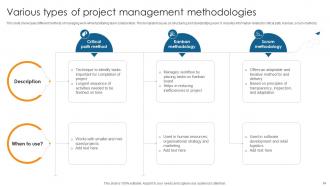
Slide 34: This slide presents different methods of managing work while facilitating team collaboration. This template focuses on structuring and standardizing work.
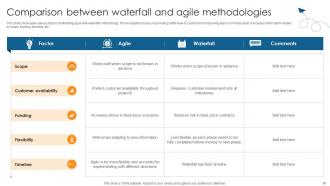
Slide 35: This slide showcases various factors diminishing agile with waterfall methodology. This template focuses on providing better view to customer for improving team communication.
Slide 36: This slide shows title for topics that are to be covered next in the template.
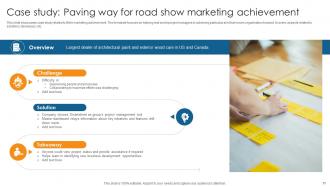
Slide 37: This slide showcases case study related to Behr marketing achievement. This template focuses on helping real world project managers in achieving particular aims.
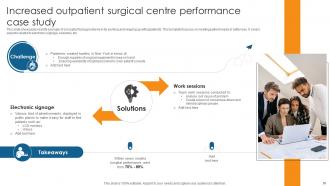
Slide 38: This slide presents real life example of a hospital facing problems in its working and keeping up with p[patients. This template focuses on meeting patient needs in better way.
Slide 39: This slide shows title for topics that are to be covered next in the template.
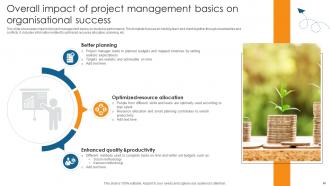
Slide 40: This slide showcases impact of project management basics on business performance. This template focuses on holding team and client together through uncertainties and conflicts.
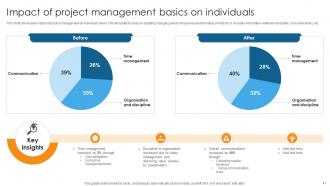
Slide 41: This slide presents impact of project management on individual career. This template focuses on adapting changing needs of business and demands of industry.
Slide 42: This slide shows title for topics that are to be covered next in the template.
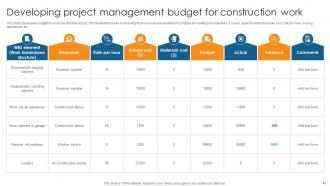
Slide 43: This slide showcases budget for small construction project. This template focuses on ensuring that resources are available in company for meeting set objectives.
Slide 44: This slide shows title for topics that are to be covered next in the template.
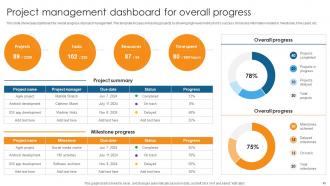
Slide 45: This slide showcases dashboard for overall progress of project management. This template focuses on tracking projects by showing high-level metrics for it’s success.
Slide 46: This slide displays metrics related to information technology services. This template focuses on monitoring success of project and campaigns.
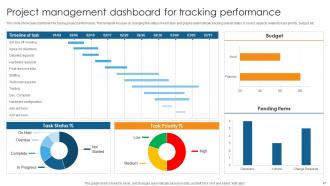
Slide 47: This slide showcases dashboard for tracing project performance. This template focuses on changing the status of each task and graphs automatically tracking overall status.
Slide 48: This slide shows all the icons included in the presentation.
Slide 49: This slide is titled as Additional Slides for moving forward.
Slide 50: This is an Idea Generation slide to state a new idea or highlight information, specifications etc.
Slide 51: This is Our Vision, Mission & Goal slide. Post your Visions, Missions, and Goals here.
Slide 52: This slide depicts Venn diagram with text boxes.
Slide 53: This is Our Team slide with names and designation.
Slide 54: This is a Thank You slide with address, contact numbers and email address.
Guide On Navigating Project Management Basics Powerpoint Presentation Slides PM CD with all 62 slides:
Use our Guide On Navigating Project Management Basics Powerpoint Presentation Slides PM CD to effectively help you save your valuable time. They are readymade to fit into any presentation structure.











FAQs for Guide On Navigating Project Management Basics Powerpoint Presentation
So there's five main phases you gotta hit: initiation, planning, execution, monitoring/controlling, and closure. First you define scope and get the green light. Planning is where you map out timelines, resources, all that fun stuff - seriously don't skip this part, trust me. Execution's the actual work (where I basically live these days). Then you're constantly tracking progress and fixing stuff that breaks. Closure wraps everything up with a retrospective. Oh and pro tip? Spend extra time planning upfront. I know it's boring but it'll save your butt when everything goes sideways later.
Honestly, just nail down three things: what you're actually building, what you're definitely NOT doing, and how you'll know if you won. List out every single deliverable first. Then - this saves so much drama later - write down what's completely off limits. I learned this the hard way lol. Get everyone to literally sign off on the scope and timeline before you start anything. Trust me, those "wait I thought we were also doing Y" conversations are the worst. Being crazy specific now beats dealing with scope creep nightmares later.
Oh man, so many good options! Gantt charts are clutch - Microsoft Project, Asana, Monday.com all let you see how tasks connect and when stuff's due. I'm weirdly obsessed with Trello though, especially for smaller projects. The whole card thing just works for my brain, you know? If you want to track actual time spent (vs what you think you're spending), Toggl and Harvest are solid. Honestly, just pick whatever doesn't make you want to tear your hair out and stick with it. You can always switch later, but consistency's the real game-changer here.
Honestly, just talk to them constantly. Figure out what they're actually expecting first - don't guess. Get everyone on the same page about timeline, scope, all that stuff before you start. Regular updates are huge, even boring ones. Nobody likes getting blindsided later. When things go sideways (and they will), tell them right away. Don't try being the hero who fixes everything quietly - that usually backfires. Oh, and set up consistent check-ins. Stick to them religiously. Trust me, being reliable beats being perfect every single time.
Think of risk management as your project's safety net. Spot the big problems before they hit - stuff like budget blowouts, team conflicts, or scope creep. I can't tell you how many projects I've watched crash because no one asked "what if this goes sideways?" Don't get crazy mapping every little thing that could happen, but definitely nail down your top 5 risks and figure out backup plans. Way better to be ready than scrambling later. Honestly, most project disasters are totally predictable if you just take time upfront to think through the obvious trouble spots.
Honestly, just dump everything into a list first - labor, materials, software, whatever you can think of. Then tack on 10-15% extra because stuff ALWAYS goes sideways (learned that the hard way). I like breaking it down by phases so you're not staring at one massive number. Check in on your spending weekly or every couple weeks - spreadsheets work fine, don't overthink the tools. The whole point is catching problems early when you can actually fix them instead of panicking at the end.
Honestly, start with the basics - get everyone on Slack or Teams so you're not drowning in email threads. Daily standups are a game changer if you can pull them off, even just 15 minutes. Document stuff in Google Docs or Confluence so it doesn't vanish into the void. But here's the thing - none of that tech matters if people don't feel safe speaking up about problems. I'd kick off your next meeting by straight-up asking what's blocking everyone. Actually listen to what they say. Oh, and make sure roles are crystal clear because confusion kills momentum fast.
Look, it really comes down to how much your project's gonna change. Clear requirements and a fixed endpoint? Waterfall's perfect - like construction projects or anything with heavy regulations. But most software stuff these days goes Agile because, let's be honest, requirements always shift and you need constant feedback. Think about your team size too, plus how involved your client can actually be (some promise the world then disappear for weeks). My rule of thumb: ask yourself how much this thing will probably evolve as you figure stuff out. That answer usually makes the choice pretty obvious.
Dude, scope creep will absolutely destroy you - I've seen it happen so many times. Get your requirements nailed down first and document literally everything, even the obvious stuff. Communication problems kill way more projects than any tech issues ever will. Build in extra time because trust me, something random always breaks. Check in with everyone regularly so you catch the fires while they're small. Oh, and learn to say no to new requests that weren't part of the original plan. That's probably the hardest part honestly. Write down what "done" actually looks like before you even start.
Honestly, just track the big stuff first - are you on time, on budget, and delivering what you promised? Good luck hitting all three though, seriously. I usually throw in stakeholder happiness and whether the team's actually being productive too. You can get fancy with earned value tracking or just make a simple dashboard - whatever works for your brain. But here's the thing that really matters: did you actually solve their problem? Like, would they call you again for the next project? That's your real performance measure right there.
Honestly, just stay ahead of it with regular check-ins - I do weekly with my core team, monthly with the big bosses. Everyone cares about different stuff though. Execs want the high-level "are we on track" while your team leads need the nitty-gritty blocker details. I learned this one the painful way: better to overcommunicate than leave people guessing. Mix it up with emails, quick calls, maybe a shared dashboard if you're feeling fancy. But here's the real thing - never blindside anyone. Something's going wrong? Tell them right away with how you'll fix it, not just the mess itself.
Don't wait until the end to check quality - that's a recipe for disaster, trust me. I've been there and it sucked. Get your stakeholders to define what "done" actually means right at the start. Build in review checkpoints as you go - peer reviews, client feedback sessions, whatever works. Quality shouldn't just be QA's problem, make it everyone's thing. Honestly, a simple checklist for each phase works wonders. Your team will know exactly what needs to happen before they can move on to the next step.
Honestly, jump on conflicts fast before they blow up - that's my biggest tip. Listen to what people are actually saying, not just waiting for your turn to talk. Make sure everyone feels safe speaking up about problems, you know? Focus on the issue itself rather than getting into personality clashes (learned that one the hard way). When things get tense, try breaking it down: what's really wrong here, what solutions can we brainstorm together, where do we all agree on the end goal? Write down whatever you decide so nobody "forgets" later. Practice with small stuff first - you'll get way better at handling the big drama when it hits.
Honestly, change management will make or break your project every single time. Without a solid process for scope changes, budget shifts, or timeline adjustments, everything falls apart. I've watched entire projects crash because teams just said yes to everything without thinking it through - such a mess. You really need approval workflows and impact assessments before agreeing to changes. Oh, and keep stakeholders in the loop constantly. The trick is setting up your change control process right at kickoff, not scrambling later when requests start flooding in. Trust me, they always do.
Honestly, project management software is a lifesaver. Everyone can see what's happening instead of constantly asking "wait, who's handling this?" The timeline stuff helps too - no more missed deadlines because someone forgot. And I swear the best part is ditching those annoying email threads where important details get buried. You'll spot problems way earlier with the tracking features. Most of these tools play nice with whatever apps you're already using. I'd probably start with Trello or Asana since they're pretty straightforward, then maybe upgrade later if you need more bells and whistles.
-
Fantastic collection. Loved how we can personalize these templates as per the requirements.
-
“Love it! I was able to grab an exciting proposal because of SlideTeam.”