

Project Managers Playbook Powerpoint Presentation Slides




Try Before you Buy Download Free Sample Product
 Impress Your
 Audience
 100%
100% Editable
 Save Hours
 of Time


Here is an efficiently designed Project managers playbook which is an essential guideline that enables effective project management from concept to closure. It covers best practices of highly productive project managers, the role of the project manager in managing information flow, enabling strategic planning, the role of the project management office, the project management framework including process groups, Knowledge areas, processes, and a checklist to track project lifecycle management activities. The playbook covers different knowledge areas managed by the project manager for integration management for seamless team collaboration, project business case development, and project charter development. Scope management includes feasibility assessment, portfolio management, and work breakdown structure. Quality management includes a quality management plan for project progress and team meeting to ensure top notch project quality. Human resource management includes key people associated with the project management team, project tea, characteristics, and initiatives to enhance work productivity. Stakeholder management is done by impact assessment by analyzing impact vs. priority. The risk is managed by a risk maintenance register and risk management plan. The overall project performance is tracked through dashboards. Download our 100 percent editable and customizable template, which is also compatible with Google Slides.
People who downloaded this PowerPoint presentation also viewed the following :
Content of this Powerpoint Presentation
Slide 1: This slide introduces Project Managers Playbook. State Your Company Name and begin.
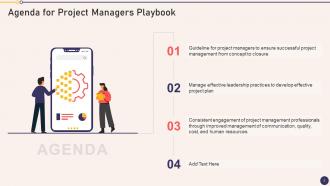
Slide 2: This slide states Agenda of the presentation.
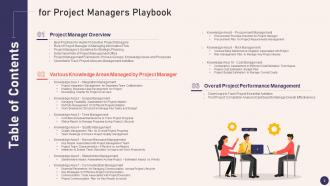
Slide 3: This slide presents Table of Content for the presentation.
Slide 4: This slide highlights title for topics that are to be covered next in the template.
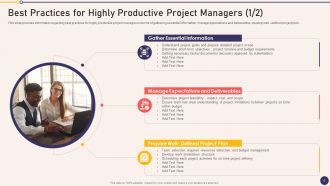
Slide 5: This slide shows Best Practices for Highly Productive Project Managers.
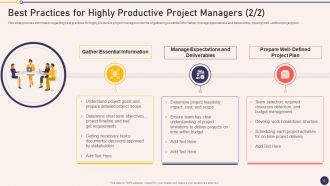
Slide 6: This is another slide continuing Best Practices for Highly Productive Project Managers.
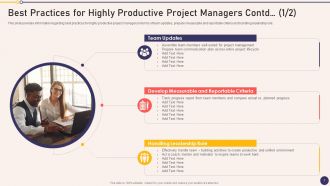
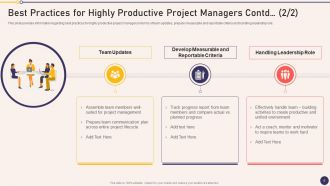
Slide 7: This slide presents Best Practices for Highly Productive Project Managers Contd.
Slide 8: This is another slide continuing Best Practices for Highly Productive Project Managers.
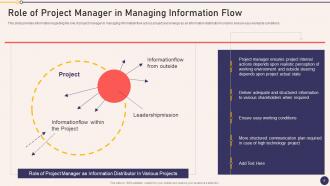
Slide 9: This slide displays Role of Project Manager as Information Distributor In Various Projects.
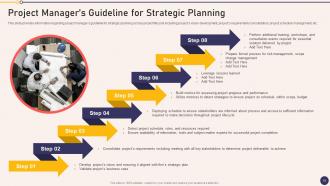
Slide 10: This slide represents Project Manager’s Guideline for Strategic Planning.
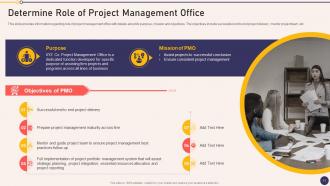
Slide 11: This slide provides information regarding role of project management office.
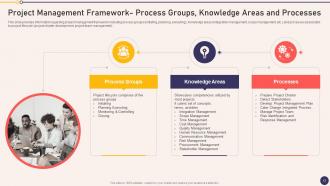
Slide 12: This slide showcases Project lifecycle comprises of five process groups.
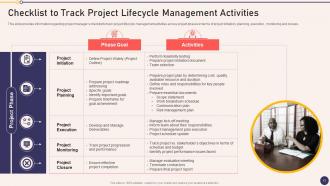
Slide 13: This slide shows Checklist to Track Project Lifecycle Management Activities.
Slide 14: This slide highlights title for topics that are to be covered next in the template.
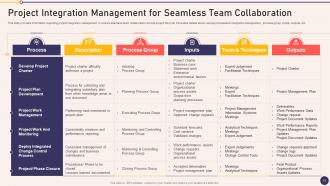
Slide 15: This slide presents Project Integration Management for Seamless Team Collaboration.
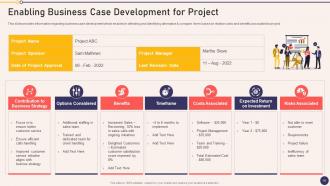
Slide 16: This slide displays Enabling Business Case Development for Project.
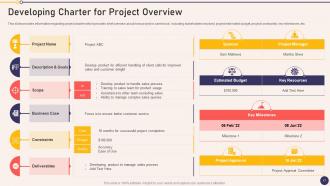
Slide 17: This slide represents Developing Charter for Project Overview.
Slide 18: This slide highlights title for topics that are to be covered next in the template.
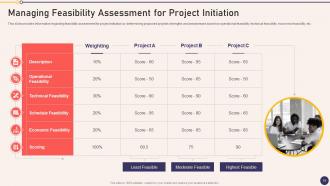
Slide 19: This slide showcases Managing Feasibility Assessment for Project Initiation.
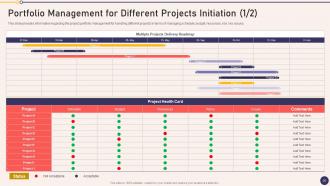
Slide 20: This slide shows Portfolio Management for Different Projects Initiation.
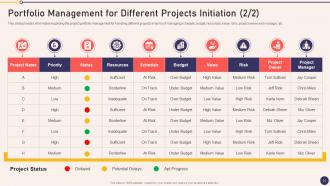
Slide 21: This is another slide continuing Portfolio Management for Different Projects Initiation.
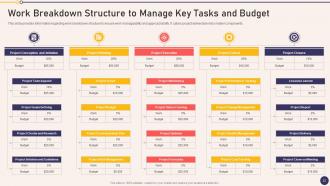
Slide 22: This slide presents Work Breakdown Structure to Manage Key Tasks and Budget.
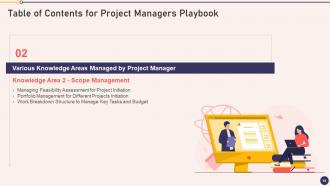
Slide 23: This slide highlights title for topics that are to be covered next in the template.
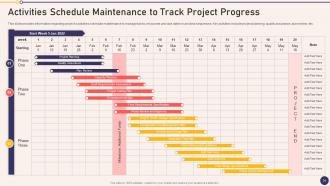
Slide 24: This slide displays Activities Schedule Maintenance to Track Project Progress.
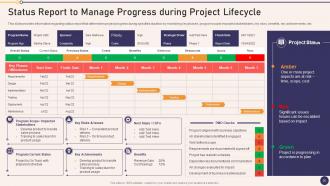
Slide 25: This slide represents Status Report to Manage Progress during Project Lifecycle.
Slide 26: This slide highlights title for topics that are to be covered next in the template.
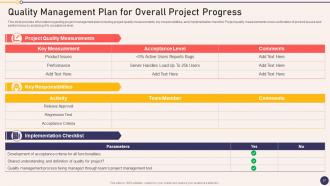
Slide 27: This slide showcases Quality Management Plan for Overall Project Progress.
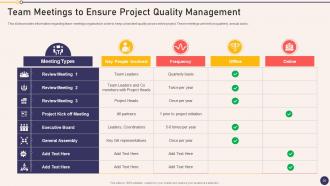
Slide 28: This slide shows Team Meetings to Ensure Project Quality Management.
Slide 29: This slide highlights title for topics that are to be covered next in the template.
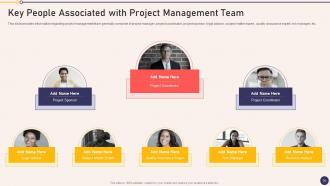
Slide 30: This slide presents Key People Associated with Project Management Team.
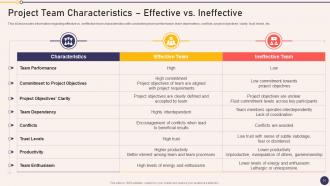
Slide 31: This slide provides information regarding effective vs. ineffective team characteristics.
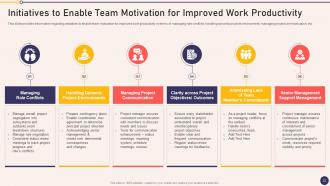
Slide 32: This slide displays Initiatives to Enable Team Motivation for Improved Work Productivity.
Slide 33: This slide highlights title for topics that are to be covered next in the template.
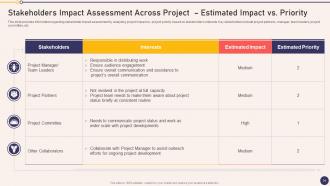
Slide 34: This slide provides information regarding stakeholder impact assessment.
Slide 35: This slide highlights title for topics that are to be covered next in the template.
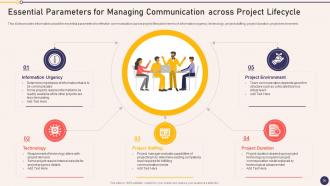
Slide 36: This slide represents Essential Parameters for Managing Communication across Project Lifecycle.
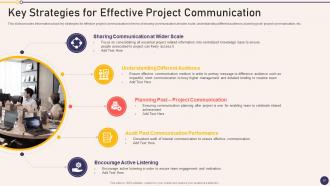
Slide 37: This slide showcases Key Strategies for Effective Project Communication.
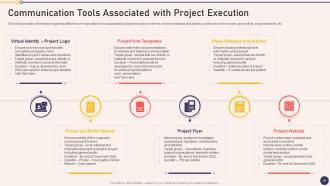
Slide 38: This slide shows Communication Tools Associated with Project Execution.
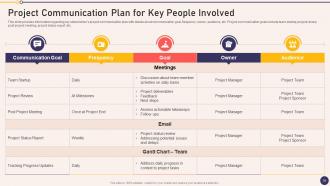
Slide 39: This slide presents Project Communication Plan for Key People Involved.
Slide 40: This slide highlights title for topics that are to be covered next in the template.
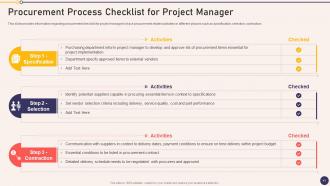
Slide 41: This slide displays Procurement Process Checklist for Project Manager.
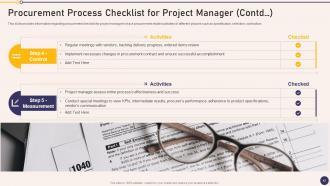
Slide 42: This is another slide continuing Procurement Process Checklist for Project Manager.
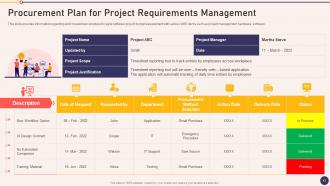
Slide 43: This slide represents Procurement Plan for Project Requirements Management.
Slide 44: This slide highlights title for topics that are to be covered next in the template.
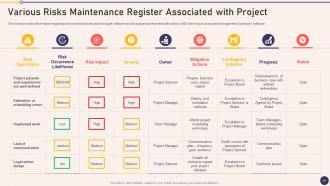
Slide 45: This slide showcases Various Risks Maintenance Register Associated with Project.
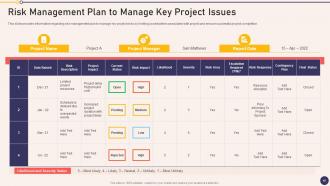
Slide 46: This slide shows Risk Management Plan to Manage Key Project Issues.
Slide 47: This slide highlights title for topics that are to be covered next in the template.
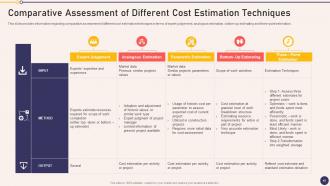
Slide 48: This slide presents Comparative Assessment of Different Cost Estimation Techniques.
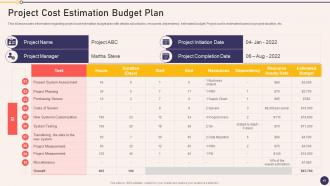
Slide 49: This slide provides information regarding project cost estimation budget plan.
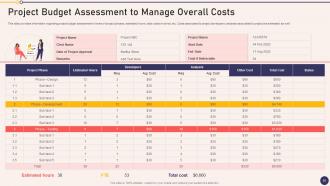
Slide 50: This slide displays Project Budget Assessment to Manage Overall Costs.
Slide 51: This slide highlights title for topics that are to be covered next in the template.
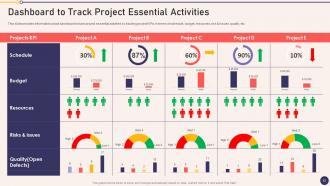
Slide 52: This slide represents Dashboard to Track Project Essential Activities.
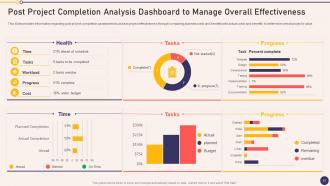
Slide 53: This slide showcases Post Project Completion Analysis Dashboard to Manage Overall Effectiveness.
Slide 54: This slide displays Icons for Project Managers Playbook.
Slide 55: This slide is titled as Additional Slides for moving forward.
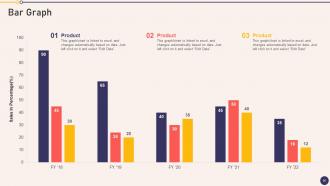
Slide 56: This slide presents Bar chart with two products comparison.
Slide 57: This slide depicts Venn diagram with text boxes.
Slide 58: This slide shows Post It Notes. Post your important notes here.
Slide 59: This is Our Target slide. State your targets here.
Slide 60: This slide provides 30 60 90 Days Plan with text boxes.
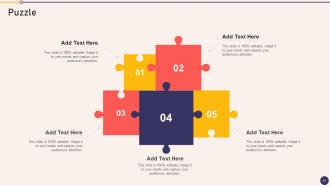
Slide 61: This slide contains Puzzle with related icons and text.
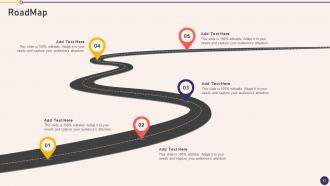
Slide 62: This slide presents Roadmap with additional textboxes.
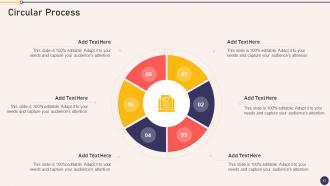
Slide 63: This slide shows Circular Diagram with additional textboxes.
Slide 64: This is a Thank You slide with address, contact numbers and email address.
Project Managers Playbook Powerpoint Presentation Slides with all 69 slides:
Use our Project Managers Playbook Powerpoint Presentation Slides to effectively help you save your valuable time. They are readymade to fit into any presentation structure.






FAQs for Project Managers Playbook
So there's five main phases you gotta know: initiation, planning, execution, monitoring, and closure. Basically your roadmap from idea to done. First you figure out what you're actually trying to do (initiation), then map out timelines and resources (planning). Execution is the actual work - but here's where people mess up. They think that's it! You need to track progress constantly and adjust when things go sideways (monitoring). Then wrap it all up and write down what you learned (closure). Each phase connects to the next one. Skip planning and you'll hate yourself later - trust me on this one. I learned that the hard way on my last project.
So basically agile splits everything into these short 1-2 week chunks called sprints. Way better than trying to plan the whole thing upfront - that stuff never survives contact with reality anyway. You're constantly getting feedback and tweaking things instead of finding out you built the wrong thing six months later. Daily standups help catch problems early (though honestly some of mine drag on forever). Your stakeholders get to see actual working pieces throughout instead of waiting for some big ta-da moment at the end. Makes pivoting when priorities change way less painful.
Dude, stakeholder engagement can totally make or break your project. First thing - map out everyone who's affected or has any pull. I learned this the hard way when some exec I'd never heard of showed up furious because nobody looped him in. Communication is key, but honestly, some stakeholders need way more hand-holding than others. Figure out who has the most influence and interest, then prioritize your time accordingly. Getting buy-in early saves you from so much drama later. Trust me, it's worth spending extra time upfront rather than dealing with angry people derailing everything at the end.
Honestly, start with that important/urgent matrix thing - I know it sounds like corporate BS but it actually helps. Map out everything you need to do first. Then figure out who on your team can handle what based on their skills and current workload. I'm obsessed with spreadsheets for this (yeah, I'm that person) but Asana works too if you want something prettier. Don't forget about deadlines and which tasks depend on others finishing first. The biggest thing though? Review it weekly because everything changes constantly and you'll go crazy trying to stick to some rigid plan.
Start with a risk register - just brainstorm everything that could go wrong and group it. Then do probability/impact matrices to figure out what actually matters. SWOT analysis helps too, though I probably overuse it at this point. For the big risks, pick your strategy: avoid it, transfer it (hello insurance), reduce the chance it happens, or just accept it with a backup plan. Team risk workshops are honestly where the magic happens - they'll spot stuff you'd miss completely. Oh, and don't treat this like a one-and-done thing. Keep updating it as your project evolves.
Honestly, good communication just cuts through all the confusion that tanks projects. Regular check-ins and clear updates mean everyone actually knows what's happening - sounds basic but you'd be shocked how rare this is. Fewer missed deadlines, less scope creep, and your team feels way more confident making calls because they get the full picture. Pick whatever works - daily standups, weekly reports, whatever - but stick with it religiously. That consistency is where the magic happens. Trust me on this one.
Honestly, scope creep kills more projects than anything else. Get everything in writing upfront and make them sign off - trust me on this one. I've watched "just add this tiny thing" spiral into total chaos way too many times. Your timelines? Double them. Something always breaks or takes forever. Regular check-ins help too, even boring "nothing happened this week" updates. Oh, and actually track your milestones religiously so you can pivot early instead of panicking later. Way better than scrambling at the end!
Dude, get project management software ASAP. Everything lives in one spot - tasks, deadlines, who's working on what. No more digging through endless email threads (my personal hell). Asana or Monday.com are solid starting points. The automated stuff is clutch - workflows run themselves and everyone stays in the loop without those soul-crushing status meetings. You'll actually see where things get stuck too, which is weirdly satisfying. Honestly, spreadsheets feel medieval now. Start simple and add features once your team stops panicking about change.
Honestly, the best way is comparing against what you originally planned - scope, timeline, budget, all that stuff. Are your stakeholders actually happy with what you delivered? Did it solve the problem you set out to fix? Team dynamics matter too - like, did everyone work well together and hit deadlines? One thing I've learned is you gotta think long-term. Is your solution still working months later, or did it fall apart? The trick is defining what "success" looks like right at the beginning. Way easier than scrambling to figure it out when everything's done.
Dude, scope is everything - it stops those annoying "oh just one more tiny feature" requests that completely destroy your timeline. Been burned by this so many times! Set up a change control process from day one. When people want modifications (and they will), write down how it affects your budget and timeline, then make them sign off before you do anything. Sounds bureaucratic but honestly it saves your ass. Get stakeholders to approve your scope docs upfront too. People have short memories when deadlines start slipping.
Oh man, this stuff trips up so many teams. Different cultures communicate totally differently - some are blunt, others drop hints, and you'll miss deadlines because of mixed signals. Time zones are the obvious pain, but here's what's weird: cultures view time itself differently. Germans show up early, others think relationship stuff matters more than being punctual. I got burned on this with a Tokyo project once - should've seen it coming honestly. Set up communication rules early and pad your timeline. Trust me, you'll need that buffer when switching between different team contexts.
Okay so you definitely need the technical basics - Agile, Scrum, all those PM tools everyone uses. But here's the thing: soft skills are honestly what make or break you. Communication is huge because you're basically playing translator between teams all day. Problem-solving and emotional intelligence matter too since projects go sideways constantly (learned that one the hard way lol). Oh and adaptability - super important. I'd say work on communication first though. Once you've got that down, everything else clicks into place way easier.
Okay so you definitely need feedback loops throughout your whole project cycle. I'd do weekly or bi-weekly retrospectives with your team - depends how long the project is really. For stakeholders, set up regular demos or quick check-ins so they're not blindsided later. Honestly, I love the "start, stop, continue" format for team retros because it's super straightforward. Here's the thing though - you actually have to act on what people tell you, not just collect feedback and forget about it. Document everything you learn and tweak your process as you go. Don't wait until something breaks to ask for input.
Honestly, you've gotta be super clear about expectations from day one or everything falls apart. Daily standups are a lifesaver - even if they're awkward at first. Time zones will make you want to scream, but find those overlap hours for the big stuff. I'd throw everything into Slack and some project management tool so people can actually see what's happening. Document way more than feels normal since you can't just walk over to someone's desk anymore. Oh, and don't skip the random virtual coffee chats! Sounds cheesy but your team will get weird and disconnected without them.
Don't just dump lessons learned into some folder nobody checks. Write down what worked and what sucked right after each project wraps - people forget fast. Build those insights into your templates and checklists so they actually get used next time. Make everything searchable by tagging common issues or project types. Here's the thing though - you've gotta actively pull up relevant lessons during kickoffs, not just collect them. I've seen too many teams skip this step. Use past mistakes to shape how you approach new work from the start.
-
Awesome use of colors and designs in product templates.
-
Awesome use of colors and designs in product templates.