

Incident Response Playbook Powerpoint Presentation Slides





Try Before you Buy Download Free Sample Product
 Impress Your
 Audience
 100%
100% Editable
 Save Hours
 of Time


Organizations are investing more in cybersecurity incident management programs in an effort to protect their employees and assets confidential information. To manage such cybersecurity risk events, our professionals at SlideTeam have curated this customizable Incident Response Playbook. This playbook includes a standardized incident response methodology that organizations can use to manage cybersecurity risk events and educate new employees on how to prepare and follow up an incident effectively. Organizations can use sections such as introduction to cyber security incidents, addressing our five phased incident response approach to address key statistics related to cyber threats, ransom payment, and phases that will help out in effectively responding to any cybersecurity incident. Slides such as training program and communication plan will assist the organizations in providing details about the training courses to create cyber awareness and plan to communicate and manage any incident effectively. Lastly, the incident monitoring dashboard section will help track real time incident management and department wise security incidents. Build a powerful template like this for yourself and book a free demo with our research team now.
People who downloaded this PowerPoint presentation also viewed the following :
Content of this Powerpoint Presentation
Slide 1: This slide introduces Incident Response Playbook. State Your Company Name and begin.
Slide 2: This slide shows Purpose of incident response playbook.
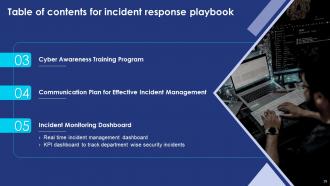
Slide 3: This slide presents Table of Content for the presentation.
Slide 4: This slide highlights title for topics that are to be covered next in the template.
Slide 5: This slide Addresses various security incidents and attacks.
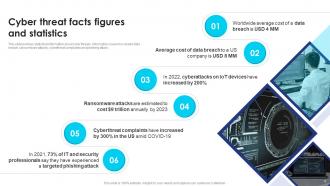
Slide 6: This slide presents Cyber threat facts figures and statistics.
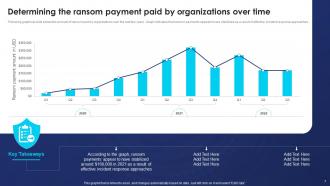
Slide 7: This slide Determines ransom payments paid by organizations over time.
Slide 8: This slide highlights title for topics that are to be covered next in the template.
Slide 9: This slide displays Classifying various security issues and attacks.
Slide 10: This slide represents Categorization worksheet for system components.
Slide 11: This slide showcases Asset criticality of identified system components.
Slide 12: This slide highlights title for topics that are to be covered next in the template.
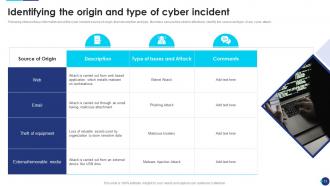
Slide 13: This slide shows Identifying the origin and type of cyber incident.
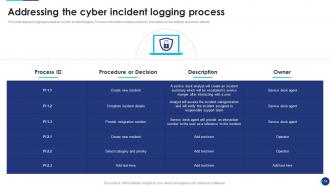
Slide 14: This slide presents Addressing the cyber incident logging process.
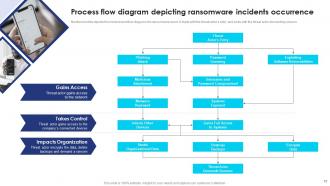
Slide 15: This slide displays Process flow diagram depicting ransomware incidents occurrence.
Slide 16: This slide highlights title for topics that are to be covered next in the template.
Slide 17: This slide represents Identifying the severity level and impact of cyber incident.
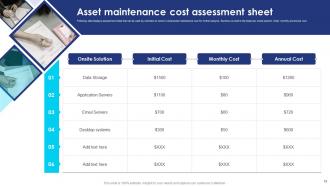
Slide 18: This slide showcases Asset maintenance cost assessment sheet.
Slide 19: This slide highlights title for topics that are to be covered next in the template.
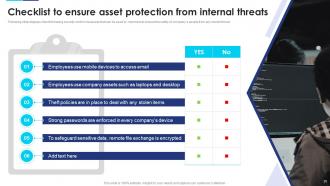
Slide 20: This slide shows Checklist to ensure asset protection from internal threats.
Slide 21: This slide Addresses the roles and responsibilities of incident response team.
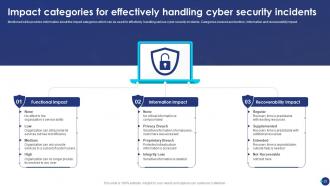
Slide 22: This slide presents Impact categories for effectively handling cyber security incidents.
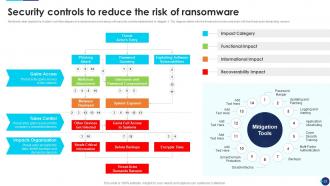
Slide 23: This slide displays Security controls to reduce the risk of ransomware.
Slide 24: This slide highlights title for topics that are to be covered next in the template.
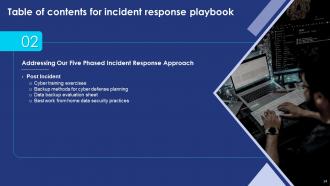
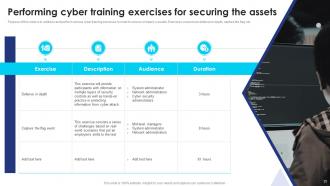
Slide 25: This slide represents Performing cyber training exercises for securing the assets.
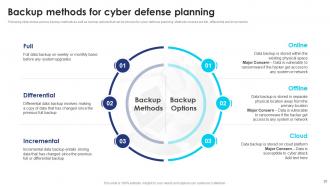
Slide 26: This slide showcases Backup methods for cyber defense planning.
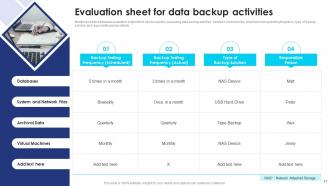
Slide 27: This slide shows Evaluation sheet for data backup activities.
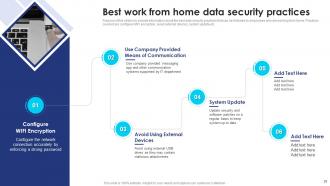
Slide 28: This slide presents Best work from home data security practices.
Slide 29: This slide highlights title for topics that are to be covered next in the template.
Slide 30: This slide displays Cyber security awareness training program.
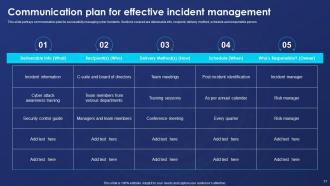
Slide 31: This slide represents Communication plan for effective incident management.
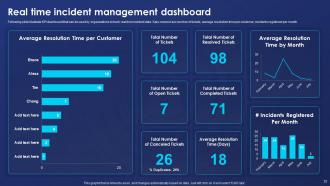
Slide 32: This slide showcases Real time incident management dashboard.
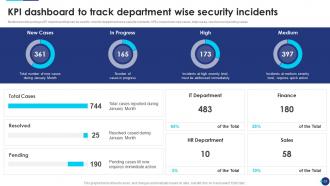
Slide 33: This slide shows KPI dashboard to track department wise security incidents.
Slide 34: This slide displays Icons for incident response playbook.
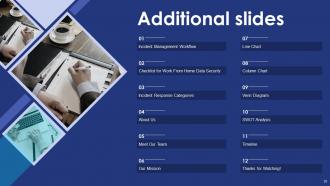
Slide 35: This slide is titled as Additional Slides for moving forward.
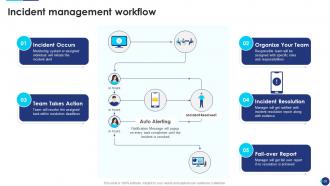
Slide 36: This slide showcases Incident management workflow.
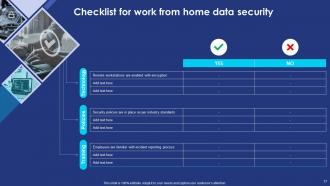
Slide 37: This slide represents Checklist for work from home data security.
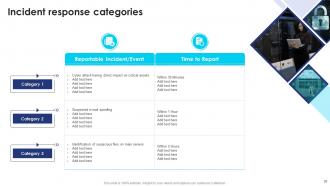
Slide 38: This slide shows Incident response categories.
Slide 39: This is About Us slide to show company specifications etc.
Slide 40: This is Our Team slide with names and designation.
Slide 41: This is Our Mission slide with related imagery and text.
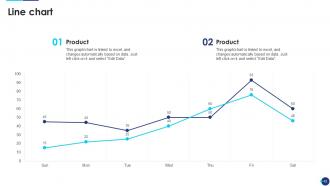
Slide 42: This slide describes Line chart with two products comparison.
Slide 43: This slide displays Column chart with two products comparison.
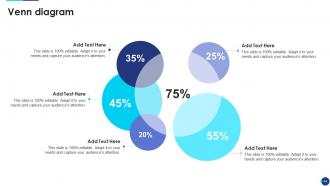
Slide 44: This slide depicts Venn diagram with text boxes.
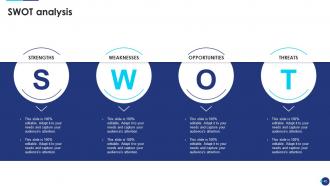
Slide 45: This slide shows SWOT describing- Strength, Weakness, Opportunity, and Threat.
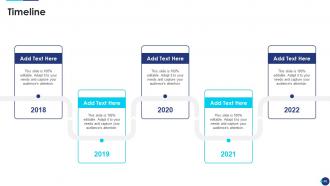
Slide 46: This is a Timeline slide. Show data related to time intervals here.
Slide 47: This is a Thank You slide with address, contact numbers and email address.
Incident Response Playbook Powerpoint Presentation Slides with all 52 slides:
Use our Incident Response Playbook Powerpoint Presentation Slides to effectively help you save your valuable time. They are readymade to fit into any presentation structure.
















FAQs for Incident Response Playbook
Start with who's doing what when everything hits the fan - clear roles save your sanity. Communication templates are huge because nobody thinks straight during a crisis. Step-by-step procedures for different scenarios, plus contact info that's actually current (seriously, update those numbers!). Post-incident reviews and evidence collection matter too. Honestly, the simpler the better - if someone can't follow it while half-asleep at 2 AM, it's too complicated. Run some practice drills so people don't freeze up when it's real.
Your playbook's gonna get stale fast if you don't keep updating it. I'd say do quarterly reviews - new threats pop up constantly and your tech stack probably changes too. Post-mortems are gold after incidents, that's where you'll find the real gaps. Make someone actually own this process though, otherwise it just sits there collecting digital dust. Run tabletop exercises yearly to see if your procedures actually work when shit hits the fan. Honestly, the hardest part is just blocking time for it. Put those review dates in your calendar right now or you'll keep pushing it off.
Honestly, threat intel is what makes your incident response plan actually worth something. It shows you which attacks you should realistically worry about instead of just guessing. Use it to figure out how attackers operate, then build your response procedures around those specific tactics. Think of it as your cheat sheet for knowing which incidents need immediate attention and what containment methods work against particular bad actors. Oh, and don't forget to keep updating your playbook - new threats pop up constantly and your old strategies might not cut it anymore.
Quarterly testing is the sweet spot - frequent enough to catch issues but not so often it becomes a chore. After major incidents or infrastructure changes, definitely review everything too. Nothing worse than discovering your runbook is outdated when you're dealing with a production fire at 3am (been there). New team members joining? Perfect time for another review. Same goes for critical system updates or when a playbook totally failed during an actual incident. Set those calendar reminders now and assign ownership to someone, or it'll just keep getting pushed off. Trust me on that one.
Honestly, the worst thing you can do is make it way too vague. Like saying "assess the situation" - that's useless when everything's on fire. Most companies write these things once and never touch them again, so they're basically ancient history when you actually need them. Nobody knows who's supposed to do what either, which is a nightmare. And please don't write War and Peace - keep it short with actual steps people can follow. I've seen too many 50-page monsters that just sit on shelves. Run practice drills every few months or you'll find out the hard way what doesn't work.
You definitely need separate playbooks for each type - they're just too different to lump together. Data breaches are all about containment and hitting those legal notification deadlines. Ransomware? That's immediate isolation, backup recovery, and having a framework for... well, let's hope you never have to make that call. Map out who needs to know what and when for each scenario. Also the technical steps that are specific to your setup. I'd start with whatever threats you're most likely to face - no point building a zombie apocalypse plan if you're worried about phishing. Templates are fine but you'll need to customize them heavily for your environment.
Honestly, start with the basics - how fast you catch problems (MTTD) and how quickly you fix them (MTTR). Those are your bread and butter metrics. Containment time matters too since you want to stop things from getting worse. Here's what most people miss though - track when your team ignores the playbook steps. That's usually a dead giveaway that your procedures suck or aren't realistic. I'd also survey your incident responders afterward to see if the playbook actually helped or just made things more confusing. Check these numbers monthly and tweak your playbook accordingly.
Honestly, quarterly tabletop exercises are a game changer. Walk your team through fake scenarios - ransomware hits, data gets breached, whatever keeps you up at night. Everyone practices their actual roles using your playbook. Don't forget to loop in legal and PR people since they'll be scrambling around too when stuff hits the fan. The crazy thing is how these sessions expose blind spots you'd never think of. Oh, and definitely debrief after each one - update your playbook when things go sideways. Start simple, then ramp up complexity as people get the hang of it.
Dude, build legal stuff into your playbook right from the start. Data breach laws are super strict about notification timing - mess up those deadlines and you're looking at hefty fines. Evidence preservation is huge too, especially in healthcare or finance where regulators love to dig deep. Oh, and if you're dealing with international ops, GDPR makes cross-border data transfers a total headache. Honestly, just get your legal team involved early. They'll spot compliance issues you'd never think of - trust me on this one.
Your incident response playbook shouldn't exist in isolation - weave it into whatever security frameworks you're already using. I'd start by mapping your playbook stages to NIST phases, then align escalation procedures with your current risk policies. Communication protocols need to match your business continuity plans too. During a crisis, juggling multiple procedures is the last thing anyone wants to deal with. Connect it to your threat intel feeds and vulnerability processes so you're not responding blind. Honestly, just audit what frameworks you already have first, then find those natural connection points where everything plugs together smoothly.
Honestly, start with a solid SIEM like Splunk or QRadar - they're absolute lifesavers for spotting patterns across all your logs. For tracking incidents, TheHive is pretty solid, though ServiceNow works if you're already using it. Phantom or Demisto can handle the boring repetitive stuff automatically. Oh, and set up dedicated Slack channels now, not when everything's on fire. Trust me on that one. Volatility's great for memory forensics too. Really though, just look at what takes forever when you're dealing with incidents and automate those parts first.
Look, communication can totally make or break your incident response - I've watched things go sideways just because someone forgot to tell legal what was happening. Your playbook needs contact lists, escalation trees, and message templates ready to go. Pick one person to handle external comms so you don't get mixed messages flying around. Don't forget about all your stakeholders either - customers, executives, maybe even media depending how bad things get. Oh, and actually keep those contact lists current. Trust me, calling someone who quit months ago during a crisis is the worst.
Honestly, tabletop exercises are where it's at - get your team doing regular simulation drills. Everyone needs to know their exact role for different incident types, plus basic forensics and how to communicate under pressure. NIST or SANS certs are nice to have, but real practice beats certificates every time. Oh, and don't skip the soft skills stuff - you'll need it when executives are breathing down your neck during an outage. Build a shared knowledge base with playbooks and contact info. Trust me, when everything's on fire, you don't want people scrambling to find the right phone numbers.
Honestly, make security everyone's problem, not just IT's headache. Skip the boring policy docs - train people with actual horror stories they'll remember. Build a culture where folks aren't terrified to report weird stuff. I've watched so many situations blow up because someone was scared they'd get blamed for clicking the wrong thing. Run fake phishing tests and practice scenarios regularly. Here's the thing though - actually celebrate when people catch suspicious emails or whatever. That positive feedback really does work better than just scolding people after they mess up.
So post-incident analysis is where you take all that chaos and actually learn from it. Document what went right, what was a disaster, and where your procedures completely failed you. Yeah, I get it - once the crisis is over you just want to forget it happened, but this stuff is pure gold for next time. Check your response times, see where communication broke down, find the outdated contact info that screwed you over. Then actually update your playbook with what you learned. New scenarios, better steps, fixed escalation paths. Do this after every major incident, not just the really bad ones.
-
A beautiful, professional design paired with high-quality images and content that is sure to impress. It is a must-use PPT template in my opinion.
-
Editable templates with innovative design and color combination.