

Training playbook template powerpoint presentation slides




Try Before you Buy Download Free Sample Product
 Impress Your
 Audience
 100%
100% Editable
 Save Hours
 of Time


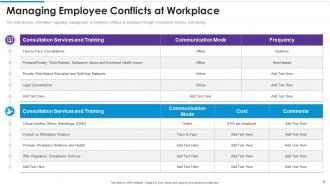
Training playbook emerges as a training guideline for employees at workplace. It caters as a game plan for optimizing employee performance and leveraging existing talent pool. It covers details about workforce training program criteria based on different learning practices, talent growth for employees, various employee training methods, importance of training for employees and employers, engaging employees across firm. The playbook covers workforce training program highlighting game plan for employee training, roadmap for successful employee training program, workforce required training across different departments, objectives of training offered to employees, trainee competency assessment matrix, workforce training requirements identification form, employee skills and knowledge requirements, workforce training meeting schedule. Different training modules are captured highlighting effective employee onboarding, skills enhancement, sales team training, efficient customer support team. Moreover, it caters trainers and training initiatives for employee training, communication skills training for executives, employees and managers, managing employee conflicts ate workplace, motivating employees for active participation across training programs. Workforce training effectiveness and cost estimation is highlighted along with workforce training performance tracking dashboard.
People who downloaded this PowerPoint presentation also viewed the following :
Content of this Powerpoint Presentation
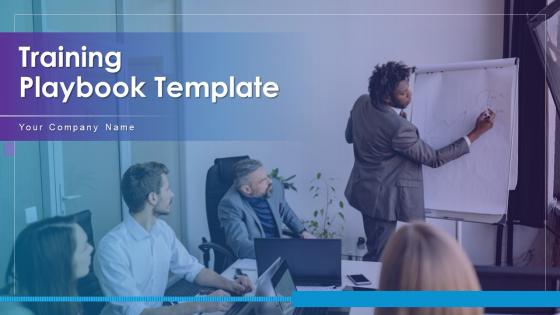
Slide 1: This slide introduces Training Playbook Template. State Your Company Name and begin.
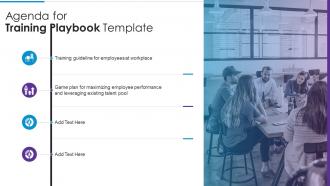
Slide 2: This slide shows Agenda for Training Playbook Template.
Slide 3: This slide presents Table of Contents for Training Playbook Template.
Slide 4: This slide shows title for topics that are to be covered next in the template.
Slide 5: This slide displays Workforce Training Program Criteria Based on Different Learning Practices.
Slide 6: This slide provides information regarding talent growth for employees by addressing skills gap.
Slide 7: This slide represents Various Kinds of Employee Training Methods.
Slide 8: This slide showcases training for employees and employer by addressing various benefits to employees.
Slide 9: This slide shows Providing a compelling job descriptions for attracting qualified applicants.
Slide 10: This slide shows title for topics that are to be covered next in the template.
Slide 11: This slide presents Developing Game Plan for Employee Training.
Slide 12: This slide displays Roadmap for Successful Employee Training Program.
Slide 13: This slide represents Addressing Workforce Required Training across Different Departments.
Slide 14: This slide showcases Objectives of Training Offered to Employees.
Slide 15: This slide shows Addressing Trainee Competency Assessment Matrix.
Slide 16: This slide represents Workforce Training Requirements Identification Form.
Slide 17: This slide showcases Determine Employee Skills and Knowledge Requirements.
Slide 18: This slide shows Addressing Workforce Training Meeting Schedule.
Slide 19: This slide shows title for topics that are to be covered next in the template.
Slide 20: This slide displays HR checklist for efficient employee onboarding process from hiring to employee performance tracking.
Slide 21: This slide represents Determine New Employee Onboarding Process.
Slide 22: This slide shows title for topics that are to be covered next in the template.
Slide 23: This slide presents Determine Employee Skill Enhancement Plan at Workplace.
Slide 24: This slide displays Workforce Upskilling Initiative through Different Training Delivery Channels.
Slide 25: This slide represents Determine Employee Training Log for Skills Enhancement.
Slide 26: This slide shows title for topics that are to be covered next in the template.
Slide 27: This slide provides information regarding sales team training plan by addressing sales skills.
Slide 28: This slide represents Addressing Sales Meeting Plan for Team Training.
Slide 29: This slide showcases Ensuring Effective Communication Training among Sales Team.
Slide 30: This slide shows title for topics that are to be covered next in the template.
Slide 31: This slide presents Checklist to Track Essential Activities for Customer Support Team.
Slide 32: This slide shows title for topics that are to be covered next in the template.
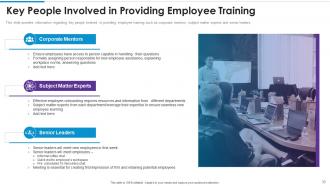
Slide 33: This slide displays Key People Involved in Providing Employee Training.
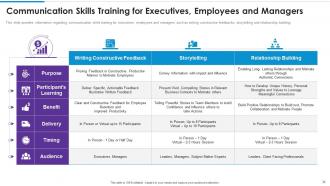
Slide 34: This slide represents Communication Skills Training for Executives, Employees and Managers.
Slide 36: This slide showcases Motivating Employees for Active Participation in Training Programs.
Slide 37: This slide shows title for topics that are to be covered next in the template.
Slide 38: This slide presents Determine Workforce Training Program Effectiveness.
Slide 39: This is another slide continuing Determine Workforce Training Program Effectiveness.
Slide 40: This slide provides information regarding workforce training cost estimation.
Slide 41: This slide shows title for topics that are to be covered next in the template.
Slide 42: This slide presents Determine Workforce Training Performance Tracking Dashboard.
Slide 43: This is another slide continuing Determine Workforce Training Performance Tracking Dashboard.
Slide 44: This slide displays Icons for Training Playbook Template.
Slide 45: This slide is titled as Additional Slides for moving forward.
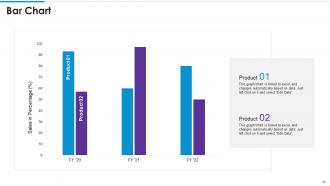
Slide 46: This slide presents Bar chart with two products comparison.
Slide 47: This is About Us slide to show company specifications etc.
Slide 48: This is a Timeline slide. Show data related to time intervals here.
Slide 49: This is Our Target slide. State your targets here.
Slide 50: This is a Financial slide. Show your finance related stuff here.
Slide 51: This is a Comparison slide to state comparison between commodities, entities etc.
Slide 52: This is an Idea Generation slide to state a new idea or highlight information, specifications etc.
Slide 53: This slide shows Post It Notes. Post your important notes here.
Slide 54: This is a Thank You slide with address, contact numbers and email address.
Training playbook template powerpoint presentation slides with all 59 slides:
Use our Training Playbook Template Powerpoint Presentation Slides to effectively help you save your valuable time. They are readymade to fit into any presentation structure.
-
Training Playbook Template
-
Agenda for Training Playbook Template
-
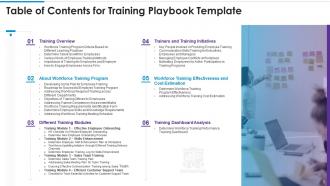
Table of Contents for Training Playbook Template
-
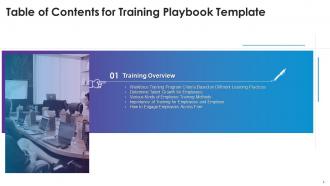
Table of Contents for Training Playbook Template
-
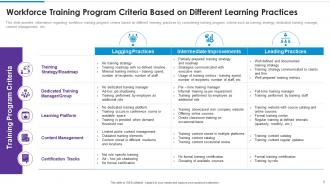
Workforce Training Program Criteria Based on Different Learning Practices
-
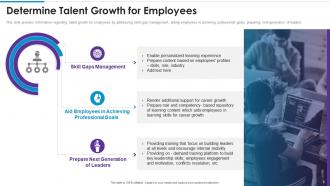
Determine Talent Growth for Employees
-
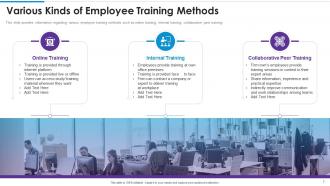
Various Kinds of Employee Training Methods
-
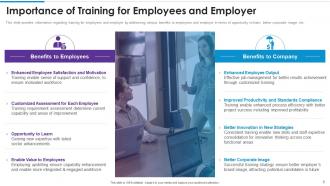
Importance of Training for Employees and Employer
-
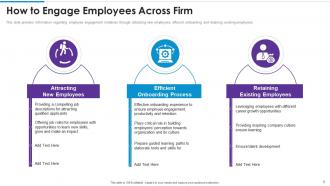
How to Engage Employees Across Firm
-
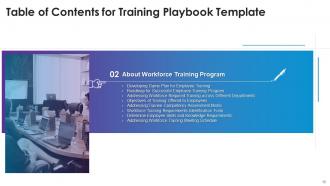
Table of Contents for Training Playbook Template
-
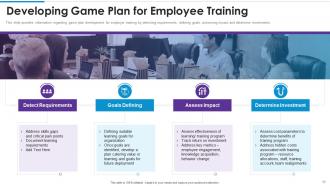
Developing Game Plan for Employee Training
-
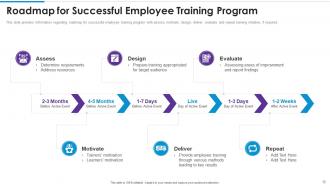
Roadmap for Successful Employee Training Program
-
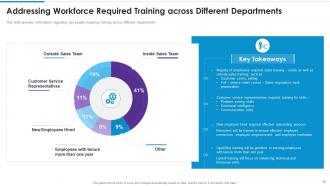
Addressing Workforce Required Training across Different Departments
-
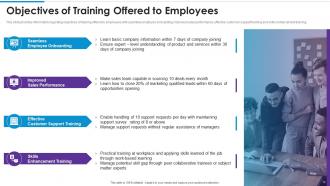
Objectives of Training Offered to Employees
-
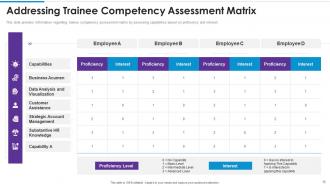
Addressing Trainee Competency Assessment Matrix
-
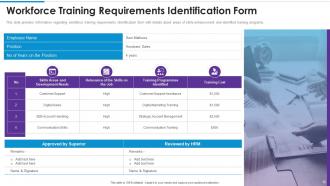
Workforce Training Requirements Identification Form
-
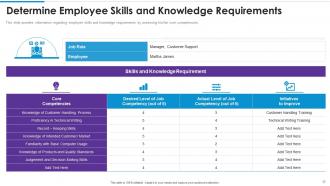
Determine Employee Skills and Knowledge Requirements
-
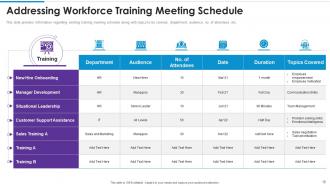
Addressing Workforce Training Meeting Schedule
-
Table of Contents for Training Playbook Template
-
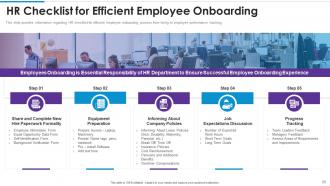
HR Checklist for Efficient Employee Onboarding
-
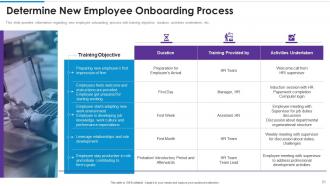
Determine New Employee Onboarding Process
-
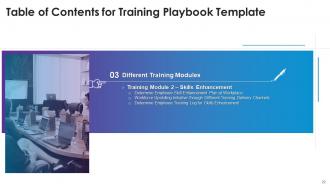
Table of Contents for Training Playbook Template
-
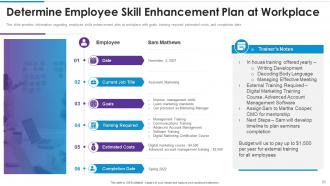
Determine Employee Skill Enhancement Plan at Workplace
-
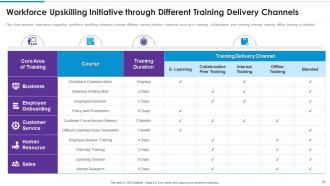
Workforce Upskilling Initiative through Different Training Delivery Channels
-
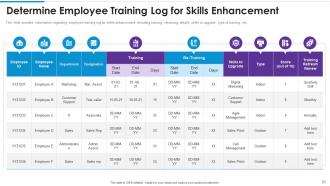
Determine Employee Training Log for Skills Enhancement
-
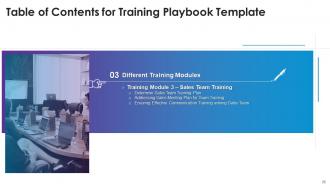
Table of Contents for Training Playbook Template
-
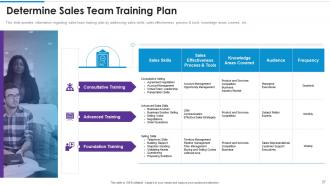
Determine Sales Team Training Plan
-
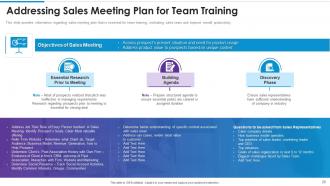
Addressing Sales Meeting Plan for Team Training
-
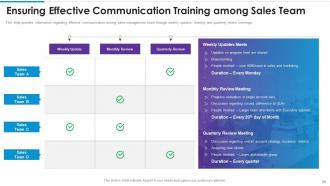
Ensuring Effective Communication Training among Sales Team
-
Table of Contents for Training Playbook Template
-
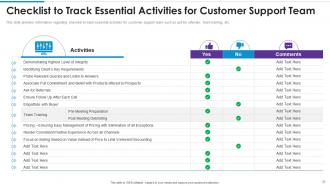
Checklist to Track Essential Activities for Customer Support Team
-
Table of Contents for Training Playbook Template
-
Key People Involved in Providing Employee Training
-
Communication Skills Training for Executives Employees and Managers
-
Managing Employee Conflicts at Workplace
-
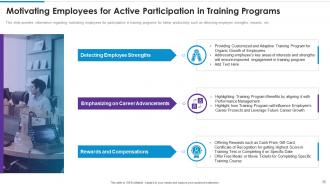
Motivating Employees for Active Participation in Training Programs
-
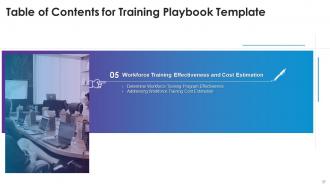
Table of Contents for Training Playbook Template
-
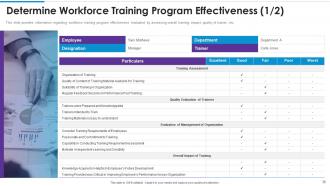
Determine Workforce Training Program Effectiveness 1 2
-
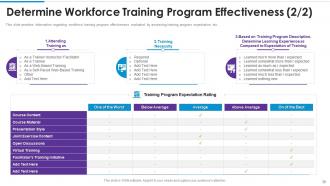
Determine Workforce Training Program Effectiveness 2 2
-
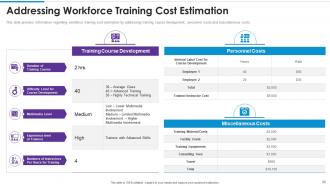
Addressing Workforce Training Cost Estimation
-
Table of Contents for Training Playbook Template
-
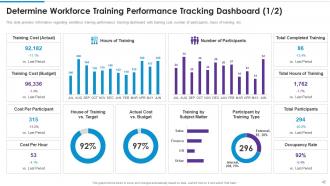
Determine Workforce Training Performance Tracking Dashboard 1 2
-
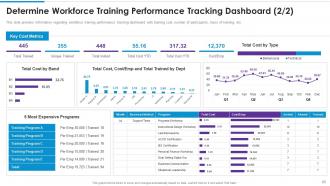
Determine Workforce Training Performance Tracking Dashboard 2 2
-
Icons Slide for Training Playbook Template
-
Additional Slides
-
Bar Chart
-
About Us
-
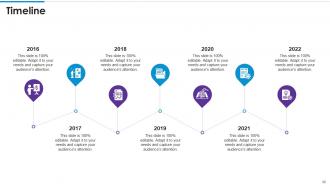
Timeline
-
Our Target
-
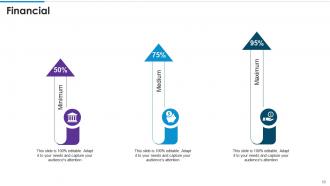
Financial
-
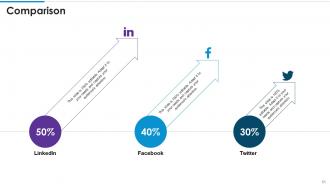
Comparison
-
Idea Generation
-
Post it Notes
-
Thanks for Watching Us
-

-

-

-

-

FAQs for Training playbook template
Honestly, start with clear objectives so people know what they're supposed to learn. Break everything into small steps - nobody wants to read a novel. Real examples help tons, way more than abstract explanations. You'll definitely need troubleshooting sections because there's always that one person who breaks things in creative ways lol. Include timelines, prerequisites, and contact info for when they get stuck. Good headers and bullet points make it scannable. Here's what I'd do: build one section first, test it with a couple people, then expand based on their feedback. Way easier than trying to perfect everything upfront.
So basically, new hires won't be wandering around lost anymore when you give them an actual roadmap to follow. Map out those first 30 days with modules and checkpoints - honestly, it's a game changer. Your managers will finally stay on the same page too, instead of forgetting to show someone how the CRM works (we've all done it). The template thing is pretty smart because you can tweak it for different roles but keep the main structure intact. I'd start with just that first month and see how it goes. Way better than throwing people into the deep end and hoping they figure it out.
First thing - survey each team to figure out their roles, skills, and what's driving them crazy day-to-day. That info shapes everything. Then adjust your content complexity and ditch generic examples for stuff that actually matters to their work. Sales teams need completely different scenarios than engineers, obviously. Timeline matters too since some groups just move faster than others. Oh, and definitely test with a pilot group first - saves you from major headaches later. The trick is keeping your main learning goals the same while making each version feel like it was built just for them.
Honestly, visuals are a total lifesaver for training stuff. Nobody wants to stare at walls of text - I sure don't. Throw in some diagrams, screenshots, maybe an infographic here and there. Your brain processes images way faster than reading, plus people actually remember visual stuff better. It breaks everything into smaller pieces so it doesn't feel like you're drowning in information. I'd say aim for at least one visual per page or section. Makes a huge difference in whether people will actually engage with it or just skim through and forget everything.
Get feedback after every session - it's what turns your playbook from garbage into gold. Send out a quick survey to trainers and trainees asking what confused them, what clicked, and where they hit roadblocks. Your first version will probably suck (mine always do), so don't stress about harsh criticism. Look for patterns in responses and update those sections first. Three simple questions on a form can tell you everything you need to know. The playbook only gets good when you actually act on what people tell you. Short surveys work better than long ones - people won't fill out anything too complicated.
Honestly, do both if your budget allows it. Start digital since that's where everyone lives now - super easy to search through and update whenever needed. But here's the thing, I'd still print out maybe 2-3 key sections as backup cards. You know how it is during training when your hands are full and you just need to quickly check something? Physical beats scrolling every time. Plus wifi always craps out at the worst possible moment lol. Digital first, then figure out which parts people actually reference most and make those your printouts.
You basically want the same blueprint everywhere - identical content, delivery, assessments, all of it. That way when you roll out training across locations, everyone gets taught the exact same stuff the same way. Honestly, it's a game-changer for scaling up. No more "telephone game" where training gets watered down or twisted as it spreads (we've all seen that disaster). The playbook kills the guesswork completely. I'd start by documenting whatever your best trainer does and turn that into your template. Pretty straightforward approach but it works.
Honestly, start simple - just pick 2-3 things that actually matter for your situation. Completion rates are obvious but boring. The good stuff? Pre/post assessments to see if people actually learned anything, plus how long it takes new hires to get up to speed. I'd definitely ask trainees for feedback on whether your playbook makes sense or just confuses them more (you'd be surprised how often it's the latter). Performance changes after training tell you everything though. Oh, and don't ignore your trainers - if they hate using it, something's wrong. Track real workplace improvements instead of getting lost in metrics hell.
Honestly, interactive stuff makes training playbooks so much better. Clickable videos, audio for people who prefer listening, quizzes with instant feedback - all that good stuff. Loom is amazing for screen recordings, btw. I use it constantly for step-by-step walkthroughs. Don't forget alt text for images and clean headings so screen readers actually work. Oh, and consistent formatting throughout - sounds boring but it matters. The whole point is giving people different ways to absorb the info so everyone can actually learn from it.
Honestly? Check it quarterly but also whenever you're mid-session thinking "why is everyone confused by this part again?" That's your cue right there. Do bigger overhauls yearly or when you get new tools/processes. I learned this the hard way - sticking to some rigid timeline while ignoring obvious problems is just dumb. Set those quarterly calendar reminders for sure. But don't wait if something's clearly not landing with people. Those random "oh crap, this section sucks" realizations between reviews are actually gold.
Honestly, the worst thing you can do is go overboard with detail. Those 50-page playbooks? Total waste - nobody reads them. Focus on what your team actually struggles with, not everything you think they should know. Write for beginners, not experts like yourself. Throw in real examples too, because step-by-step lists without context are pretty useless. Oh, and definitely test it with someone new first. They'll spot the confusing stuff you're blind to since you already know it all. Keep it tight and actually useful.
So instead of boring step-by-step lists, turn your procedures into actual stories. Like "Sarah from accounting had this exact problem and here's how she fixed it using these steps." Our brains are wired to remember stories way better than bullet points - it's weird but true. Throw in customer wins, epic fails that taught everyone something, case studies that show the whole process. Even your random examples should feel story-like, not generic corporate stuff. The goal is making people think "oh that could totally be me" so when they're actually dealing with this stuff at work, they'll remember what to do.
Quarterly reviews are your friend here, maybe monthly if you're in something super fast-moving. Google alerts save you so much time - just set them up for your key industry stuff and let the updates come to you. Your frontline people are goldmines for this too since they hear what clients actually care about. Honestly, the weekly 30-minute thing works better than trying to overhaul everything at once (learned that the hard way). Just pick one section and update it - way less overwhelming that way.
So basically, think of a training playbook as your map for cross-training people. Map out which skills connect between different roles first. Then build modules around those overlaps. Nobody has to wing it anymore - you know how that usually goes. Each module breaks everything down into steps anyone can actually follow. Your team gets the same quality training whether it's Sarah from accounting teaching or someone else entirely. Honestly, it beats the old "shadow someone and hope they remember to show you stuff" method by a mile. The whole thing just makes rotating people through departments way less chaotic.
Dude, you NEED subject matter experts - they're like having cheat codes for content creation. Get them involved from day one, not just for final reviews. They'll catch all the stuff you'd miss and stop you from teaching people outdated garbage (seriously learned this the hard way). SMEs help you figure out what's actually critical vs just nice filler content. Real-world processes are way messier than what's in manuals, you know? Schedule regular check-ins with them throughout development. Trust me, it's way better than scrambling to fix everything at the end when they point out major gaps.
-
Editable templates with innovative design and color combination.
-
Out of the box and creative design.