

Information technology business documents processing management innovation communication




Try Before you Buy Download Free Sample Product
 Impress Your
 Audience
 100%
100% Editable
 Save Hours
 of Time


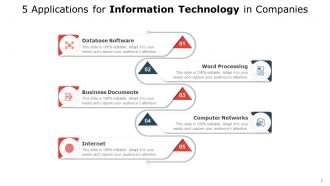
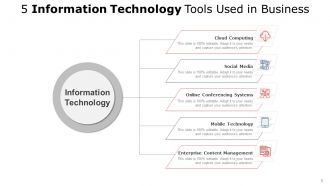
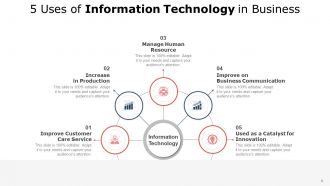
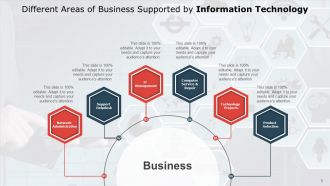
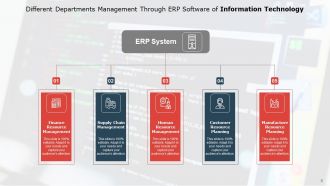
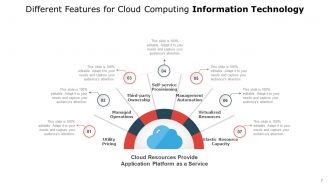
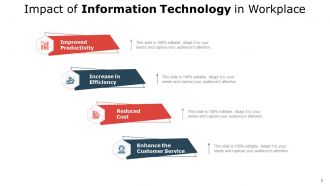
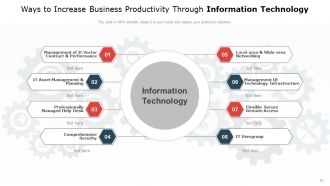
The application of information technology in business document processing has greatly facilitated the management and communication of business information. In particular, the use of information technology has allowed businesses to manage and process documents more efficiently and securely. Information technology has also played a vital role in the innovation of business document processing, resulting in more effective and efficient ways of handling business information. By understanding the different types of business documents and how to communicate with your team, you can utilize project management PowerPoint presentations to streamline communication and increase productivity. SlideTeam offers a variety of templates that are easy to use and customize, so download them now and get started on creating efficient and effective project management presentations for your team.
People who downloaded this PowerPoint presentation also viewed the following :
Information technology business documents processing management innovation communication with all 12 slides:
Use our Information Technology Business Documents Processing Management Innovation Communication to effectively help you save your valuable time. They are readymade to fit into any presentation structure.




FAQs for Information technology business documents processing
Honestly, the time savings alone will blow your mind - no more digging through random folders or that nightmare of "which version is final??" Everyone can grab what they need from anywhere, which is clutch for remote work. Security gets way better too, plus you'll have those automated workflows and audit trails if compliance is your thing. Storage costs drop since you're not drowning in filing cabinets. Oh, and collaboration actually works instead of being a total mess. My advice? Figure out what's driving you crazy about your current setup first, then pick something that fixes those specific problems. Don't just go for the fanciest option with every bell and whistle.
Okay so first thing - just do your most-used documents. Quick wins keep you motivated, trust me. Pick a system that plays nice with whatever software you're already using. Train like 3-4 people first before unleashing it on everyone (chaos otherwise). The naming conventions thing is huge - figure that out immediately or you'll hate yourself later. People are weird about changing how they do things, that's honestly the biggest hurdle. Don't go crazy trying to digitize everything at once. Active stuff first, then slowly chip away at the old archives. Give yourself maybe 6-12 months total? Oh and "we'll organize it later" is basically a lie we tell ourselves.
Honestly, start with real-time editing - having multiple people work on docs at once is a game changer. Version control is huge too because nobody wants to deal with "final_final_v3" madness again. You'll definitely need good commenting features for feedback, and integration with whatever you're already using (Slack, Teams, whatever). Permission controls matter a lot if you're sharing stuff with clients - learned that one the hard way. Automated approval workflows are pretty clutch for cutting down endless email chains. But really, just think about what drives your team crazy right now and work backwards from there.
DMS systems are total game-changers for compliance stuff. They track document versions automatically and keep audit trails without you lifting a finger. Plus retention policies get enforced so you don't accidentally keep things too long (or delete them too early). Security-wise, you get really detailed access controls - only specific people see what they need to. Encryption and backups are built in too. Honestly, when auditors come knocking, those audit trails will save your butt since you can pull up exactly who touched what documents and when. Just do yourself a favor and set permissions right from day one instead of trying to fix a mess later.
Honestly, AI can handle all the boring document stuff that makes you want to scream. Auto-sorting files, pulling important bits from contracts, making everything actually searchable instead of that nightmare we call "folder organization." The search function alone is worth it - you can find docs by what's inside them, not just hoping you named the file something logical six months ago. It'll catch compliance red flags too and suggest better workflows. Oh, and those auto-summaries for long reports? Chef's kiss. I'd start with automated filing - once you see how much time it saves, you'll wonder what other document headaches you can dump on AI.
Honestly, user resistance hits hardest. Nobody wants to ditch their precious file system they've used forever. Data migration? Total nightmare - always way more junk files than you think. Different departments will fight over features they want, which gets old fast. Oh, and connecting to your current systems usually breaks something unexpected. I'd definitely start small with people who actually want to help test it. Also nail down how you'll organize everything first, trust me on that one. Don't go company-wide until you've worked out the kinks.
Honestly? Cloud wins hands down for accessibility - you can grab your files from literally anywhere with wifi. On-premises stuff locks you to the office or dealing with VPN headaches. Money's trickier though. Sure, cloud has way lower upfront costs since you're just paying monthly instead of dropping cash on servers. But those subscription fees really pile up after a few years. If you've got decent IT people already, on-premises might actually save money long-term. Plus you get way more control over everything. I'd probably go cloud unless you're really tech-savvy or have budget concerns down the road.
Okay so metadata is like those labels on filing cabinets but for your digital stuff. You know how you can never find anything? That's why. When you tag documents with author, date, project name, whatever - suddenly search actually works. I learned this the hard way after spending like 2 hours looking for one presentation last month. Trust me, pick 3-4 fields and stick with them religiously. Don't get fancy with it. Your future self will definitely appreciate not having to scroll through a million random files with names like "final_version_2_ACTUAL_final.docx" because we've all been there.
Set up automatic versioning with solid naming conventions - that's your foundation. Make sure only one person can edit at a time with check-in/check-out controls. Trust me, without proper rules this becomes a total mess. I'd restrict who can create major versions, and definitely require version notes explaining changes. Your team needs to actually use the checkout feature before editing though. That's honestly the hardest part - getting people to follow the process. Otherwise you'll get those awful situations where everyone's editing simultaneously and nothing syncs properly.
Hands-on workshops are key - get people actually practicing with your filing system instead of just talking about it. I'd pair newbies with someone who's already nailed the process, that mentor thing really works. Role-playing helps too, like walking through scenarios they'll hit daily. Quick reference cards are a lifesaver honestly, something they can glance at without digging through a manual. Don't forget refresher training though - people get sloppy over time and your processes will change anyway. Keep it interactive or everyone zones out.
Honestly, document management systems are game-changers for remote work. Real-time collaboration means no more emailing files back and forth (thank god). You'll have instant access from anywhere, plus version control so people aren't accidentally working on old drafts. The search features actually work - way better than whatever organizational disaster most of us have in our regular folders. Security's solid too with permission settings. Everything syncs across your devices automatically. I'd start with your main project files first, then slowly move the rest over when you have time.
So the biggest things happening right now? AI document processing is everywhere - it'll auto-tag stuff and pull out key info without you doing anything. Pretty wild honestly. Cloud platforms are way better than they used to be, especially for security and working with Slack/Teams. Everyone's going mobile-first too since people want their docs on phones now (makes sense I guess). Oh, and automated workflows are huge. If your current setup doesn't have AI features or you're still stuck with mostly on-premise storage, might wanna start thinking about upgrading soon.
Honestly, UI design can make or break your DMS - I've watched companies blow serious money on systems nobody uses because they're too confusing. People will literally go back to emailing files around rather than deal with a crappy interface. Make sure the search actually works like people expect it to (this sounds obvious but you'd be surprised). Navigation should be dead simple - if someone needs training just to upload a document, you've already lost. The whole point is making it easier than whatever workaround they're currently doing.
Honestly, start with baselines of your current process first - otherwise you won't know if things are getting better. Track document retrieval times and search success rates, but don't go overboard with metrics. User adoption is probably the biggest one though - if people aren't using the system, you've got bigger problems. I'd focus on time-to-find since that's what everyone actually cares about day-to-day. Also keep an eye on storage costs and version control accuracy. Pick like 3-4 metrics max that matter to your specific team and measure monthly. Way better than tracking everything and getting overwhelmed with data.
So basically, integration turns your document system into the center of everything instead of just another random tool. Your CRM, ERP, project management stuff - they all talk to each other automatically. No more endless uploading and downloading nonsense. Honestly? It's pretty amazing once you get used to it. Documents trigger approvals, contracts fill themselves with customer data, audit trails stay synced. You stop jumping between platforms constantly, which is honestly the best part. Oh, and start with whatever systems your team actually uses most. Don't go crazy trying to connect everything at once.
-
Very good and informative
-
Enough space for editing and adding your own content.
-
Qualitative and comprehensive slides.
-
Unique research projects to present in meeting.
-
Really like the color and design of the presentation.