

Company profile information technology company powerpoint presentation slides




Try Before you Buy Download Free Sample Product
 Impress Your
 Audience
 100%
100% Editable
 Save Hours
 of Time


A company profile is a professional introduction of a company to provide operational and financial information. Check out our professionally designed template on Company Profile of an IT Company that wants to give its business details to its stakeholders employees, investors, clients, partners, shareholders, etc. It covers the operation information such as a brief overview of the company and its products and services, history, geographic presence, mission and vision statement, latest technologies, research and development activities, distribution network, etc. In addition to this, it covers the competitor details such as the name of top competitors by its operations, competitive landscape, financial comparison with competitors, etc. The template has also covered the financial overview of the company that includes the company companys financials from its income statement revenue, EBIT, and Net income, balance sheet total assets, total liabilities, goodwill, and cash flow statement cash flows from operating, investing and financing activities. In the end, it covers strategic details long-term growth goals and strategies, acquisition details, SWOT analysis and risk management strategies of the company. The module also covers the primary corporate social responsibilities of the company. Download our company profile ppt templates now.
People who downloaded this PowerPoint presentation also viewed the following :
Content of this Powerpoint Presentation
Slide 1: This slide introduces Company Profile - Information Technology Company. State Your Company Name and begin.
Slide 2: This slide shows Agenda for Company Profile - Information Technology Company.
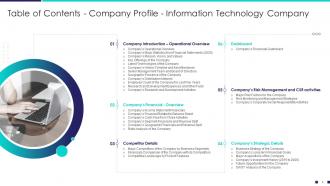
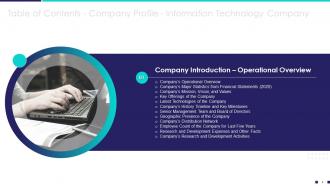
Slide 3: This slide presents Table of Content for the presentation.
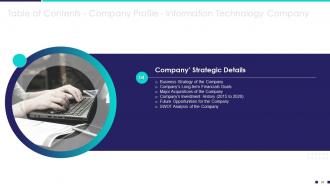
Slide 4: This slide shows Table of Content for the presentation.
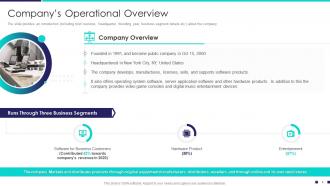
Slide 5: The slide displays an introduction including brief overview, headquarter, founding year, business segment details etc.
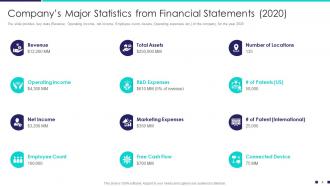
Slide 6: This slide represents Company’s Major Statistics from Financial Statements.
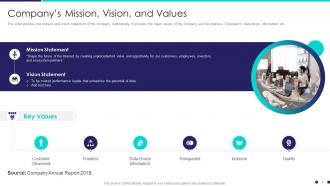
Slide 7: The slide provides the mission and vision statement of the company.
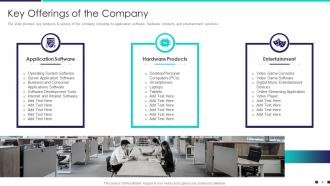
Slide 8: The slide presents key products & service of the company including its application software, hardware products and entertainment solutions
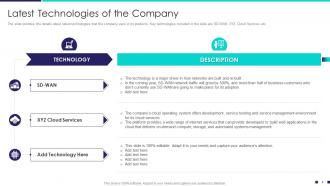
Slide 9: The slide displays the details about latest technologies that the company uses in its products.
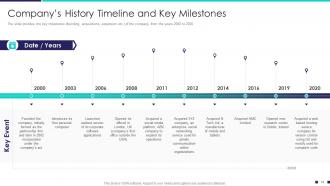
Slide 10: The slide represents the key milestones (founding, acquisitions, expansion etc.) of the company, from the years 2000 to 2020
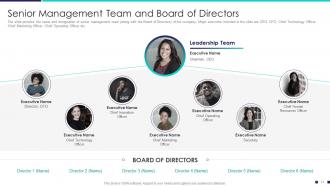
Slide 11: The slide provides the name and designation of senior management team (along with the Board of Directors) of the company.
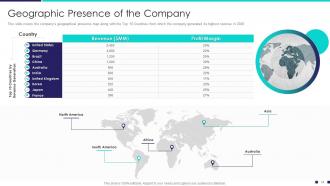
Slide 12: This slide covers the company’s geographical presence map along with the Top 10 Countries from which the company generated its highest revenue.
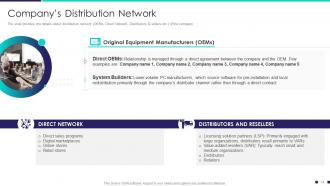
Slide 13: The slide represents the details about distribution network (OEMs, Direct Network, Distributors & sellers etc.) of the company
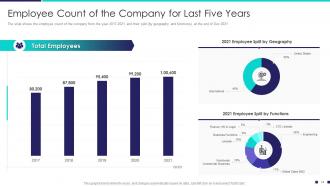
Slide 14: The slide shows the employee count of the company from the year 2017-2021 and their split (by geography and functions).
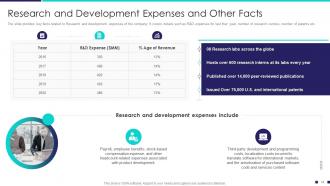
Slide 15: This slide presents Research and Development Expenses and Other Facts.
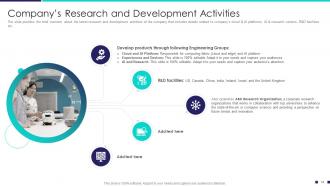
Slide 16: The slide provides the brief overview about the latest research and development activities of the company that includes details related to company’s cloud & AI platforms, AI & research centers, R&D facilities etc.
Slide 17: This slide displays Table of Content for the presentation.
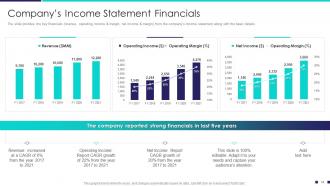
Slide 18: The slide represents the key financials (revenue, operating income & margin, net income & margin) from the company’s income statement.
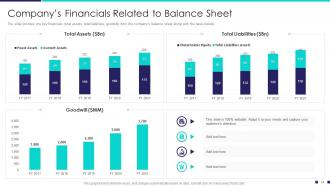
Slide 19: The slide provides the key financials (total assets, total liabilities, goodwill) from the company’s balance sheet along with the basic details
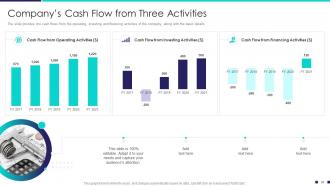
Slide 20: The slide presents the cash flows from the operating, investing and financing activities of the company.
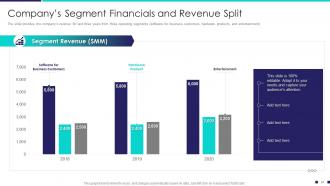
Slide 21: The slide provides the company’s revenue for last three years from three operating segments.
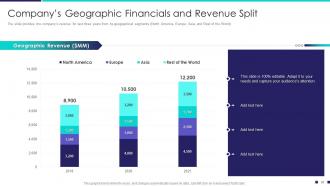
Slide 22: The slide displays the company’s revenue for last three years from its geographical segments.
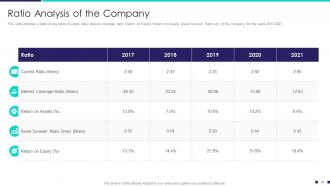
Slide 23: This slide represents a table of key ratios (Current ratio, interest coverage ratio, Return on Equity, Return on Assets, Asset Turnover Ratio etc.) of the company.
Slide 24: This slide shows Table of Content for the presentation.
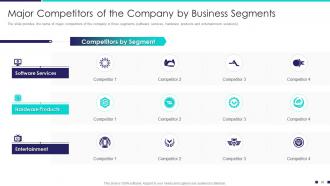
Slide 25: The slide presents the name of major competitors of the company in three segments (software services, hardware products and entertainment solutions).
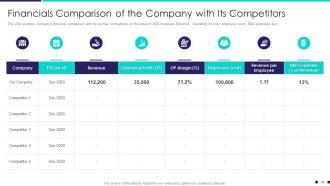
Slide 26: This slide shows Financials Comparison of the Company with Its Competitors.
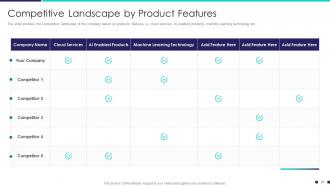
Slide 27: The slide displays the Competitive landscape of the company based on products’ features i.e. cloud services, AI enabled products, machine learning technology etc.
Slide 28: This slide represents Table of Content for the presentation.
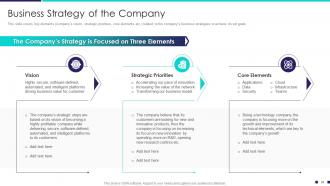
Slide 29: This slide covers key elements (company’s vision, strategic priorities, core elements etc.) related to the company’s business strategies to achieve its set goals.
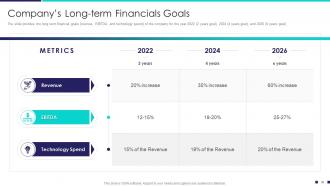
Slide 30: The slide presents the long term financial goals (revenue, EBITDA, and technology spend) of the company.
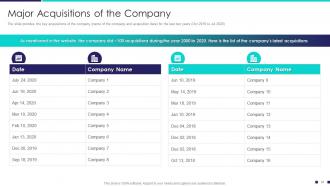
Slide 31: The slide provides the key acquisitions of the company (name of the company and acquisition date) for the last two years.
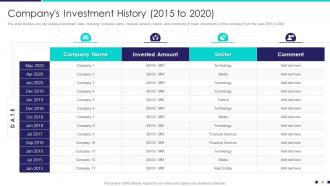
Slide 32: The slide displays the key details (investment date, investing company name, invested amount, sector, and comment) of major investments of the company.
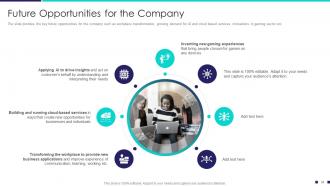
Slide 33: The slide represents the key future opportunities for the company such as workplace transformation, growing demand for AI and cloud based services.
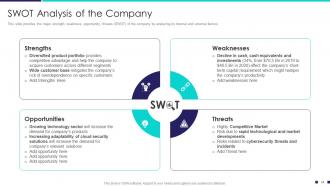
Slide 34: This slide provides the major strength, weakness, opportunity, threats (SWOT) of the company by analyzing its internal and external factors.
Slide 35: This slide presents Table of Content for the presentation.
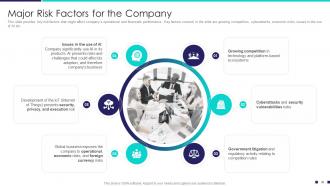
Slide 36: This slide provides key risk factors that might affect company’s operational and financials performance.
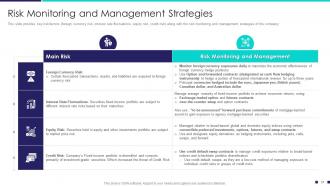
Slide 37: This slide displays key risk factors (foreign currency risk, interest rate fluctuations, equity risk, credit risk) along with the risk management strategies.
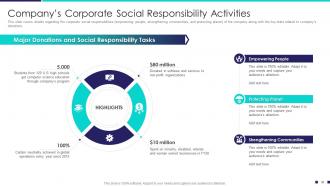
Slide 38: This slide represents Company’s Corporate Social Responsibility Activities.
Slide 39: This slide shows Table of Content for the presentation.
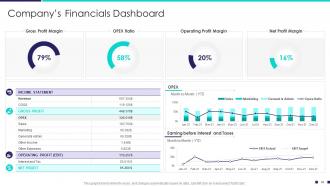
Slide 40: This slide presents Company’s Financials Dashboard with- Gross Profit Margin, Operating Profit Margin, Net Profit Margin, etc.
Slide 41: This slide shows Icons for Company Profile- Information Technology Company.
Slide 42: This slide is titled as Additional Slides for moving forward.
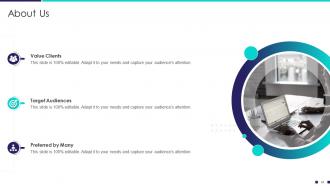
Slide 43: This is About Us slide to show company specifications etc.
Slide 44: This slide shows 30 60 90 Days Plan with text boxes.
Slide 45: This is Our Goal slide. State your firm's goals here.
Slide 46: This slide shows Venn diagram with text boxes.
Slide 47: This is a Timeline slide. Show data related to time intervals here.
Slide 48: This slide represents Post It Notes. Post your important notes here.
Slide 49: This is a Thank You slide with address, contact numbers and email address.
Company profile information technology company powerpoint presentation slides with all 49 slides:
Use our Company Profile Information Technology Company Powerpoint Presentation Slides to effectively help you save your valuable time. They are readymade to fit into any presentation structure.
FAQs for Company profile information technology company
Honestly, start with the basics - company overview, mission, key stats. Then break down your IT services and definitely include client testimonials or case studies. Your team's expertise matters too. Technical capabilities and certifications are huge for IT crowds, so don't skip those. I'd add a slide about what makes you different because that question always comes up anyway. Keep pricing transparent but flexible, and show recent project examples with real results. The trick is mixing technical stuff with business value - prove you can execute but also that you actually get what they're trying to accomplish overall.
Dude, stop dumping tech specs on people - nobody cares about your features list. Tell them a story instead. Show the customer's actual problem, then walk through how your solution fixes it. Turn those boring charts into progress updates and screenshots into dramatic before/after reveals. Honestly, I've dozed off in so many presentations that just list capabilities. People's brains love stories way more than bullet points. Throw in some real customer case studies, actual dashboard demos, maybe a testimonial video or two. You want them feeling the transformation, not just getting it intellectually.
Look at the metrics your audience actually cares about - retention rates, uptime, delivery times, ROI from old projects. Clean visuals work way better than data overload. Dashboards are great, before/after shots too. Your analytics should tell a story about impact, not just show random numbers. Real case studies with solid results are gold. If you're presenting online, maybe throw in some interactive stuff? Here's the thing though - context is everything. Don't just say "we boosted efficiency 40%" and leave it hanging. Explain what that actually meant for their profits. People need to see the real-world impact.
Skip the feature laundry list - show actual results instead. Got metrics? Use them! "Cut processing time by 60%" hits way harder than vague claims. Visuals and demos are your best friend here. I'd throw in customer testimonials if you've got any good ones. Tell the story of what sucked before and how you fixed it. Also make sure you can explain the techy stuff in normal human words since not everyone speaks developer. Keep slides clean and dump all the boring specs in an appendix they'll never read anyway.
Look, branding can make or break your IT pitch deck. Consistent colors and fonts across every slide? That's what separates you from looking like amateur hour. Apple does that clean, minimal thing while Google goes bright and playful - completely different messages, you know? Your visuals need to match whether you're the steady enterprise choice or the scrappy startup that'll change everything. Honestly, I've seen too many companies with random fonts everywhere and it just screams "we don't have our act together." Plus prospects will actually remember your stuff later if it looks cohesive. Don't overthink it though.
So basically, you've gotta match your vibe to whoever's listening. Executives? Hit them with business impact and ROI first - they literally don't care about your server setup. Technical folks want the meaty stuff though - architecture, security details, all that good nerdy content. Mixed crowds are honestly the absolute worst to present to, but start broad then ask if anyone wants deeper dives on specific parts. I always prep like 3 versions of my main slides because you never know when you'll need to pivot. Half the battle is just watching people's faces and adjusting as you go.
Dude, case studies are huge for this stuff. Real results beat vague promises every single time. Your prospects get to see actual proof that you've solved problems for companies like theirs - ROI numbers, specific wins, the whole deal. Way more convincing than those boring feature bullet points everyone ignores anyway. Trust builds so much faster when people can picture their own success. Oh, and definitely pick ones that mirror your audience's industry or pain points. Makes it feel way more relevant to their situation, you know?
Okay so first thing - organize your services into buckets like infrastructure, security, cloud stuff, whatever makes sense. People need to get what you actually do before you hit them with tech specs. Honestly? Ditch those jargon-heavy slides that put everyone to sleep. Real client stories work way better than generic bullet points. Show specific problems you've solved with actual examples for each service area. Simple diagrams help too - visual stuff that shows how everything connects as one package. Oh and don't forget clear next steps at the end of each section so they know how to move forward.
Okay so biggest thing - don't just dump tech jargon everywhere without explaining what you actually DO for people. Focus on results, not your fancy tech stack. Also please avoid those cheesy stock photos of people pointing at computers... we're all so tired of seeing those lol. Client testimonials are gold - way better than listing every certification you have. Keep slides clean and problem-focused instead of trying to prove how brilliant your team is. Oh and don't end with just "thanks for listening" - give them clear next steps so they know what happens next.
Skip the boring headshot slides - nobody cares about those anymore. Instead, show their actual credentials: certifications, years in the field, major projects they've run. Honestly, most "meet the team" slides are pretty useless. What works better? Highlight specific technical skills and any awards your people have won. Client testimonials mentioning team members by name are gold. Maybe throw in a quick case study too. The whole point is proving you've got the exact expertise they need, not just... you know, random people with pulse.
Clean layouts with tons of white space are huge for tech companies - they can't stand cluttered slides. Pick a consistent color scheme that fits your brand, maybe one pop of color for emphasis. Sans-serif fonts look way more digital than anything traditional. Charts and infographics work great since IT people actually love seeing data presented visually (who knew?). Throw in some quality icons for your services. If you're presenting digitally, subtle animations don't hurt. Honestly, just grab a template with these basics already built in. You'll save yourself so much time instead of starting from scratch.
Okay so definitely open with who you are and what you're all about - the mission stuff. Your services and tech capabilities come next, plus team credentials. Here's the key part though: drop in 2-3 solid case studies because that's honestly what seals the deal. IT people want proof, not promises. Include your tech stack and how you work. Got any cool growth numbers? Throw those in too - they love metrics. Wrap up with what makes you different and clear next steps. Oh and keep it snappy. These folks hate corporate BS, so don't drag it out. Have your call-to-action ready to go.
Start with hard numbers - your market share, how you rank revenue-wise, client portfolio size. Those quadrant charts showing where you sit vs competitors? Executives eat that stuff up, even though they're pretty cheesy honestly. Definitely throw in any industry awards or partnerships with big names like AWS or Microsoft. Pick 2-3 solid case studies where you solved stuff others couldn't. Growth metrics are key too - shows you're not just sitting around. Oh, and keep everything recent. Anything past 18 months looks dated and makes you seem behind.
Don't just pile all your testimonials at the end - that's boring. Sprinkle them throughout when you're tackling specific problems. Get the ones with actual numbers, like "we cut downtime by 40%" instead of fluffy "amazing service!" garbage. Video testimonials are way better than text if you can swing it. Here's the thing though - I've watched people totally kill their presentations by overdoing it with testimonials. Nobody wants to sit through five minutes of other companies singing your praises. Pick 2-3 really strong ones that match what your audience is dealing with. Match each testimonial to whatever challenge you're covering in that part of your pitch.
Ditch PowerPoint for Prezi or Canva - way more engaging. For product demos, screen recording with Loom or Camtasia beats static screenshots every time. Live polls through Mentimeter keep people awake during Q&A, and if you're remote, Zoom breakout rooms work well for splitting up departments. Oh, and definitely set up a sandbox environment for live demos. Actually, scratch that - test it twice minimum because tech demos love to break at the worst moment. I learned this the hard way last quarter when our entire CRM decided to crash mid-presentation.
-
Amazing product with appealing content and design.
-
Good research work and creative work done on every template.