


Linkedin Company Profile Powerpoint Presentation Slides




Try Before you Buy Download Free Sample Product
 Impress Your
 Audience
 100%
100% Editable
 Save Hours
 of Time


Here is a professionally designed LinkedIn Company Profile template that showcases an executive summary providing key stats, products offered, and key financials. It also provides an organization overview, illustrating the company website, industry, size, headquarters, type, and specialties. Moreover, it includes a vision, mission, and business model canvas to convey the companys operations and future. Further, this profile captures the community policies of LinkedIn and the revenue generation model to illustrate monetization and community engagement strategy. Additionally, the profile shows the companys historical revenue along with revenue CAGR. Besides, the slide contains details of products and services offered through the LinkedIn platform, clients, and stats. The offerings include talent, marketing, sales, and learning solutions. Furthermore, the profile exhibits client testimonials, organization history, leadership, and structure to provide brief details of the company environment and work culture. It also shows international footprint and company presence, key statistics describing active members, financial stats, and LinkedIn activity stats. Finally, It highlights listed organizations, schools, membership growth, competitor social media platform with a number of users, and contact options to reach LinkedIn. Get access now.
People who downloaded this PowerPoint presentation also viewed the following :
Content of this Powerpoint Presentation
Slide 1: This slide displays title i.e. 'LinkedIn Company Profile' and your Company Name.
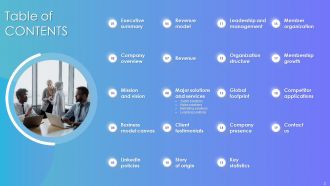
Slide 2: This slide presents table of contents.
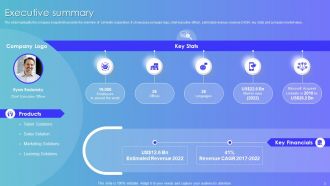
Slide 3: This slide highlights the company snapshot to provide the overview of LinkedIn corporation.
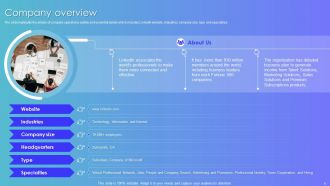
Slide 4: This slide highlights the details of company operations outline and essential details.
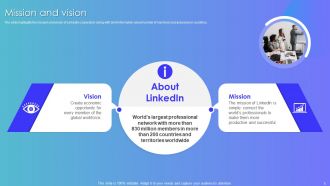
Slide 5: This slide highlights the mission and vision of LinkedIn corporation along with brief information about number of members and presence in countries.
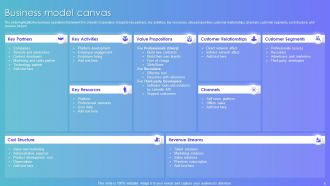
Slide 6: This slide highlights the business operations framework for LinkedIn Corporation.
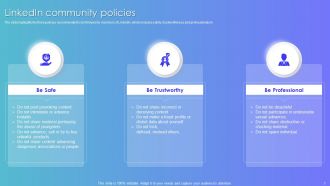
Slide 7: This slide highlights the three policies recommended to be followed by members of LinkedIn, which includes safety, trustworthiness and professionalism.
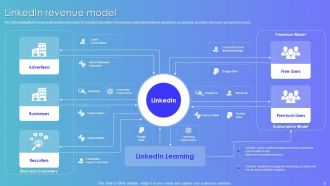
Slide 8: This slide highlights the revenue generation framework of LinkedIn Corporation.
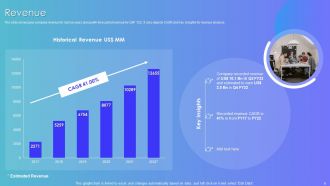
Slide 9: This slide showcases company revenue for last six years along with forecasted revenue for Q4F Y22.
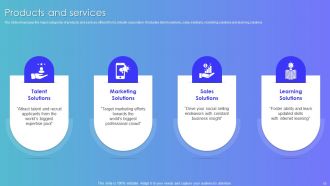
Slide 10: This slide showcases the major categories of products and services offered from LinkedIn corporation.
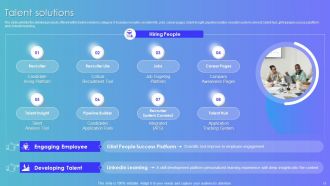
Slide 11: This slide exhibits the detailed products offered within talent solutions category.
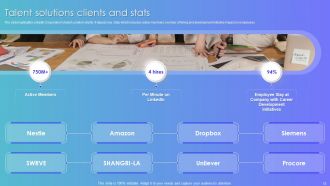
Slide 12: This slide highlights LinkedIn Corporation’s talent solution clients.
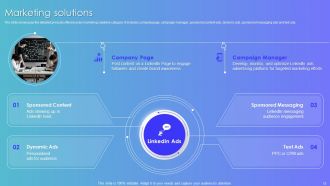
Slide 13: This slide showcases the detailed products offered under marketing solutions category.
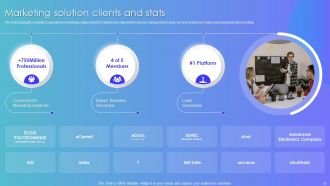
Slide 14: This slide highlights LinkedIn Corporation’s marketing solution clients.
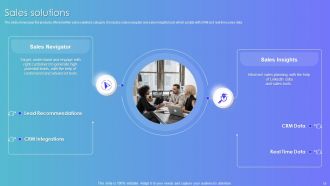
Slide 15: This slide showcases the products offered within sales solutions category.
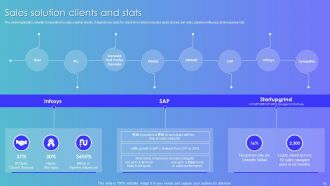
Slide 16: This slide highlights LinkedIn Corporation’s sales solution clients.
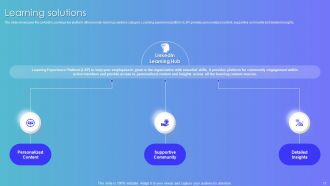
Slide 17: This slide showcases the LinkedIn Learning Hub platform offered under learning solutions category.
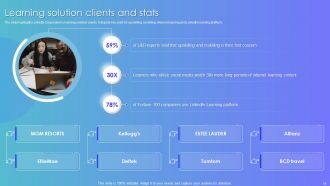
Slide 18: This slide highlights LinkedIn Corporation’s learning solution clients.
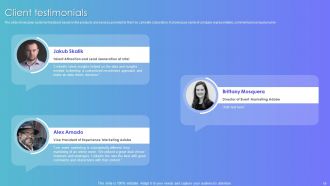
Slide 19: This slide showcases customer feedback based on the products and services provided to them by LinkedIn corporation.
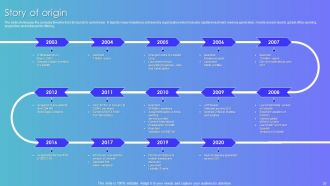
Slide 20: This slide showcases the company timeline from its launch to current year.
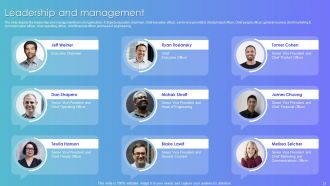
Slide 21: The slide depicts the leadership and management team of organization.
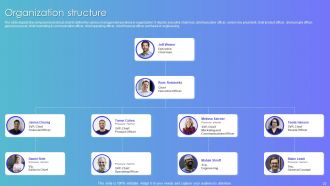
Slide 22: This slide depicts the company hierarchical chart to define the various management positions in organization.
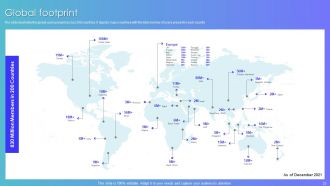
Slide 23: This slide illustrates the global users present across 200 countries.
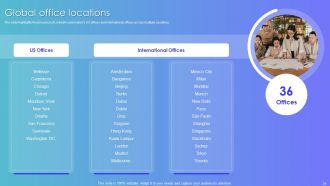
Slide 24: This slide highlights the presence of LinkedIn corporation’s US offices and international offices across multiple countries.
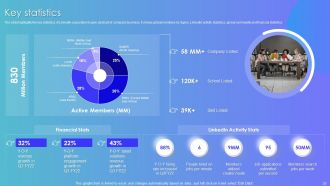
Slide 25: This slide highlights the key statistics of LinkedIn corporation to give abstract of company business.
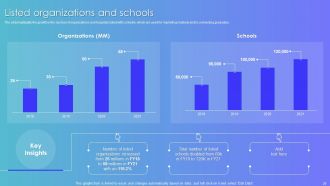
Slide 26: The slide highlights the growth in the number of organizations and hospitals listed with LinkedIn.
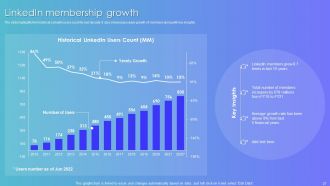
Slide 27: The slide highlights the historical LinkedIn users count for last decade. It also showcases yearly growth of members along with key insights.
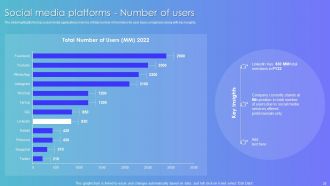
Slide 28: The slide highlights the top social media applications in terms of total number of members for user base comparison along with key insights.
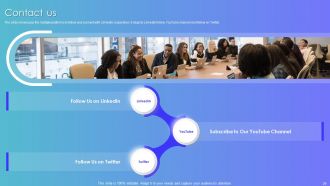
Slide 29: This slide showcases the multiple platforms to follow and connect with LinkedIn corporation.
Slide 30: This is the icons slide.
Slide 31: This slide presents title for additional slides.
Slide 32: This slide shows about your company, target audience and its client's values.
Slide 33: This slide presents your company's vision, mission and goals.
Slide 34: This slide shows details of team members like name, designation, etc.
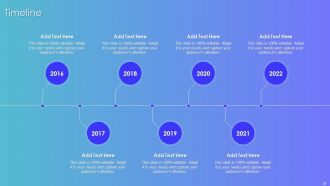
Slide 35: This slide exhibits yearly timeline.
Slide 36: This slide displays goals of the company.
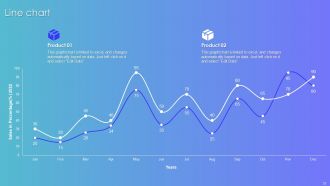
Slide 37: This slide exhibits monthly sales line charts for different products. The charts are linked to Excel.
Slide 38: This is thank you slide & contains contact details of company like office address, phone no., etc.
Linkedin Company Profile Powerpoint Presentation Slides with all 43 slides:
Use our Linkedin Company Profile Powerpoint Presentation Slides to effectively help you save your valuable time. They are readymade to fit into any presentation structure.





FAQs for Linkedin Company Profile
Okay so first things first - write a company description that actually explains what you do, not just fancy buzzwords that mean nothing. Get a decent banner image and logo up there too. Fill out the basics like company size, industry, location, all that stuff. The "About" section is where you can really tell your story and show what makes you different (plus sneak in some keywords for search). I'd honestly assign a few employees as admins so someone's always posting updates - learned that one the hard way when I got too busy and our page went dead for like two months.
Yeah, visuals totally change the game for LinkedIn company pages. Photos of your actual office and team beat those cringey stock images every time - honestly, who falls for the fake handshake pics anymore? Videos are even better if you can swing it. Short clips of your workspace or employees talking about working there feel way more authentic. Don't sleep on that cover image either, it's basically free advertising space. Oh, and make sure everything looks polished but not overly corporate. You want people thinking "I'd actually want to work here" not "this place probably has beige walls everywhere."
Look, your LinkedIn company page is probably putting people to sleep right now. You need stories, not corporate speak. Share your mission like you actually mean it - talk about real problems you've solved for actual customers. People connect with journeys and personalities, not bullet points of services. I always tell people to ditch the jargon completely. Start with your core story, then weave in specific examples throughout different sections. Show don't tell, you know? Like instead of saying "we provide excellent customer service," share how you helped Sarah from Denver save her business during COVID. That's what makes people stop scrolling.
Honestly, just show people the real stuff happening at your company. Behind-the-scenes posts work way better than corporate speak - like team meetings, office parties, or just random lunch conversations. Employee spotlights are gold, but let them talk about what they actually enjoy, not boring "we're collaborative" nonsense. I'd post culture content pretty regularly so it becomes part of your thing. Oh, and don't forget LinkedIn Stories for the more casual moments. Volunteer stuff and how you handle both good and bad days makes you seem human. People can smell fake from a mile away.
Hey! So for LinkedIn followers - consistency is key with content your audience actually cares about. Industry insights work great, plus behind-the-scenes stuff and employee features. Video's crushing it right now on the algorithm, just saying. Get your team sharing your posts too since their connections will see it. Oh, and don't forget to actually engage with other companies' content meaningfully (not just liking everything). Cross-promote on your website and email sigs. Honestly though? Your employees are your best asset here - their networks trust them way more than corporate accounts.
LinkedIn's search algorithm is basically like Google - it looks for keywords in your company description and posts to decide who sees your profile. You're invisible if you're not using the same terms your customers search for. Research what your target audience actually types when looking for companies like yours, then work those words naturally into your profile. Industry terms, your services, location stuff - all of it matters. I learned this the hard way when my friend's startup wasn't showing up for obvious searches. Short sentences mixed with longer ones help too.
Mix it up with industry stuff, team highlights, and behind-the-scenes content. Thought leadership posts work great - show what you actually know. I'm a sucker for companies that get real about their failures and wins, not just the polished stuff. Don't push products all the time, honestly it's annoying. Try that 80/20 thing where most content actually helps people, then slip in some promotion. Maybe start with 2-3 posts weekly? Oh, and definitely respond to comments - that's where the good conversations happen. People can tell when you're just broadcasting vs actually engaging.
Your employees are honestly your secret weapon on LinkedIn. Get them sharing company stuff - updates, wins, whatever makes you look good. People trust real humans way more than corporate accounts, so their posts will get more traction than yours ever will. Give your team some talking points but don't make it sound robotic. Behind-the-scenes content works great because it makes them seem plugged in when they share it. Oh, and start with whoever's already active on there - they'll actually do it instead of just nodding along in the meeting.
Oh man, where do I start? First off, ditch those generic descriptions that make you sound like literally every other company. Show your actual culture instead of just talking about "synergy" or whatever. And please, PLEASE update your logo if it looks like it's from 2010 - pixelated images are such a red flag. Don't just list what you do either; explain why you're different. People want to see real employee stories and behind-the-scenes stuff, not just constant job postings. That gets old fast. Mix up your content and keep it consistent. Honestly, just check out what your competitors are doing first.
Your Company Page's "About" section is perfect for this stuff - throw in recent awards, revenue hits, big client wins. People actually read that part. Post about wins as they happen too since it keeps things moving. Oh, and if you land something huge, pin that post to the top of your feed. Be specific with numbers and dates though - nobody buys vague bragging. Like "increased revenue 40% in Q3" hits different than "we're growing fast." Start by looking at what achievements you're totally ignoring right now. You'll probably find some good material just sitting there.
Honestly, start with the basics - follower growth, engagement stuff like comments and shares, plus how many people are actually viewing your profile. Click-through rates to your site matter way more than vanity metrics though. Oh, and get your employees sharing company posts because that's like free amplification. Check who's following you too - no point having tons of followers if they're not your target audience. I'd pull these numbers monthly and compare them quarter to quarter so you can actually see what's working. LinkedIn's got those auto notifications you can set up, which saves time since I'm terrible at remembering to check analytics regularly.
Honestly, your LinkedIn company page is like your secret weapon for recruiting. Candidates always stalk you there first - I do it too when I'm job hunting. Post team wins, share what your people are actually up to, throw in some job openings. It shows off your culture way better than some boring job description. Short sentences work. But also let your personality show through longer posts about what makes your workplace different. Get your team commenting and sharing too since their connections will see it. Way more effective than just hoping people stumble across your posts organically.
Honestly, just update that thing monthly - job postings, wins your team had, maybe some seasonal stuff. Write the company description like you're actually talking to people, not reading from a business textbook (seriously, nobody cares about "synergistic solutions"). Good photos make a huge difference. Keep your headcount current too since people judge company size. Regular posts show you're not dead in the water. Awards and big milestones? Show those off for sure. Oh, and pin major announcements at the top when something big happens - took me forever to figure out where that feature was hidden.
Honestly, LinkedIn's search filters are pretty solid for finding execs in your field - just filter by title or company. When you find someone interesting, send a connection request that mentions something specific from their profile or a recent post they shared. Don't just hit like on their stuff either. Actually comment with something thoughtful. Industry groups are where it's at though. Join the ones where these leaders hang out and actually contribute to discussions. Oh, and definitely share your own insights too - gets you noticed way faster. The trick is being helpful first instead of jumping straight into ask mode. Build relationships before you need them, you know?
LinkedIn Showcase Pages are great for spotlighting different products - basically lets you tell more targeted stories. Post consistently on your main page first, then try video content and employee takeovers. Company Updates work well for behind-the-scenes stuff and employee spotlights instead of boring corporate announcements. LinkedIn Live gets good engagement, though I still think being on camera feels awkward sometimes. Your employees sharing company content is gold since the algorithm prioritizes that. Oh, and employee advocacy really moves the needle - encourage people to comment and share your posts. Start simple, then experiment once you get the hang of it.
-
The templates are handy and I can personalize them as per my needs. Glad to be your subscriber!
-
The best part about SlideTeam is their meticulously prepared presentations (complete-decks and single-slides both), infused with high-quality graphics and easy to edit. All-in-all worthy products.