


Linkedin Marketing Strategies To Grow Your Business Powerpoint Presentation Slides




Try Before you Buy Download Free Sample Product
 Impress Your
 Audience
 100%
100% Editable
 Save Hours
 of Time


LinkedIn marketing is the strategy to promote business and build brand awareness. The main focus is to generate leads from the community of professionals and drive traffic to the company website. Check out our efficiently designed Module on LinkedIn Marketing Strategies to Grow Your Business that will help all the brands facing issues with old B2C social media marketing channels. It highlights problems related to high paid Ad costs, low subscribers count, low engagement on social media posts, increased response time, and decline in unique visitors on website traffic. It also covers the LinkedIn marketing platform deployment timeline. The given module showcases how one can build a presence organically on LinkedIn by optimizing company page descriptions, headers, and content. It also demonstrates how to use advanced search options to gain leads with the best time to post content and a structured plan for LinkedIn marketing. Additionally, It covers how to increase reach with Paid LinkedIn Ads, which showcase different advertisement types with a use case, bidding strategy, advertising campaign schedule, and detailed timeline for implementing advertising campaigns with a budget plan. Lastly, key performance indicators of LinkedIn marketing are analyzed to check the positive impact on business performance. Bag this module now.
People who downloaded this PowerPoint presentation also viewed the following :
Content of this Powerpoint Presentation
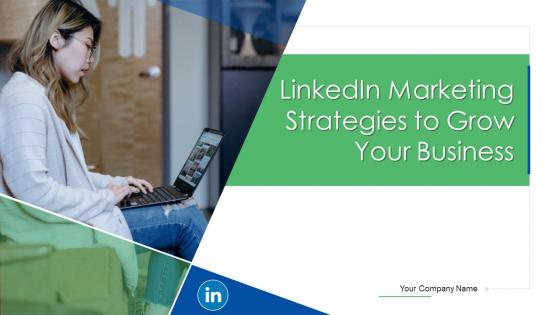
Slide 1: This slide introduces LinkedIn Marketing Strategies to Grow Your Business. State Your Company Name and begin.
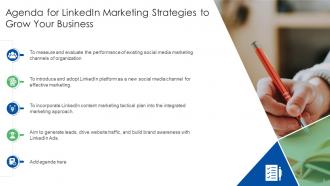
Slide 2: This slide states Agenda of the presentation.
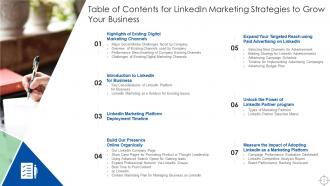
Slide 3: This slide presents Table of Content for the presentation.
Slide 4: This slide highlights title for topics that are to be covered next in the template.
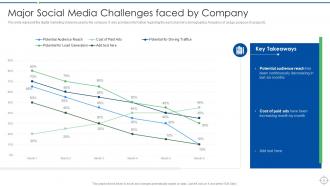
Slide 5: This slide displays Major Social Media Challenges faced by Company.
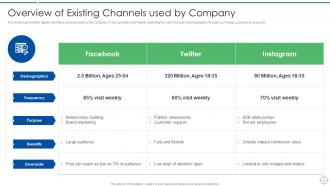
Slide 6: This slide represents Overview of Existing Channels used by Company.
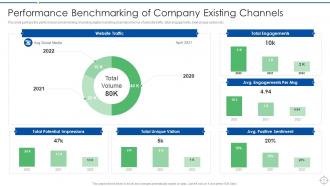
Slide 7: This slide showcases Performance Benchmarking of Company Existing Channels.
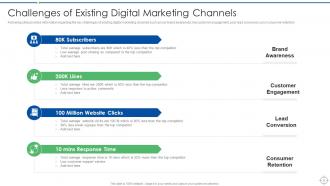
Slide 8: This slide shows Challenges of Existing Digital Marketing Channels.
Slide 9: This slide highlights title for topics that are to be covered next in the template.
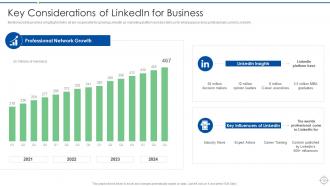
Slide 10: This slide presents Key Considerations of LinkedIn for Business.
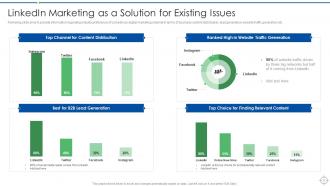
Slide 11: This slide displays LinkedIn Marketing as a Solution for Existing Issues.
Slide 12: This slide highlights title for topics that are to be covered next in the template.
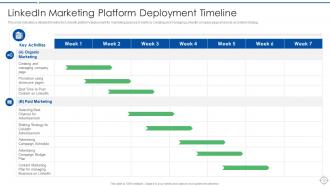
Slide 13: This slide represents LinkedIn Marketing Platform Deployment Timeline.
Slide 14: This slide highlights title for topics that are to be covered next in the template.
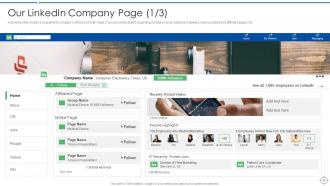
Slide 15: Following slide shares a snapshot of company’s official LinkedIn Page.
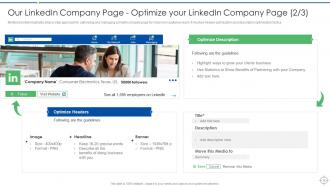
Slide 16: Mentioned slide illustrates step by step approach for optimizing and managing LinkedIn company page.
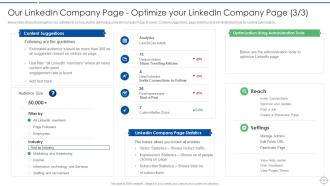
Slide 17: This slide throw light on key activities to be focused for optimizing LinkedIn Company Page.
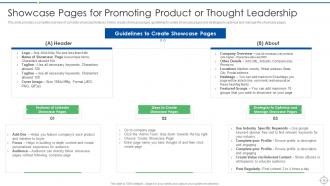
Slide 18: This slide showcases Pages for Promoting Product or Thought Leadership.
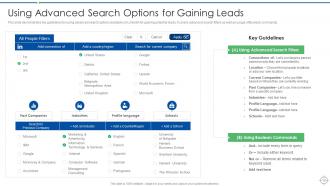
Slide 19: This slide shows Using Advanced Search Options for Gaining Leads.
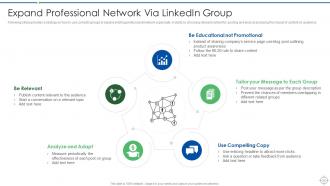
Slide 20: This slide presents Expand Professional Network Via LinkedIn Group.
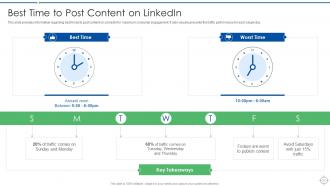
Slide 21: This slide displays Best Time to Post Content on LinkedIn.
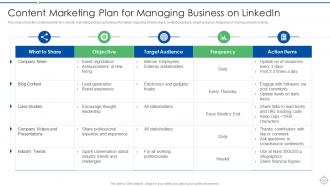
Slide 22: This slide represents Content Marketing Plan for Managing Business on LinkedIn.
Slide 23: This slide highlights title for topics that are to be covered next in the template.
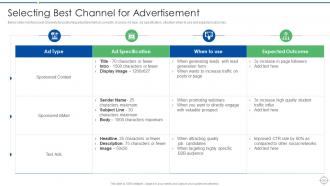
Slide 24: This slide showcases Selecting Best Channel for Advertisement.
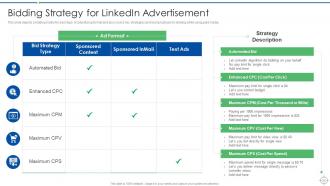
Slide 25: This slide shows Bidding Strategy for LinkedIn Advertisement.
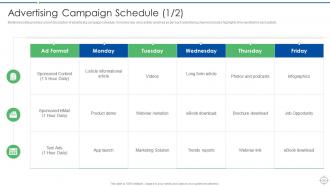
Slide 26: Mentioned slide provides a brief description of advertising campaign schedule.
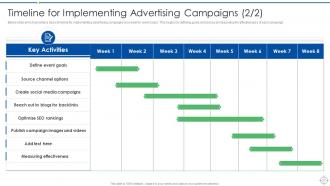
Slide 27: This slide presents Timeline for Implementing Advertising Campaigns.
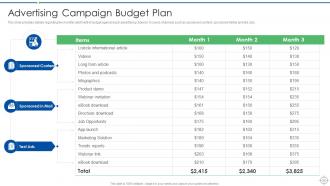
Slide 28: This slide provides details regarding the monthly allotment of budget against each advertising channel.
Slide 29: This slide highlights title for topics that are to be covered next in the template.
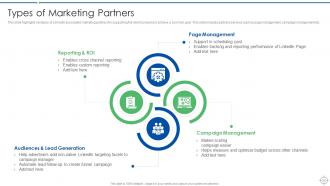
Slide 30: This slide highlights key types of LinkedIn associated marketing partners for supporting the client company.
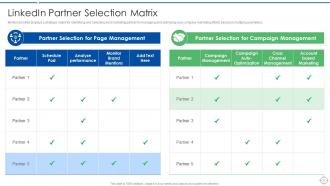
Slide 31: Mentioned slide displays a strategic matrix for identifying and selecting best marketing partner.
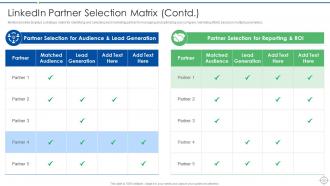
Slide 32: This is another slide continuing LinkedIn Partner Selection Matrix.
Slide 33: This slide highlights title for topics that are to be covered next in the template.
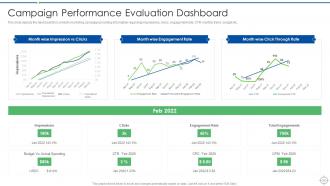
Slide 34: This slide represents Campaign Performance Evaluation Dashboard.
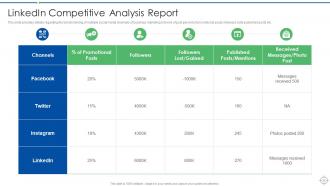
Slide 35: This slide provides details regarding the benchmarking of multiple social media channels of business marketing.
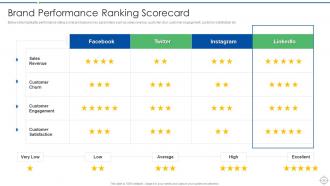
Slide 36: This slide showcases Brand Performance Ranking Scorecard.
Slide 37: This slide shows Icons for LinkedIn Marketing Strategies to Grow Your Business.
Slide 38: This slide is titled as Additional Slides for moving forward.
Slide 39: This is Our Goal slide. State your firm's goals here.
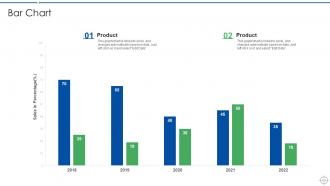
Slide 40: This slide presents Bar chart with two products comparison.
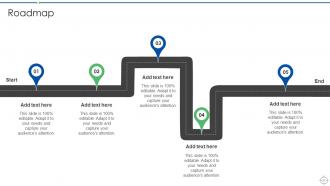
Slide 41: This slide presents Roadmap with additional textboxes.
Slide 42: This slide contains Puzzle with related icons and text.
Slide 43: This slide shows Post It Notes. Post your important notes here.
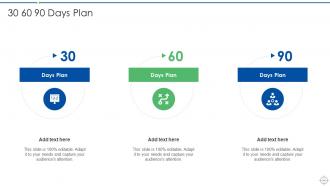
Slide 44: This slide provides 30 60 90 Days Plan with text boxes.
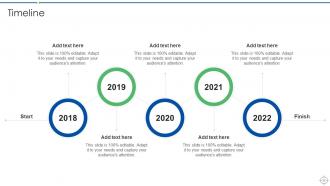
Slide 45: This is a Timeline slide. Show data related to time intervals here.
Slide 46: This is a Thank You slide with address, contact numbers and email address.
Linkedin Marketing Strategies To Grow Your Business Powerpoint Presentation Slides with all 51 slides:
Use our Linkedin Marketing Strategies To Grow Your Business Powerpoint Presentation Slides to effectively help you save your valuable time. They are readymade to fit into any presentation structure.






FAQs for Linkedin Marketing Strategies To Grow Your Business
Honestly, most companies just post random stuff and disappear - don't do that. Post consistently and actually reply to comments like a normal person would. Get your employees sharing content too since their personal profiles crush company pages in reach (LinkedIn's weird like that). Share industry stuff, company news, whatever makes sense for your audience. Native video works really well if you're not camera-shy. Also, and I can't stress this enough - fix your company page first. So many B2B brands have terrible pages but wonder why nothing works. Pick one thing to focus on this month instead of trying everything at once.
Okay so start with your company page - write a headline and description that actually makes sense, not just corporate fluff. Throw in some keywords naturally so people can find you. Post 2-3 times weekly with industry stuff, behind-the-scenes content, maybe employee spotlights. Ask questions in your posts because the algorithm eats up engagement. Oh, and get your employees sharing company posts on their personal profiles - that's huge for reach. Honestly, half the companies I see have terrible "About" sections, so fix that first this week. It's such an easy win.
Honestly, educational content that actually solves problems works best - how-to posts, case studies, industry insights. Video is killing it right now, especially those short clips where you just talk to the camera. Behind-the-scenes work stuff gets insane engagement too, which surprised me at first. For longer content, native LinkedIn articles are solid for thought leadership. Carousel posts with actionable tips perform really well also. Oh, and start with one educational post weekly - you'll figure out what clicks with your people pretty quick. Don't overthink it.
LinkedIn Groups are honestly underrated for building real connections. Find 3-5 groups where your ideal clients actually hang out and participate regularly. Don't be that annoying person constantly pitching stuff - people can smell sales-y behavior from miles away. Instead, jump into discussions with helpful insights and answer questions when you actually know something useful. It's weird how much trust you build just by being genuinely helpful first. Groups also let you connect with people who'd never see your regular posts otherwise. Better to be active in fewer groups than spread thin across tons of them.
LinkedIn ads are honestly your best bet for reaching people who can actually make buying decisions. The targeting is insane - you can hit specific job titles, company sizes, even target individual companies you want to work with. Sure, the cost per click is way higher than Facebook, but think about it: people aren't there scrolling through random memes. They're in work mode and actually open to business stuff. Quality over quantity, you know? I'd start with some basic sponsored content or message ads aimed at your dream customers, then just double down on whatever gets results.
Track cost per lead and conversion rates - that's your bread and butter. LinkedIn's Campaign Manager has decent analytics for clicks and impressions, but honestly? The interface kinda sucks. Set up UTM parameters so you can actually follow leads through your CRM. Don't get caught up in likes and comments - focus on real revenue from those leads vs what you spent. Oh, and give it at least 3-6 months before making any big decisions. You need that data runway to see what's actually working.
Honestly, you gotta post stuff that makes people want to jump in and comment. Ask questions, drop some spicy opinions, share stories they'll actually connect with. The algorithm seems to love early engagement, so I always comment on my own posts right after - sounds weird but it works. Behind-the-scenes content is gold, especially if you're sharing failures or lessons learned. People are nosy like that lol. Ditch the corporate voice completely and just talk like a normal person. Oh, and engage with others' stuff first - thoughtful comments, not just "great post!" Comment genuinely on their content and most will do the same for you.
Okay so basically treat your LinkedIn company page like any website - stuff your company description and posts with keywords that actually matter to your business. Post regularly because their algorithm is obsessed with fresh content. Here's the weird part though: your employees' profiles usually rank way better than company pages for some reason. Get your team to optimize their individual profiles and share your company stuff - it really does boost visibility. Oh and consistency is huge with posting. I'd start by figuring out 3-5 keywords you want to target, then just work them into everything naturally. Don't overthink it.
Honestly, just focus on helping people instead of pushing your services all the time. Your first line needs to grab attention since that's all most people see before scrolling past. Personal stories work way better than boring industry news - I swear everyone's tired of those generic posts. Don't go crazy with hashtags, maybe 3-5 tops. Mix things up content-wise too... polls, videos, those PDF carousel things. Oh and actually reply to comments like a real person! Consistency matters but you don't need to post every single day. Track what gets real engagement, not just likes.
Honestly, LinkedIn Analytics is way better than I thought it'd be. You can see which posts actually get engagement and when your audience is online. The demographic stuff is really useful too - shows if you're hitting the right job titles. I check mine weekly now (probably obsessively lol). Short posts vs long ones, timing, content types - you'll start noticing patterns pretty quick. Just adjust based on what's working and ditch what isn't. Game changer for figuring out what your audience actually wants to see.
Ugh, the worst thing people do is jump straight into sales mode. Nobody wants that. You've gotta actually personalize your messages - those generic connection requests are so obvious and frankly just lazy. Another thing - post regularly or don't bother posting at all. Inconsistency kills your reach. Oh, and engage with other people's stuff before expecting them to care about yours. I see so many people ignoring their company pages too, which is dumb since it's free visibility. Build real relationships first, then share useful content. Way better approach than blasting everyone with pitches.
Honestly, you've gotta start telling stories on LinkedIn instead of just posting industry updates. People remember narratives way better than facts - our brains are wired that way. Share a client win, talk about a project that went sideways, or describe that lightbulb moment you had last Tuesday. Even boring industry stuff becomes interesting when you frame it as "so this weird thing happened..." I'm telling you, ditch the corporate speak. Try starting your next post with "Last week at a client meeting..." and watch your engagement actually go somewhere. Stories stick, sales pitches don't.
LinkedIn marketing doesn't have to suck! Start with their built-in stuff - Sales Navigator for finding people and Campaign Manager for ads. Both work pretty well. For scheduling posts, Hootsuite or Buffer are lifesavers. Octopus CRM can automate connection requests, but seriously don't spam people with it. I learned that the hard way lol. Sprout Social gives way better analytics than LinkedIn's basic dashboard, though honestly the free LinkedIn insights aren't terrible if you're just starting out. My advice? Pick maybe two tools tops. Otherwise you'll bounce between them all and accomplish nothing.
Don't just pitch your company - actually solve a problem people have. Your title needs to grab attention right away. Keep slides scannable with minimal text because honestly? Most SlideShares are painfully boring to read through. Use good visuals and data charts that don't suck. Stay between 10-20 slides max - people's attention spans are short. Brand everything consistently but don't go overboard with it. Always end with a clear next step, whether that's visiting your LinkedIn page or hitting up a landing page. Oh, and upload during work hours then push it in your other posts for better reach.
Dude, employee advocacy is a game changer for LinkedIn. Your reach could literally explode - like 10x bigger audience. Here's why it works: LinkedIn trusts content more when real people share it instead of just the company account posting. Makes total sense honestly. Your employees' connections are goldmines - industry contacts and potential customers you'd never find on your own. People actually trust stuff their friends share way more than corporate posts anyway. Just make it stupid easy for your team to participate. Give them templates or whatever so they don't have to think too hard about it.
-
Their templates are super easy to edit and use even for the one like me who is not familiar with PowerPoint. Great customer support.
-
I faced no difficulty while searching for the slide I wanted. Honestly, the website’s interface is easy to use and can be navigated easily!