

Interface Management Plan For Project Execution




Try Before you Buy Download Free Sample Product
 Impress Your
 Audience
 100%
100% Editable
 Save Hours
 of Time


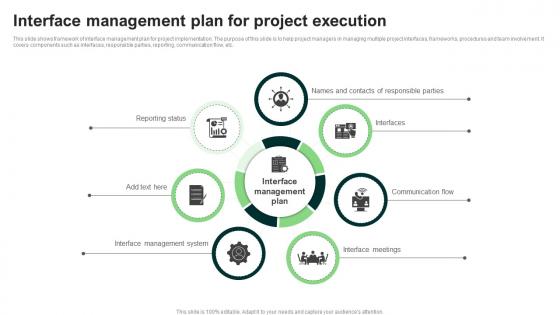
This slide shows framework of interface management plan for project implementation. The purpose of this slide is to help project managers in managing multiple project interfaces, frameworks, procedures and team involvement. It covers components such as interfaces, responsible parties, reporting, communication flow, etc.
People who downloaded this PowerPoint presentation also viewed the following :
Interface Management Plan For Project Execution with all 9 slides:
Use our Interface Management Plan For Project Execution to effectively help you save your valuable time. They are readymade to fit into any presentation structure.








FAQs for Interface Management Plan
Start by mapping out all your touchpoints - internal and external stuff. Then build your governance around that foundation. You'll want interface identification, clear roles, communication protocols, and change control processes. Risk assessment for each interface is honestly a lifesaver when things go sideways later. Don't skip the escalation procedures and review schedules either. Documentation is huge because this stuff gets chaotic without proper tracking. Oh, and the communication piece - probably more important than people think since interfaces can make or break project flow.
So basically, it's like creating a game plan for how all your different teams and vendors talk to each other. You map out who hands what to whom, when stuff needs to happen, and how people communicate. Think air traffic control but for projects - honestly, without one you're just playing telephone with important info and that always goes sideways. It spells out responsibilities, timing, and how to handle fights when they pop up. Start working on yours early and actually update it, or you'll waste tons of time just figuring out who should be looping in who.
Look, interfaces are honestly where most projects blow up, so risk management has to be baked into your plan from day one. Start by mapping out all the ways things could go wrong - communication gaps, tech that doesn't play nice together, delays that ripple everywhere. Each interface point needs its own mitigation strategy and someone actually owning it. Set up clear escalation paths too because when stuff hits the fan, you need to know who calls who. Oh and don't just write this once - keep updating it as things change because interfaces are constantly shifting.
Honestly, the right tech tools completely change the game for interface management. They'll automate all that tedious tracking stuff and give you real-time visibility into what's actually happening with dependencies. Project management platforms are great for mapping interfaces and setting up alerts when deliverables start going sideways. Plus you get that single source of truth everyone can actually access - no more hunting through email chains (seriously, I've watched projects crash because someone missed one critical email). The integrated dashboards help catch bottlenecks early too. Just pick something that plays nice with whatever systems you're already using and make sure your key people actually stick with it.
Oh man, stakeholder alignment is going to be your biggest headache. Everyone's got different priorities and timelines - it's honestly exhausting sometimes. Scope creep will sneak up on you too. Getting interface definitions nailed down early is crucial, but teams don't always talk to each other like they should. Dependencies get messy fast. Documentation turns into chaos if you don't set standards from day one. Start simple with a basic template and do regular interface reviews. Assign someone to own each interface point - trust me, this prevents so much blame-shifting down the road.
Honestly, it really depends on your industry's specific headaches. Construction crews obsess over physical interfaces between different trades - who's doing what where. Oil & gas? They're all about those safety-critical connections, running HAZOP reviews like crazy. Software folks treat APIs as their main interfaces, and they've actually figured this stuff out way better than most traditional industries. Aerospace requires documenting every single interface touchpoint. Pain in the ass, but makes sense given the stakes. Just look at what your competitors are doing with their interface registers. Copy their good ideas, then tweak it for your project's weird quirks.
Track your interface closure rate first - basically how many you're actually getting done on schedule. Escalations are telling too; fewer means your coordination isn't a mess. Response times matter big time - stakeholders who drag their feet on interface questions will kill your momentum. Change requests from interface problems can snowball fast, so watch those closely. Honestly, a weekly dashboard saves you from surprises better than monthly reports. The key is catching trends before they bite you. I'd keep it simple though - too many metrics and you'll spend more time tracking than actually managing.
So basically you map out who needs to talk to who and when - like a relationship chart for your project teams. I've been burned before by assuming someone else was handling communication (never again lol). You'll want to document all the touchpoints between teams, set up regular check-ins, and create clear escalation paths. This whole thing prevents those awkward "wait, I thought YOU were doing that" moments when deadlines hit. Honestly, it's boring to set up but saves your sanity later. Just start by listing every team interface and work out the communication flow from there.
Start with interface control documents (ICDs) - they're your roadmap for how systems talk to each other. Your interface register tracks everything throughout the project, which honestly saves your butt later. Also grab interface agreements between teams, change control procedures, and dependency matrices. Testing protocols are massive because interfaces love to fail at the worst moments! Communication logs help too, plus escalation procedures when things go sideways. Oh, and keep docs updated - stale interface documentation will mislead you worse than having nothing. ICDs and the register first, then build out the rest.
Oh man, your Interface Management Plan is gonna change constantly - don't even think about writing it once and walking away. You start with basic requirements, then suddenly you're drowning in technical specs and communication protocols as things get real. People quit, new teams show up, so those contact lists become useless fast. Honestly, I've watched these documents literally double in size between kickoff and when you're actually building stuff. Dependencies shift around, new risks appear out of nowhere. You'll discover interfaces that nobody mentioned in the beginning (seriously, where do they come from?). Just treat it like a living doc and meet with your leads regularly.
Build your escalation path before things go sideways - trust me on this one. Most issues get resolved when interface owners just talk directly to each other first. Can't fix it there? Bump it up to project managers, then steering committees if you're really stuck. Document everything because the same stupid conflicts will pop up again later. Oh, and set actual timelines for each level so problems don't just sit there forever. Honestly, having this process ready beats scrambling to figure it out mid-crisis every time.
Start with interface identification and dependency mapping - that's where most teams crash and burn. Communication protocols matter too, but honestly? The money skill is catching conflicts before they explode in your face. Get your people trained on whatever tools you're actually using, even if it's just fancy spreadsheets. Stakeholder management is huge since you're dealing with multiple teams who... let's just say they don't always get along. Oh, and definitely pilot this with a small group first. You don't want to find out your training sucks when you've already rolled it out everywhere.
Absolutely dig into your old projects first. Look for those cringe moments - missed handoffs, unclear responsibilities, teams talking past each other. That stuff's actually gold for spotting interfaces you might miss otherwise. But also check what worked well, like specific meetings or docs that kept things running smooth. Honestly, I hate reviewing old project disasters, but it's so worth it here. Get your team together for a quick lessons learned session, then use all that to build better identification processes and communication protocols into the new plan. Way better than starting from scratch.
So your Interface Management Plan is basically what controls how your schedule flows between teams and systems. It maps out all the handoffs, dependencies, and deliverables - like "who needs what from whom and when." Without it, everything just falls apart (learned that the hard way on my last project). The interface plan creates these critical touchpoints that become your scheduling constraints. You can't build a realistic schedule if you're ignoring these coordination points. Pro tip: always update your interface plan first, then tweak your schedule to match. Never do it backwards.
Honestly, just bake feedback right into your timeline from the start. Schedule quarterly check-ins with your main stakeholders - could be meetings, surveys, whatever works. I've watched so many good plans die because nobody bothered asking "is this actually working?" Document what people tell you and follow up on changes you make. Close the loop! Nothing's more annoying than giving feedback into a void. Oh, and don't wait forever to start - grab your most important stakeholders and set up something in the next couple weeks. Trust me, making it systematic beats scrambling for input later.
-
Wow, never been this impressed with any online service provider. Really appreciate the customer support all along from the navigation to purchasing the right products.
-
Loved the fact that SlideTeam provides clean, high-definition, and professional PowerPoint products.