

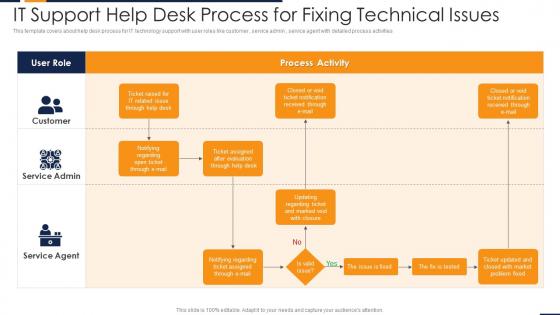
It support help desk process for fixing technical issues




Try Before you Buy Download Free Sample Product
 Impress Your
 Audience
 100%
100% Editable
 Save Hours
 of Time


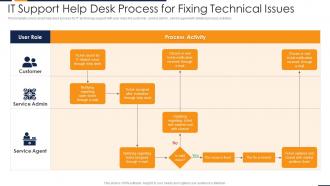
This template covers about help desk process for IT technology support with user roles like customer, service admin, service agent with detailed process activities.
People who downloaded this PowerPoint presentation also viewed the following :
It support help desk process for fixing technical issues with all 6 slides:
Use our IT Support Help Desk Process For Fixing Technical Issues to effectively help you save your valuable time. They are readymade to fit into any presentation structure.





FAQs for It support help desk process for
So you'll need ticket management first - like, actually logging everything that comes in. Clear escalation procedures are huge too. Build out a good knowledge base while you're at it. Honestly, get a centralized system where you can track all requests or you'll lose your mind. Set up defined SLAs so people aren't constantly asking "when will this be done?" Proper categorization helps route stuff to the right team fast. Oh, and self-service options are a lifesaver - cuts down on the basic questions. Regular reporting helps you catch patterns before they become bigger problems. I'd start by looking at what's currently broken and fix the worst stuff first.
Dude, automation will save your sanity at the help desk. Start with the boring stuff - password resets, ticket routing, those basic "have you tried turning it off and on again" responses. Chatbots handle most FAQ nonsense pretty well these days. Set up auto-assignment based on keywords and you're golden. Your team gets to work on actual problems instead of mindlessly clicking through the same fixes. We rolled it out slowly, one thing at a time, which honestly worked way better than trying to automate everything at once. You'll wonder why you waited so long.
Start with the big three: first call resolution, average response time, and customer satisfaction scores. Those will tell you the most. Ticket volume by category is clutch for spotting patterns, plus it helps with staffing decisions. Escalation rates matter too - honestly, nothing's worse than tickets getting passed around like hot potatoes. I'd throw in agent utilization and knowledge base usage since they're good for finding training gaps. Oh, and resolution time by category - forgot that one. Build from these basics first, then you can get fancy with other metrics later.
Honestly, it comes down to just not leaving people hanging. Hit them back fast - doesn't matter if you're just saying "hey, saw this, looking into it." People get SO mad when they feel ignored. Keep them posted on what's happening, especially if it's gonna take a while. I've watched too many simple issues turn into nightmare situations because nobody bothered updating the customer. Oh, and definitely check back after you fix something to make sure it's actually working. Use their name when you can and skip the tech speak - just explain it like you're talking to your mom. Track your response times this week, you'll probably be surprised how slow you actually are.
Dude, knowledge management will save your sanity. Document your common fixes and build a searchable database - trust me on this one. You'll stop retyping the same password reset instructions fifty times a week. New hires can actually figure stuff out without bugging you every five minutes. I'd start with whatever ten problems keep showing up in your queue. Honestly, being able to just paste a link instead of explaining the same thing again? Life-changing. It's basically like having that one coworker who remembers everything, except it doesn't take vacation days.
Honestly, just go by impact and urgency - how many people are screwed and how badly? Server down or security breach? Drop everything. After that, hit the stuff affecting multiple users before you deal with individual problems. Your SLA agreements matter too, plus any VIP users if your company does that whole thing. The key is setting up clear criteria so everyone knows what counts as critical vs low priority. Trust me, most places wing it and wonder why everything's chaos. Short sentences help your team actually follow the system instead of guessing every time.
Ugh, you're gonna get slammed with tickets where people just say "it's broken" - so annoying. Force them to fill out actual details with mandatory fields in your ticketing system. Knowledge gaps are huge too, so build a solid FAQ database. Train your team on the common stuff that comes up over and over. Honestly, automated responses saved my sanity for basic questions. Look at your current tickets first and see what patterns pop up. Then you can build actual processes instead of just putting out fires all day. Way better to get ahead of problems than constantly chase them.
Okay so first thing - get a decent ticketing system like ServiceNow or Jira Service Management. Everything revolves around that. Remote access tools are a lifesaver too (TeamViewer, LogMeIn) because who wants to walk across the building every time someone can't print? A knowledge base keeps your team from reinventing the wheel constantly. Monitoring software catches problems before users start calling. Oh and Slack or similar for team chat - way better than email chains. Honestly, I'd prioritize the ticketing system since it's where you'll live most days.
Remote support should be your go-to for most tickets - seriously saves so much time. Get your team set up with TeamViewer or Windows Remote Desktop, whatever works best. Train everyone on screen sharing basics too (trust me, you don't want awkward moments with personal stuff). Here's what I'd do: give remote fixes about 15-20 minutes max before sending someone out. If it's not fixed by then, dispatch. Oh and document everything in your ticketing system so the next tech doesn't waste time repeating what was already tried remotely.
So for your help desk training, hit these three main things: tech troubleshooting basics, customer service stuff, and your company's specific systems. Tech side means networking fundamentals, common software problems, when to escalate - you know the drill. But honestly? The people skills matter just as much. Active listening and empathy go way further than you'd think with frustrated users. Don't forget training on your ticketing system and knowledge base too. I'd do like a 2-week program for new people covering everything, then maybe quarterly check-ins. Oh, and clear communication training - some techs are brilliant but can't explain anything without using jargon.
Set up automated routing first - use keywords and priority to send tickets straight to the right team instead of having them sit around. Templates are a lifesaver for common issues, trust me on this one. Your team will thank you for not making them type "have you tried turning it off and on again" for the hundredth time. Clear escalation paths help too. Maybe throw in a chatbot for password resets and basic stuff. Oh, and definitely give users some self-service options - cuts down on tickets big time. I'd start with your top 5 most common problems and automate those.
Honestly, start with a triage system - that's your biggest quick win. Sort tickets by urgency and impact so you're not treating password resets like the building's on fire. Password resets, ugh - automate those along with other basic requests through self-service portals. Should cut your ticket volume by like 30-40%. Cross-train people so work doesn't pile up when someone's out sick. Set up escalation rules too. The triage thing first though - once you see what's actually killing your time, everything else becomes way clearer.
Honestly, good communication with other departments will save your sanity. Those relationships are everything - Finance and HR become your allies instead of constantly bugging you about random stuff. Department heads see patterns you miss and can give you a heads up about projects coming down the pipeline. You'll prioritize way better when you actually understand what's breaking their workflows versus just annoying them. I'd start with quick monthly check-ins, maybe 15 minutes each. Sounds like overkill but trust me, it makes everything run smoother when problems hit.
Document everything super clearly - what the user said was wrong, which troubleshooting steps you tried, how you fixed it. I learned this the hard way after forgetting how I solved something months later. Copy error messages exactly, note software versions and hardware specs. Use the same keywords so you can actually find stuff when searching later. Write like you're leaving notes for another tech who might have to jump in - they shouldn't need to bug the user again for basic details. Honestly saves so much time down the road.
Honestly, the best approach is hitting them from multiple angles. Send those quick surveys right after you close tickets - that's when everything's still fresh in their heads. Also do broader satisfaction polls every few months, plus just casually check in with your regulars. Here's the thing though - most teams totally bomb at this next part. You gotta actually look at the patterns in what people are telling you. Spot the recurring complaints, figure out where your team needs help. Then (and this is crucial) actually DO something about it. Share the insights with everyone monthly and make real changes. Oh, and definitely circle back to let users know you heard them.
-
Best way of representation of the topic.
-
Really like the color and design of the presentation.