

Itil Incident Management Workflow Powerpoint Presentation Slides





Try Before you Buy Download Free Sample Product
 Impress Your
 Audience
 100%
100% Editable
 Save Hours
 of Time


Introducing our content ready Itil Incident Management Workflow PowerPoint Presentation Slides. Talk about the need for implementing incident management processes such as maintaining service levels, meeting service availability requirements and so on. The topic-specific incident resolution workflow PowerPoint presentation contains twenty-two editable PPT slides to serve all your business needs. Take advantage of the professionally designed problem management best practices PPT slideshow to discuss with your team the key issues of ITIL workflow like lack of transparency, decreased customer satisfaction, high risk of business etc. Demonstrate best practice of ITIL management like creating and maintaining a knowledge base and handling major incidents etc. Utilize the visually appealing ITIL framework PowerPoint compete deck to showcase benefits of ITIL e.g. maintain dashboard and reports etc. You can also use the PPT slides to represent stages of the IT incident management lifecycle. Thus, download the informative and interactive PowerPoint templates to list down the key performance indicators of IT incident management. From this day forward you won't look back. Our ITIL Incident Management Workflow Powerpoint Presentation Slides keep you focused ahead.
People who downloaded this PowerPoint presentation also viewed the following :
Content of this Powerpoint Presentation
Slide 1: This slide introduces ITIL Incident Management Workflow. State your company name and begin.
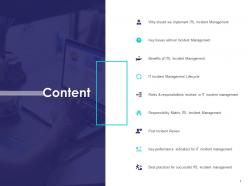
Slide 2: This slide displays the Content of the presentation.
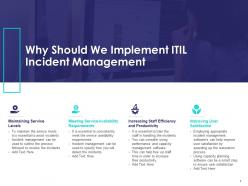
Slide 3: This slide describes Why Should We Implement ITIL Incident Management.
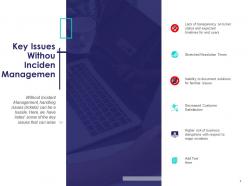
Slide 4: This slide showcases Key Issues Withou Incident Management.
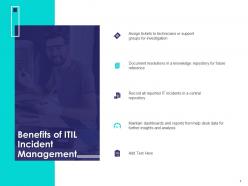
Slide 5: This slide showcases the Benefits of ITIL Incident Management.
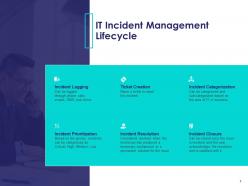
Slide 6: This slide showcases the IT Incident Management Lifecycle.
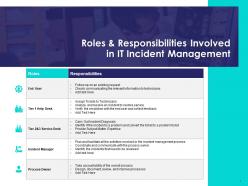
Slide 7: This slide displays the Roles & Responsibilities Involved in IT Incident Management.
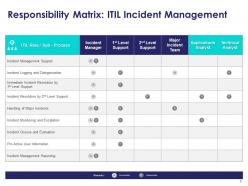
Slide 8: This slide depicts Responsibility Matrix: ITIL Incident Management.
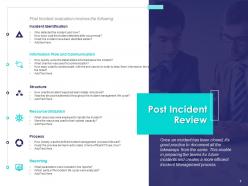
Slide 9: This slide depicts Post Incident Review showcasing post incident evaluation.
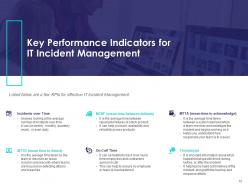
Slide 10: This slide showcases Key Performance Indicators for IT Incident Management. Listed below are a few KPIs for effective IT Incident Management.
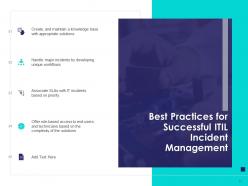
Slide 11: This slide depicts Best Practices for Successful ITIL Incident Management.
Slide 12: This is ITIL Incident Management Workflow Icons Slide.
Slide 13: This is Our Team slide with names and designation.
Slide 14: This is three years Timeline slide.
Slide 15: This is Venn slide.
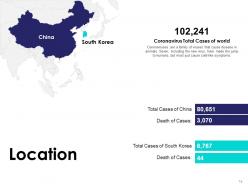
Slide 16: This is Location slide showcasing Corona virus cases in different countries of the world.
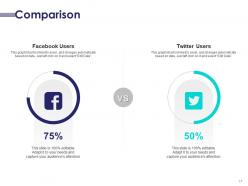
Slide 17: This is Comparisons slide showcasing comparison between facebook users and twitter users.
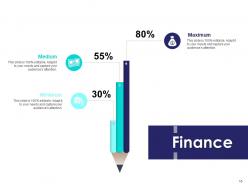
Slide 18: This is Finance slide. Showcase finance related stuff here.
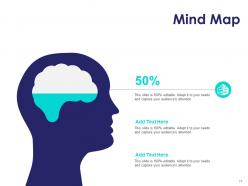
Slide 19: This is Mind Map slide for representing entities.
Slide 20: This is Idea Generation slide to highlight ideas, information etc.
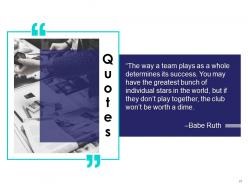
Slide 21: This is quotes slide to convey message, beliefs etc.
Slide 22: This is Thank You slide with address, contact number, email address.
Itil Incident Management Workflow Powerpoint Presentation Slides with all 22 slides:
Use our Itil Incident Management Workflow Powerpoint Presentation Slides to effectively help you save your valuable time. They are readymade to fit into any presentation structure.



FAQs for Itil Incident Management Workflow
Look, when stuff breaks, your only job is getting it working again ASAP. Don't worry about figuring out why it happened - that's someone else's problem later. Just fix it, even if it's ugly. Speed beats perfection every time here. Think of yourself like an EMT, not a doctor doing surgery. Sometimes a quick bandaid solution is way better than spending hours on the "right" fix while everyone's freaking out. I learned this the hard way honestly. When something goes down, ask yourself what's the fastest path back to normal, even if it's just a temporary workaround.
So incident management is basically "oh crap, fix it NOW" - you're just trying to get things working again as fast as possible. Problem management comes after, where you actually figure out WHY it broke. Like when your email server crashes - incident team restarts it and calls it done. Problem team digs into logs, finds out the memory was leaking, and patches that bug so it won't crash again next week. Most places honestly suck at the second part though. They'll put out the fire but never ask what started it, so they end up fighting the same issues over and over.
So ITIL incident management has 5 main stages - identification, logging, categorization, investigation & diagnosis, then resolution & closure. First you spot the incident and log all the details. Categorization comes next, where you set priority and impact levels (this part's actually super critical for response times). After that, investigate what went wrong and figure out the root cause. Finally, fix it and close everything out. Oh and definitely document each step properly - I learned this the hard way when the same issue hit us three months later and nobody remembered how we'd solved it!
Track your MTTR, first-call resolution rates, and incident volumes - those are your basics. Customer satisfaction scores matter way more than people think though. Like, hitting your SLAs means nothing if customers still feel frustrated, you know? Watch escalation rates too. If lots of incidents keep turning into bigger problems, that's your canary in the coal mine right there. Don't get obsessed with speed if you're just creating more work later. Monthly dashboard reviews with the team help catch trends before they bite you.
So your Service Desk is where all the chaos starts - users call in with problems and these folks handle the initial triage. They log everything, figure out what's urgent vs what can wait, and knock out the easy fixes right away. Can't solve it? They bump it up to the right tech team but stay in the loop to update users. Honestly, this is where most of your incident process succeeds or fails. Once everything's fixed, they close it out and check that people are actually satisfied. Oh, and definitely track your first-call resolution rates - that metric tells you way more than you'd think about how smooth your whole operation runs.
Honestly, automation is a game-changer for incident response. You can set up ticket routing so stuff automatically goes to the right teams instead of sitting in some general queue forever. Auto-escalation is clutch too - prevents tickets from just dying somewhere. I'd start with the boring stuff like password resets and service restarts since those happen constantly anyway. Status updates can run automatically which is nice because stakeholders won't bug you every five minutes asking "what's happening??" Don't try to automate everything at once though. Pick one thing, get it working, then add more.
So you'll definitely want a solid ITSM platform first - ServiceNow, Remedy, or Jira Service Management are the big ones. Get that ticketing system locked down before anything else. Monitoring tools like Nagios or SolarWinds are game-changers because they actually catch stuff before your users start complaining (which is honestly the best feeling). Slack or Teams for coordinating when things go sideways. Oh, and don't sleep on having a decent knowledge base - saves you from reinventing the wheel every incident. CMDB helps with root cause stuff too, but that's more advanced territory.
So basically you want to look at two things: impact and urgency. Impact is like how many people get screwed over, urgency is how fast you need to fix it. CEO's email down? Both are high - drop everything. Random person can't print? Whatever, both low. Here's where it gets weird though - critical server crashes at 2am but nobody's working, so high impact but maybe medium urgency since you've got some breathing room. I'd make a simple chart that crosses these two factors and gives you clear priority levels. Way easier than your team trying to wing it every time.
Honestly, the worst part is when people freak out over tiny stuff but then brush off actual emergencies. Communication gets messy fast too - especially with multiple teams where everyone thinks someone else is handling user updates. Knowledge management is a nightmare because nobody documents solutions properly, so you're constantly starting from scratch. During big incidents? Good luck getting resources when everyone's scrambling. Oh and resource allocation becomes this whole political thing sometimes. Start with a solid priority system and make status updates mandatory - that'll save you so much headache later.
Honestly, you've got to nail three things here. First, set up a dedicated communication channel so people aren't digging through endless email chains - trust me on this one. Second, keep sending updates even when nothing's happening. I know it feels pointless, but radio silence freaks everyone out way more than "still working on it" messages. Figure out who needs what info beforehand too. Your dev team wants technical details, but executives just want the business impact stuff. Oh, and definitely create some message templates now while you're not stressed - you'll thank yourself later when everything's on fire.
Start with standardized templates and make documentation mandatory at every step - opening, investigating, resolving, closing. Your ticketing system needs required fields because people absolutely will skip stuff if they can. Train everyone on good documentation practices. The real trick is capturing what you tried that DIDN'T work, not just the solution. I learned this the hard way when we kept repeating the same failed fixes. Review your incident records regularly to find gaps in your templates. Oh, and definitely make this part of post-incident reviews or it'll never stick.
First things first - get that ITIL certification if you don't have it. It's basically required everywhere now. Technical troubleshooting is obviously huge since you need to understand your company's systems inside and out. Communication skills matter way more than people realize though - you're constantly updating everyone and coordinating between teams who probably don't want to talk to each other lol. Being able to categorize incidents quickly is key. Time management becomes critical when everything's "urgent priority." Oh, and learn to stay calm when everything's on fire because it will be. Start with ITIL then dive deep into whatever tech stack your place uses.
ITIL and Agile/DevOps actually play nice together if you speed things up. Get your cross-functional teams working incidents as a group - developers should be jumping in to fix what they broke, not hiding behind support tickets. Automate your detection and first response (very DevOps), but keep ITIL's structure for categorizing and escalating when things get messy. The real shift? Stop obsessing over documentation and blame. Focus on fixing fast, then learning from it afterward. Mean time to recovery matters way more than ticket counts - that's what your users actually care about, right?
Think of incident management as your digital fire department. Quick responses stop tiny glitches from turning into massive outages that wreck your SLAs. Users actually trust you more when they see problems get fixed fast - crazy how that works, right? The incident data you collect becomes super valuable for spotting patterns later (that's technically problem management but who's counting). Track your incident trends over time. You'll probably discover some wild systemic issues you never noticed before. It's honestly one of those things that pays for itself.
When you're constantly putting out fires, you miss the bigger picture. Incident analysis is like stepping back to see what's actually breaking down. Look for patterns - maybe your database crashes every Tuesday, or certain systems always fail during peak hours. Honestly, it's pretty satisfying when you start connecting the dots. Instead of just reacting to problems, you can actually prevent them by fixing the root cause. Your response procedures get better too since you'll see what worked and what was a waste of time. Pull up last month's incidents and see if anything jumps out.
-
Good research work and creative work done on every template.
-
Informative presentations that are easily editable.
-
Very well designed and informative templates.