

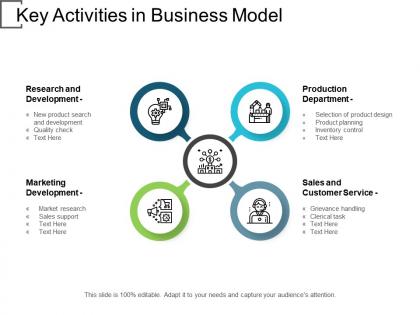
Key activities in business model




Try Before you Buy Download Free Sample Product
 Impress Your
Audience
 100%
Editable
 Save Hours
of Time


Our Key Activities In Business Model ensure a full hall. They will attract big crowds.
People who downloaded this PowerPoint presentation also viewed the following :
Key activities in business model with all 5 slides:
The challenge in great presentations is to use fewer words and more visuals. That's exactly what our Key Activities In Business Model do.


FAQs for Key activities
You need three things really - structure, content that hits, and confident delivery. Start with your core message first, then build around it. Visuals should back you up, not steal the show. Oh and timing? I still suck at that part honestly, but whatever - practice helps. Ask questions or tell stories instead of just lecturing at people. Know your stuff well enough that if tech fails or someone derails you, you can roll with it. The whole intro-main points-conclusion thing works because it just does. Don't overthink the format too much though.
Honestly, visuals are a game-changer because they turn boring abstract stuff into something people can actually wrap their heads around. Nobody wants to stare at walls of text during a presentation - I've been there and it's brutal. Charts and diagrams help visual learners stay tuned in instead of checking their phones. They also give you those natural breathing moments where you can pause and actually look at your audience. Oh, and don't just slap random stock photos everywhere thinking it helps. Keep your visuals simple and make sure they connect to what you're saying.
Dude, stories are like magic for presentations. Our brains just eat that stuff up compared to boring bullet points. When you frame info as a story with characters and conflict, people actually pay attention instead of checking their phones. I've literally watched the most mind-numbing quarterly reports become interesting just by telling them like "here's what happened when we tried this..." The emotional connection hits different than raw data ever could. Next time you're pitching something, start with a story. Trust me, you'll see people lean forward instead of zoning out completely.
Oh man, this is so true! Japanese audiences want tons of background info and relationship-building first. Germans? Just cut to the chase already. Americans eat up data and confidence, but that same energy can seem super rude in more traditional, hierarchical places. Eye contact rules are totally different everywhere too - I bombed a presentation in Seoul because I didn't get this. Quick tip: always research their cultural norms beforehand. How you handle Q&A, your gestures, even your tone matters way more than you'd think.
Here's what works for me: one big idea per slide, and make your headlines actually mean something. People scan titles first, so that's where your story lives. High contrast colors are clutch - nobody's squinting to read pale gray text. I swear by the 6x6 thing: six bullet points max, six words each. Ditch paragraphs whenever you can. Charts and images hit way harder than text blocks anyway. Oh, and make sure folks in the back can actually see your font size. Your slides should back you up, not steal the show. Dense slides are honestly just distracting.
You've gotta figure out what your audience actually wants to hear. Executives? Hit them with ROI and big picture stuff - they'll zone out if you get too technical. But your engineering team wants all those nitty-gritty details you'd normally skip. Sales people are tricky though. Give them simple value props they can actually remember (half the time they're already planning their next meeting anyway). Drop the jargon with general crowds, but specialists expect you to speak their language. Before any presentation, I ask myself: what's the one thing this group needs to know? Then I figure out how they like getting info. Makes everything way smoother.
Hey! So presentation anxiety is totally normal - I still get it sometimes even after doing tons of presentations. Practice out loud is huge, not just reading it in your head. That deep breathing thing actually works before you go up. Oh and get there early so you're not scrambling with the tech stuff last minute. Visualization sounds weird but honestly it helps - just picture it going well. Your audience isn't sitting there hoping you'll bomb, they want good info. Try those and see how it goes!
Okay so data is basically what stops your presentation from being just your opinion, you know? Without numbers backing you up, people won't take your recommendations seriously. I've watched presentations bomb because they were all talk and zero proof. Here's the thing though - don't just dump a bunch of spreadsheets on them. Pick maybe 2-3 really solid data points that actually support what you're saying. Make them visual too. Oh, and always explain WHY the numbers matter before you show them. Like, tell them the takeaway first, then prove it with data.
So here's what actually works - send people a quick survey right after your presentation while it's still fresh. Don't ask "any feedback?" because that's useless. Ask specific stuff like "what confused you?" or "what would you change?" Then keep a running doc of all the feedback you get. Trust me on this part - look for patterns. Three people say you talk too fast? That's real data, not just one person being picky. Before your next presentation, check that doc and pick like 1-2 concrete things to work on. I wish I'd started doing this sooner honestly.
Okay so here's the deal with CTAs - you need action words that actually tell people what to do. Skip the weak "learn more" garbage and go with "Get," "Download," or "Start." Add some urgency too, like "only 24 hours left" or whatever makes sense. The value has to be super obvious - what's actually in it for them? Make your button pop visually so people can't miss it. Oh and definitely test different versions because honestly, the results can be weird sometimes. I'd start with your biggest benefit and build everything else around that.
Dude, interactive tech is a game changer for presentations. I always throw in a quick poll at the start - helps me read the room's vibe. Live Q&A tools are clutch too since people can ask stuff without awkwardly interrupting you mid-sentence. Clickable slides let you bounce around based on what your audience actually cares about. Even the most mind-numbing topics get way more engaging with the right tools. Don't go overboard though - pick maybe two interactive bits that actually make sense for your content. Otherwise it's just distracting fluff.
Honestly, the worst thing you can do is drone on for like 30 minutes straight - people's brains just check out. Switch things up every 10-15 minutes. Go from presenting to discussion, then maybe some hands-on stuff. I'm obsessed with quick polls and breakout rooms because they actually get people talking. Don't be afraid to call on specific people (but be cool about it). Watch their faces though - if everyone looks dead, pivot fast! Keep some backup activities ready. Oh, and shared docs where everyone can contribute? Total game changer.
Honestly, less is way more with slides. Keep it to like 6-8 words max and let your visuals do the talking. I used to cram everything onto slides - total disaster lol. Your audience should listen to you, not squint at tiny text. Slides work best when they're basically billboards that make sense instantly. Pick your main point first, grab one solid image that backs it up, then delete everything else. Oh and here's a trick - show someone your slide for 5 seconds and ask what they remember. You'll be surprised how little sticks.
Honestly, the biggest thing right now is making presentations actually interactive instead of just droning on. Data visualization is everywhere too - people want charts and graphics that actually make sense of complicated stuff. Thank god we're finally ditching those awful text-heavy slides! Now it's all about visual storytelling with bold images and way less text. Virtual presentations are still a thing (ugh, I know), so you've got to design for people both in the room and on Zoom. Keep it simple, make it engaging, and definitely don't just grab some random template - think about who you're actually presenting to.
Honestly, rehearsing is a game-changer for presentations. You'll catch all the weird phrasing and figure out your timing before it matters. I always do at least one full run-through out loud - sounds silly but it works. Your transitions get smoother, and you won't be glued to reading slides (which is so obvious when people do that). Plus when tech inevitably breaks or someone asks a curveball question, you're not panicking about forgetting your content. The confidence boost alone is worth it. Oh, and you'll spot which slides are confusing way before your audience does.
No Reviews