

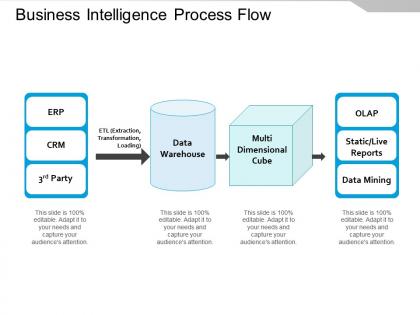
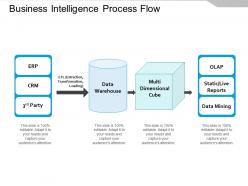
Business intelligence process flow




Try Before you Buy Download Free Sample Product
 Impress Your
 Audience
 100%
100% Editable
 Save Hours
 of Time


Our Business Intelligence Process Flow will earn you credit. The audience will appreciate the advantage they create.
People who downloaded this PowerPoint presentation also viewed the following :
Business intelligence process flow with all 5 slides:
Counter the impact of any distractions with our Business Intelligence Process Flow. It allows you to handle irritants.


FAQs for Business
Honestly, start with auditing your current data quality - that's where most people mess up. You'll need solid data sources and analytics tools that actually work, plus people who know what they're doing with them. Data governance is huge too (trust me on this one, garbage in = garbage out). Executive support makes everything easier, and your KPIs need to match what the business actually cares about. Oh, and don't skimp on training - I've seen so many fancy dashboards just sit there unused because nobody gets how to read them. Figure out your biggest headaches first, then build from there.
Honestly, get yourself a decent data integration platform first - something that can grab stuff from all your databases, APIs, whatever files you've got scattered around. Talend's solid, or if you're doing cloud stuff, Azure Data Factory works well. But here's the thing - and I learned this the hard way - you've gotta nail down consistent formats and quality standards upfront. Otherwise you're literally comparing apples to oranges and your analysis will be garbage. Figure out if you need real-time processing or if batch works fine. Start with your most important data sources, then build from there. Don't try to boil the ocean right away.
Honestly, data visualization just makes everything so much clearer than drowning in spreadsheets. You can actually see what's happening with your numbers - trends jump out at you, problems become obvious right away. Heat maps are surprisingly good for this stuff. Your whole team gets it instantly, even people who normally zone out during data meetings. Real-time dashboards let you catch issues before they blow up, and explaining results to your boss becomes way less painful. I'd start simple though - basic bar charts work better than you'd think. Makes such a difference in presentations.
Dude, predictive analytics is honestly a game changer - you stop guessing and start using actual data to predict what's coming. Historical patterns show you stuff before it becomes a headache, like which customers are about to bail or when you'll run out of inventory. It's math-based forecasting that actually works (way better than my fantasy football predictions lol). The smart move? Pick one area where your data isn't a mess and test it there first. Once you see results, you can roll it out to other parts of your business. Much better than constantly putting out fires.
Honestly, the worst part is always your data - it's gonna be a mess spread across like 10 different systems. Most people don't realize how bad their data actually is until they start this process. Then you've got everyone who's been using Excel for years suddenly freaking out about learning something new. Legacy systems make integration a total pain too. Oh, and training takes way longer than anyone budgets for. Start with just one team first. Clean up your data before you do anything else, and don't cheap out on training or people will just go back to their old ways.
Honestly, cloud computing just eliminates all those scaling nightmares with BI tools. You don't sit around for weeks waiting on new servers when your data suddenly blows up - everything scales instantly based on what you need. More users want dashboards? The platform automatically spins up resources in real-time without you lifting a finger. The cost thing is pretty sweet too since you're only paying for actual usage instead of those expensive servers collecting dust half the time. Way better than the old days. You'll actually spend time analyzing insights rather than babysitting server capacity.
Honestly, start with your most important datasets and nail down three things. Set up validation rules right when data enters your system - catch the garbage before it spreads everywhere. Automated alerts are a lifesaver for weird spikes or missing stuff. You'll thank me later when you're not scrambling at month-end. Document where everything comes from too, because someone will always ask "wait, how did we calculate this?" Also super important: make sure sales and finance actually agree on what "revenue" means. They never do by default. Oh, and audit your source systems regularly - data gets funky over time.
Dude, real-time BI is seriously worth it. Instead of finding out about problems next week when you can't fix them, you catch stuff as it happens. Like bottlenecks in your workflow or which products aren't selling. You can tweak inventory and staffing on the spot rather than just winging it. Monthly reports are so painfully slow compared to this. Your team actually makes decisions based on data instead of guessing. Honestly? Focus on whatever's causing you the biggest headaches first - that's where you'll notice the difference right away.
Three big things to nail down: data privacy, transparency, and avoiding bias. Only grab data people actually said yes to sharing - being sneaky with data is such a bad look. Be super clear about what you're doing with it too. Algorithmic bias is tricky but you've got to watch for it, especially if it screws over certain groups. Think about the bigger picture impact of your insights as well. Honestly, build these guardrails right into your data setup from the start. Way easier than trying to fix everything later when you're already knee-deep in problems.
So basically, whatever's hot in tech ends up in BI tools eventually. Companies got flooded with IoT and social media data, which pushed vendors toward real-time analytics and cloud stuff. AI is literally everywhere now (my neighbor's dog probably has machine learning), so BI platforms are scrambling to add ML features and voice queries. Remote work made mobile BI way more important too. Here's the thing though - your needs will shift as these trends do. Pick something flexible instead of getting stuck with a platform that can't evolve. Trust me on this one.
Honestly, you need to watch both the tech stuff and business impact. Check your user adoption rates and how often people actually use the dashboards - response times matter too. Business-wise, track how fast decisions get made now, what you're saving on manual reports, and revenue tied to data insights. ROI's the obvious big metric everyone asks about. But seriously, don't skip user satisfaction scores because if your dashboards suck to use, people just won't bother. Set up maybe 3-5 key metrics in a monthly scorecard. Makes it way easier to catch problems early and fix them before they get worse.
Totally! Start with what you already have - Google Analytics is free, and honestly Excel pivot tables work better than people think. Most businesses are sitting on tons of useful data in their CRM or POS systems. Pick one simple question first, like "who are my best customers?" Don't try building some crazy dashboard right away. I've watched small companies get amazing insights from really basic analysis. Just export your data monthly and look for patterns. You'd be shocked what you'll notice. Google Data Studio is another free option that's pretty solid too.
So the biggest thing happening in BI right now? AI and machine learning are completely changing the game - way better predictions and insights just happen automatically. Natural language processing is pretty cool too since you can literally just ask questions in normal English instead of learning weird query syntax. Cloud stuff makes everything way more accessible obviously. Oh and there's this thing called augmented analytics where the AI actually tells you what data to look at next - kind of creepy but useful lol. My advice? Go with tools that already have this stuff built in rather than trying to add it later.
So BI takes all that customer data sitting in your CRM and actually makes it useful. You can see who's buying what, spot your best customers, and figure out which leads are worth chasing. Honestly, the pattern recognition stuff is pretty wild - like noticing seasonal trends or which campaigns aren't total garbage. Plus you can personalize your outreach better and catch customers before they bail. Oh, and it helps optimize your whole sales process. My advice? Connect your CRM to a BI tool and pick one metric to focus on first. Don't try to boil the ocean right away.
Honestly, SQL is your best friend here - can't do BI without it. Tableau or Power BI for visualization comes next. Don't laugh, but Excel is still crazy relevant in most companies. You'll spend half your time explaining data stuff to people who glaze over at numbers, so communication skills matter more than you'd think. Being able to think critically about what the data's actually telling you is key too. Oh, and understanding the business side helps you ask better questions instead of just making pretty charts. Start with SQL and pick one viz tool - that combo gets you in the door almost anywhere.
No Reviews