


Marketing automation showing targeted list and execute campaign




Try Before you Buy Download Free Sample Product
 Impress Your
 Audience
 100%
100% Editable
 Save Hours
 of Time


Bring in an extra dimension with our Marketing Automation Showing Targeted List And Execute Campaign. They enable fresh concepts to emerge.
People who downloaded this PowerPoint presentation also viewed the following :
Content of this Powerpoint Presentation
Description:
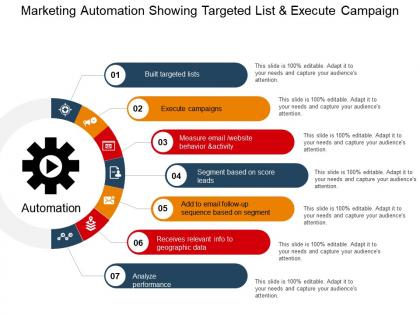
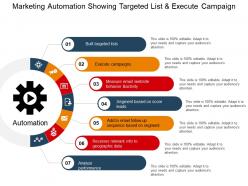
The image is of a PowerPoint slide titled "Marketing Automation Showing Targeted List & Execute Campaign." It visually represents the steps involved in a marketing automation process using a circular flow diagram centered around a gear icon symbolizing automation. Each step of the process is sequentially numbered and described:
1. Built targeted lists: The process starts with creating targeted lists of potential customers based on certain criteria.
2. Execute campaigns: Once the lists are created, personalized marketing campaigns are executed aimed at these targeted groups.
3. Measure email/website behavior & activity: The response to the campaigns is measured by tracking email interactions and website behaviors.
4. Segment based on score leads: Leads are scored based on their interaction levels and segmented into different categories for further action.
5. Add to email follow-up sequence based on segment: Depending on their segment, leads are added to relevant email follow-up sequences to nurture them through the sales funnel.
6. Receives relevant info to geographic data: Tailored information is sent to leads based on their geographic data to enhance personalization.
7. Analyze performance: The performance of the marketing campaigns and follow-up actions is analyzed for effectiveness and further refinement.
Use Cases:
Marketing automation is crucial across industries for targeting the right audience and streamlining marketing efforts for efficiency and impact.
1. E-commerce
Use: Streamlining customer communication and sales processes.
Presenter: Marketing Manager.
Audience: Marketing and Sales Teams.
2. Banking and Finance
Use: Personalizing financial services and product offers.
Presenter: Customer Relations Manager.
Audience: Client Service Teams, Stakeholders.
3. Retail
Use: Enhancing customer shopping experiences with personalized promotions.
Presenter: Digital Marketing Strategist.
Audience: Retail Management, Marketing Staff.
4. Real Estate
Use: Automating property listings and client follow-ups.
Presenter: Real Estate Marketing Lead.
Audience: Real Estate Agents, Brokers.
5. Healthcare
Use: Managing patient outreach and health care campaigns.
Presenter: Healthcare Marketing Specialist.
Audience: Clinic Administrators, Outreach Coordinators.
6. Education
Use: Automating student recruitment and engagement initiatives.
Presenter: Admissions Director.
Audience: Admissions Staff, Educational Marketers.
7. Technology Services
Use: Executing targeted software or service campaigns.
Presenter: Product Marketing Manager.
Audience: Marketing Team, Product Managers.
Marketing automation showing targeted list and execute campaign with all 5 slides:
Our Marketing Automation Showing Targeted List And Execute Campaign ensure you come away with flying colors. It allows you to face any inspection.

FAQs for Marketing automation showing targeted list
Honestly, the time savings alone makes it worth it. No more manually sending follow-up emails or posting on social - that stuff just runs itself. Your leads get scored automatically based on what they actually do, which is way smarter than guessing who's interested. Plus you can finally see real data on what's working instead of throwing spaghetti at the wall. The messaging stays consistent too, even when you're scaling up. I'd say start with basic email automation first since that's the easiest win, then add other stuff later. Way better than doing everything by hand like some kind of masochist.
Oh dude, marketing automation is seriously worth it. It handles all the boring repetitive tasks while you focus on the bigger picture stuff. You can create email sequences that actually respond to what people do - like if someone grabs your whitepaper, they automatically get relevant follow-ups. The lead scoring thing is probably my favorite feature though. It ranks your prospects so your sales team isn't wasting time on dead ends. Plus you'll finally see which campaigns are actually bringing in results instead of just guessing. My advice? Start small with one basic drip campaign. Don't go crazy trying to automate everything right away - learned that one the hard way!
Start with email automation - that's honestly where you'll get the most bang for your buck. Lead scoring helps you focus on the prospects actually worth your time. CRM integration is a must unless you enjoy manually updating spreadsheets all day (which... no). Analytics matter so you can see what's actually moving the needle. The interface should be intuitive - I've seen people abandon perfectly good platforms because they were nightmares to navigate. A/B testing and landing page builders save you from constantly bugging developers. Just map out your biggest headaches first, then demo accordingly.
So marketing automation is basically like having a smart assistant that watches what your customers do and sorts them into groups automatically. Like, it tracks who clicks what, buys stuff, or just ignores your emails completely. Then you can send different messages to each group without doing it manually - because honestly, who wants to sit there organizing spreadsheets all day? The cool part is these groups update themselves as people's behavior changes. You'll see way better results because you're not just blasting everyone with the same generic stuff. I'd start small though - maybe just set up 2 or 3 basic triggers first and see how it goes.
So AI basically runs most marketing automation these days - it does all that tedious stuff you used to handle manually. Your customer data gets analyzed to predict what people will do next, content gets personalized automatically, and send times optimize themselves. Pretty neat how it learns from every single interaction, making your campaigns smarter over time. Lead scoring happens in the background, audience segments form based on weird patterns you'd never catch, plus it'll generate subject lines and product recommendations. Honestly, just dig into whatever AI features your current platform has first - most tools have predictive stuff you're probably ignoring.
So marketing automation just takes care of all that tedious email stuff you'd usually do by hand. Welcome emails for new people, abandoned cart reminders - they all fire off automatically based on what users actually do. The segmentation part is honestly where it gets cool though. You can target people super specifically using their purchase history or how much they engage with your content. Real-time analytics show up without you having to crunch numbers yourself, which is nice. I'd start simple - maybe just a welcome sequence? You'll be shocked how much time you get back. Trust me on this one.
Start with the obvious stuff - open rates, click-through rates, conversions. Then track how leads move through your scoring system and their lifetime value. Don't ignore unsubscribe rates either (nobody wants to be that annoying company). Here's what really matters though - segment everything by audience instead of just staring at overall numbers. ROI on your automation investment is huge too. Oh, and see how well your sequences actually push people through the funnel. Honestly, pick like 3-4 metrics first or you'll go crazy trying to track everything.
Build privacy in from the start - get consent before adding people to campaigns and make opting out super easy. Only grab data you actually need. That whole "oops sorry" strategy? Yeah, GDPR killed that approach completely. Your platform needs encryption and audit trails. Clean out old contacts regularly too. Here's the thing - someone WILL ask what data you have on them eventually. Happens to everyone. Set up a process for data requests now instead of panicking later when you're digging through spreadsheets at midnight trying to find everything.
Oh man, don't try automating everything right away - that's how you end up with angry customers and broken workflows. Pick something basic first, maybe welcome emails? Get that working smoothly before you touch anything else. Make sure someone actually owns each step too. I've watched campaigns sit there for weeks because nobody knew Jim from sales was supposed to approve them, lol. Test with tiny groups first and honestly, keep your old manual process running just in case. Write down what you did as you go - trust me, you'll forget the weird workarounds you had to make.
So basically, marketing automation tracks what people do on your site and sends them stuff based on their behavior. Like if someone dumps items in their cart, boom - automatic email reminder. You can get super specific with who gets what message too. The whole thing runs itself once you set it up, which is honestly kind of mind-blowing. Start simple though - maybe just cart abandonment emails or welcome sequences. Then you can add fancier triggers later as you figure out what actually works. Way better than blasting everyone with the same generic content.
So marketing automation takes your CRM from being just a contact list to actually doing stuff for you. Your leads get scored automatically based on what they're doing on your site. Follow-ups happen at the perfect time without you remembering. Honestly, I wish I'd set this up sooner - my sales team actually gets decent leads now instead of random names. Plus you can see patterns in customer behavior that you'd never catch otherwise. Just make sure whatever tool you pick talks nicely with your current CRM or you'll hate yourself later.
Honestly, just throw them into sandbox mode first so they can mess around without nuking your email list (learned that one the hard way). Get them doing hands-on training with the stuff they'll actually use every day - skip the fancy features for now. Make some quick cheat sheets for the basic tasks. Pick a couple tech-savvy people to be your internal help desk when things get weird. Oh, and give everyone practice time before you go live with real campaigns. Nothing worse than someone panicking during their first send because they don't know where the "undo" button is.
Think of marketing automation as the thing that connects all your channels so they actually talk to each other. Someone likes your Instagram post? Boom - they're in your email funnel. Cart abandonment triggers both retargeting ads AND a text reminder. The coolest part is seeing someone's whole journey across email, social, web, mobile in one place instead of jumping between like five different dashboards (which honestly used to drive me crazy). Plus you'll finally know which channels are actually working for attribution. I'd start by listing out where you're currently reaching people, then figure out where automation could fill the weird gaps.
Honestly, your marketing automation data is like having a roadmap for what actually works. Pull up last quarter's numbers and hunt for patterns - I bet you'll find weird stuff like Tuesday emails bombing while Thursday ones crush it. Check which content gets people to actually buy, not just click. Your most valuable customers probably behave totally differently than you think they do. Once you spot these trends, you can ditch the stuff that's burning money and double down on what's working. Oh, and timing matters way more than most people realize - the data will show you exactly when your audience is paying attention.
Honestly, lead nurturing is all about not being annoying while staying helpful. Break your leads into groups based on what they do and who they are - makes your emails way more relevant. Don't hit them with massive forms right away; ask for info bit by bit as you go. I usually space emails 3-5 days apart at first, then back off. Value comes before pitches, always. Share useful stuff - guides, case studies, whatever helps them. Oh, and set up lead scoring so you'll know when they're actually ready to buy instead of just browsing. Nobody wants pushy sales tactics these days.
-
Good
-
good
-
AWESOME!!
-
good
-
Very helpful templates
-
good
-
easy and simple view!
-
Very good
-
Really good
-
Very Nice, Good
-
Page:
- You're currently reading page 1
- Page 2
-
