


Model Size Comparison Of GPT Models Introduction To GPT 4 ChatGPT SS




Try Before you Buy Download Free Sample Product
 Impress Your
 Audience
 100%
100% Editable
 Save Hours
 of Time


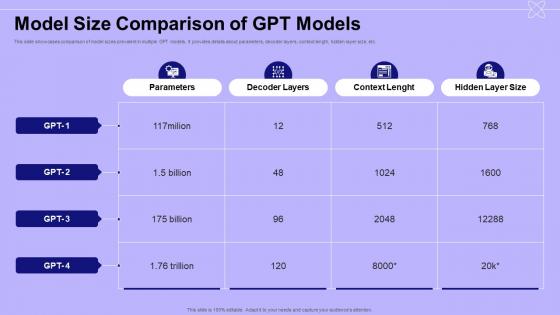
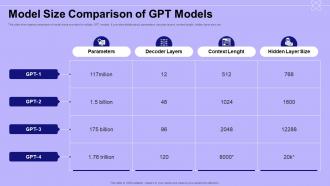
This slide showcases comparison of model sizes prevalent in multiple GPT models. It provides details about parameters, decoder layers, context length, hidden layer size, etc.
People who downloaded this PowerPoint presentation also viewed the following :
Model Size Comparison Of GPT Models Introduction To GPT 4 ChatGPT SS with all 9 slides:
Use our Model Size Comparison Of GPT Models Introduction To GPT 4 ChatGPT SS to effectively help you save your valuable time. They are readymade to fit into any presentation structure.
-
Model Size Comparison Of GPT Models Introduction To GPT 4 ChatGPT SS
-

Model Size Comparison Of GPT Models Introduction To GPT 4 ChatGPT SS
-

Model Size Comparison Of GPT Models Introduction To GPT 4 ChatGPT SS
-

Model Size Comparison Of GPT Models Introduction To GPT 4 ChatGPT SS
-

Model Size Comparison Of GPT Models Introduction To GPT 4 ChatGPT SS
-

Model Size Comparison Of GPT Models Introduction To GPT 4 ChatGPT SS
-

Model Size Comparison Of GPT Models Introduction To GPT 4 ChatGPT SS
-

Model Size Comparison Of GPT Models Introduction To GPT 4 ChatGPT SS
-

Model Size Comparison Of GPT Models Introduction To GPT 4 ChatGPT SS
FAQs for Model Size Comparison Of GPT Models Introduction To GPT
So model size basically comes down to how complex your architecture is - more layers and wider networks = bigger model. The data types matter too, like using higher precision weights just makes everything heavier. Attention mechanisms are total memory hogs btw. But you've got options to shrink things down: pruning gets rid of useless weights, quantization drops the precision, compression helps a ton. I'd honestly just profile your model first to see where all those parameters are actually hiding. Sometimes it's not where you think it'll be. Embedding dimensions can be sneaky space-wasters too.
Dude, bigger models are resource hogs - like seriously expensive. Training time goes up exponentially, not linearly, which is wild. A 10x parameter bump might mean 50x more compute time. You're looking at thousands instead of hundreds per training run. GPU requirements get insane too, plus way more memory. Honestly, I learned this the hard way when I tried jumping straight to a huge model last year. Start with something smaller first to test your setup and data - then scale up once everything's working. Trust me on this one.
Honestly, smaller models can crush the bigger ones in a lot of situations. When you don't have much training data, they won't overfit as badly - they literally can't memorize all the garbage. Computational limits? Smaller models are your friend. Need fast responses? Same deal. I always tell people to start small for basic stuff like classification tasks. Fine-tuning is way less of a headache too. The huge models are overkill unless you're doing something that actually needs complex reasoning. It's like... why use a sledgehammer when you just need to hang a picture, you know?
Look, most people way overthink this and get stuck spinning their wheels forever. Just figure out your minimum accuracy threshold first, then work backwards. Test a few different sizes with your actual data - seriously, don't skip this part. A smaller model that does what you need beats some giant overkill thing every time. Also factor in what you can actually afford to run since bigger models cost way more. Honestly? I'd just start mid-size, benchmark it against your real use case, then adjust up or down based on those results. Way easier than trying to predict everything upfront.
So for comparing model sizes, accuracy and F1-score are obviously the main things to check. Then you've got inference time and memory usage - that stuff matters way more than people think. Model size in MB/GB is huge if you're doing mobile deployment (learned that one the hard way). Training time's worth tracking too, plus how many predictions per second you can squeeze out. Oh and energy consumption - apparently that's a big deal now? Anyway, just make a spreadsheet with all these metrics and weight them based on what actually matters for your project. Way easier to pick the right model when you can see everything side by side.
Yeah, so bigger models basically just memorize everything instead of actually learning patterns - it's like that friend who crams for tests but can't apply anything later. Your training accuracy will look amazing while validation tanks. I usually start way smaller than I think I need, then bump it up slowly. The tricky part is hitting that sweet spot where it's complex enough to get your data but not so massive it becomes a glorified cheat sheet. Honestly, most people go too big too fast and wonder why their model sucks in production.
Honestly, transfer learning is where it's at. You grab a pre-trained model that's already learned the basics, then just tweak the top layers for whatever you're trying to do. Way better than starting from zero - cuts your training time in half and you don't need some monster model eating up resources. Most of the heavy lifting is already done for you. Find models that match your domain first, then figure out how much of the original structure you actually need. I've seen people overthink this, but really you can strip out tons of parameters once it's specialized. Game changer for sure.
So basically better hardware makes those massive models way more doable - cheaper to run and faster to train. GPUs keep getting better, chips are more efficient, and you've got way more memory to work with now. It's crazy how quickly this stuff evolves, honestly. There are even chips built specifically for AI work which helps a ton. But here's the thing - models are scaling up even faster than the hardware can keep pace with. Total arms race situation. I'd probably look into cloud options if I were you, gives you more flexibility without the huge upfront costs.
Honestly, bigger models are just way harder to crack open and understand. You get killer performance but zero clue what's happening inside. Smaller ones? You can actually see what they're doing - which features matter, how decisions get made. Think glass box vs total black box situation. The huge models might crush your accuracy targets, but try explaining that to your boss when something breaks lol. Plus debugging becomes a nightmare. I'd probably start small if you need to justify the "why" behind predictions, then only go bigger if the performance gap is actually worth losing all that transparency.
Yeah, totally! Smaller models use way less energy since they don't need as much computing power to run. Your electricity bills and cooling costs drop pretty significantly. The big models are honestly kind of ridiculous with how much power they suck up. You'll usually lose some accuracy or features, but most of the time you can still get like 80-90% of the performance for half the energy costs. Pretty solid trade-off if you ask me. I'd just test out some smaller versions of whatever you're using now and see if the performance hit works for your situation.
Yeah, mixing different model sizes actually works really well for ensembles. Small models are quick and good at catching obvious patterns that big models sometimes overthink. Meanwhile, your bigger models handle the complex stuff. Kinda like having different tools for different jobs, you know? The trick is figuring out how much weight to give each one based on how they perform on validation data. I'd start with maybe 2-3 models of different sizes - you'll probably see their combined predictions crush what any single model does alone.
Yeah totally! DistilBERT is crazy popular for sentiment stuff - companies get like 97% of BERT's accuracy with way fewer parameters. MobileNet's another solid one for image recognition on phones since it won't drain your battery to death. Most chatbots actually run on smaller GPT models too, not the massive ones everyone talks about. Here's the thing though - most real-world apps don't need the fanciest model anyway. I'd honestly just start with whatever's smallest but still hits your accuracy targets. You can always upgrade later if you need to, but you'll probably be surprised how well the compact versions work.
Honestly, your architecture choice makes a huge difference in how well those parameters actually work. Transformers are beasts at scaling - throw more params at them and they'll usually reward you for it. RNNs? Not so much, they hit a wall pretty quick. CNNs are okay but really depends what you're doing with them. Modern stuff like BERT and GPT variants just handle the extra size way better than older models. Oh and don't just blindly add parameters thinking it'll help - your architecture needs to actually be able to use them effectively first.
There's a few ways to shrink models without killing accuracy. Pruning cuts out the less important weights - I'd start around 50-70% sparsity and see what happens. Quantization drops your weights from 32-bit down to 8-bit or lower, which helps a ton. Knowledge distillation is pretty cool too, basically you train a smaller model to copy what the big one does. Honestly? Combining pruning and quantization usually works best in my experience. Just don't go too aggressive right away or you'll hate yourself when the accuracy tanks.
Yeah, big models are honestly a pain for edge stuff. Memory gets crushed, your battery dies fast, and everything runs super slow on basic hardware. I'd try smaller models first - maybe under 100MB if you can swing it. Quantization helps shrink things down too, or pruning if you're feeling fancy. Like, who has time to wait 30 seconds for their doorbell cam to figure out it's just the mailman? Test a few different sizes against whatever hardware you're actually using. You might be surprised what the smaller ones can handle.
-
These stunning templates can help you create a presentation like a pro.
-
Easy to edit slides with easy to understand instructions.