

Optimizing Organization Workforce For Call Center Powerpoint Presentation Slides




Try Before you Buy Download Free Sample Product
 Impress Your
 Audience
 100%
100% Editable
 Save Hours
 of Time


Our Optimizing Organization Workforce For Call Center Powerpoint Presentation Slides are topically designed to provide an attractive backdrop to any subject. Use them to look like a presentation pro.
People who downloaded this PowerPoint presentation also viewed the following :
Content of this Powerpoint Presentation
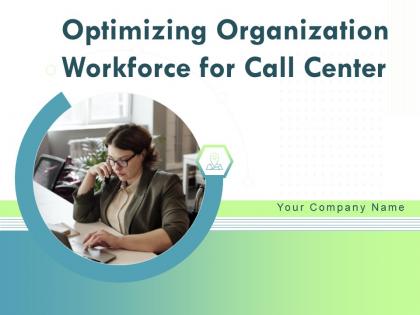
Slide 1: This slide introduces Optimizing Organization Workforce for Call Center. State your Company name and begin.
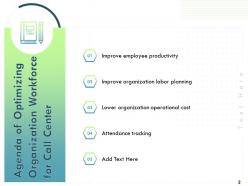
Slide 2: This slide displays Agenda of Organization Workforce for Call Center.
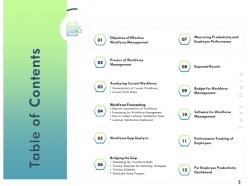
Slide 3: This slide displays Table of Contents of the presentation.
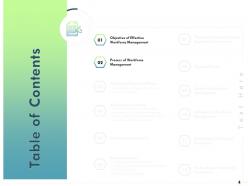
Slide 4: This slide displays Table of Content.
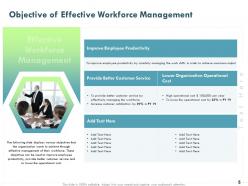
Slide 5: This slide displays Objective of Effective Workforce Management
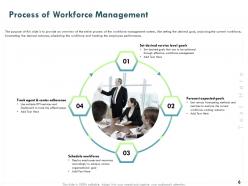
Slide 6: The purpose of this slide is to provide an overview of the entire process of the workforce management system, like setting the desired goal, analyzing the current workforce, forecasting the desired outcome, scheduling the workforce and tracking the employee performance.
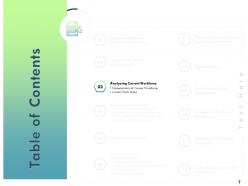
Slide 7: This slide displays Table of Content of the presentation.
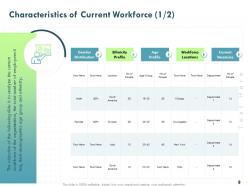
Slide 8: The objective of the following slide is to analyze the current workforce of the organization, the total number of employees it has , their demographics age group and ethnicity.
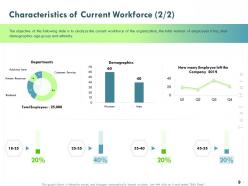
Slide 9: The objective of the following slide is to analyze the current workforce of the organization, the total number of employees it has , their demographics age group and ethnicity.
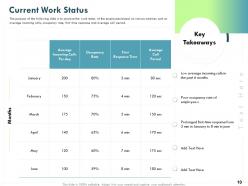
Slide 10: The purpose of the following slide is to analyze the work status of the employees based on various metrices such as average incoming calls, occupancy rate , first time response and Average call period
Slide 11: This slide displays Table of Content
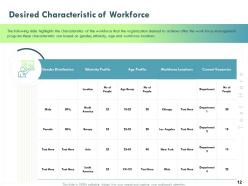
Slide 12: The following slide highlights the characteristics of the workforce that the organization desired to achieve after the Work Force Management program these characteristics are based on gender, ethnicity, age and workforce locations.
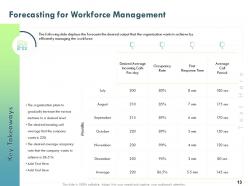
Slide 13: The following slide displays the forecasts the desired output that the organization wants to achieve by efficiently managing the workforce.
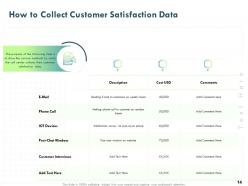
Slide 14: The purpose of the following slide is to show the various methods by which the call center collects their customer satisfaction data
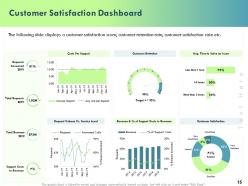
Slide 15: This slide shows Customer Satisfaction Dashboard.
Slide 16: This slide displays Table of Content containing- Workforce Gap Analysis
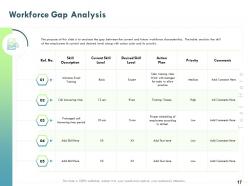
Slide 17: The purpose of this slide is to amylase the gap between the current and future workforce characteristics. The table analysis the skill of the employees its current and desired level along with action plan and its priority.
Slide 18: This slide displays Table of Content.
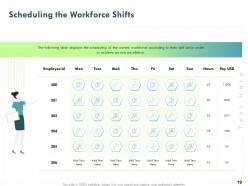
Slide 19: This slide displays the scheduling of the current workforce according to their skill set in order to achieve service excellence.
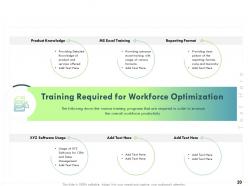
Slide 20: This slide shows the various training programs that are required in order to increase the overall workforce productivity.
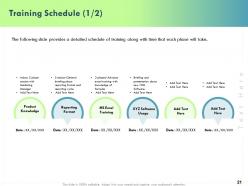
Slide 21: This slide provides a detailed schedule of training along with time that each phase will take.
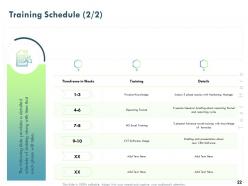
Slide 22: The following slide displays the scheduling of the current workforce according to their skill set in order to achieve service excellence.
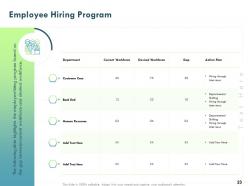
Slide 23: This slide highlights the employee hiring program based on the gap between current workforce and desired workforce.
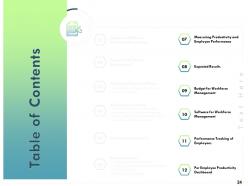
Slide 24: This slide showcases Table of Content
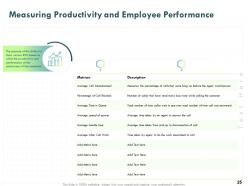
Slide 25: The purpose of this slide is to show various KPIs based on which the productivity and performance of the employees will be measured.
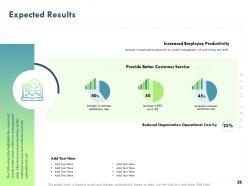
Slide 26: The following slide highlights the expected results of the total workforce management plan. Like increased productivity, better customer service and reduction in total operational cost.
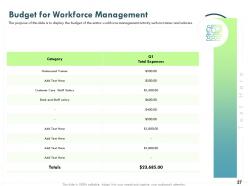
Slide 27: The purpose of this slide is to display the budget of the entire workforce management activity such as trainer and salaries.
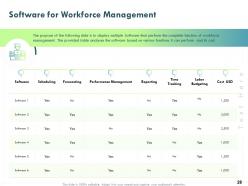
Slide 28: The purpose of the following slide is to display multiple Software that perform the complete function of workforce management . The provided table analyses the software based on various functions it can perform and its cost.
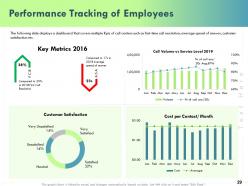
Slide 29: This slide displays a dashboard that covers multiple Kpis of call centers such as first-time call resolution , average speed of answer , customer satisfaction etc.
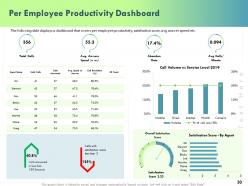
Slide 30: This slide displays a dashboard that covers per employee productivity, satisfaction score, avg answer speed etc
Slide 31: This is Optimizing Organization Workforce for Call Center Icons Slide
Slide 32: This slide is titled as Additional Slides for moving forward.
Slide 33: This is About us slide to showcase Company specifications.
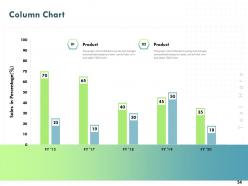
Slide 34: This slide displays Column Chart with Products Comparison.
Slide 35: This slide displays Mission, Vision and Goals.
Slide 36: This is Our team slide with Names and Designations.
Slide 37: This is 30 60 90 Days Plan slide
Slide 38: This slide displays Timeline process.
Slide 39: This is Thank you slide with Contact details.
Optimizing Organization Workforce For Call Center Powerpoint Presentation Slides with all 39 slides:
Use our Optimizing Organization Workforce For Call Center Powerpoint Presentation Slides to effectively help you save your valuable time. They are readymade to fit into any presentation structure.
FAQs for Optimizing Organization Workforce For Call Center
So there's basically four things to nail down: forecasting/scheduling, performance tracking, quality checks, and analytics. Honestly, get your forecasting right first - predicting call volumes so you staff properly will fix most of your problems right there. Then build out real-time dashboards for stuff like handle time and resolution rates. Quality scorecards help with coaching too. Analytics connects everything by spotting patterns you can actually act on. I'd definitely start with forecasting though - it's like 80% of the battle. Once that's working, add the other pieces gradually instead of trying to do everything at once.
Dude, technology will totally change how you handle your team. AI forecasting beats the hell out of those messy spreadsheets - way more accurate for predicting call volumes. Real-time dashboards let you see what's happening instantly throughout the day. Automated scheduling is clutch because it factors in what your people actually want and what they're good at. Honestly, the analytics alone make it worth it - you'll catch problems before they blow up. My advice? Pick one tool that fixes your worst headache first, then add more later.
Dude, real-time analytics is basically having a live feed of everything happening on your call floor. You can watch agent performance, queue lengths, wait times - all as it's actually happening instead of finding out hours later when you can't do squat about it. When call volume suddenly jumps, you'll instantly know to grab agents from other stuff or open backup queues. Honestly the best part is setting up alerts for your main metrics. Otherwise you're just sitting there watching dashboards all day like some kind of weirdo waiting for disasters to strike.
Start with last year's call data from the same time periods. Seasonal stuff matters way more than people think. Basic forecasting honestly does most of the work - those fancy WFM tools are nice but you don't need all the bells and whistles. Don't forget upcoming marketing campaigns or product drops that'll mess with your volumes. When you're figuring out staffing, factor in handle times and what service level you're shooting for. Shrinkage kills you if you're not careful - sick days, breaks, training sessions pile up quick. I'd run new forecasts every week and tweak as you get closer.
So you want to track First Call Resolution, Average Handle Time, Customer Satisfaction, and Schedule Adherence. FCR is honestly the big one - shows if your agents actually fix things without people calling back constantly. AHT keeps you efficient without rushing customers off the phone. CSAT gives you the real customer perspective, which matters more than internal metrics sometimes. Schedule Adherence affects your whole operation's flow - can't have people wandering off whenever. Start with those four religiously, then add occupancy rates and quality scores later. Don't overwhelm yourself trying to measure everything at once.
Honestly, engaged employees make everything so much easier. Your turnover drops, people actually show up on time, and quality scores go up. I've seen it firsthand - when agents don't hate their jobs, they're way more efficient on calls and take fewer "sick" days (you know what I mean). The whole forecasting thing becomes predictable because you're not constantly dealing with people quitting or half-assing it. Focus on giving feedback regularly and recognizing good work. Career development helps too, though that takes longer to pay off. Your optimization metrics will basically fix themselves once people actually want to be there.
So a few things work really well - split shifts are clutch, plus letting people start anywhere between like 8-10am instead of rigid times. Cross-training is huge too since agents can jump between different queues when needed. Self-scheduling tools are honestly a lifesaver, people love choosing their own shifts. Part-time and remote work? Total game-changers. Oh and shift swap platforms help tons - someone always wants to trade. Real-time tools let you adjust on the fly based on call volume, which is super handy. I'd start with maybe two of these and see what sticks before going crazy with everything.
Look at your actual call data first - recordings, feedback scores, all that stuff. Figure out where agents are actually struggling instead of guessing. Generic training is honestly a waste of everyone's time and agents see right through it. Mix up your formats: quick microlearning bits, role-playing for the tricky situations, maybe pair newer folks with veterans. Different experience levels need different approaches too. Oh and make sure it connects to real scenarios they deal with daily, not some made-up customer situation. That theoretical stuff never sticks anyway.
So this workforce software is pretty solid for getting your staffing right and making agents perform better. It forecasts call volumes so you're not scrambling last minute or wasting money on too many people. Tracks tons of stuff - call patterns, how productive everyone is, customer happiness scores. The amount of data it processes is actually crazy. You can also figure out who needs training and who your rockstars are way faster. Oh, and definitely try it in just one department first to test if it actually fixes your scheduling mess and agent usage.
So predictive modeling is pretty solid for this stuff - you can forecast call volumes, figure out staffing needs, even predict which agents might bail or need more training. Historical data gets crunched with seasonal patterns and outside factors to give you decent projections weeks out. Way better than just winging it with last year's numbers, honestly. You'll nail the scheduling sweet spot without burning money on overstaffing or dealing with those awful understaffed days. Oh, and start collecting clean data on volumes, handle times, and how agents perform - that's basically your starting point for anything useful.
Honestly? Data silos are your worst enemy - nothing talks to each other at first. Your agents will freak out thinking you're micromanaging them, which I get. Clean data integration is a total pain, and call volumes are so random that forecasting feels impossible sometimes. Plus these tools cost serious money upfront. People assume you're just trying to squeeze more work out of them. Start with maybe two metrics tops, get your team leads on board first. Show agents how it actually makes their jobs easier instead of just watching their every move. Trust me on this one.
Cross-training is honestly a huge win for call centers. Your agents can handle different call types, so customers don't get bounced around as much - which they absolutely hate. Handle times drop too. Scheduling becomes way easier since you're not stuck with super rigid routing. I've seen places cut staffing costs by like 15-20% just from better coverage during busy periods and when people call out sick. Oh, and here's the thing - use your best agents to train others instead of just relying on manuals. They know all the real shortcuts that actually work.
Honestly, customer feedback is your best friend for figuring out staffing. If people keep complaining about wait times, you need more agents during those hours - pretty straightforward. Rude service comments? That's not a numbers problem, that's training. I'd check feedback weekly and match it against your call data. Patterns always show up first in complaints before they hit your metrics. Like, customers will tell you exactly when you're understaffed or where your team's struggling. It's way better than waiting for your performance reports to catch problems later.
Track the obvious stuff first - savings from less turnover, reduced training costs, fewer overtime hours. Productivity gains are huge too: faster call resolution, better first-call rates, happier customers. The annoying part? Putting actual dollar amounts on things like engagement and fewer sick days. But those add up more than you'd think. Compare your total spend on tools and training against all these savings. Give it 12-18 months to really see the impact. Oh, and start measuring everything NOW before you change anything. Trust me on this one - you'll need those baseline numbers later.
You gotta be upfront about how you're measuring things - agents hate mystery metrics. Celebrate the wins where everyone can see, but keep coaching conversations private. Give them some say in their schedules if you can swing it. Micromanaging is honestly the fastest way to tank morale, so don't do that. Instead of just calling out problems, give feedback that actually helps them improve. Oh, and listen when they complain about workload stuff - they're usually right. Ask what would make their jobs easier. Their ideas often boost both happiness and numbers, which is perfect.
-
Awesome presentation, really professional and easy to edit.