

Workforce Planning Powerpoint Presentation Slides





Try Before you Buy Download Free Sample Product
 Impress Your
 Audience
 100%
100% Editable
 Save Hours
 of Time


Workforce Planning PowerPoint Presentation Slides helps management professionals to guide their human resources to successfully achieve business objectives. Showcase workforce goals and measures to fulfill short-term and long-term requirements using the professional design of personnel management PPT theme. This employee management PowerPoint template is excellent to review current workforce in terms of skills, and other performance metrics. Assess future workforce requirements using the workforce analysis turnover and workforce turnover calculator included in our manpower planning PPT presentation. Use the exit survey provided in workers planning PowerPoint template to illustrate key reasons and remedial actions for employee turnover. Consolidate the results of PESTLE analysis with the help of this labor planning PowerPoint theme. Determine and demonstrate the scope of the workforce planning through the staff management PPT template. Present the stakeholder’s engagement plan along with communication strategy with the aid of the liveware PowerPoint complete deck stunning visuals.
People who downloaded this PowerPoint presentation also viewed the following :
Content of this Powerpoint Presentation
Slide 1: This slide introduces Workforce Planning. State your Company name and begin.
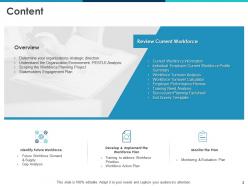
Slide 2: This slide displays Content of the presentation.
Slide 3: This slide displays the Overview.
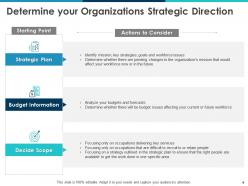
Slide 4: This slide is about Determining your Organizations Strategic Direction.
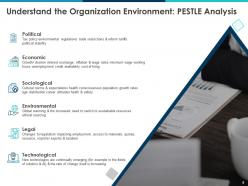
Slide 5: This slide tells to Understand the Organization Environment: PESTLE Analysis.
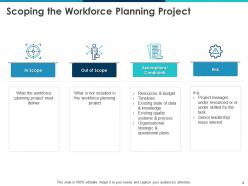
Slide 6: This slide is about Scoping the Workforce Planning Project.
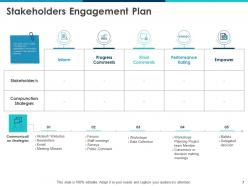
Slide 7: This slide explains Stakeholders Engagement Plan. The slide covers a table indicating how stakeholders will be kept involved in the workforce planning
Slide 8: This slide shows Review Current Workforce.
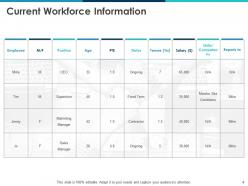
Slide 9: This slide represents Current Workforce Information.
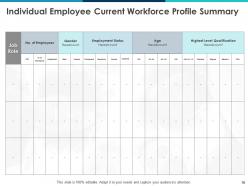
Slide 10: This slide presents Individual Employee Current Workforce Profile Summary.
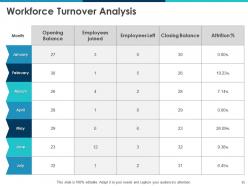
Slide 11: This slide shows Workforce Turnover Analysis.
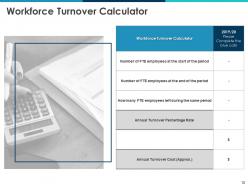
Slide 12: This slide shows Workforce Turnover Calculator.
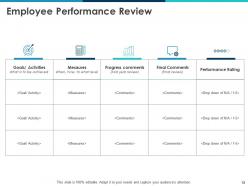
Slide 13: This slide depicts Employee Performance Review.
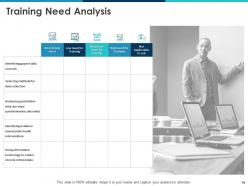
Slide 14: This slide highlights Training Need Analysis.
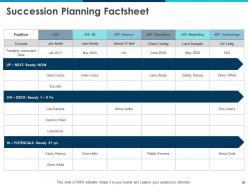
Slide 15: This slide presents Succession Planning Factsheet.
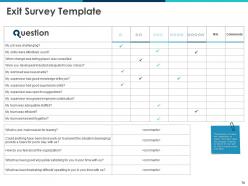
Slide 16: This slide shows Exit Survey Template.
Slide 17: This slide depicts Identify Future Workforce
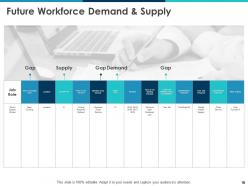
Slide 18: This slide depicts Future Workforce Demand & Supply.
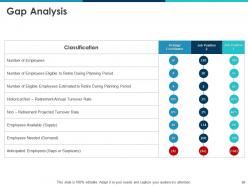
Slide 19: This slide shows Gap Analysis.
Slide 20: This slide shows Develop & Implement the Workforce Plan.
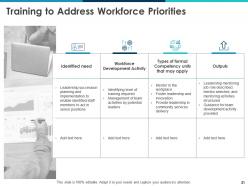
Slide 21: This slide is about Training to Address Workforce Priorities
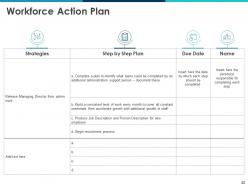
Slide 22: This slide presents Workforce Action Plan.
Slide 23: This slide depicts Monitor the Plan.
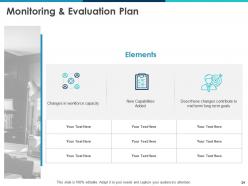
Slide 24: This slide depicts Monitoring & Evaluation Plan.
Slide 25: This is Workforce Planning Icons Slide.
Slide 26: This slide is titled as Additional Slides for moving forward.
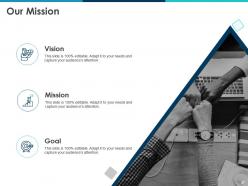
Slide 27: This is Our Mission slide displaying Mission, Vision and Goals.
Slide 28: This is Our Team slide with Names and Designations.
Slide 29: This is About Us slide to showcase Company specifications.
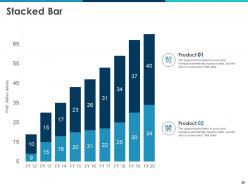
Slide 30: This slide shows Stacked Bar chart with Product Comparisons.
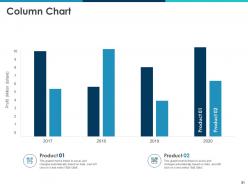
Slide 31: This slide displays Column Chart with Products Comparison.
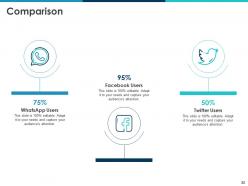
Slide 32: This is Comparison slide Showcasing Comparison between Facebook users, Twitter users and WhatsApp users.
Slide 33: This slide is titled as Post it Notes. Post your Important notes here.
Slide 34: This is Financial slide. Showcase your finance related stuff here.
Slide 35: This is Thank you slide with Address, Email address and Contact number.
Workforce Planning Powerpoint Presentation Slides with all 35 slides:
Use our Workforce Planning Powerpoint Presentation Slides to effectively help you save your valuable time. They are readymade to fit into any presentation structure.




FAQs for Workforce Planning
Look, you basically need four things: workforce analysis, demand forecasting, supply planning, and spotting the gaps. First analyze what you've got now - skills, ages, who's actually good at their job. Forecast what you'll need based on where the business is headed and market stuff (honestly, external factors always throw these off more than you'd think). Plan how you're gonna get that talent - hiring, training people up, keeping the good ones around. Then figure out where you're short so you can actually do something about it. Oh, and make it ongoing - check every quarter because everything changes way faster than you expect.
Honestly, start by pulling your turnover data from the last couple years - you'll be shocked at the patterns that jump out. Look at when departments usually lose people, track retirement trends, and see how business growth affects headcount. I always tell people to mix HR numbers with actual business stuff like revenue or project timelines because that's where you get the real picture. Skills gaps are huge too. Also track how well your recruiting pipeline works - some companies are terrible at this but don't realize it. Budget forecasting gets way easier once you nail down headcount projections.
Honestly, tech has completely changed how we do workforce planning - it's night and day from the old spreadsheet days. AI tools can actually predict when people might quit or what skills you'll need next year, which still blows my mind sometimes. The visual dashboards make spotting trends so much easier too. Most HR platforms will automate the boring stuff automatically, so you can focus on bigger picture strategy instead. I'd start by looking at what you're already using and figure out where automation could save you the most headaches. Game changer, seriously.
Look, workforce planning is basically figuring out what skills your team has now vs what you'll actually need down the road. Once you map that out, you can spot the gaps and decide how to fill them - maybe train your current people, hire someone new, or bring in contractors. Do a skills inventory first (sounds boring but it's super helpful) and match it against your upcoming projects. That gap analysis shows exactly where to focus. Being proactive beats the hell out of panicking when you desperately need expertise you don't have.
Data gaps are your worst enemy - you can't predict much without decent historical info. Leadership changing priorities every five minutes doesn't help either (and trust me, they will). Budget constraints mean you're always hiring reactively instead of getting ahead of it. My advice? Set up monthly check-ins with leadership so you're not blindsided by changes. Get some solid HR analytics tools if you can swing it. Building real relationships with hiring managers helps too - they'll actually tell you what's coming down the pipeline. Create workforce plans that bend without breaking when things shift unexpectedly.
Honestly, workforce planning is totally different depending on your industry. Tech moves crazy fast - they're scaling up quick and dealing with skills that go stale in like two years. Manufacturing? They care more about production capacity and those seasonal ups and downs. Healthcare's a nightmare with all the licensing hoops plus everyone's retiring (the nursing shortage is brutal). Retail just juggles seasonal hiring and people constantly quitting. If you're in something heavily regulated, just expect way longer hiring timelines to find qualified people.
So remote work totally flips workforce planning on its head. Geography doesn't limit you anymore - you can hire someone brilliant from anywhere, which honestly is pretty cool. But your old planning models? Yeah, those need work. Headcount per office becomes meaningless when everyone's scattered. Time zones mess with project timelines too, and you gotta figure out if remote people are actually more or less productive (the jury's still out on that one). I'd start by looking at what assumptions you're still making that don't really apply anymore.
Honestly, you've got to bake this stuff into your planning from day one - can't be an afterthought. Start with an audit of where you actually stand right now, then set real numbers for hiring and promotions. Track everything obsessively. Partner with HBCUs, women's orgs, community groups for your pipeline. Your job descriptions probably have biased language (most do), so scrub those clean. Make sure interview panels aren't just a bunch of clones. Here's the thing - D&I dies when it's just feel-good talk. You need concrete goals for every department and level. What gets measured actually happens.
Start with demand forecasting - look at your growth plans and seasonal patterns to predict headcount. Workforce analytics will show you turnover trends and skill gaps. Scenario planning honestly saved my butt during budget season, so definitely do that. Map your talent pipeline and flag roles that are nightmare to fill. Oh, and don't forget automation might change what skills you actually need. Build a simple dashboard to track this stuff monthly. Trust me, you don't want to be scrambling when someone randomly quits.
Yeah, regulatory changes can totally flip your staffing needs overnight. New rules drop and boom - you're scrambling to hire compliance people or train your current team on stuff they've never dealt with. GDPR was a perfect example - companies were suddenly hunting for privacy officers like crazy. Honestly, it's one of the most annoying parts of workforce planning because there's not always a ton of warning. I'd definitely stay connected with industry groups and legal newsletters for your field. The real trick is keeping your workforce flexible enough that you're not completely screwed when new requirements show up.
Honestly, workforce planning and retention are super connected - if people keep quitting, you're always scrambling to fill spots instead of thinking ahead. High turnover makes it impossible to plan properly. But here's the thing: bad planning also causes people to leave because they don't see growth opportunities. I've seen companies get stuck in this awful loop where they can't break out of firefighting mode. Your turnover data will probably tell you everything - just compare it with your planning forecasts and the patterns become pretty obvious. Fix one problem and the other usually gets easier.
You definitely need to get other teams involved in workforce planning - they catch stuff you'd totally miss otherwise. Sales will tell you about that huge deal coming through, product teams know when they're launching new features that need extra hands. Operations always has the real scoop on what's actually happening day-to-day. Finance is obviously crucial for budget reality checks (they love crushing dreams, but in a helpful way). The trick is having regular coffee chats or quick check-ins with these people. Don't just wait for them to remember to loop you in when everything's already on fire.
Honestly, start with just the big three buckets. First is talent flow - like turnover rates, how long it takes to fill roles, internal moves. Then workforce makeup: skills gaps, age spread, diversity numbers. The skills gap thing is wild right now, everyone's freaking out trying to map what they actually have vs what they need. Last bucket is business impact - productivity per person, revenue per employee, that stuff. Oh and definitely track succession planning coverage plus engagement scores since those usually predict who's about to bail. But seriously, don't go crazy with like 20 metrics or you'll just get paralyzed by all the data.
Look, start with 3 basic scenarios for next year - growth, steady, and downturn. Figure out headcount needs for each one. Way easier than it sounds, trust me. Main thing is spotting your business drivers first. Revenue goals, product launches, whatever moves the needle for you guys. Then just translate that into people stuff - how many bodies you'll need and when. I'd honestly just focus on headcount numbers at first. Don't overcomplicate it with skills mapping right away. You can always add that layer once you've got the basics down. Most people overthink this process but it's pretty straightforward once you dive in.
Honestly, your employees are sitting on goldmine insights you're probably missing. They see the real skill gaps and bottlenecks firsthand. When people get a voice in planning their future, they actually care more about sticking around - wild concept, right? You'll catch turnover red flags early and spot who's ready to step up. The intel becomes way more solid since it's from folks actually doing the work. Just start casual - ask your team leads what they're noticing. I bet you'll uncover stuff that never shows up in reports.
-
Very unique, user-friendly presentation interface.
-
Editable templates with innovative design and color combination.
-
Excellent template with unique design.
-
Very unique and reliable designs.
-
I discovered this website through a google search, the services matched my needs perfectly and the pricing was very reasonable. I was thrilled with the product and the customer service. I will definitely use their slides again for my presentations and recommend them to other colleagues.