


Call Center Employee Management Powerpoint Presentation Slides




Try Before you Buy Download Free Sample Product
 Impress Your
 Audience
 100%
100% Editable
 Save Hours
 of Time


Strengthen the relationship with your customers by employing Call Center Employee Management PowerPoint Presentation Slides. Improve employee productivity, and provide better customer service by discussing the objectives of effective workforce management. Our customer relationship management PowerPoint templates help to provide an overview of the processes of workforce management systems like setting the desired goal, analyzing the current workforce, forecasting the desired outcome, and tracking employee performance, etc. It is possible to analyze the current workforce of the organization, the total number of employees, their demographic age group, and ethnicity by using the employee management system PowerPoint slideshow. Take the assistance of our readily available call center management PPT visuals, and analyze the work status of employees based on various metrics, such as average incoming calls, occupancy rate, first-time response, and average call period. You can easily edit the slides to present the various methods by which the call center collects their customer satisfaction data. Customer satisfaction score, retention rate, customer satisfaction rate can also be presented by incorporating our ready-to-use workforce management PowerPoint slide deck.
People who downloaded this PowerPoint presentation also viewed the following :
Content of this Powerpoint Presentation
Slide 1: This slide introduces Call Center Employee Management. State your Company name and begin.
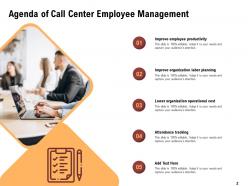
Slide 2: This slide displays Agenda of Call Center Employee Management.
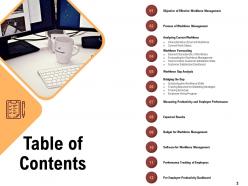
Slide 3: This slide displays Table of Contents of the presentation.
Slide 4: This slide displays Table of Content.
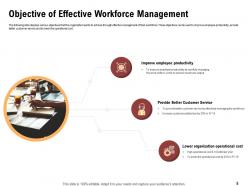
Slide 5: This slide displays Objective of Effective Workforce Management
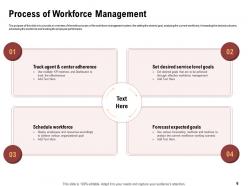
Slide 6: The purpose of this slide is to provide an overview of the entire process of the workforce management system, like setting the desired goal, analyzing the current workforce, forecasting the desired outcome, scheduling the workforce and tracking the employee performance.
Slide 7: This slide displays Table of Content of the presentation.
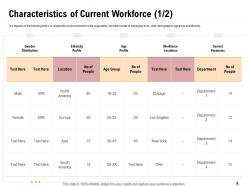
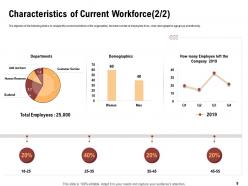
Slide 8: The objective of the following slide is to analyze the current workforce of the organization, the total number of employees it has , their demographics age group and ethnicity.
Slide 9: The objective of the following slide is to analyze the current workforce of the organization, the total number of employees it has , their demographics age group and ethnicity.
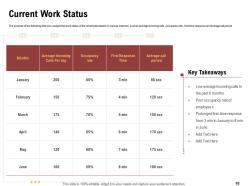
Slide 10: The purpose of the following slide is to analyze the work status of the employees based on various metrices such as average incoming calls, occupancy rate , first time response and Average call period
Slide 11: This slide displays Table of Content
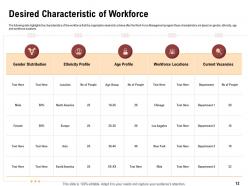
Slide 12: The following slide highlights the characteristics of the workforce that the organization desired to achieve after the Work Force Management program these characteristics are based on gender, ethnicity, age and workforce locations.
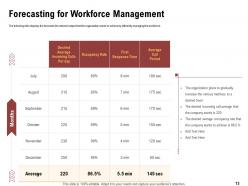
Slide 13: The following slide displays the forecasts the desired output that the organization wants to achieve by efficiently managing the workforce.
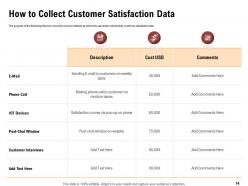
Slide 14: The purpose of the following slide is to show the various methods by which the call center collects their customer satisfaction data
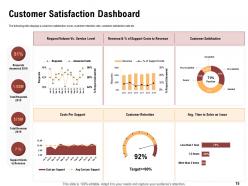
Slide 15: This slide shows Customer Satisfaction Dashboard.
Slide 16: This slide displays Table of Content containing- Workforce Gap Analysis
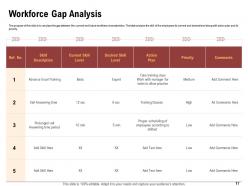
Slide 17: The purpose of this slide is to amylase the gap between the current and future workforce characteristics. The table analysis the skill of the employees its current and desired level along with action plan and its priority.
Slide 18: This slide displays Table of Content.
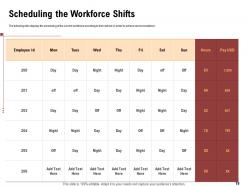
Slide 19: This slide displays the scheduling of the current workforce according to their skill set in order to achieve service excellence.
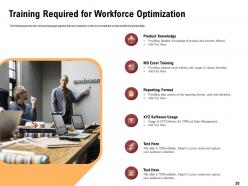
Slide 20: This slide shows the various training programs that are required in order to increase the overall workforce productivity.
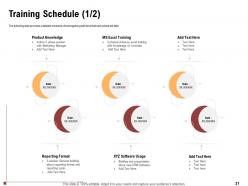
Slide 21: This slide provides a detailed schedule of training along with time that each phase will take.
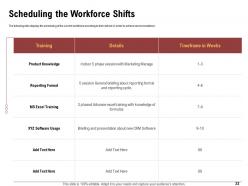
Slide 22: The following slide displays the scheduling of the current workforce according to their skill set in order to achieve service excellence.
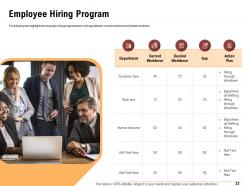
Slide 23: This slide highlights the employee hiring program based on the gap between current workforce and desired workforce.
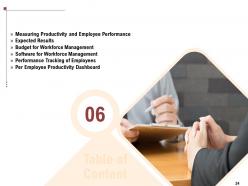
Slide 24: This slide showcases Table of Content
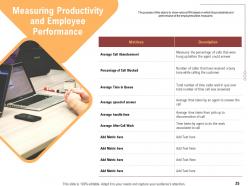
Slide 25: The purpose of this slide is to show various KPIs based on which the productivity and performance of the employees will be measured.
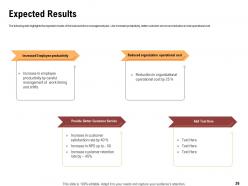
Slide 26: The following slide highlights the expected results of the total workforce management plan. Like increased productivity, better customer service and reduction in total operational cost.
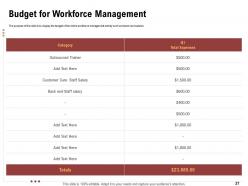
Slide 27: The purpose of this slide is to display the budget of the entire workforce management activity such as trainer and salaries.
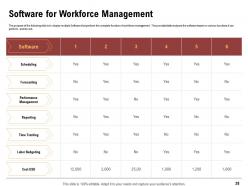
Slide 28: The purpose of the following slide is to display multiple Software that perform the complete function of workforce management . The provided table analyses the software based on various functions it can perform and its cost.
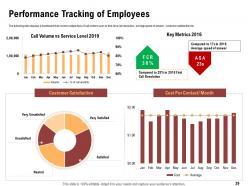
Slide 29: This slide displays a dashboard that covers multiple Kpis of call centers such as first-time call resolution , average speed of answer , customer satisfaction etc.
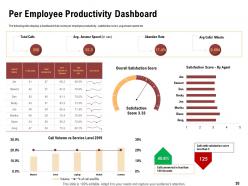
Slide 30: This slide displays a dashboard that covers per employee productivity , satisfaction score, avg answer speed etc
Slide 31: This is Call Center Employee Management Icons Slide.
Slide 32: This slide is titled as Additional Slides for moving forward.
Slide 33: This is About Us slide to showcase Company specifications.
Slide 34: This is Our Team slide with Names and Designations.
Slide 35: This slide displays Mission, Vision and Goals of the Company.
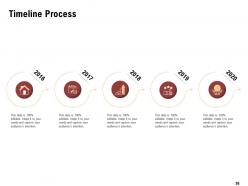
Slide 36: This slide shows Timeline Process
Slide 37: This slide is titled as Post It Notes. Post your important notes.
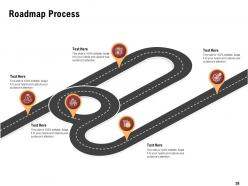
Slide 38: This slide displays Roadmap Process
Slide 39: This is Thank You slide with Contact details.
Call Center Employee Management Powerpoint Presentation Slides with all 39 slides:
Use our Call Center Employee Management Powerpoint Presentation Slides to effectively help you save your valuable time. They are readymade to fit into any presentation structure.


FAQs for Call Center Employee Management
Honestly, start with these five: First Call Resolution (FCR), Average Handle Time (AHT), Customer Satisfaction Score (CSAT), Service Level, and Agent Utilization Rate. FCR's the big one - affects both customer happiness and your costs. CSAT shows what customers actually think about your service. Service level tells you if you're answering calls fast enough, while AHT tracks efficiency (but don't get crazy about speed if it tanks quality). Agent utilization shows whether your staffing's right. Oh, and abandonment rate's worth adding once you've got these down. Start simple, build from there.
Honestly, AI chatbots are a game changer for handling the basic stuff so your agents can focus on the messy problems. Get a good CRM system - nobody wants to repeat their entire story every time they call. Call routing software matches people with the right person instantly, which is clutch. Real-time analytics help you catch issues before they blow up. Oh, and decent scheduling tools save you from staffing nightmares (learned that one the hard way). Just don't fall for flashy features you don't actually need. Pick what fixes your biggest headaches first.
Honestly, ditch the boring classroom stuff and go with hands-on training. Role-playing scenarios work amazing, plus having new people shadow your best agents. I'd also grab some real call recordings for practice - way better than made-up examples. People get weirdly competitive so throw in some leaderboards or point systems. Weekly coaching beats those useless annual reviews every time. Oh, and those bite-sized training modules are perfect since you can fit them between calls. The biggest thing though? Don't make it a one-time deal. Keep it rolling with regular skill sessions and actually track who's improving.
Honestly, call routing is huge for both things. Poor routing pisses off customers AND wastes your team's time - nobody wins. But when you route smartly based on skills or language, customers get help faster and agents aren't drowning in calls they can't handle. Your queue times drop, first-call resolution goes up. I've seen it make agents way less stressed too, which is honestly underrated. The whole thing creates this positive cycle where customers stick around and your metrics actually start looking decent. I'd audit your current setup first - see where calls are bouncing around for no reason.
Oh man, remote call center management is tough. You've gotta overcommunicate like crazy and build structure from scratch. Schedule regular one-on-ones, not just team stuff. Daily expectations need to be crystal clear. Video calls beat audio every time - seriously, it makes such a difference for building rapport. Track your performance metrics consistently, but also check how people are actually doing mentally. Call center work gets lonely fast when you're remote. Set up virtual coffee chats or whatever team building thing works. Stay available on Slack constantly - they'll need you more than you think.
You gotta look at your historical data first - figure out when those crazy busy periods hit. Then have part-time people or overflow services ready to jump in. I've honestly seen way too many call centers get totally wrecked by unexpected spikes, it's brutal. Set up your call routing so everything flows smoothly even when it gets nuts. Cross-train everyone so they can handle different types of calls when you need the flexibility. Oh, and make sure your team knows exactly when to pull the trigger on bringing in extra help - like clear protocols they can actually follow without panicking.
Honestly, feedback from customers is like having a cheat sheet for managing your team. It'll show you who's doing great and who needs help way better than just looking at call times or whatever. I always find customers notice weird stuff we totally miss internally. You can use it to figure out training gaps, update those terrible scripts nobody likes using, and actually know what to focus on in meetings. The key is setting up some kind of regular review thing - otherwise you're just hoarding complaints in a spreadsheet. Trust me, act on it quickly and your team will improve way faster than just guessing what's wrong.
Honestly, call centers are brutal if you don't handle retention right. Start with recognition - celebrate the small wins because that job can feel pretty thankless. Career paths are huge too. People need to see they won't be stuck answering phones forever, so offer training and advancement opportunities. Your team leads better actually know how to coach instead of just hovering over metrics all day. Oh, and please get them decent technology - nothing tanks morale like fighting with crappy systems. Give agents some freedom in how they handle calls when you can. The burnout's real, so a supportive environment isn't optional.
Oh man, the language gaps between agents and customers are brutal. Cultural misunderstandings happen constantly too. Service quality gets all over the place when you're dealing with multiple languages, and don't even get me started on how long calls take to route properly. Here's what actually works: do solid language testing when you hire people. Quality scorecards need to be language-specific - like, really specific. Scripts help but they can't be direct translations, they need cultural tweaks. Smart routing systems that match people based on language skills are worth it. Honestly though? Start small and figure out your worst gaps first.
Pull your call data from the past year and look for patterns - trust me, you'll spot trends right away. Seasonal stuff is huge, plus certain days of the week are always crazier. Weather's a weird factor too; snowstorms somehow make everyone call support at once. Once you see the patterns, those analytics tools can forecast your staffing needs weeks out. Way better than just winging it. Track real-time numbers so you can shuffle schedules when things get nuts. Honestly, even basic pattern spotting beats guessing every time.
Just let them get it all out first - seriously, don't jump straight into problem-solving mode. Once they're done venting, say something like "I totally get why you're frustrated" but never tell them to calm down (learned that one the hard way lol). Match their energy but bring it down slightly, talk slower than usual. Focus on what you CAN actually do instead of rattling off policies they don't care about. And honestly? If you're drowning, grab your supervisor - there's no shame in that. The whole point is making them feel heard, not agreeing with every word they say.
Record calls regularly and build scoring rubrics for stuff like greetings, problem-solving, wrap-ups. Random sampling beats scheduled reviews - nobody expects it so you get more honest performances. Weekly coaching sessions work great for going over specific calls together. Focus on wins AND what needs work. Oh, and track patterns across your whole team, not just individual stats. That's been huge for us. Consistency is everything with evaluation, plus give feedback right away when you can. Nothing worse than letting small issues turn into big problems later. Real-time coaching hits different than waiting weeks to address something.
Honestly, your call center culture is everything. Toxic vibes? You'll get burned-out agents who sound dead inside - and trust me, customers pick up on that immediately. But when people feel actually valued and heard, it shows in every conversation. Their energy just hits different. I've seen teams completely flip their numbers by focusing on the basics: recognizing good work, communicating clearly (not just throwing metrics at people), and genuinely listening when agents bring up issues. Higher satisfaction scores, better retention, faster call times - the whole nine yards. It's wild how much voice tone alone can make or break a customer's entire opinion of your company.
First thing - get a platform that connects your phone system with chat, email, social media, all that stuff. Your agents need to see the whole conversation history no matter where customers reached out before. Training your team on multiple channels at once is honestly kind of rough at first (we definitely struggled with this). Update your CRM so it tracks everything across all touchpoints - you don't want things getting lost. Oh, and start with just one or two new channels. Don't go crazy right away or you'll overwhelm everyone.
Yeah, the money side is pretty solid - most companies save like 30-50% on ops costs. Plus you get agents who actually know what they're doing instead of training someone from scratch. Scaling up for busy periods becomes way easier too. But honestly? You're gonna lose some control over quality. Communication gets messy sometimes, and if they don't really get your product, customers notice immediately. I'd probably test it out small first - maybe just one department or something. Set up clear metrics beforehand so you're not scrambling later to figure out if it's working.
-
Awesome use of colors and designs in product templates.
-
Design layout is very impressive.
-
Easily Editable.