

Organizational Hierarchy Chart For Supermarket Guide For Enhancing Food And Grocery Retail




Try Before you Buy Download Free Sample Product
 Impress Your
 Audience
 100%
100% Editable
 Save Hours
 of Time


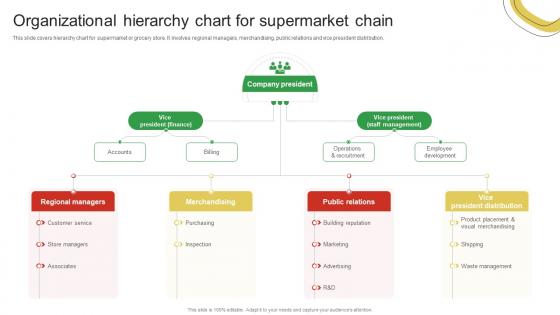
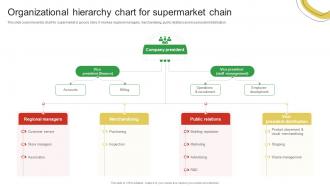
This slide covers hierarchy chart for supermarket or grocery store. It involves regional managers, merchandising, public relations and vice president distribution.
People who downloaded this PowerPoint presentation also viewed the following :
Organizational Hierarchy Chart For Supermarket Guide For Enhancing Food And Grocery Retail with all 9 slides:
Use our Organizational Hierarchy Chart For Supermarket Guide For Enhancing Food And Grocery Retail to effectively help you save your valuable time. They are readymade to fit into any presentation structure.








FAQs for Organizational Hierarchy Chart For Supermarket Guide For Enhancing Food
You'll need job titles, names, and who reports to who - that's the core stuff. Departments too so people can see the big picture. Contact info is clutch if it's internal, trust me on that one. I usually go top-down with executives at the top, but side-by-side works better for flatter companies. Chain of command has to be obvious or what's the point? Keep it clean and simple. Update it regularly though - these things change constantly and there's nothing worse than an outdated org chart when you're trying to figure out who actually makes decisions.
Honestly, hierarchy charts are lifesavers - they show exactly who reports to whom so you don't waste time guessing who makes what decisions. No more awkward email chains trying to figure out the right person to bug! New people especially love them because they can see team structure right away instead of learning through trial and error (which, let's be real, usually means accidentally going around your boss). Plus you'll avoid those cringe moments when you realize you should've looped someone in earlier. Just make sure yours is actually updated - nothing worse than outdated org charts that confuse everyone more.
Honestly, visual org charts are a game changer compared to trying to figure out who reports to who from job descriptions. At a glance you can see the whole chain of command and spot any weird gaps in your team structure. New hires especially love having that visual reference - saves so much back-and-forth explaining. There's something weirdly satisfying about those neat boxes and connecting lines too, maybe I'm just a visual person. Definitely update yours every few months or it becomes useless pretty quick. Really helps when you're presenting to stakeholders and need to show how everything connects.
Org charts are like having X-ray vision for spotting leadership problems. You'll see right away if someone's managing way too many people, or if there's a whole department missing managers in the middle. Honestly, it's wild what jumps out once everything's mapped visually. Look for bottlenecks where everything goes through one person, or teams that desperately need more leadership development. Wide spans of control become super obvious too. My advice? Draw up your current structure first, then circle the messy spots. You might be surprised at what you find - I always am when I do this exercise.
Honestly, just use software - it's so much easier than doing it manually. Tools like Lucidchart or Visio can pull data straight from your HR system, which saves tons of time. Even Google Workspace has decent built-in options now. The drag-and-drop stuff is pretty intuitive, and you don't have to rebuild everything when someone gets promoted or leaves. Real-time editing is clutch too since multiple people can work on it. I'd probably start by seeing what integrates with whatever HR platform you're already using - might as well make your life easier, right?
Basically, your org chart becomes way more horizontal - like a wide rectangle instead of those crazy tall pyramids with endless middle management boxes. Each manager ends up with more people reporting to them directly. Honestly, it's so much cleaner to look at than those messy traditional charts that go on forever. The tricky part? You might have to get creative showing who does what since you can't rely on the usual "levels" anymore. I'd probably group people by what they actually do rather than where they sit in some hierarchy. Way easier to update too, which is nice because nobody likes redoing org charts every few months.
Don't wait for some scheduled review - update that thing as soon as changes happen. I've watched companies where the chart still shows managers who quit like 6 months ago, and it's just awkward for everyone. New leadership hires, department shuffles, people switching roles - get it all updated right away. Your team actually uses this to figure out who reports to who and how decisions get made. Maybe set up something automatic so HR (or whoever handles it) gets pinged when there's a change? Way easier than trying to remember later.
Honestly, **Visio** is probably your best bet if you want something detailed and professional-looking. **Lucidchart** is what most people use now since everyone can jump in and edit at the same time - super handy when you're dealing with HR stuff. Don't sleep on **PowerPoint** though, it's way better for org charts than people think. **Draw.io** is totally free which is nice. If you're on Mac, **OmniGraffle** is solid but kinda pricey. Oh and **Google Drawings** works fine if you're already living in Google workspace hell like the rest of us. I'd just start with whatever you already have installed and see how it goes.
Oh totally! So like in Japan or Mexico, people really care about showing clear levels and fancy titles - hierarchy's a big deal there. But Scandinavian teams? They're all about flat structures and teamwork. Too much rank stuff actually makes them uncomfortable, which I learned the hard way once. You should probably ask each regional team what they prefer first. Some cultures are super into individual roles while others focus on group setups. Honestly, don't try to use the same chart everywhere - just make different versions for different regions. Way easier than fighting cultural expectations!
Oh totally, color-coding is a game changer! I usually do blue for engineering, green for sales, red for executives - that kind of thing. Makes it so much easier to spot patterns without reading every tiny name. Your brain just gets it immediately, you know? Though honestly, I learned the hard way not to use like 12 different colors because then it just looks ridiculous. Stick to maybe 4-5 max and keep them consistent across the whole chart. It's one of those things that seems obvious once you do it.
Your hierarchy chart is basically a crystal ball for succession planning. Mark your critical roles first, then find 2-3 backup people for each one. When someone leaves or moves up, you'll know exactly where the gaps are. Honestly, the "what if" scenarios are where this gets really useful - like if your VP bails tomorrow, who's actually ready? You can spot which employees need more development to move up and build mentorship programs around that. It's way better than scrambling when people quit unexpectedly.
Honestly, just clean up the design first - decent fonts, colors that don't hurt your eyes, you know? Don't try to cram everyone into one massive chart because nobody wants to stare at 500 tiny boxes. Split it up by department instead. I'd add little descriptions under each role so people actually know what Susan from Finance does all day. Interactive ones are pretty cool too - click to expand whatever section you care about. The whole thing should make sense in like 30 seconds max, focusing on who your employees actually work with.
Honestly, government org charts are way more rigid than private companies. You'll see tons of clearly defined levels and strict reporting lines - sometimes the number of boxes is just insane. Private sector? Way flatter and more flexible with how they organize teams. Government charts show all these oversight bodies and committees (I swear they multiply overnight). Companies focus on functional departments and profit centers instead. Also, good luck changing anything in the public sector without like fifteen approvals. Public orgs care about accountability and transparency above all. Private ones just want efficiency and speed.
Ugh, those rigid hierarchies are the worst for getting anything done quickly. Everything crawls up and down through like five different managers before you get an answer. Your best ideas from frontline people just get buried because they're "too low" to matter. And don't get me started on how departments end up in their own little bubbles, never talking to each other. When the market shifts, you're stuck moving at a snail's pace while competitors zoom past. Innovation? Forget it. Maybe try some cross-team projects or let people skip a few layers when they need answers fast.
Honestly, use that hierarchy chart during onboarding - it's a game changer. New people get so lost trying to figure out who reports to who. Walk them through where they fit, point out the key people they'll actually work with. I always add names and quick role descriptions in their first week so they can reference it later. Makes networking way less awkward when you at least know the structure. Oh and definitely show how departments connect - most people only see their little bubble at first. Saves everyone from those "wait, who should I ask about this?" moments.
-
Great product with highly impressive and engaging designs.
-
I was able to find the right choice of PPT template for my thesis with SlideTeam. Thank you for existing.