

Diapositives de présentation PowerPoint de la solution du problème






Try Before you Buy Download Free Sample Product
 Impress Your
Audience
 100%
Editable
 Save Hours
of Time


Un énoncé de problème est une description des problèmes d'entreprise et de la manière dont les problèmes doivent être abordés. Utilisez nos diapositives de présentation de la solution d'énoncé de problème pour exécuter le processus d'amélioration du projet. Si vous devez résoudre un problème, vous devez comprendre le problème. Avec l'aide de ces études de cas, les diapositives PPT vous permettent d'identifier et d'expliquer les problèmes. Cela aide à identifier l'écart entre l'état actuel et l'état souhaité du projet. Ce jeu complet de diapositives PowerPoint sur l'énoncé de problème contient des conceptions prêtes à l'emploi haute résolution qui peuvent être utilisées par les équipes de projet pour travailler au développement d'une solution. Le contenu de cette présentation a été étudié par notre équipe d'experts. Toutes les diapositives sont faciles à personnaliser. Les utilisateurs peuvent modifier ces modèles en fonction de leurs besoins. Incorporez des diapositives PPT de solution de problème pour l'analyse des problèmes. Téléchargez des modèles de présentation PowerPoint d'énoncé de problème de projet pour présenter des solutions et des stratégies pour les problèmes d'entreprise. Empêchez les erreurs de se produire avec nos diapositives de présentation de la solution d'énoncé de problème PowerPoint. Mettez en évidence et améliorez les défauts existants.
People who downloaded this PowerPoint presentation also viewed the following :
Contenu de cette présentation Powerpoint
Diapositive 1 : Cette diapositive présente l'énoncé du problème et la solution. Indiquez le nom de votre entreprise et commencez.
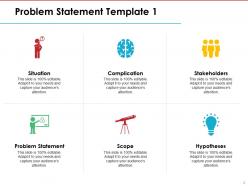
Diapositive 2 : Ceci est le premier modèle d'énoncé de problème montrant la situation, la complication, les parties prenantes, les hypothèses, la portée et l'énoncé du problème.
Diapositive 3 : Ceci est le deuxième modèle d'énoncé de problème contenant les cinq points suivants : Coût, directement, il peut également aider à réduire le coût du garde, Main-d'œuvre, en utilisant ce produit, la main-d'œuvre peut être réduite. Pour assurer l'espace de stationnement pour le propriétaire du parc de stationnement, Sécurité, ce produit permettra uniquement aux voitures enregistrées d'entrer dans le parc de stationnement.
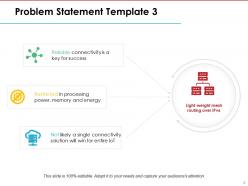
Diapositive 4 : Ceci est le troisième modèle d'énoncé de problème montrant le routage maillé léger sur IPv6 : Limité en puissance de traitement, mémoire et énergie, Une connectivité fiable est la clé du succès, Il est peu probable qu'une seule solution de connectivité gagne pour l'ensemble de l'IoT.
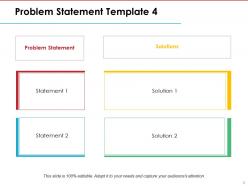
Diapositive 5 : Ceci est le quatrième modèle d'énoncé de problème qui montre l'énoncé et les solutions à ajouter.
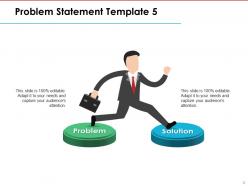
Diapositive 6 : Ceci est le cinquième modèle d'énoncé de problème qui montre le problème et la solution avec des images et des zones de texte.
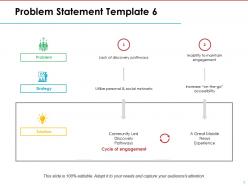
Diapositive 7 : Ceci est le sixième modèle d'énoncé de problème qui montre le cycle d'engagement, le problème, la stratégie, la solution.
Diapositive 8 : Cette diapositive est intitulée Diapositives supplémentaires pour aller de l'avant. Vous pouvez modifier le contenu de la diapositive selon les besoins.
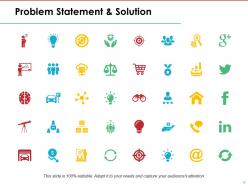
Diapositive 9 : Cette diapositive montre l'énoncé du problème et la solution avec des icônes. Modifiez selon les besoins.
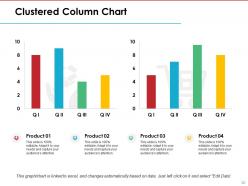
Diapositive 10 : Ceci est une diapositive de graphique à colonnes groupées pour présenter la comparaison de produits/entités, les spécifications, etc.
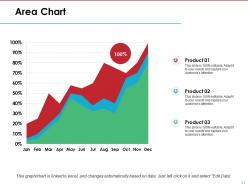
Diapositive 11 : Cette diapositive présente un graphique de courbes pour afficher la croissance de deux produits concurrents.
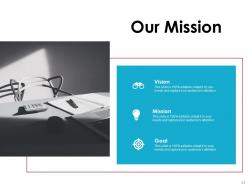
Diapositive 12 : Ceci est la diapositive Notre mission. Énoncez ici votre mission, votre vision et vos objectifs.
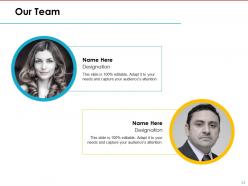
Diapositive 13 : Cette diapositive présente Notre équipe pour indiquer les membres de l'équipe/la personne responsable du projet. Indiquez le nom, le poste pour présenter l'équipe.
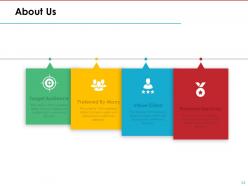
Diapositive 14 : Ceci est une diapositive À propos de nous avec Public cible, Préféré par de nombreux, Valeurs client et Services premium comme exemples.
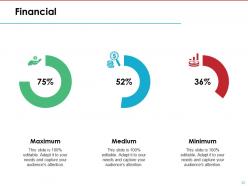
Diapositive 15 : Cette diapositive montre le score financier avec des paramètres maximum, moyen et minimum.
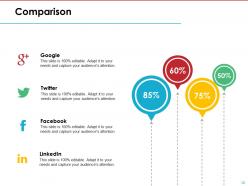
Diapositive 16 : Cette diapositive montre la comparaison de produits/entités, etc.
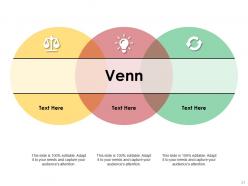
Diapositive 17 : Ceci est une diapositive d'image de diagramme de Venn pour montrer des informations, des spécifications, etc.
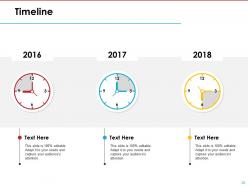
Diapositive 18 : Ceci est une diapositive de chronologie pour présenter des dates importantes, un parcours, une évolution, des étapes importantes, etc.
Diapositive 19 : Ceci est une diapositive de remerciements avec l'adresse n° de rue, ville, état, numéros de contact, adresse e-mail.
Voici la présentation PowerPoint avec les 19 diapositives : 1. Énoncé du problème 2. Analyse du problème 3. Collecte des données 4. Définition des objectifs 5. Génération des idées 6. Évaluation des options 7. Sélection de la solution 8. Plan de mise en œuvre 9. Ressources nécessaires 10. Calendrier de mise en œuvre 11. Gestion des risques 12. Communication du plan 13. Exécution du plan 14. Suivi et contrôle 15. Évaluation des résultats 16. Leçons apprises 17. Prochaines étapes 18. Résumé 19. Questions et réponses
Impliquez-vous dans le travail avec nos diapositives de présentation de la solution du problème. Examinez attentivement chaque détail complexe.


FAQs for Problem Statement Solution
Okay so you need three main things: what's actually broken, who's getting screwed over by it, and why we can't just ignore it anymore. Don't be vague - nobody cares about "challenges we're facing" blah blah. Get specific about what sucks right now. Then hit them with real numbers or stories so they actually feel it, you know? Oh and make sure you're clear about how big this thing is and when it needs fixing. People should walk away like "damn, we really gotta do something" instead of just shrugging. End it so you can smoothly jump into your solution.
Honestly, it's all about reading the room. Stakeholders want the business angle - show them revenue loss, angry customers, or how competitors might get ahead. Don't bog them down with tech stuff. Engineers are the opposite though - they actually want those boring performance metrics and error details. Same problem, totally different spin. I learned this the hard way when I once gave a CEO way too much technical info and watched their eyes glaze over. Figure out who you're talking to first. Then switch up your examples and language to match what they care about.
Bold headers and bullet points are your best friend - they make complex stuff way easier to digest. I'd throw in some simple icons too, like a broken chain for process issues or a declining graph. Don't get carried away with animations though, they're usually distracting. Color coding works amazing for before/after scenarios. Make your font big enough that people in the back can actually read it! Pro tip: walk across the room and check if you can see everything clearly before you present. Trust me, nothing's worse than squinting at tiny text during a meeting.
Start with a character people know - like "Meet Sarah, drowning in status update emails every morning." Way better than diving straight into data because your audience thinks "oh god, I AM Sarah." Build up the tension first, show what happens if this problem doesn't get solved. Then hit them with your solution. Honestly, problem slides are just mini stories when you think about it. Try opening with "Imagine..." next time - I swear people perk up instantly. It's the difference between bullet points that put everyone to sleep and actually getting them invested.
Don't be vague with your problem statement - "customers are unhappy" tells me nothing. I need specifics. You can't just throw statistics around without explaining what they mean either. The mistake I see all the time? People jump straight to their solution before showing why anyone should care about the problem. It's backwards. Also, skip the whole "the world is ending" vibe - sounds way too dramatic and honestly makes you less believable. Focus on problems your audience actually wants solved. Here's what works: grab someone who knows nothing about your project and test your problem statement on them. If they don't immediately get why it matters, you've got more work to do.
Charts make your problem statement hit different - instead of "sales are down," you can show exactly where and by how much. People see the visual proof and suddenly it clicks. Raw numbers are boring, but a good chart makes stakeholders actually feel the pain. You'll spot patterns you'd totally miss otherwise too. Honestly, visuals just stick better when people are making decisions later. Start simple - before/after comparisons or basic trend lines work great for getting everyone on board. Way more convincing than spreadsheets.
So basically, treat your problem statement like you're telling a story. Start with the pain point everyone already feels, then crank up the stakes to show why this can't wait. I swear, it's just like good storytelling - you build that tension before revealing the solution. People stay hooked when you flow logically from "this is broken" to "here's why ignoring it will bite us." Each part should connect to the next one naturally. Oh, and map out your whole thing like a mini-narrative first - don't jump straight into slides. You'll save yourself tons of revision later.
Dude, context is everything when you're trying to get people to actually care about a problem. Like, anyone can say "this thing sucks" but that doesn't tell me why I should drop what I'm doing to help fix it. You gotta set the scene first - who's dealing with this mess? What's the actual impact? When does it happen? I always start with the "where and why" stuff because honestly, most people need to understand the bigger picture before they'll prioritize your issue. Without that backdrop, you're just another person complaining into the void. Paint the whole situation so they get why it matters.
Look, figure out what you actually want first - approval, money, buy-in, whatever. That'll shape how you frame the problem. Say you're asking for budget - focus on the cost stuff, not just technical issues (though those matter too, obviously). Match your problem's urgency to whatever solution you're pitching. Your audience matters here - what keeps them up at night? Honestly, I think of it like this: you're setting up dominoes so your solution can knock them all down. The problem statement isn't just background info - it's your setup for everything that comes next.
Honestly, watch how people react during your presentation - are they asking good questions or just staring blankly? After you're done, send a quick survey asking if the problem actually feels urgent to them. Most people totally skip this part which is wild to me. The real test though? See if anyone gives you budget or approval afterward. That's when you know they actually get it. Oh, and pay attention to whether people start quoting your problem statement back in meetings later. That's like the golden signal. I'd start with just watching engagement since it's super obvious to spot.
You've gotta read the room basically. Executives? Keep it high-level - they want business impact, not technical weeds. Your team can handle the nitty-gritty details and root cause stuff. I usually start with the big picture impact, then add just enough detail to make my point stick. Don't dump everything on them at once - you'll lose people fast. Here's my test: after you explain it, can they tell someone else what the main problem is? If they're confused or their eyes glazed over, you went too deep. Match the detail to what they actually need to decide on.
You want problem statements that actually hit people in the gut, you know? Airbnb crushed it early on with "Price is an important concern for customers booking travel online" - super simple but everyone felt that. Uber just went with "Getting a cab sucks" which honestly, yeah. The magic happens when your audience goes "oh shit, I've totally been there." Make it specific enough that it's believable but not so narrow that only three people relate. Find that annoying thing everyone deals with but nobody really thought could be fixed.
Sort your feedback into three piles: clarity, accuracy, and relevance. Honestly, if people are confused about what problem you're even solving, fix that first - everything else is pointless otherwise. Don't get caught up tweaking sentences when your whole structure might be off. Maybe you need to completely reframe the scope or explain why this actually matters. I always read drafts out loud because it's weird how much that helps with flow. Oh, and definitely check back with whoever gave feedback to make sure you actually fixed what they meant. Sometimes we miss the mark there.
Okay so the trick is making a smooth transition from problem to solution. When you hit your solution slides, call back to specific issues you mentioned - "that 40% engagement drop we talked about? Here's the fix." Otherwise it feels like you stapled two different decks together (trust me, seen it happen). Before jumping into solutions, do a quick recap of what needs fixing. Your audience can then mentally score each solution against those criteria. Also - and this might sound obvious but people forget - wrap up each solution by stating exactly which problem it solves. Makes the whole thing way tighter.
Honestly, if your team's been dealing with the same problem for months, don't waste time on a problem slide - they're living it daily. Crisis situations too. People are already stressed and just want your solution, not a recap of their pain. You'll actually irritate stakeholders by rehashing stuff they know better than you do. Jump straight to your fix instead. You can mention the problem as you walk through your approach. Save those problem slides for when you're talking to people who don't know the issue exists or need convincing it's urgent.
No Reviews