


Problems And Solutions Powerpoint Presentation Slides





Try Before you Buy Download Free Sample Product
 Impress Your
 Audience
 100%
100% Editable
 Save Hours
 of Time


Showcase problems and solutions in one slide with Problems And Solutions PowerPoint Presentation Slides. Highlight the risks and threats that are causing executing the process using problems and solutions PowerPoint presentation slideshow. Present the challenges and get to the leading cause of the problems. Conduct risk and swot analysis. Jot down the challenges which are slowing down the business growth. Showcase various opportunities and risks with problems and solutions PPT presentation templates. Overcome the hurdles and present the solutions to various business problems such as resources, financial management, monitoring performance, technology, products, services, customer service, and more. This deck comprises of various professionally designed slides showing problems and solutions. You can choose the template as per your need. Entrepreneurs, managers, students, scholars can avail this PowerPoint deck to list down the problems and their solutions. Download professionally designed problems and solutions PowerPoint presentation slides to figure out the opportunities to reach to the business goals. Fasten your grip with our Problems And Solutions Powerpoint Presentation Slides. Get the controls firmly in hand.
People who downloaded this PowerPoint presentation also viewed the following :
Content of this Powerpoint Presentation
Slide 1: This slide introduces Problems And Solutions with a creative puzzle image.
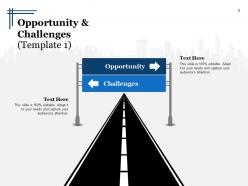
Slide 2: This is an Opportunity & Challenges slide with a descriptive road image with text boxes on either side.
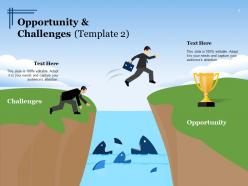
Slide 3: This is another slide on Opportunity & Challenges with humans, land and hurdles imagery with text boxes.
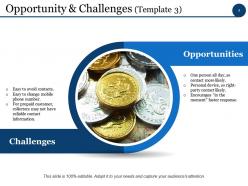
Slide 4: This slide presents Opportunities- (One person all day, so contact more likely, Personal device, so right-party contact likely, Encourages “in the moment” faster response). Challenges (Easy to avoid contacts, Easy to change mobile phone number, For prepaid customer, collectors may not have reliable contact information).
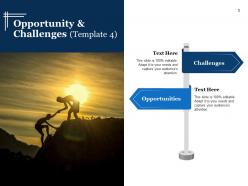
Slide 5: This slide displays Challenges and Opportunities with text boxes and an image of humans on hill.
Slide 6: This slide displays Opportunity & Challenges with imagery of handshake and limitation icons.
Slide 7: This slide presents Opportunity with target image and Challenges with hurdle image and text boxes.
Slide 8: This slide displays Opportunity & Challenges with target image and limitation icon accompanied with text boxes.
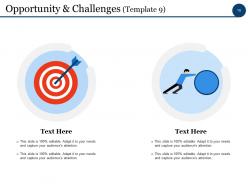
Slide 9: This slide displays Opportunity & Challenges with respective target and human rolling a rock image.
Slide 10: This slide shows another Opportunity & Challenges with imagery and text boxes.
Slide 11: This slide displays Coffee Break for halting.
Slide 12: This is a Problems And Solutions Icon Slide.
Slide 13: This slide is titled Charts & Graphs to proceed forward.
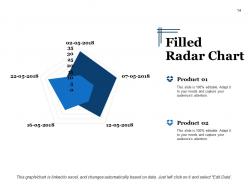
Slide 14: This slide shows a Filled Radar Chart for two product comparison.
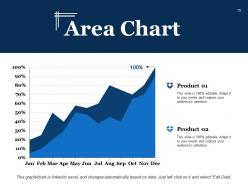
Slide 15: This slide showcases an Area Chart to display growth of two competitive products.
Slide 16: This slide is titled Additional Slides to proceed forward.
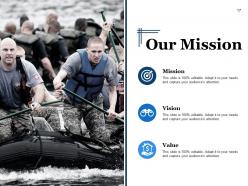
Slide 17: This is Our Mission, Vision, Value, Mission slide.
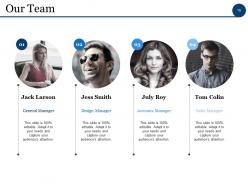
Slide 18: This slide presents Our Team with name and designation.
Slide 19: This is an About Us slide where you can show-Professional, Creative orTalented aspects of your company.
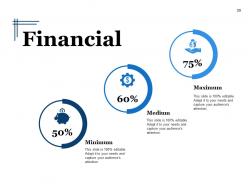
Slide 20: This slide showcases Financial score in terms of Minimum Medium Maximum.
Slide 21: This is an Our Goal slides. State your goals here.
Slide 22: This is a Thank You slide with Address# Street Number, City, StateEmail Address, Contact Numbers.
Problems And Solutions Powerpoint Presentation Slides with all 22 slides:
Earn instantaneous appreciation with our Problems And Solutions Powerpoint Presentation Slides. It generates immediate applause.





FAQs for Problems And Solutions
Oh man, the worst part is always cramming too much stuff onto each slide - like, why do we do this to ourselves? Your fonts and colors will be all over the place too, which looks super messy. Then there's the inevitable tech meltdown where nothing works right and your animations just... die. Start with your main point first, that's honestly the only way I stay focused. Keep slides clean and simple. Also maybe have a backup ready because projectors hate us all. The storytelling flow thing is huge too - slides should actually connect to each other, not just exist randomly.
Honestly, you've gotta make it feel more like a conversation than a lecture. Ask questions throughout - not the boring "any questions?" at the end, but stuff like "how many of you deal with this?" or "what would you do here?" Stories work way better than bullet points too. Eye contact feels super awkward at first but it makes a huge difference. Oh, and pause sometimes to check if people are actually following along - I learned that one the hard way. Just try adding one interactive thing next time and see how it goes.
Honestly, Canva's your best bet if you want something that looks decent without much effort. Figma's cool too but more complex - depends how fancy you wanna get. Oh, and PowerPoint's Designer thing is actually not trash anymore if you're already using Microsoft stuff. Before diving into any tool though, map out your content first in Notion or Google Docs. Trust me on this one - I've wasted way too many hours dragging text boxes around because I didn't plan ahead. Start with the outline, then worry about making it pretty. You'll thank me later.
Honestly, just pick ONE key thing your audience needs to walk away with. That's your anchor. Then add maybe 2-3 supporting points max - anything else is just noise. I used to be terrible at this btw. Would write these massive posts thinking more = better. Wrong. Break stuff up with bullets and short paragraphs so people don't get that wall-of-text feeling. Oh, and read it out loud - if you're gasping for air mid-sentence, it's too long. Your readers have like zero attention span these days, so respect that.
Honestly, the biggest thing is just letting them finish talking before you jump in. I used to interrupt all the time thinking I knew what they were asking - bad move. If someone throws you a curveball, just say you don't know instead of rambling. Way better than looking like you're making stuff up on the spot. Oh, and repeating tricky questions back works great - gives you time to think plus shows you're actually listening. When people get aggressive, I usually acknowledge what they're worried about first, then pivot to the actual facts. Always have a couple backup topics ready too because someone will definitely ask something completely random. That "great question, let me think" line? Total lifesaver.
White space is everything - don't cram stuff together. One idea per slide, max 6-8 words per line. Clean fonts only (please, for the love of god, no Comic Sans). High contrast colors so people can actually see what you wrote from the back row. Make your main point the biggest thing on there. Images should back up what you're saying, not just fill space. Quick test: glance at your slide for like 3 seconds. If you can't get the point immediately, it's too busy. I learned this the hard way after bombing a presentation with cluttered slides. Short sentences work better than long ones.
Dude, high-quality images only - blurry screenshots are the worst and everyone will hate you for it. One concept per slide, don't throw five charts together like some kind of data monster. Test your videos beforehand because tech WILL break when you need it most. Keep videos short, maybe 2 minutes max since people zone out fast. Always have backups ready. Size your images big enough so people in back can actually see them. Oh and add alt text if you're sharing digitally. Quick tip: screenshot your own slides first to see how terrible they'll look when projected - saves embarrassment later.
Honestly, just ask people what they thought! Send a quick survey about what made sense and what didn't. During your talk, watch for engagement - nobody scrolling their phone is a good sign. Did you actually get what you wanted from it though? Like, if you needed approval or action items, did that happen? I started keeping notes after presentations (sounds nerdy but whatever) about what worked and what bombed. You'll notice patterns way faster than just winging it every time. Body language tells you everything too - way more than people being polite afterward.
Ugh presentations are the worst but here's what actually helped me. First thing - drill your opening lines until you could say them in your sleep. Those first 30 seconds are everything. Definitely do the whole deep breathing thing beforehand (sounds dumb but it works). Show up early so you can mess with the tech and get comfortable in the space. Here's the thing though - literally nobody cares as much as you think they do. Half the room's probably scrolling Instagram anyway lol. When you screw up (and you will), just pause for a sec and keep going. Oh and record yourself practicing at home first! Trust me on this one.
Honestly, it's all about reading the room before you even walk in. I always creep on LinkedIn to see who's coming (judge me all you want). Executives? Hit them with business impact right away - they'll zone out if you get too granular. Technical folks are the opposite. They want proof, data, all the nitty-gritty stuff. Mixed crowds are trickier - you've got to layer things so both groups stay engaged. Don't use jargon with non-experts, but absolutely speak their language with specialists. I usually throw out a few questions upfront to gauge what people actually know.
Dude, stories are total game-changers for presentations. People actually *care* when you give them characters and conflict instead of just rattling off bullet points. Like, they'll remember your customer story way longer than whatever stats you threw at them. Here's the thing - stories make weird abstract stuff suddenly click. You're basically showing your solution in action rather than just talking about it. Even something super quick works. Just grab a 30-second customer experience or something that happened to you, then connect it back to your main point. Honestly beats the hell out of another boring slide deck.
So definitely go with high-contrast colors and bigger fonts - like 18pt minimum. Alt text for images is a must. If you've got videos, captions are your friend. Here's something I literally always mess up: making sure the slide order actually makes sense when a screen reader goes through it. Don't jam-pack your slides either - cognitive overload is real and honestly just makes everyone zone out. Oh, and skip the fancy jargon for simple language. My best advice? Run it through accessibility tools first or grab someone to give it a once-over. Trust me, catching issues beforehand beats scrambling later.
Honestly, talking to yourself in the mirror helps way more than you'd think - I felt ridiculous at first but whatever works, right? Slow down when you speak because anxiety makes you race through everything. Record yourself on your phone to catch all those "ums" - you'll be shocked how many you use without realizing. Strong openings and endings matter most since that's what sticks with people. If there's a Toastmasters group nearby, go for it. The feedback is solid. Start with smaller presentations first to build up your confidence before tackling the scary ones.
Don't wait until everything's perfect before getting feedback - seriously, that's a trap. Ask super specific questions though, like "does slide 3 make sense?" instead of just "thoughts?" Trust me, you'll get way better answers. When people give you feedback, bite your tongue and actually listen instead of defending everything. Three people saying the same thing? Yeah, they're probably right. Test changes in small chunks so you know what's working. Oh, and definitely circle back with people to show how you used their input - they'll be way more helpful next time.
Okay so basically don't mess with your data or use sketchy chart tricks to make things look better than they are. Your audience isn't dumb. Also never share confidential stuff without permission - seriously, I've watched people's careers implode over this. Give credit where it's due if you're borrowing ideas or research. Try to use inclusive language so everyone feels welcome. Oh, and don't cherry-pick stats just because they support your argument better. Here's my test: would you feel totally fine explaining every single slide to your grandma? If not, fix it.
-
Easily Understandable slides.
-
Great designs, really helpful.