

Project governance model project structure powerpoint slide download




Try Before you Buy Download Free Sample Product
 Impress Your
 Audience
 100%
100% Editable
 Save Hours
 of Time


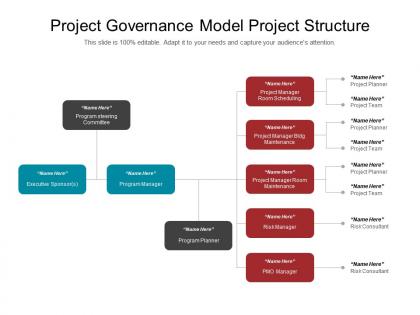
The project governance framework presentation slide is useful to describe various key elements of project governance. A user can take help of the project governance structure PowerPoint template to illustrate a variety of governance components along with that their applicability to the real world. The project governance framework template is suitable for the case study and which represents lack of project governance that has rippling effects. The project governance roles and responsibilities slide for PowerPoint is useful to share roles that are essential for establishing and maintaining project or program governance. A presenter can use the project governance structure template to discuss why every company needs a governance information repository and explaining the concepts for project governance. The project governance structure example slide is useful to describe reasons why project governance is critical for success of a project. The project governance tools template is perfect to discuss that alignment is also a crucial factor and need to consider while defining the project governance framework, roles and responsibilities and stakeholder engagement & communication. Handle bad influences with our project governance model project structure powerpoint slide download. Caution folks to guard against dangerous habits.
People who downloaded this PowerPoint presentation also viewed the following :
Project governance model project structure powerpoint slide download with all 5 slides:
Experiment anew with our project governance model project structure powerpoint slide download. They are good for breaking fresh ground.


FAQs for Project governance model project structure
Start by figuring out who makes what decisions and when - that's your foundation. You'll need clear roles, approval processes, and reporting structures. Risk management protocols are crucial too. Quality checkpoints at major milestones will save your butt later. Honestly, the communication piece is where most people screw up - stakeholders get pissy when they're out of the loop. Don't forget resource allocation guidelines and change control processes. Oh, and escalation procedures for when things go sideways (they will). Build everything around that decision-making structure once you've mapped it out.
Think of project governance like having good bouncers at a club - they keep the wrong stuff out. You want decision frameworks and approval gates that connect back to your company's main goals. Otherwise you'll get random pet projects that don't actually matter. Map your current projects against your top 3-5 strategic priorities first (this part's honestly pretty eye-opening). Set up stakeholders who can evaluate if each initiative makes sense and deserves resources. The whole point is preventing scope creep and making sure you're not just busy, but actually moving things forward. Start there and you'll see gaps pretty quickly.
So stakeholders are basically the people who actually matter for your project - the ones making decisions and controlling the budget. You've got to figure out who they are pretty early on. Some have way more power than others, which honestly can be frustrating but that's just how it works. I always map out their influence versus how interested they actually are in the project. That tells you who needs constant updates versus who you can just loop in occasionally. Regular check-ins are key though. Think of it like keeping your project's VIPs happy - they're the ones who can either make your life easy or completely derail everything.
Honestly, good project governance is like having guardrails everywhere - you set up regular checkpoints where people can actually catch problems before they explode. Define who makes what decisions upfront, because when stuff hits the fan, you don't want everyone standing around confused. Those milestone reviews? Super helpful for spotting issues early. Document what goes wrong too (I know, boring but trust me). The whole framework needs to be in place before you start, and everyone's gotta know their part in managing risks. Sounds formal but it'll save your butt later.
So governance is the "what" and "why" stuff - strategic oversight, who gets to make the big decisions, making sure your project actually fits with business goals. Management handles the "how" - daily execution, schedules, coordinating resources, all the detailed work. Picture governance as the steering committee going "we need a bridge here" while project management figures out what concrete to use and the construction timeline. Honestly, governance feels more important when projects start going off the rails. If you're confused about major decisions or scope changes, that's probably a governance thing, not management.
So basically, governance is who makes what calls and how you hold them accountable afterward. You need clear decision rights and approval processes - otherwise you're just guessing who to bug when stuff needs to get done. I've watched projects implode without this structure, it's honestly painful to see. The whole thing creates transparency around outcomes too. Match your governance to how complex and risky your project actually is. Simple stuff doesn't need five approval layers, but don't let big decisions fly by without proper oversight either. Makes sense?
Mix process and outcome metrics - that's where you'll see if things actually work. How fast are decisions getting made? Are stakeholders happy? Success rates on project delivery matter too. Here's the thing though - compliance is huge. People love finding workarounds when governance feels clunky. Track whether they're actually following your processes or just pretending to. Meeting effectiveness is another big one. Oh, and make sure the right people are in the room when decisions happen. Start with maybe 3-4 metrics tied to your worst pain points, then build from there.
Look, you've gotta bake flexibility right into your governance from day one. Don't just do those boring annual reviews - quarterly check-ins are where it's at. Actually evaluate if your processes still make sense or if the market's left you behind. I swear, some teams cling to terrible approval chains forever! Track stuff like project velocity and stakeholder feedback instead of just budget numbers. Oh, and set up automatic triggers that force governance updates when you hit certain thresholds. Honestly saved my butt more than once. Schedule your first review for next quarter and stick to it.
Most PMOs I've worked with stick to the basics - project charters, steering committees, stage-gate processes. RACI matrices are clutch for avoiding the whole "I thought you were handling that" mess. Dashboards in PowerBI or Tableau help track your KPIs without manually pulling reports every week (thank god). A lot of teams follow PRINCE2 or PMI standards since they're tried and tested. Oh, and don't just copy what the big companies do - pick what actually makes sense for your team size. I've seen too many small teams get bogged down with overly complex frameworks.
Managing a diverse team is honestly pretty tricky - different cultures handle decisions and authority totally differently. Some people expect everything to go through the boss first, while others want everyone to weigh in (which can drag things out forever). Plus time zones are just the beginning - some cultures plan way ahead, others are more flexible about deadlines. I learned this the hard way on my last project. Don't force everyone into the same process. Map out how each group prefers to make decisions, then build your workflow around those differences instead of fighting them.
Honestly, just map out who needs what info and when first. Weekly updates for your team, bi-weekly for steering committee, monthly dashboards for execs. Different detail levels for each group - execs want the highlights, not the weeds. Consistent templates are your friend here (seriously, executives lose their minds over format changes). Flag risks early, don't wait until everything's on fire. Oh, and make it two-way - build in spots for feedback so people actually engage. Create a simple calendar to track it all or you'll forget someone important and hear about it later.
Honestly, dashboards are a game-changer here. Set up something that pulls data automatically from all your systems so people can see what's actually happening without bugging you for updates every five minutes. Digital workflows are clutch too - they show exactly who approved what and when, which saves you from those awkward "wait, didn't you sign off on this?" conversations. Oh, and get a decent document system where everyone's working off the same version. I've seen projects go sideways just because someone was using old specs. Start with tracking your main metrics in one place and watch how much more engaged people get.
Honestly, the hardest part is convincing people this isn't just more red tape. Stakeholders hate anything that sounds like extra bureaucracy. Then you've got the whole turf war thing - everyone wants to be in charge but when stuff goes wrong, suddenly nobody's around, you know? Balancing oversight without being a total micromanager is tricky too. Oh, and the technical setup across different project types? That's a whole mess on its own. My take: pilot it with maybe 2-3 projects first. Work out the bugs before you roll it out everywhere. Way easier to prove it's actually useful rather than just annoying.
Honestly, it totally depends on your industry's risk tolerance. Construction projects are super rigid - tons of safety checks, regulatory hoops, everything locked down before you move to the next phase. IT's way more flexible though, with agile setups and quick approval cycles. Healthcare? Kind of falls in the middle I'd say. They need patient safety oversight but can pivot faster than construction (thank god). The trick is just figuring out what regulatory stuff you're dealing with and how much risk your industry can actually handle. Some sectors are naturally more buttoned-up than others.
Look, your leaders are everything here. People watch what they do way more than what they say - and honestly, they can smell BS from miles away. When leadership cuts corners but preaches compliance? Your whole team will do the same thing. You need leaders who actually walk the walk. They celebrate good governance, call out problems consistently, and show everyone that these aren't just annoying rules to check off. The policies actually protect your project (and your butt). Start with getting your project leads to model exactly what you want to see. Trickles down fast.
-
Visually stunning presentation, love the content.
-
Top Quality presentations that are easily editable.