Project management process group and knowledge area mapping
Try Before you Buy Download Free Sample Product
Audience
Editable
of Time
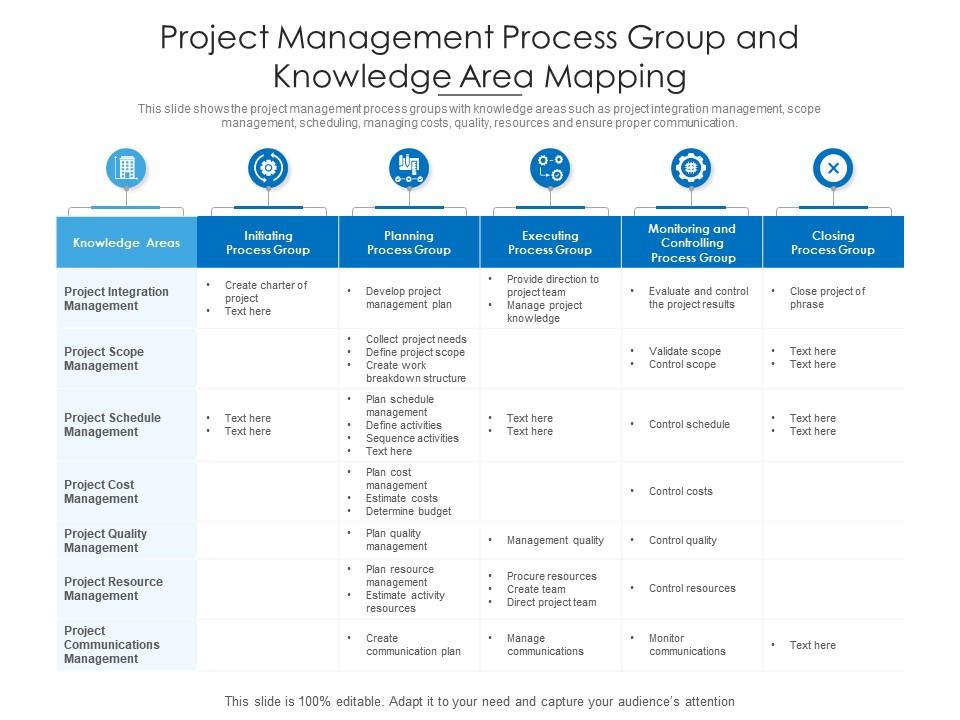
This slide shows the project management process groups with knowledge areas such as project integration management, scope management, scheduling, managing costs, quality, resources and ensure proper communication.
People who downloaded this PowerPoint presentation also viewed the following :
Project management process group and knowledge area mapping with all 2 slides:
Use our Project Management Process Group And Knowledge Area Mapping to effectively help you save your valuable time. They are readymade to fit into any presentation structure.
FAQs for Project management process group and
So project mapping is just putting your whole workflow on paper - tasks, deadlines, who's doing what, all that stuff. Way better than keeping it all in your head (guilty as charged). You'll actually see where things might get stuck before they do. Plus explaining progress to your boss becomes so much easier when you can point at something visual instead of rambling. Honestly, bottlenecks become super obvious once everything's mapped out. Dependencies make sense too. Start with something basic - even a rough flowchart beats the chaos of winging it completely.
You need project scope and timeline with milestones first. Resource allocation and task dependencies come next - this is where people usually get tripped up because they don't map out who needs what when. Team roles and budget breakdown are obvious ones. Risk factors though? That's where everyone screws themselves over by being way too optimistic about what could go wrong. Communication channels matter too, plus how decisions actually get made. Your stakeholders want to see connections between everything, not random puzzle pieces. Start simple with visuals showing relationships, then build detail as you go.
Visuals are a game changer for stakeholder meetings, trust me. You take all that messy project data and turn it into charts or dashboards people can actually read. Gantt charts work great for timelines. I've watched exec meetings shrink from 2+ hours of chaos to 30 minutes of real decisions just by ditching the text-heavy reports. People spot problems way faster when they're looking at visuals instead of reading through paragraphs - honestly, it's night and day. Next time, try opening with a visual timeline. Your engagement will shoot up immediately.
Honestly, Miro and Lucidchart are your best bets for project mapping - their drag-and-drop stuff is way cleaner than dealing with Visio (which feels ancient at this point). If you're broke, diagrams.net works fine too. Monday.com is cool because you can map everything out AND actually manage the project in one spot instead of jumping between apps. Asana does timeline views pretty well too. I'd just start with Miro's free version and mess around with it first. Oh, and avoid anything too fancy at the beginning - you'll just get overwhelmed trying to make everything perfect.
Yeah, project maps totally work with agile! You just gotta make them flexible instead of those crazy detailed upfront ones. Build living maps that change each sprint - like visual guides showing the big picture but staying adaptable. Honestly? Teams waste way too much time perfecting the initial map (kinda defeats the whole agile point). Just map your user stories and dependencies in Miro or whatever - even sticky notes work. Then update them during retros based on what you've actually learned. The key is treating them as evolving tools, not set-in-stone documents.
Honestly, mapping is a game-changer for catching risks before they bite you. You get this bird's eye view of how everything connects, so those nasty bottlenecks just pop right out. Single points of failure become super obvious when you can actually see the flow. Plus you can build in backup plans around your critical stuff - way better than scrambling later. I always tell people to map their current project first because you'll probably find risks hiding in plain sight. The visual thing really helps when you're trying to explain why something's risky to your boss too. Worth the time, trust me.
Dude, mapping out your projects is clutch for resource management. You get this visual of everything - tasks, deadlines, who's doing what. Makes it super obvious when someone's drowning in work while others are twiddling their thumbs. I swear it's saved my butt so many times from those "wait, everyone has stuff due the same day" disasters. You can spot bottlenecks coming from a mile away and shuffle things around before people start panicking. Just map your current project first - I bet you'll find some weird overlaps you totally missed.
Think of mapping as your project's GPS - shows you exactly where you are vs where you should be. Gantt charts work great for seeing how tasks connect, or just plot milestones on a timeline. Way better than drowning in spreadsheets (honestly, who has time for that?). You'll spot problems fast and can actually explain to your boss what's happening without the usual chaos. Delays become obvious before they wreck everything downstream. I'd start simple with milestone tracking first. The visual stuff makes such a difference - you can see the whole picture at once instead of guessing.
Honestly, just tweak the phases and milestones to fit whatever you're working on. Software teams obsess over sprints and releases, but construction guys care more about permits and inspections - totally different beast. I'd map out your critical path first, then throw in the stakeholders and approval gates that actually matter for your industry. Most PM tools let you save custom templates anyway, so you won't have to rebuild everything from scratch each time. Trust me, using the wrong template will eat up way more time than you think!
Weekly reviews for active stuff, monthly for the bigger projects. Someone who's actually doing the work should own the map - not some PM who barely knows what's happening. Update it right when scope shifts or new people join because stale maps are literally pointless (trust me on this one). Everyone needs to see the same version, so nail down your version control. Oh and make updates obvious to the team - notifications, quick standup mentions, whatever works. Honestly, just start scheduling these reviews now. Consistency beats perfection every time.
Honestly, project mapping is a game changer for getting teams to actually work together. You literally draw out who's doing what and when - suddenly marketing realizes their campaign launch affects the dev team's timeline. No more "oh shit, I didn't know you needed that by Tuesday" moments. Teams stop being so territorial because they can see the whole picture, not just their part. Bottlenecks become obvious way earlier too. I always kick off cross-team projects with a mapping session now. Everyone leaves knowing exactly how their work fits in, and you avoid so much drama later.
Track a few key things to see if your project map actually works. Timeline accuracy is big - how close are your milestones to reality? Also watch resource utilization so you don't end up with everyone overbooked (been there, it sucks). Stakeholder engagement matters too, plus how well communication flows. But honestly? The real test is fire-fighting frequency. Still scrambling constantly? Your map isn't cutting it. Pick 2-3 metrics and track them consistently for a few sprints - that'll give you a solid baseline to work from.
Oh man, this is such a real problem! Colors hit differently across cultures - like red screams "urgent" to me but means good luck in some places. Your timeline layout matters too since some cultures think cyclically instead of linear steps. I learned this the hard way on a project once, ugh. Get your team involved when you're designing these maps from the start. Also sounds obvious but always throw in a legend explaining your symbols and colors - saves so much confusion later.
Don't get too crazy with details right away - you'll waste tons of time and it gets outdated super fast. Work with your actual team instead of doing it solo, otherwise you're just making stuff up. I've seen people treat these things like they're permanent when they should change constantly. Simple tools work best (seriously, some of these mapping platforms are ridiculous). Start basic, get everyone's input, then keep updating it. Oh and make it visual - walls of text defeat the whole purpose.
Start by baking it right into your kickoff templates - like, make mapping a required thing, not something teams can skip. Train your PMs on whatever tools you want everyone using (trust me, they'll all have opinions about their preferred methods). Then hook the maps directly into your regular project docs so they actually get updated instead of collecting digital dust. Honestly, pilot it with a couple teams first to work out the kinks. The whole trick is making it feel natural instead of like another checkbox exercise. Once you've got their feedback, roll it out everywhere with clear rules about when to map stuff. Short answer: make it part of the process, not an add-on.
-
Helpful product design for delivering presentation.
-
Really like the color and design of the presentation.