


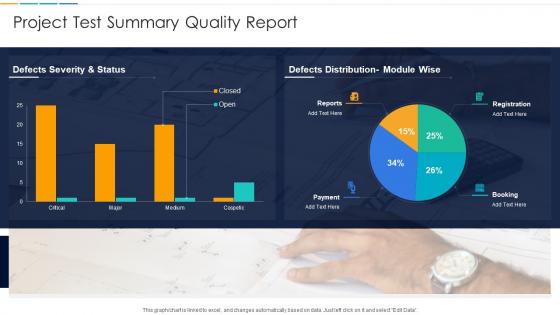
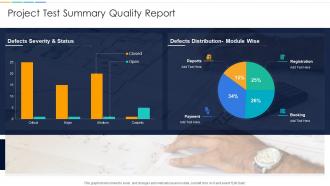
Project Test Summary Quality Report




Try Before you Buy Download Free Sample Product
 Impress Your
 Audience
 100%
100% Editable
 Save Hours
 of Time


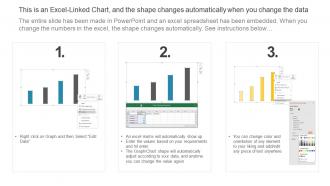
This graph or chart is linked to excel, and changes automatically based on data. Just left click on it and select Edit Data.
People who downloaded this PowerPoint presentation also viewed the following :
Project Test Summary Quality Report with all 7 slides:
Use our Project Test Summary Quality Report to effectively help you save your valuable time. They are readymade to fit into any presentation structure.





FAQs for Project Test
So there's unit testing - that's just testing individual pieces of code. Then integration testing checks if different parts actually play nice together. System testing looks at the whole app, and acceptance testing makes sure it does what users actually want. Oh, and regression testing catches stuff that breaks when you change things (super annoying but necessary). Performance testing is for speed and handling lots of users. Honestly? Don't stress about doing all of these right away. Start small with unit tests on your main functions. The rest you can add as your project gets more complex. The names sound scarier than they really are.
Honestly, start with what could go wrong and work backwards from there. High-risk stuff like financial apps need way more testing than some basic landing page - that's just common sense. Timeline matters too though. If you're crunched, focus on the critical paths and automate whatever repetitive tests you can. Your team's current skills play into this more than people realize. No point planning elaborate tests if nobody knows how to execute them properly. I'd map out your biggest potential failure points first, then build tests around catching those early. It's really about finding that sweet spot between being thorough and actually shipping something.
Automated testing takes care of all the boring, repetitive stuff so you can spend time on the tricky parts that actually need your brain. Start early - once your core features are stable enough to test against. Honestly, it's a game changer for catching regressions and will save you hours during dev cycles. Begin with your most critical user flows, then build out from there. Oh, and don't go crazy trying to automate everything right away - that's a recipe for burnout. Focus on the tests that'll save you the most headaches first.
Honestly, just pick one main tool and stick with it - Jira or Azure DevOps work great for tracking completion rates and defect trends in real-time. Even basic spreadsheets are fine if that's what your team likes. Daily standups are clutch for catching issues early. I'd also do weekly progress reports against your milestones. But here's the thing - don't get obsessed with just numbers. You need to actually check if critical user scenarios are getting covered properly. Oh, and make sure someone's watching test quality, not just quantity. The visual dashboards help, but regular team check-ins are where you'll catch the real problems.
Start with test coverage percentage and defect detection rate - those are your bread and butter. Track how long test execution takes too. Pass/fail ratios are obvious but important. Cost per defect is huge for budgets. Oh, and definitely monitor how many critical bugs slip into production (nobody wants that conversation). Your team's velocity matters - like how many test cases you knock out per sprint. I always check defect leakage rate and mean time to fix issues. Honestly, these core ones will cover most of what you need. Add project-specific stuff later.
Honestly, getting stakeholders involved in testing is a game-changer. They'll spot stuff you'd never even consider - like workflow issues that seem fine technically but are absolute nightmares for actual users. I've watched dev teams miss obvious problems that stakeholders catch in like 5 minutes. When they're part of the process from early planning through UAT, you get way better feedback. Plus they're already on board with whatever you find, so no awkward conversations later when you need approval. Trust me, their input will save you from those "why didn't anyone tell us this was confusing" moments after launch.
Oh man, time constraints are brutal - there's literally never enough time to test properly. Requirements being vague is another nightmare. What I've learned is you gotta bake testing into the timeline from the start, not tack it on at the end. Push hard for clear acceptance criteria early on. Environment issues will bite you too, so fight for test environments that actually match production. Also, communication breakdowns between devs and testers create so much chaos. Regular check-ins help tons. One trick that's saved me: write test cases while they're still figuring out requirements. You'll spot inconsistencies way earlier.
Start with mapping out your critical user paths and edge cases - that's your foundation. I shoot for 80% code coverage but honestly? Better to cover the right stuff than chase numbers. Mix it up: unit tests for individual functions, integration tests for how components work together, end-to-end for full workflows. Error handling and negative scenarios are huge - I learned that the hard way when they kept breaking production. Oh and definitely get coverage reports in your CI pipeline so you can see the gaps during code reviews.
Dude, regression testing literally saves your butt. New code breaks old stuff ALL the time - fix one thing, break three others. Super annoying but that's just how it goes. These tests catch those sneaky bugs before users do. Yeah it's boring running the same tests repeatedly, but honestly? Way better than dealing with angry customers later. Oh and definitely automate this stuff early if you can - manually clicking through everything gets old fast. Think of it like double-checking your work, except the consequences of not doing it are way worse than a bad grade.
Honestly, just make your test environments match production as closely as you can - same configs, data volumes, network setup, all that stuff. Automate the environment creation too because waiting 2 days for someone to manually spin up a test box is absolutely brutal. Containers or infrastructure-as-code work great for keeping everything consistent. One thing I learned the hard way - isolate your different test phases so integration tests don't mess with performance testing. Oh, and definitely audit what's actually different between your test setup and prod right now. You'll probably find some weird surprises there.
Honestly, just think about what would make users lose their minds if it broke - start there. Payment stuff, login flows, anything people use constantly. I always go for the high-traffic features first because those failures hit different, you know? Look at code that's been touched recently or has a sketchy bug history. Complex areas are usually trouble too. Maybe create a quick scoring thing - like how likely is this to fail vs how bad would it suck if it did? Saves you when deadlines get crazy. Trust me, having that priority list ready beforehand is clutch.
Your acceptance criteria should connect directly to what you're actually trying to achieve with this project. Get your stakeholders involved in writing test scenarios that mirror real user workflows - not just boring feature checklists. I've watched so many teams waste time testing weird edge cases while completely missing whether they're solving the core problem. Your UAT people need to be actual target users doing tasks they'd normally do. Oh, and document which tests prove which goals so you can see what you're covering. If a test doesn't show you're fixing the original problem, ditch it.
Oh man, you definitely want to document everything during testing. Track your test cases, results, and any weird bugs you find. When someone else jumps on the project (or you forget what you did last week), they'll actually know what's been covered. I've watched entire teams basically re-test stuff because nobody wrote anything down - such a waste. Document as you go though, not at the end. Trying to remember everything later is brutal. Those random edge cases especially - write that stuff down immediately or you'll lose it.
So you're basically capturing what blew up during testing so you don't step on the same landmine twice. Document the issues, why they happened, how much time they ate up - all that stuff becomes gold for your next project. Honestly, I've watched teams dodge entire weeks of pain just by checking what screwed them over before. Use that data to get better at estimating how long testing will actually take (spoiler: always longer than you think) and spot those annoying patterns that keep showing up. Just start a simple doc after each project wrapping up what happened. Trust me, you'll be so glad you did this when you're planning the next one.
Honestly, AI testing tools are where it's at right now - they're getting scary good at predicting where bugs'll show up. Risk-based testing is smart too. Focus on stuff that'll actually hurt your business instead of wasting time on random edge cases. CI/CD pipelines basically require continuous testing now, no way around it. The collaborative approach is working well for most teams I know - getting devs, QA, and product people talking from the start instead of that old handoff nightmare. Oh, and shift-left is still buzzy but it works. Just pick one thing to try first.
-
Enough space for editing and adding your own content.
-
The content is very helpful from business point of view.