

Qa bug summary report with defect details





Try Before you Buy Download Free Sample Product
 Impress Your
Audience
 100%
Editable
 Save Hours
of Time


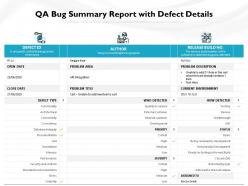
Select our QA Bug Summary Report With Defect Details PowerPoint Presentation Slide and make a lasting impression on your audience. Discover and define weak spots identified by a QA tester by taking the aid of this PPT template. With this PPT slide, you can analyze the root cause of software defects easily and efficiently. Highlight the defect management process by taking the aid of this PPT layout. Educate your audience about the importance of effective bug reporting with the assistance of this PPT theme. Increase productivity, profitability, and revenue growth by using this PPT design to address the software testing activities. Set the guidelines for successful bug testing and reporting by employing this PowerPoint graphic. Create a comprehensive quality assurance dashboard to track and monitor your project progress efficiently by incorporating this PPT visual. Without any further ado, click the download button and create a winning presentation!
People who downloaded this PowerPoint presentation also viewed the following :
Qa bug summary report with defect details with all 2 slides:
Use our QA Bug Summary Report With Defect Details to effectively help you save your valuable time. They are readymade to fit into any presentation structure.

FAQs for Qa bug summary report
Start with bug counts by severity and resolution status - that's your bread and butter. Trends over time are clutch too. Testing scope is essential because someone will definitely ask what you actually covered. I always include a few examples of critical bugs since stakeholders eat that stuff up. Root cause analysis helps if you're seeing the same issues pop up repeatedly. Pass/fail rates and other testing metrics should be in there. Oh, and definitely call out any blockers or risks that could mess with release dates. Charts work way better than walls of text - execs just skim anyway.
Start with priority buckets - Critical, High, Medium, Low. Color-code them so people can scan quickly. I always throw a count at the top like "3 Critical, 8 High" because stakeholders love that overview stuff. Focus on business impact, not just the technical weirdness. Critical bugs need fix estimates and workarounds if you've got them. Oh, and don't bury the action plan at the bottom - spell out what needs tackling first. The whole thing should tell a story about what's broken and how bad it hurts.
Honestly, bug severity is everything when it comes to prioritizing your testing. Critical bugs? Those'll completely blow up your release timeline and turn into total fire drills. Everyone drops what they're doing. Medium ones usually get pushed to the next sprint, while low severity stuff just... sits there becoming technical debt that bites you months later. Your QA process has to be ready to pivot fast when serious bugs pop up - stakeholders obsess over the critical ones anyway. Oh, and definitely set clear severity criteria upfront. Trust me, you don't want your team arguing about what counts as "urgent" every single time.
Skip the tech speak when you're presenting bugs to stakeholders. Instead of "authentication token expires," tell them users will randomly get kicked out and lose their work - way more impactful. Map your severity levels to real scenarios like "breaks the checkout flow" or "people lose their data." Honestly, I cringe when I see bug reports that read like robot manuals. Focus on which issues hit your money-making features first. Always throw in fix estimates and temporary workarounds so they can actually decide if the release should wait or not.
Bug discovery rate and severity distribution are your bread and butter - they show if you're actually catching stuff that matters. Track resolution times too. False positives will drive everyone nuts, so definitely monitor that rate. I learned that one the hard way! Defect density per feature tells you where the real problem areas are. Don't forget reopened bugs either - that's your "did we actually fix it" metric. Honestly, focus on trends instead of just raw numbers. The whole point is answering whether you're shipping decent software, not just proving you found bugs.
Honestly, visuals are a game-changer for bug reports. Screenshots with arrows pointing to the broken stuff beat long paragraphs every time. Screen recordings work great too - way better than trying to describe what's happening. Your stakeholders will actually get it without wading through technical jargon. I always throw in a quick diagram when things get weird. "Button doesn't work" sounds vague, but show them the busted button and boom - they're on board. Start with the visual proof, then add just enough text to fill in the gaps. Trust me, it's so much faster.
Think of bug reports as breadcrumbs for your future self. You'll want to capture the root cause, how to reproduce it, and what actually fixed things - not just "it broke, we fixed it." Your team starts seeing patterns this way, which honestly is where the real value comes in. New QA people can actually learn something useful instead of stumbling around blind. Don't just document what went wrong. Focus on why it happened and what process tweaks might prevent similar headaches. Each bug report becomes like a mini case study that'll save everyone time down the road.
Honestly, I'd say weekly is the bare minimum during active development. After each sprint or major testing cycle works better though - keeps everyone in the loop without you becoming a full-time report monkey. When things get crazy before a release, daily updates might be necessary (or even twice daily if the world's on fire). The whole point is giving your team current info on bug trends and what's getting fixed. Pick a schedule that actually works and stick with it. That way people know when to expect fresh data instead of bugging you about it constantly.
Start with severity levels - critical, high, medium, low. That's gonna drive everything your team does anyway. Then break it down by area like UI, backend, performance stuff. Makes patterns way more obvious, plus you know who to bug about what. If things get messy you can throw in bug types too - logic errors, UI weirdness, integration fails. Honestly though, don't overcomplicate it at first. Pick whatever makes sense and stick with it so everyone's on the same page. You can always add more categories later when you actually need them.
So bug summary reports are basically your way of translating QA chaos into something devs can actually work with. You're showing them patterns instead of bombarding them with 50 random tickets. Think of it as giving them a map of where the real problems are hiding. Honestly, most developers appreciate this way more than sifting through individual bugs all day. They can see what's actually breaking versus minor annoyances. Plus it makes you look way more strategic to management - like you're not just randomly clicking around finding stuff. Include impact analysis and fix priorities in yours. Game changer.
Check out your current bug tracker's reporting first—you might already have everything you need. Jira, Azure DevOps, and Bugzilla all pull metrics like bug counts and resolution times automatically. TestRail's pretty decent for test reports too. Honestly? Don't overthink it. Pick whatever works with your existing setup instead of changing everything. I made that mistake once and it was a nightmare. If you need prettier charts for the higher-ups, throw Tableau or Power BI on top. But seriously, start with what you've got before going down any rabbit holes.
honestly, digging through your old bug reports is where the magic happens. grab the last 6 months of data and start sorting by severity, which components failed, when stuff broke in the dev cycle. patterns jump out fast - like certain modules that just can't catch a break lol. i get weirdly excited about this detective work because your bug history literally tells you where to test harder next time. plus you'll spot which bug types keep slipping past your current tests. it's basically free intel sitting right there in your system.
Don't dump every bug detail on people - they'll tune out. Group stuff by severity and what actually caused it. Show trends too, not just random snapshots. Skip the tech speak with non-technical folks (learned this the hard way). Here's what really matters though: connect those bug patterns to real business problems. Like, how did this affect users? Most reports I see just list what broke without explaining why anyone should care. Always wrap up with actual next steps. Otherwise you're basically saying "stuff's broken, good luck!"
Honestly, user feedback is gold for bug reports because people use your stuff in ways you'd never think of. Your QA team tests logically, but real users? They'll break things in the weirdest ways possible. Plus they're brutally honest about what pisses them off - which is actually super helpful. I started adding a "User Impact" section to my reports with actual quotes from frustrated customers. Makes it way easier to prioritize what needs fixing first based on real pain points, not just how technically scary the bug looks. Developers get the "why" behind fixes too.
Track your resolution rates, time-to-fix, and reopen rates month-over-month - that's where the real insights are. Same bug types keep showing up? That's a red flag about root causes you're missing. I'd also watch severity trends since crushing critical bugs faster means you're getting better at prioritization. Honestly, a simple spreadsheet works fine for this stuff - no need to overcomplicate it. Just compare the numbers each month. You'll spot patterns pretty quick and see if you're actually getting better at this whole bug-squashing thing or just spinning your wheels.
No Reviews