


Quality dashboard showing total defects open defects checklist outcome





Try Before you Buy Download Free Sample Product
 Impress Your
 Audience
 100%
100% Editable
 Save Hours
 of Time


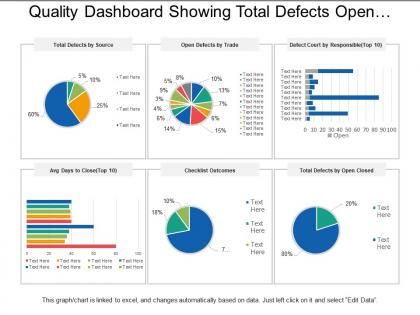
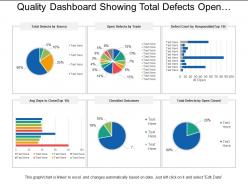
Be the first one to use our multi-featured quality dashboard showing total defects checklist outcome and leave an everlasting impact on your audience. This quality dashboard PPT has been made up of six boxes in each of which is a different representation. This performance management PowerPoint presentation uses graphical images like the pie charts, linear bar graphs, slide bars, etc. Using this multi-dimensional quality KPI model presentation you can explain various business related processes like total detects by source, open detects by trade, defect court by response, average days to close, checklist outcomes, total defects by open closed, etc.. Our business experts have skillfully designed this dashboards and measuring PPT model that will help you to reduce you stress and workload. Highly influence your audience with this visuals and illustrations business slides. Put a halt to all your doubts with our Quality Dashboard Showing Total Defects Open Defects Checklist Outcome. They ensure you cease to fret.
People who downloaded this PowerPoint presentation also viewed the following :
Content of this Powerpoint Presentation
Description:
The image presents a "Quality Dashboard Showing Total Defects Open..." as part of a presentation designed for tracking and analyzing quality-related issues within an organization. This comprehensive dashboard includes various graphs and charts, each focusing on a different aspect of quality management. Many of the text elements within the dashboard are labeled as "Text Here," indicating that they are customizable templates intended to be populated with specific data, allowing for flexibility in tailoring the content to meet specific presentation needs.
Starting from the top left, the "Total Defects by Source" pie chart provides a visual breakdown of the origin of defects, expressed as percentages. Customizable legend entries allow for detailed identification of defect sources. Moving to the right, the "Open Defects by Trade" pie chart appears to analyze defects across different trades or job functions. The "Defect Count by Responsible (Top 10)" bar chart on the right suggests a ranking of defect counts associated with individual or departmental responsibilities.
Further down, the "Avg Days to Close (Top 10)" horizontal bar chart likely measures the efficiency of defect resolution by displaying the average time taken to close issues. The "Checklist Outcomes" pie chart is likely used to visualize pass/fail rates or compliance with standards. Lastly, the "Total Defects by Open Closed" pie chart offers a simple visual representation of the proportion of open defects compared to closed defects.
This template serves as an informative tool for monitoring and improving processes, ensuring compliance, and effectively presenting data. It offers the advantage of auto-updating with data from Excel, making it a dynamic and efficient resource for presentations.
Use Cases:
These quality-related slides are relevant to a wide range of industries that prioritize quality control and process optimization, including:
1. Manufacturing:
Use: Tracking defects in production lines.
Presenter: Quality Assurance Manager.
Audience: Production Team Leads and Workers.
2. Construction:
Use: Monitoring project defects and responsible trades.
Presenter: Project Manager.
Audience: Contractors and Subcontractors.
3. Software Development:
Use: Analyzing bug reports and fix timelines.
Presenter: Lead Developer or QA Lead.
Audience: Development Team.
4. Healthcare:
Use: Managing patient care quality and safety issues.
Presenter: Hospital Administrator.
Audience: Medical Staff and Department Heads.
5. Automotive:
Use: Assessing defects in vehicle parts or the assembly process.
Presenter: Quality Control Supervisor.
Audience: Engineers and Assembly Line Workers.
6. Food and Beverage:
Use: Ensuring quality standards in food production.
Presenter: Quality Assurance Coordinator.
Audience: Food Processing and Quality Assurance Teams.
7. Aerospace:
Use: Overseeing defect resolution in aircraft manufacturing.
Presenter: Quality Engineer.
Audience: Design and Production Engineers.
Quality dashboard showing total defects open defects checklist outcome with all 5 slides:
Avoid insignificant debates with our Quality Dashboard Showing Total Defects Open Defects Checklist Outcome. Identify any baseless arguments.
FAQs for Quality dashboard showing total defects open
Honestly, start with the basics that actually matter - defect rates, customer satisfaction, first-pass yield, and what quality issues are costing you. Cycle times and rework rates are solid too since they'll catch problems before customers see them. Keep it stupidly simple though. Like 5-7 key metrics max that tie back to what your business actually cares about. I've seen too many dashboards with a million charts that just sit there looking pretty while nobody uses them. You can always add more later, but don't overcomplicate things right out the gate. Focus on stuff people will actually look at and act on.
Your brain totally processes visuals way faster than numbers - that's why charts beat spreadsheets every time. I used to miss tons of patterns staring at data tables, but dashboards changed everything for me. You'll spot spikes and outliers instantly with simple bar charts. Heat maps are clutch for showing where issues cluster together. Trend lines reveal if you're actually improving over time or just kidding yourself. Start basic with your main KPIs first. Oh, and line graphs work great too - don't overthink it at the beginning.
Look, real-time data is what makes your quality dashboard actually useful instead of just another fancy report sitting there. You'll catch problems while they're tiny and fixable - way better than finding out days later when defective stuff is already at customers' doors. It's like having GPS vs using some old paper map, you know? Quick data updates mean your team can jump on quality issues, equipment problems, or process changes right away. Oh, and definitely set up alerts for your key numbers so people aren't glued to screens all day watching for changes.
First thing - figure out what metrics actually matter for your industry. Manufacturing? Look at defect rates and OEE. Healthcare focuses more on patient safety stuff and staying compliant with regulations. Generic dashboards are honestly pretty worthless, so customize your KPIs to what really counts. Connect your data sources to the right systems - MES for manufacturing, EMR for healthcare, whatever fits your field. Include benchmarks that match industry standards. Oh, and don't go crazy at first. Start with maybe 5-7 key metrics, then build from there based on what people actually use.
Put your worst nightmare metrics top-left - that's where people look first. Defect rates, compliance stuff, whatever makes you panic at 2am. Group similar things together and honestly, just go with red/yellow/green even though it's boring as hell. One screen max or people get annoyed scrolling around. Skip the fancy charts - simple works better than pretty. Oh, and definitely test it with real users first! They'll roast you for stuff that seemed obvious but totally isn't. You'd be surprised how often something looks cool but is completely useless in practice.
Honestly, clean data is everything - garbage in, garbage out, you know? Set up those automated checks first so weird stuff gets caught before it reaches your dashboard. Someone actually needs to own each data source too, can't just be floating around with no accountability. I learned this the hard way when our main KPI dashboard was totally wrong for like 3 weeks and nobody noticed! Alerts for missing data are clutch. Let users report issues they catch. Oh, and write down what your metrics actually mean - sounds obvious but half the arguments I see are just people measuring different things.
Tableau and Power BI are solid choices if you want something really robust - both have great visuals once you figure them out. Google Data Studio's decent for tighter budgets, just more limited. Honestly? I've seen people work magic with Excel pivot tables and charts. Not flashy but it works. The real trick is picking whatever your team will actually keep updated. Nobody wants a dead dashboard collecting digital dust. Start with your most important metrics first, then add more later. Keep it simple at the beginning - you can always get fancier down the road.
Add comment sections and rating systems to your dashboard - makes a huge difference. When metrics hit certain thresholds, set up alerts that actually mean something. Let users flag issues right from the data view instead of doing what I've seen everywhere - people screenshotting problems and firing off random emails. What a nightmare that becomes! Build structured feedback forms that grab context and priority levels. The shorter you make that feedback path, the more people will use it. Oh, and review everything weekly so teams see their input creates real changes.
Don't cram everything onto one dashboard - seriously, less is more here. Stick to maybe 5-7 metrics that actually matter for decisions. Context is huge too... showing just raw numbers without trends or targets leaves people guessing if they should panic or celebrate. I used to go overboard with fancy colors and animations (guilty!), but clean beats flashy every time. Short sentences work. Get your actual users involved early - they'll save you from building something nobody wants to use.
Honestly, a good dashboard saves your ass when auditors come knocking. All your compliance stuff lives in one spot instead of scattered across random spreadsheets - which, let's be real, is a nightmare to manage. You'll get alerts when things start going sideways, so you can fix problems before they blow up. Track your KPIs against whatever standards you need (ISO, FDA, whatever). The automated reporting is clutch too. I mean, who wants to spend hours pulling data manually? Set up threshold alerts for your critical metrics and you won't be stressed about surprise violations anymore.
Honestly, line charts work best for this stuff. Show your 12-month trends first, then zoom into the last 30 days so people get both perspectives. I'm obsessed with color coding - green for good trends, red for the scary ones. Those little callout boxes are clutch when you hit major spikes or dips, because nobody remembers what happened three months ago without context. Oh, and definitely throw in your target lines as references. Makes it super obvious if you're crushing goals or... not. Start with your biggest metrics and keep everything visual - trust me on this one.
So basically it's like having different keycards at work. Viewers only see read-only stuff for their department. Managers get broader access across teams plus some editing rights. Admins can see everything and change settings - honestly kind of jealous of that level of control lol. The annoying thing is when you think you should see certain metrics but your permissions are blocking you. Don't assume the data doesn't exist though. Just hit up your admin about expanding your role if you're missing stuff you actually need.
So honestly, the key is getting your team involved from the start - ask them what they'd actually look at daily. Nobody wants another pretty but useless dashboard collecting digital dust. Set up clear thresholds and alerts so people know when stuff needs fixing. I've watched so many teams ignore dashboards because they don't know what action to take. Tie everything to your actual team goals, rotate different views in meetings, and keep tweaking based on feedback. Otherwise you'll just have expensive wallpaper that everyone ignores.
Okay so this is actually super interesting - different cultures read your dashboard metrics completely differently. Red indicators? Some teams see those as personal failures and won't even report problems. Others just view them as normal improvement stuff. Risk-averse cultures think your risk metrics are way too aggressive, while other cultures think you're being conservative. Then there's the whole collective vs individual thing - some cultures interpret team quality scores as everyone's responsibility, others focus on individual performance. You've gotta explain what your metrics actually mean and maybe adjust how you present results depending on who you're talking to. Context is everything here.
Honestly, the stuff that's actually worth paying attention to right now is AI predictive analytics - catches problems before they blow up. IoT sensors are everywhere now for real-time monitoring. Mobile dashboards are finally decent too. Self-service analytics is huge (took long enough, right?). Sustainability tracking is becoming mandatory at most places. Oh, and voice controls for factory floors - pretty cool actually, though I'm not sure how well that works with background noise. Don't get caught up trying everything though. Pick what fixes your biggest headache first.
-
I discovered this website through a google search, the services matched my needs perfectly and the pricing was very reasonable. I was thrilled with the product and the customer service. I will definitely use their slides again for my presentations and recommend them to other colleagues.
-
Presentation Design is very nice, good work with the content as well.