


QMS Document Control Powerpoint Ppt Template Bundles





Try Before you Buy Download Free Sample Product
 Impress Your
 Audience
 100%
100% Editable
 Save Hours
 of Time


Our QMS Document Control Powerpoint Ppt Template Bundles are topically designed to provide an attractive backdrop to any subject. Use them to look like a presentation pro.
People who downloaded this PowerPoint presentation also viewed the following :
QMS Document Control Powerpoint Ppt Template Bundles with all 25 slides:
Use our QMS Document Control Powerpoint Ppt Template Bundles to effectively help you save your valuable time. They are readymade to fit into any presentation structure.







FAQs for QMS Document Control Powerpoint
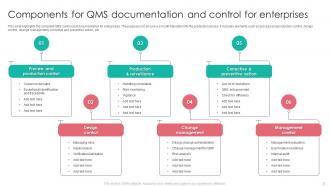
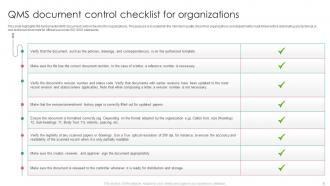
Document control comes down to five things: version control, approval workflows, controlled distribution, regular reviews, and decent storage systems. Most companies I've worked with totally overthink this stuff though. Map out what documents you have first and who needs them - that's where you'll spot the real problems. Your system needs to show who approves what and make finding the right doc brain-dead simple. Oh, and lock down old versions so people can't accidentally use outdated procedures. That's honestly where most disasters happen. Start simple, then build from there once you've got the basics working.
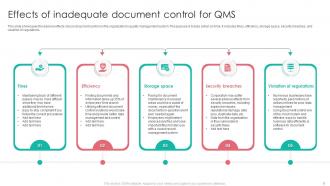
Document control is honestly the foundation that keeps your whole QMS from falling apart. You need everyone using the same current info and following updated procedures - otherwise it's chaos. Version control and proper approvals stop people from accidentally using old processes that'll mess things up. Auditors love seeing this stuff organized too, which saves you headaches later. Without good document control, you're basically asking for miscommunication and compliance issues. My advice? Map out your quality-critical documents first and control those. Don't bite off more than you can chew right away.
Ugh, honestly the worst part is getting people to actually stick to the procedures - everyone just reverts to their old ways. Version control becomes a nightmare when three people are editing the same doc. Can't find anything if your naming system sucks from the start, which happens more than you'd think. Training new people constantly with high turnover is exhausting. Then processes change and suddenly everything's outdated. My advice? Start super simple with how you organize folders and get your approval process locked down first. Makes everything else way less painful later.
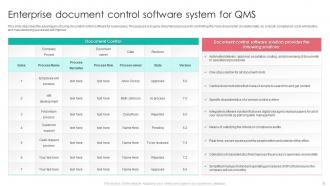
Honestly, automated document management will change your life. No more hunting around asking "is this the latest version?" because the system tracks everything automatically. Reviews get sent out on schedule, everyone collaborates in real-time, and you get proper digital signatures that'll actually pass an audit. The search function is incredible too - you can find any procedure in seconds instead of digging through folders for ages. Plus automatic backups mean you'll never lose anything important. I know it sounds like overkill, but the time savings are massive once you're set up.
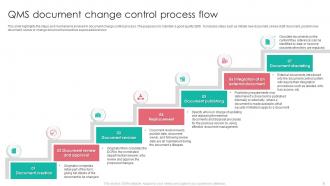
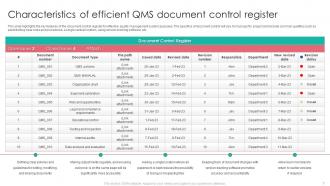
So version control is basically your lifesaver for documents - tracks who changed what and when. You know how someone always "improves" something that was working fine? Yeah, this fixes that mess. You can roll back to older versions, compare changes, and stop people from using random drafts they saved months ago. The trick is having clear version numbers and controlling who can access what. Otherwise your team won't know which document is actually current. Trust me, nothing's worse than everyone working off different versions of the same file. Set it up right and you'll save yourself so many headaches later.
Regulations are basically your starting point for document control - they tell you what to track, retention periods, approval chains, all that stuff. FDA 21 CFR Part 820 and ISO 13485 are pretty detailed about version control and keeping old docs from floating around where they shouldn't. Honestly, auditors love checking if your procedures actually match the regs, so you can't really wing it. I'd start by figuring out which regulatory sections hit your document types, then design your processes around those. It's kind of backwards from how you'd think to do it, but that's compliance for you.
Honestly, the trick is making it feel natural instead of like another chore. Train people properly first - they won't follow stuff they don't understand. Your systems better be easy to use too. If hunting down the right document version is a nightmare, people just grab whatever's closest. I've noticed gentle nudges work way better than being the document police. Set up automatic alerts when things get updated, and - this part's key - build the workflows into what people already do daily. Oh, and audit regularly but don't be weird about it. You want this integrated into their routine, not sitting on top of it like some annoying extra step.
Honestly, skip the boring PowerPoint death march and make it hands-on instead. Focus training on what each person actually uses - not everyone needs to know every single thing about document control. Show them the basics: finding current versions, reading revision numbers, following approvals. Use your real documents for practice since people learn better with stuff they recognize. Oh, and plan refresher sessions when procedures change or new people join. The whole point is making it useful for their daily work, not just another compliance headache to check off.
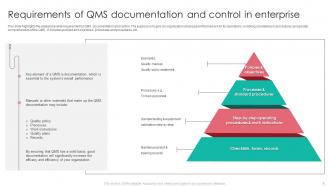
So basically you gotta control anything that actually impacts your processes - procedures, work instructions, forms, specs, policies, all that stuff. Quality manuals are the obvious ones. But people always forget about training docs, calibration certificates, supplier paperwork. The list gets crazy long depending on what you do. I'd honestly just start by figuring out what documents your team actually uses day-to-day to get work done - like, what do they reference when they're doing their jobs? Those are your must-haves. Focus on stuff that affects product quality or keeps you compliant. Don't overthink it at first.
Honestly, most people just do annual reviews because that's what the standards say. But here's the thing - it really depends on your industry. Fast-moving sectors? You'll probably need quarterly checks, maybe even monthly for the critical stuff. I always tell people to be smart about it - your safety procedures need way more attention than your document control policy, you know? Track what's actually working through feedback and metrics. Oh, and definitely set up those calendar reminders now or you'll forget. Trust me on that one. Assign owners to each doc so nobody can punt responsibility.
So there's a few ways to handle this. Version control logs and access audit trails are probably your best bet - most QMS software does this automatically anyway. It'll track who looked at what and timestamp every change. You could do manual tracking but honestly that's just asking for mistakes. SharePoint or dedicated QMS platforms work great for detailed reports on user activity and downloads. The main thing is capturing who accessed stuff and when for compliance reasons. Oh, and set up automated alerts so you're not stuck checking logs all day like I used to do.
Track how fast people find current versions and whether old docs are still circulating. Seriously, nothing's worse than realizing everyone's been using some ancient version from 2019. Time your approval workflows - are they actually helping or just slowing everything down? Survey users too. If they hate the system, it's probably not working. My go-to test: grab someone random and see if they can find the latest version of any document in under two minutes. Regular audits catch the stuff you'd otherwise miss. Also check revision turnaround times - that'll tell you a lot.
Honestly, integrating your document system with QMS is a total game-changer. Version control becomes automatic - no more digging through folders wondering if you've got the right revision. Change workflows get way smoother too since reviews and approvals happen in one spot. Teams I've worked with cut their review cycles in half, which is pretty nuts. The best part? All your quality records become searchable and linked together. Makes audits so much less of a nightmare. Oh, and definitely map your current workflows first - that's where you'll spot the biggest time-savers for integration.
Honestly, document control is like your insurance policy against chaos. You want everyone using the same current procedures, not some random outdated version from 2019. Poor version control? That's how you end up with quality disasters and compliance headaches - trust me, I've watched companies scramble during audits because nobody knew which SOP was actually valid. Short sentences work. When something goes sideways, you'll actually be able to trace back what happened instead of playing detective with mystery documents. Start by checking what people really use daily versus what's "officially" in your system. The disconnect might surprise you.
Honestly, you'll want to track everything with version numbers and keep clear records of what's current vs archived. Set up timestamps and audit trails so you can prove nothing got tampered with - auditors love that stuff. Train your whole team on the system because trust me, someone will grab the wrong version otherwise. Regular cleanouts help too, just toss anything past its retention date. Oh and make it searchable! There's nothing worse than digging through files for hours when compliance shows up. A simple numbering system works best - don't overcomplicate it.
-
Based on my personal experience, I would recommend other people to subscribe to SlideTeam. No one can be disappointed here!
-
Delighted to see unique and eye-catching PowerPoint designs that are so easy to customize.