

Quarterly Content Calendar Plan Overview




Try Before you Buy Download Free Sample Product
 Impress Your
 Audience
 100%
100% Editable
 Save Hours
 of Time


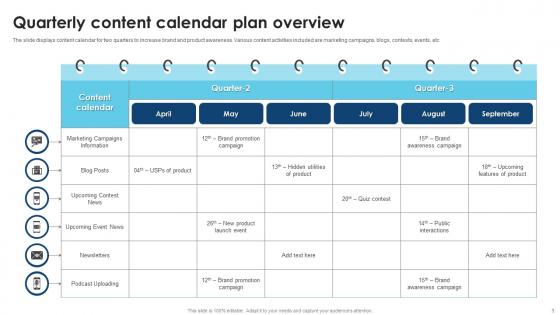
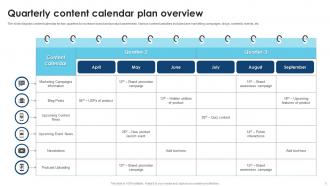
The slide displays content calendar for two quarters to increase brand and product awareness. Various content activities included are marketing campaigns, blogs, contests, events, etc.
People who downloaded this PowerPoint presentation also viewed the following :
Quarterly Content Calendar Plan Overview with all 6 slides:
Use our Quarterly Content Calendar Plan Overview to effectively help you save your valuable time. They are readymade to fit into any presentation structure.





FAQs for Quarterly Content
Know your audience first - like, actually research what they care about and their knowledge level. Figure out your goal before touching any software (PowerPoint sucks anyway, just saying). Your core message should hit their pain points directly. Don't just dump data on people - weave it into a story that actually means something. Plan your call-to-action from the start so everything builds toward it. Map the whole flow first. Design comes last. Oh, and make sure every slide pushes toward that one thing you want them to do.
Honestly, knowing your audience is everything. You can't just wing it and hope for the best. Figure out what they're struggling with and how much they already know about your topic. Don't dump technical stuff on beginners - they'll tune out immediately. But also don't talk down to experts because that's just as bad. I always create those little audience personas first, even though it feels weird at first. Then everything else falls into place - your examples, tone, even which problems you decide to tackle. It's like having a roadmap instead of wandering around lost.
Look, SEO makes or breaks whether anyone finds your templates. I'd start with keyword research first - figure out what people actually type in, like "business pitch deck template" or whatever. Then optimize your titles and descriptions around those terms. Long-tail keywords work better since there's way less competition. Your metadata needs to be crystal clear about what each template does. Honestly, you could make the most gorgeous templates ever, but if they're stuck on page 10 of Google results, you're screwed. It's really that simple.
Honestly, visuals are like cheat codes for storytelling - they hit way harder than just words. Your brain processes images 60,000x faster than text, which is insane when you think about it. But here's the thing: don't just slap random photos everywhere. Map your story first, then pick visuals that actually boost each moment. Before/after shots work great for transformation stories. Charts show real impact. Even basic icons can guide people through your whole narrative. I've seen too many presentations where pretty graphics just... exist without purpose. Make yours count.
Honestly, the best way is watching your audience during the actual presentation. Are they engaged or scrolling their phones? Quick surveys afterward help too - just ask if stuff made sense and felt relevant. But here's what really matters: do people actually DO anything different after? Like, do they email you follow-up questions or try implementing what you taught them? That's gold right there. Behavioral change is everything. Oh, and if people start sharing your slides with their teams - that's usually a good sign. Pick maybe 2-3 things to track that match whatever you were trying to accomplish in the first place.
So yeah, brand consistency is huge. People can tell when your fonts and colors are random - makes you look amateur honestly. Think of it like wearing a suit jacket with flip flops, you know? Your audience starts recognizing your stuff instantly when everything matches. That builds trust over time. Meanwhile your competitors look messy if they're just throwing things together. I'd make a quick style guide with your main colors, fonts, and how you want to sound. Then stick to it! Sounds boring but it actually makes a massive difference. You'll look way more professional without much extra work.
Start with your main business goals and what your audience actually needs - that's your foundation. Map out the big stuff first: product launches, quarterly reviews, industry events. Those dates are set in stone anyway. After that, think about seasonal stuff and any regular presentation series you do. I used to way overthink this whole process, but honestly? Just focus on building buffer time for revisions and making sure someone owns each presentation. Oh, and pick some content themes so everything doesn't feel random. Basic spreadsheet works fine - you can get fancy later once you figure out what actually helps.
Think of user feedback as your content GPS - it tells you what's actually working. Comments, shares, DMs, and your analytics all show which topics and formats people love. Honestly, I used to completely skip reading comments (so dumb), but they're pure gold for spotting what your audience really wants. Pay attention to patterns - what do they keep asking about? What makes them complain or get excited? Then tweak your content plan based on that. Just create a simple routine where you're checking this stuff regularly and adjusting as you go.
Honestly, less is more with multimedia stuff. Each video or image needs a real reason to be there - like, what's it actually doing for your message? I'd keep videos super short, maybe 2-3 minutes tops. Test your tech beforehand too (learned that one the hard way). Don't go overboard with animations - nobody wants to sit through a presentation that looks like a 2005 MySpace page. Make sure people in back can actually see your visuals. If you can't explain why something's there, just ditch it. Your slides should help tell your story, not distract from it.
Honestly, I used to just throw content out there and hope something stuck - such a waste of energy. Now I actually look at the numbers first. Check your website analytics and see what posts got the most engagement. Social media metrics tell you a lot too. Email open rates? Gold mine. I dig into search data to figure out what questions people are actually asking, not what I think they should be asking. Pull your top 5 pieces from last quarter and find the patterns. Those common themes? That's your roadmap right there. Way better than guessing.
Honestly? Getting everyone on the same page is brutal. Marketing's doing their thing, product team's writing docs, sales is making random materials - nobody talks to each other. It's like herding cats sometimes. Resource issues don't help either, plus most companies have zero clear brand guidelines. Oh, and everyone uses different tools which makes everything harder. I'd say figure out your goals and who you're actually talking to first. The calendar stuff can wait - that's the easy part once people actually agree on direction.
Check out what your competitors are doing first - you'll spot gaps in their content and see what messaging they're using. Honestly, most of their stuff is probably putting people to sleep anyway. Look at their slide designs and how they tell stories. What topics are they missing? Then you can either go completely different or just do their best ideas way better. I'd start with like 3-5 of their recent presentations and make notes. The whole point is avoiding that same boring content everyone's already seen a million times. Their audience engagement tactics will show you what actually works too.
Dude, templates are seriously game-changers. No more staring at blank pages wondering where to start - that's the worst. Your team stops wasting time rebuilding the same stuff over and over. I'd say you'll probably cut your production time in half, maybe more depending on how scattered you were before. Everything looks way more consistent too, which honestly makes a huge difference for your brand. Just pick your most common content types and document what works. Like, grab your best blog post and turn that structure into a framework everyone can use. Same with emails, social posts, whatever you're cranking out regularly.
Break your presentation into smaller chunks for social media. I always grab screenshots of my best slides - honestly they get way more engagement than I expected. Pull out your strongest quotes and stats for LinkedIn or Twitter posts. Short video clips work great too, especially if you're comfortable on camera. Find 3-4 key takeaways from your presentation and build separate posts around each one. Use hashtags but don't go crazy with them. One presentation can easily become 8-10 social posts if you're strategic about it. Start with whatever felt like your strongest moment during the actual presentation.
Honestly, the game-changer for me has been building a content library where I dump all my best stuff. Break everything into chunks - stats, case studies, whatever - so you can swap pieces around easily. Same core message, different examples depending on who's listening. Oh, and don't just let presentations die after one use! I'll turn slides into blog posts or even video scripts later. Sounds extra but it's actually way less work than starting from scratch every time. Keep a running list of your strongest content bits - you'll thank yourself when you're scrambling before a big presentation.
-
Thank you for offering such fantastic custom design services. The team is really helpful and innovative. In a very short time, I received my personalized template.
-
Editable templates with innovative design and color combination.