Quarterly Meeting Agenda With Activity And Timeline

Rating:
80%
Quarterly Meeting Agenda With Activity And Timeline
Slide 1 of 6
Favourites Favourites

Try Before you Buy Download Free Sample Product

Audience Impress Your
Audience
Editable 100%
Editable
Time Save Hours
of Time
The Biggest Sale is ending soon in
0
0
:
0
0
:
0
0
Rating:
80%
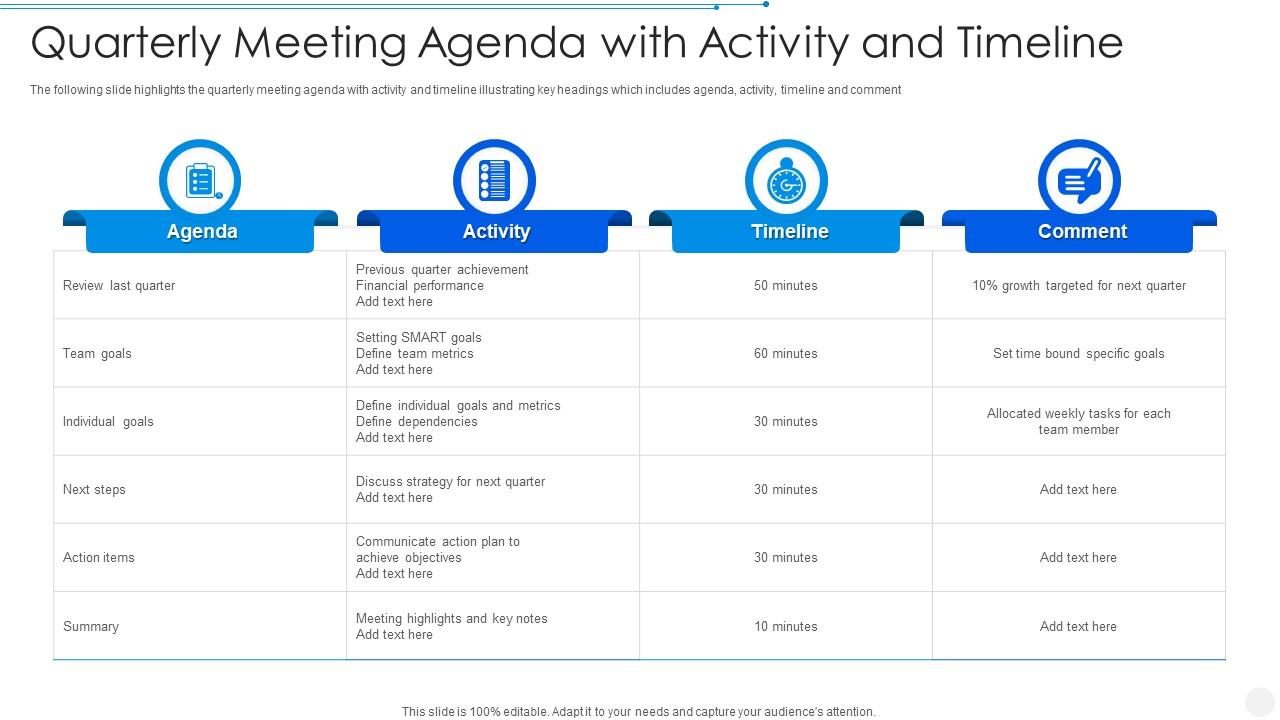
The following slide highlights the quarterly meeting agenda with activity and timeline illustrating key headings which includes agenda, activity, timeline and comment Presenting our well structured Quarterly Meeting Agenda With Activity And Timeline. The topics discussed in this slide are Quarterly Meeting Agenda With Activity And Timeline. This is an instantly available PowerPoint presentation that can be edited conveniently. Download it right away and captivate your audience.
FAQs for Quarterly Meeting Agenda With

For quarterly meetings, I'd focus on the basics: how'd you do against last quarter's goals, financial numbers, what went well (and what didn't), plus next quarter's priorities. Strategic updates too if there's any big changes coming. These things turn into total time sucks without structure, so definitely time-box each section. Oh, and send the agenda 48 hours ahead - otherwise people show up completely unprepared and you're just wasting everyone's time. Don't forget to leave space for team input though. That's usually where the good stuff comes up.

Don't just split time evenly between agenda items - that's a trap! Your big strategic stuff should get 40-50% of the meeting, even if it's only one topic. I swear, I've watched so many meetings where status updates just drain everyone's energy before you hit the important discussions. Quick decisions and reports? Give those way less time. Oh, and build in like 5-10 minute buffers between sections or you'll feel constantly behind. You need someone willing to actually call out when things are running long - not just a polite timekeeper. Do a mental run-through beforehand to test your timing.

Send the agenda beforehand - trust me on this one. Nobody wants to sit there clueless about what's happening. Call on specific people instead of asking "any thoughts?" into the awkward silence. If you've got more than 8 people, break them into smaller groups for like 10-15 minutes. Gets the quiet ones actually talking. Oh, and use that parking lot thing for random ideas so people don't feel ignored but you don't get completely off track. The big thing though? Actually do something with their suggestions. Otherwise they'll just check out mentally next time.

Give it about 25 minutes, right after your opening while people are still paying attention. Start with the big numbers - revenue, conversions, your main KPIs. Then tell the story behind them. Honestly, visual dashboards are a lifesaver here because spreadsheets will put everyone to sleep. Show the wins AND the problem areas, but don't just throw data at people. Connect it back to your bigger goals. Oh, and definitely leave time for discussion - that's where you'll get the real insights about what these numbers actually mean going forward.

So you want your quarterly meetings to actually accomplish something instead of being a total waste of time? Smart. Save the last 15-20 minutes for action planning - that's where the magic happens. Get specific about who's responsible for what and when stuff needs to happen. Write it all down because people forget everything otherwise (myself included). Someone should blast out those action items the next day. Also, don't wait three months to check in again - build in some touch points along the way or nothing will get done.

Try Miro or Mentimeter instead of boring bullet points - they make agendas way less painful. Make your topics clickable so they expand into details, or throw in some live polls to see what people actually care about. Timeline visuals are pretty cool too, though I might be biased since I'm a visual person. Oh, and embed your docs right in the presentation so you're not frantically switching tabs like a maniac. Honestly though? Don't go overboard your first time. Pick one interactive thing and test it out.

Start with wins and shoutouts - seriously, people need that boost. Cross-team updates are clutch so everyone sees how their stuff fits together. I'd definitely add a "challenges we crushed" section because problem-solving wins hit different when you celebrate them as a group. Rotate who presents different parts so it's not the same person droning on every time. Oh, and throw in something informal - quick personal updates or random project facts. The whole point is getting people to actually talk instead of just sitting there. Make it interactive or you'll lose them.

Here's what works for me - break up the meeting with discussion time after each big topic instead of cramming it all at the end. People literally forget what they wanted to say earlier, it's so annoying. Do your key updates first, then pause right away for questions. Maybe add a "parking lot" section halfway through for random stuff that doesn't fit anywhere else. Send the agenda out a few days early too so people aren't caught off guard. Oh and actually ask for input - don't just go "any questions?" Save the last 20-30 minutes for open feedback.

Dude, you've gotta be way more specific with your agenda items. Instead of "review Q3 results," write something like "figure out why sales dropped 15% and who's fixing it." I swear, half the meetings I sit through are just people giving updates with zero follow-through. Make sure you build in time for actual assignments - who's doing what and by when. Use words like "decisions needed" instead of wimpy stuff like "let's discuss." Oh, and here's the key part: summarize commitments before moving to the next topic. Otherwise people will just nod and forget everything.

Honestly, templates are a lifesaver for quarterly meetings. You're not sitting there at 2pm wondering what the hell to talk about first. Having that same structure each time means you'll actually cover the important stuff - financials, project updates, goal reviews, whatever matters to your team. People can prep better too since they know what's coming. I'm big on keeping that core framework but tweaking it slightly each quarter based on what's actually happening. Way better than starting from scratch every three months and inevitably forgetting something crucial.

Definitely pad extra time at the beginning for tech stuff - someone's wifi will crap out, guaranteed. Send your agenda and docs a day ahead so people can actually look at them. Break things up every hour or so because honestly, staring at screens all day is brutal. Mark which agenda items need remote people to actively participate vs just listen in. This saves everyone's sanity. During discussions, you'll need to specifically call on remote folks since they can't just wave their hand or whatever. Oh, and front-load your most important stuff while people are still paying attention instead of checking email.

Split your agenda into two parts - first half covers what you actually got done this quarter (wins, numbers you hit, stuff you delivered). Then switch gears to planning the next 6-12 months. Honestly, I've watched so many meetings just circle back to old victories without moving forward! Block out specific time for each section or everything bleeds together. When you get to future planning, connect those goals back to what's already working. That way people can see how it all fits together and you don't lose the good momentum you've built up.

Ugh, don't try cramming everything into one meeting - you'll either go way over or skim through stuff without actually solving anything. Been there! Get specific with your agenda too. Like instead of "discuss Q3 results," write "review Q3 sales vs targets, figure out what went wrong." Send it 48 hours early so people aren't walking in blind. Actually assign time limits and stick to them (hardest part honestly). I swear half the trainwreck meetings I've sat through happened because the agenda was too vague or people got zero heads up.

Honestly, visuals are a game changer for meetings. Icons work great for different agenda items, and color-coding by department keeps things organized. Nobody wants to read a boring text wall anyway. Progress bars show where you are in longer presentations, which is super helpful. Charts can quickly display time breakdowns too. Oh, and infographics are perfect for metrics - way better than bullet points. Just don't go crazy with it or you'll look like you're trying too hard. Start with maybe 2-3 visual touches and watch how much more your team actually pays attention. It's honestly night and day.

Honestly, just send out a super quick survey after each meeting - I'm talking like 3 questions max because people hate long forms. Google Forms works fine. What really helps though is rotating who builds the agenda. Fresh eyes catch stuff you totally miss. During meetings, jot down which topics dragged on forever or felt rushed. But here's the thing - sometimes the most useful feedback comes from just asking someone directly afterward: "What sucked about that meeting?" Maybe throw 10 minutes on your next agenda to brainstorm improvements together. People actually have good ideas when you ask.

Ratings and Reviews

80% of 100
Review Form
Write a review
Most Relevant Reviews
  1. 80%

    by Thomas Garcia

    Excellent template with unique design.
  2. 80%

    by Craig Moreno

    Designs have enough space to add content.

2 Item(s)

per page: