

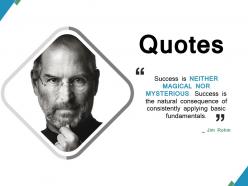
Quotes ppt powerpoint presentation file design templates





Try Before you Buy Download Free Sample Product
 Impress Your
 Audience
 100%
100% Editable
 Save Hours
 of Time


Encourage folks to establish common ground with our Quotes Ppt Powerpoint Presentation File Design Templates. It helps handle divergence of ideas.
People who downloaded this PowerPoint presentation also viewed the following :
Quotes ppt powerpoint presentation file design templates with all 5 slides:
Eliminate the cause of defeatist attitudes wit our Quotes Ppt Powerpoint Presentation File Design Templates. Identify the demoralising factors.
FAQs for Quotes ppt powerpoint presentation
Okay so first thing - make your quote pop with good fonts and contrast. Don't go crazy with the background though, I've seen people ruin perfectly good quotes with weird patterns or colors that make it impossible to read. You need the speaker's name, their title/company, maybe the date. Oh and whitespace is your friend - cramped text looks amateur. Throw in your brand colors but keep it subtle. Here's what I'd do: make like 2-3 different templates so you're not posting the same boring format every single time. Mix it up a bit, you know?
Honestly, good visual design is what makes quotes actually stick with people. Use big fonts and contrasting colors - I can't tell you how many presentations I've seen where quotes are just buried in tiny text that everyone ignores. White space is your friend here. Pick typography that matches the vibe too, like bold fonts for punchy quotes or something more elegant for formal ones. Oh, and those little design touches? Quotation marks, subtle borders, maybe a background shape to frame it. The whole point is getting people to actually stop and read the thing instead of glossing over it.
Dude, stick with readable fonts - Georgia or Playfair Display are solid choices. Times New Roman works too, though it's kinda boring. For modern vibes, try Lato or Open Sans. Seriously though, avoid those crazy script fonts. I made that mistake once and nobody could read anything lol. Bump your font size up to at least 18-24px, way bigger than regular text. Give it breathing room with extra line spacing. Italics look nice for the "- Author Name" part. Main thing? Your quote should pop but not scream at people. Test it on your phone first - that's where most people will see it anyway.
So basically you just swap out the industry stuff - like for schools, use "per student" pricing and curriculum development. Business clients want to see ROI metrics and implementation timelines. Wellness is all about sessions and membership tiers. The trick is talking their language with the right jargon. Visual styling matters too - corporate looks way different than wellness vibes. I'd start with one good base template, then tweak it for each industry. Honestly, once you nail the first one, the rest are pretty easy to customize.
Dude, color schemes can totally make or break your quotes. I'd go with contrasting colors so the text actually pops against the background - nothing worse than squinting at a slide trying to read some bland quote. You can highlight key phrases with accent colors too. Honestly, I've sat through way too many presentations where the quotes just disappear into the background. Such a waste! Try using your brand colors but strategically - bold for the main quote, then something softer for who said it. Oh, and definitely test it on your phone first because what looks good on your laptop might be awful on other screens.
Honestly, readable text is everything - I've made this mistake so many times! Make sure there's good contrast between your words and whatever's behind them. Font size matters too, especially on phones. What works well is putting a semi-transparent overlay on your image, or finding spots in the photo where there's empty space for text. Keep backgrounds pretty simple or blur them a bit. The quote needs to be the main focus, not fighting with a busy image for attention. Quick test: squint at it. Can you still read the text easily? Then you're good to go.
Ugh, don't make it a novel - too much info and clients just zone out. White space is your friend. Skip the generic copy-paste language too, makes people feel like they're just another number. Been there, super awkward. Make pricing stupid simple - confusing fees are deal killers. Always throw in next steps and deadlines so they know what's up. Oh and test it with a couple good clients first! They'll catch weird stuff you missed. Clean layout beats fancy every time.
Honestly, quotes are like having a celebrity endorse your argument - they bring instant credibility. Drop a solid quote from someone respected and boom, your point hits harder. I usually use them right after I make my main argument, kind of like "see? this famous person agrees with me too." You can also open with one to grab attention. Just don't go overboard - I've seen presentations that were basically quote salads and it got annoying fast. Pick one or two really good ones that actually match what you're saying. The timing matters more than cramming in tons of them.
Dude, quotes are seriously underrated. They make people trust you more because of that whole "authority bias" thing - we just believe famous voices over random content. But here's the thing that really gets me: quotes stick in your brain forever. I swear I can still quote stuff from presentations I saw like 3 years ago, but can't remember what I had for lunch yesterday lol. They also give readers those perfect "yes, exactly!" moments. Just don't be lazy about it - match the quote's vibe to what you're actually saying or it'll feel super forced.
Yeah, most modern quoting tools have drag-and-drop features for multimedia stuff. Videos are perfect for product demos - way better than just describing features. Interactive pricing calculators are honestly game-changers because prospects can mess around with different options themselves. Charts help visualize ROI comparisons too. One thing though - don't go crazy with huge files or everything loads super slow. I'd start small. Maybe one video or chart per template first, then add more once you see what works. Oh, and interactive elements feel like having a mini sales pitch built right in.
Honestly? Pre-designed templates are lifesavers - you'll get quotes done in minutes instead of spending forever on them. They come with all the legal stuff already baked in, which is nice because who remembers all that. But here's the thing - they're super generic. If you want to stand out or your business is kinda unique, custom ones give you way more room to make it yours. My buddy started with the basic templates just to get rolling, then tweaked them once he figured out his flow. I'd do the same - start simple, then customize later.
Oh this is actually super cool - you basically turn quotes into like chapter breaks for your story. Pick one quote that sets up your main problem first. Then drop in others that show different angles or the journey unfolding. It's way better than just rattling off data points, honestly. Each quote becomes its own little moment that pushes the narrative forward. The trick is making sure they flow together emotionally, not just logically. By the end, you've got this thread your audience can follow straight to whatever action you want them to take. Way more engaging than the usual presentation format.
Honestly, just go with Canva first. It's got tons of business quote templates and you can actually figure it out without wanting to throw your laptop out the window. Adobe InDesign is more powerful if you're feeling fancy, but why torture yourself right off the bat? Even Google Docs works fine for simple text quotes - I mean, not everything needs to look like a magazine spread. Start with Canva's free stuff, slap your logo on there, pick some colors that don't hurt people's eyes. Save that as your go-to template and you're golden for future quotes.
Honestly, I'd start with flexible layouts that work for both - super basic but saves you headaches later. Go with high contrast colors and stick to clean fonts like Arial. The tricky part? What looks amazing on screen can be trash when printed, so definitely test early versions on paper. I learned that one the hard way. Make your logo and contact stuff prominent but scalable. For digital versions, clickable links are great, but have backup plans like QR codes for print. Canva or InDesign work well since they export cleanly to PDF and web formats.
You gotta dig into what actually keeps them up at night - their real problems, not just surface stuff. I always look at old quotes that worked with similar companies (seriously, that historical data saves me every time). Match how they talk. If they're super formal, don't hit them with casual language. Study their industry jargon and throw it back at them - shows you're not just some outsider. Test different versions when possible. Short ones sometimes work better than long explanations, depends on the client. The goal? Make it feel like you sat down and wrote this just for them, not like you're running some template factory.
No Reviews