


RACI Chart Showing Responsibilities Of Project Team Strategic Plan For Project Lifecycle




Try Before you Buy Download Free Sample Product
 Impress Your
 Audience
 100%
100% Editable
 Save Hours
 of Time


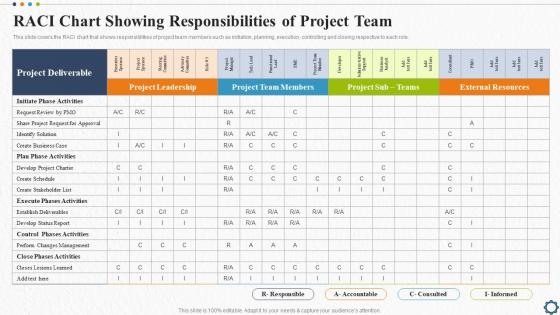
This slide covers the RACI chart that shows responsibilities of project team members such as initiation, planning, execution, controlling and closing respective to each role.
People who downloaded this PowerPoint presentation also viewed the following :
RACI Chart Showing Responsibilities Of Project Team Strategic Plan For Project Lifecycle with all 6 slides:
Use our RACI Chart Showing Responsibilities Of Project Team Strategic Plan For Project Lifecycle to effectively help you save your valuable time. They are readymade to fit into any presentation structure.





FAQs for RACI Chart Showing Responsibilities Of Project Team Strategic Plan
So a RACI chart is this matrix thing that breaks down who's doing what on your project. Four roles: Responsible (actually does the task), Accountable (owns it), Consulted (gives input), and Informed (just needs to know what's happening). Honestly? It's pretty brilliant for stopping those awkward "wait, wasn't that your job?" conversations. Map out each task, assign everyone their role, and boom - no more confusion about who's supposed to be doing what. I always create one at the start now. Saves so much headache later when things get hectic and people start forgetting responsibilities.
Okay so RACI charts are actually pretty useful - you just assign letters to people for each task. R means they're doing the actual work, A means they own it (and there can only be one A per task, which is clutch), C means you need their input, and I means keep them posted. Set it up like a grid with tasks down the side and people across the top. Honestly, it sounds kind of corporate-y but it really does stop those "wait, I thought you were handling that" disasters. I've seen teams waste so much time on confusion that could've been avoided. Worth trying at your next project meeting for sure.
So basically you list your tasks down the left, team members across the top, then fill in the grid with RACI codes. R is who actually does the work, A is who owns the final outcome, C means you need their input, and I is just keeping people in the loop. The real nightmare is always figuring out who gets to be Accountable - everyone either wants it or nobody does, there's no in-between. But honestly, once you've got it mapped out, the confusion just... disappears? Pick your messiest project first and start plugging people in. You'll probably have to move some around, but that's normal.
Yeah totally - RACI charts are super flexible. Small projects? Just hit the main decisions and deliverables with your core people. Bigger ones get messy fast, so I usually break them down by phase or team so you don't end up with some giant spreadsheet from hell. Honestly, the biggest mistake is trying to RACI everything. Skip the tiny stuff. Focus on where people always get confused - like handoffs, approvals, the big deliverables. Those are the real troublemakers. Start simple and only add detail if you're actually seeing people bump into each other or things getting stuck.
Oh man, the classic mistakes? First off, people get way too vague with who's doing what - like listing "team" as responsible. Useless. Then they put multiple people as "Accountable" which is honestly the worst thing you can do. One person per task, that's it. Otherwise everyone just points fingers when stuff goes wrong. Don't go overboard with details either or you'll be updating that stupid chart forever instead of actually working. Keep the roles super clear from the start. My advice? Make a basic version first, see how it works, then tweak it.
Honestly, I'd use RACI charts when projects get messy and nobody knows who's doing what. You know those multi-department things where everyone's confused about ownership? Perfect for that. New teams love them too - gives everyone clarity upfront. External partners especially need this stuff spelled out or you'll spend forever explaining roles. Oh, and product launches are chaos without clear accountability. If you're constantly fielding "wait, whose job is this?" questions, just make the chart already. Pro tip though - start small with key decisions only. Don't overcomplicate it from day one.
RACI charts are basically your project lifesaver - they map out who's Responsible, Accountable, Consulted, and Informed for each task. No more "wait, was I supposed to handle that?" disasters. Everyone knows their exact role upfront. Game changer, honestly. You won't have people stepping on toes or missing crucial input from the right stakeholders. Try making one for your next project and watch how much smoother things go. Communication becomes way less messy when expectations are clear from day one. I learned this the hard way after too many confusing meetings where nobody knew who was actually making decisions.
Honestly, just use whatever you've got already - Excel or Google Sheets work perfectly fine. I mean, you literally just need a grid. Sometimes I'll even start by sketching one out on a whiteboard first, especially when brainstorming with the team. If you want something fancier later, tools like Asana or Monday.com have RACI templates built right in. Visio's good too if you're into that visual stuff. But here's the thing - don't overcomplicate it at the start. Begin with a basic spreadsheet, then maybe upgrade if you need better sharing features or it needs to connect with other project tools you're using.
Oh, RACI charts are everywhere in project-heavy stuff. Software teams swear by them for product releases - saves so much confusion about who's coding versus who's just reviewing. Construction is probably where I see them most though, coordinating architects and contractors and all that. Healthcare uses them too for patient protocols. Manufacturing, consulting... honestly most industries with cross-functional teams. My old IT job used them religiously and it actually worked. If you've got multiple people working toward the same goal, try one out on your next project. Worst case, you waste an hour making a chart.
Honestly, most people just make the RACI chart and then it sits there collecting dust. Don't do that! Actually use it in your meetings - when someone's confused about who decides what, literally point to it and be like "nope, that's Mike's call." Update your project tools so the right people get pinged automatically. I've seen so many teams forget these things exist after like two weeks. Also review it when things change mid-project because roles always shift around. The whole point is making it guide real decisions, not just look official in some folder somewhere.
So RACI has four roles - Responsible, Accountable, Consulted, Informed. Pretty straightforward. RASCI throws in "Supportive" for people who help out but aren't the main ones doing the work. RAPID's completely different though, it's all about fast decisions with Recommend, Agree, Perform, Input, Decide. Honestly? Just stick with regular RACI unless your org is super complex. I've seen teams get bogged down trying to figure out who's "supportive" vs "responsible" - it gets messy fast. Start simple and if you keep running into situations where you're like "wait, what about Bob who kinda helps sometimes?" then maybe look at the others.
Honestly, don't overthink it - just use RACI charts for bigger stuff like features and epics, not every little user story. That'd drive you crazy. During sprint planning, they're actually pretty useful for figuring out who needs to be looped in, especially when you've got multiple teams in the mix. Keep yours super lightweight though. When roles shift between sprints (and they will), update it. Oh, and definitely bring it up in retros if people were confused about who was supposed to do what. I'd start with just your major deliverables first and see how it goes.
Honestly, I update mine whenever big stuff changes - new team members, scope creep, role switches, that kind of thing. Quick monthly check works too, otherwise I totally forget about it. Get your key people involved when you're making changes so they can actually validate what makes sense. Then just shoot everyone an update about what's different. Oh and definitely write down why you changed things - future you will thank you when someone asks "wait, why is Sarah doing this now?" The whole point is staying ahead of the chaos instead of scrambling when nobody knows who's supposed to be doing what.
So here's what I've seen work really well - do a RACI review with your team and watch for red flags. Like when Sarah's somehow "Responsible" for literally everything (recipe for disaster, trust me). Or when three different people think they're "Accountable" for the same decision. Those conversations always bring up the real issues - who's drowning, who feels sidelined, where people are accidentally stepping on each other. The good stuff happens when you actually shift things around based on people's strengths. Run a quick retrospective after your next project to see if it helped.
Honestly, the best way to know if your RACI chart is actually working is tracking decision speed - are things moving faster now? I'd also watch how often people bug you asking "wait, who's supposed to do this?" Project delays from unclear ownership are the worst, so definitely track those. Communication gets way more efficient too - less pointless email chains and redundant meetings. Your team surveys on role clarity help, but sometimes people just tell you what they think you want to hear. Pick 2-3 metrics that fix your biggest headaches from before and stick with those.
-
Perfect template with attractive color combination.
-
Professionally designed slides with color coordinated themes and icons. Perfect for enhancing the style of the presentations.