

Real Estate Company Brochure Trifold




Try Before you Buy Download Free Sample Product
 Impress Your
 Audience
 100%
100% Editable
 Save Hours
 of Time


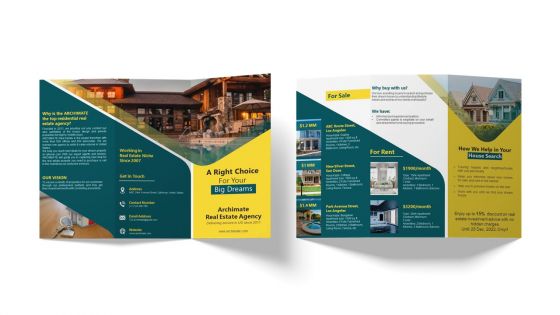
Advertise your real estate company by using our visually appealing Real Estate Company Trifold Brochure Template. Use this pamphlet presentation template to provide information about the company overview, including its vision. With the assistance of the Real Estate Company brochure PowerPoint theme, you can talk about properties for sale across the United States along with their details such as house type, apartment size, price, and amenities. Employ this professionally designed PPT brochure to showcase unique selling points such as informed and experienced realtors and committed agents to streamline the home buying process. Further, this brochure covers rental apartments, company assistance in searching for a house, and contact details such as an address, number, email address, and website link.
People who downloaded this PowerPoint presentation also viewed the following :
Real Estate Company Brochure Trifold with all 1 slides:
Use our Real Estate Company Brochure Trifold to effectively help you save your valuable time. They are readymade to fit into any presentation structure.
FAQs for Real Estate
Start with the basics - price, square footage, bedrooms/bathrooms. Good photos are everything though, seriously. Blurry phone pics will tank your listing so fast. Mention neighborhood perks like schools or walkable spots. Don't skip the boring stuff either - parking, lot size, recent updates. A quick neighborhood vibe description helps people picture living there. Oh, and if you've got a nice kitchen or master, definitely highlight that. Keep it punchy but detailed enough. Make sure your contact info stands out, maybe throw in a QR code for tours.
Honestly, just pick whatever makes that house special and hammer it home. Get killer photos of the best stuff - that gorgeous kitchen or whatever backyard oasis they've got going on. Bold headings work great for breaking up sections, especially if you're highlighting original hardwood or smart home features. I always think about it like this: what would actually make me pick this place over the house down the street? Clean layout is key, but throw in some callout boxes or little icons to really make those selling points pop. Oh, and don't forget location perks like good schools if they've got them.
Honestly, you can't go wrong with solid exterior shots and good interior pics of the main rooms. Aerial shots are great too - shows the whole neighborhood context. Just make sure everything's well-lit and crisp quality. I'd definitely spring for a professional photographer if you can swing it. Floor plans are clutch because people want to visualize the flow before they even visit. Lifestyle shots can work but don't get too cheesy with the staged family stuff, you know? Oh, and put your best exterior shot right on the cover - that's what hooks them first.
Oh man, colors really do matter for listings! I always go with blues, grays, and whites as my base - they scream trustworthy and classy. Learned this lesson the hard way with this awful neon green theme I tried once (what was I thinking?). Warm touches like soft gold work amazing for cozy family homes. Cool tones? Perfect for luxury stuff. You'll want to match whatever vibe the property has and who's gonna buy it. Honestly, bright flashy colors just make places look cheap. Test out a couple options first before you commit!
Lead with your best feature - that's what grabs people right away. Ditch the tired words like "cozy" and "charming" (seriously, they're everywhere). Instead of just listing features, show the benefit - granite countertops become "granite countertops perfect for hosting dinner parties." Paint a picture so buyers can imagine themselves there, but keep it tight. Don't forget the basics though - square footage, bedroom count, cool amenities. I always tell people to end with urgency, something like "book your showing today." Works way better than being all wishy-washy about it.
Honestly, just work those market trends into your property descriptions naturally. Throw in stats like "inventory down 15% this quarter" or "average days on market: 12" - creates instant urgency. Focus on what's hot right now too: home offices, outdoor spaces, energy upgrades. Some agents I know do these sick infographics showing neighborhood price jumps. But here's the thing - don't just dump random data everywhere. Make it actually relevant to the specific house you're selling. Oh, and definitely cite your sources because buyers will Google everything nowadays and call you out if something's off.
Typography totally makes or breaks your brochure design. Choose fonts that actually fit your brand - serif feels fancy and traditional, sans-serif looks clean and modern. Use different sizes strategically so people can scan fast. Big bold text for prices, smaller stuff for the details. I swear, nothing's worse than amazing photos paired with Comic Sans or something equally tragic. Stick to maybe 2-3 font families tops - more than that gets messy. Oh, and definitely print a test page first! What looks good on screen doesn't always translate to paper. Trust me on that one.
Okay so definitely make them mobile-friendly since everyone's gonna check on their phones anyway. High-res images are key but keep files under 5MB or they'll take forever to load. PDFs are solid, though I've noticed flipbooks get way more engagement - there's something satisfying about swiping through them. Make sure your text isn't tiny on small screens (learned that one the hard way). Clickable links are clutch - add them for virtual tours, contact stuff, social media. Don't just attach to emails though, embed them directly for better open rates. Test on a few different devices first!
Honestly, just go with high-res PDFs or InDesign files for anything you're printing - your text will look way sharper. Digital's where it gets fun though. PDFs are solid for email, but interactive ones with clickable stuff? Those are pretty sweet for online listings. I mean, JPEGs work for social posts but they always look kinda compressed to me. Your website and MLS uploads should definitely be PDFs since they won't get weird on different phones or whatever. Oh, and start with your print version first, then go digital. Trust me on this one - doing it backwards is such a pain.
Don't dump all your testimonials in one spot - spread them around the brochure instead. Get specific ones with real numbers like "sold in 3 days" or "$15K over asking." I pull the best part and make it a big headline, then put the full quote below. Client photos help too if they're cool with it (faces = way more believable). Put your strongest one right on the front where everyone sees it first. Then scatter 2-3 others near your contact stuff and service descriptions. Short punchy quotes work better than long rambling ones, trust me.
Dude, actual property photos beat stock images every single time. Buyers want to see the real space they're considering - the actual lighting, layout, all of it. Stock photos scream "lazy agent" and people can tell they're fake instantly. That kills your credibility fast. Real photos let buyers picture themselves living there, which is huge for getting them emotionally invested. Honestly? Just hire a good photographer. Yeah it costs money upfront, but your conversion rates will thank you. I learned this the hard way when I tried cutting corners once.
Get professional photos first - seriously, lighting makes or breaks everything. Your headline can't be boring like "Beautiful Home." Try "Chef's Dream Kitchen with Mountain Views" instead. I've seen way too many generic brochures that just disappear in the pile. Tell a story about the neighborhood or mention stuff your competition ignores. Oh, and spend money on decent paper stock. Sounds weird but people notice when it feels cheap. Don't forget the obvious - give them a clear next step like scheduling a showing or checking your website.
Definitely put the address and price right up front - that's literally the first thing people look for. Then you want your best exterior shot taking up most of the space. Add the key details like "4BR/3BA" or whatever makes it special. Honestly? Skip putting your headshot on the cover - I know everyone does it but it's just clutter. Save your contact info for the bottom in smaller text. The whole point is getting them to actually open it, so don't overthink the text. Let that amazing photo sell itself. Would you pick it up if you saw it?
Dude, interactive stuff is a game changer for digital brochures. Virtual tours are huge - way better than static photos. Clickable floor plans work great too, plus mortgage calculators that actually help buyers crunch numbers. Some agents throw in neighborhood maps with restaurants and schools marked, which honestly makes total sense. People spend way more time engaging when they can click around and explore. It builds that emotional "I could live here" feeling you need. Oh, and photo galleries where they can flip through at their own speed. Start with just a virtual tour and you'll see engagement jump pretty quick.
Don't cram a ton of text on there - photos should do most of the work anyway. Those grainy, dark pictures will kill you every time (I've seen so many awful bathroom shots, it's painful). Skip the generic "charming" and "cozy" BS. Focus on actual features people want. Double-check your contact info and square footage because nothing looks worse than wrong details. Keep it simple with maybe 3-5 main selling points. Oh, and always tell them what to do next - call you, visit the open house, whatever.
-
Unique research projects to present in meeting.
-
I am glad to have come across Slideteam. I was searching for some unique presentations and templates for my business. There are a lot of alternatives available here.