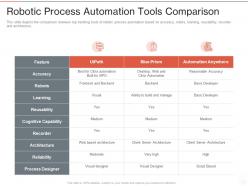
Robotic process automation tools comparison ppt powerpoint presentation example file
Try Before you Buy Download Free Sample Product
Audience
Editable
of Time
Our Robotic Process Automation Tools Comparison Ppt Powerpoint Presentation Example File are topically designed to provide an attractive backdrop to any subject. Use them to look like a presentation pro.
People who downloaded this PowerPoint presentation also viewed the following :
Robotic process automation tools comparison ppt powerpoint presentation example file with all 2 slides:
Use our Robotic Process Automation Tools Comparison Ppt Powerpoint Presentation Example File to effectively help you save your valuable time. They are readymade to fit into any presentation structure.
FAQs for Robotic process automation tools comparison ppt powerpoint
So RPA's main thing is speed and accuracy - it crushes repetitive tasks way faster than people and cuts out those annoying manual errors. Your team gets to ditch the boring data entry stuff for actual interesting work. ROI's usually decent since you're saving on labor while productivity goes up. Oh, and these bots work around the clock without needing breaks or calling in sick, which honestly feels a bit dystopian but whatever. I'd start by looking at your most repetitive, rule-based processes first - that's where you'll see the biggest impact right away.
So RPA tools basically hook into your current systems through APIs, database connections, and UI automation. They don't need you to rip apart everything you've already built - which is honestly a lifesaver. Tools like UiPath connect using standard protocols. Your legacy systems stay put. The bots can interact with web apps, desktop software, databases, even those ancient mainframes by copying what humans do or making direct system calls. It all happens at the surface level, not buried deep in your architecture. First step? Map out which systems your bot needs to access, then see what connection options your platform offers.
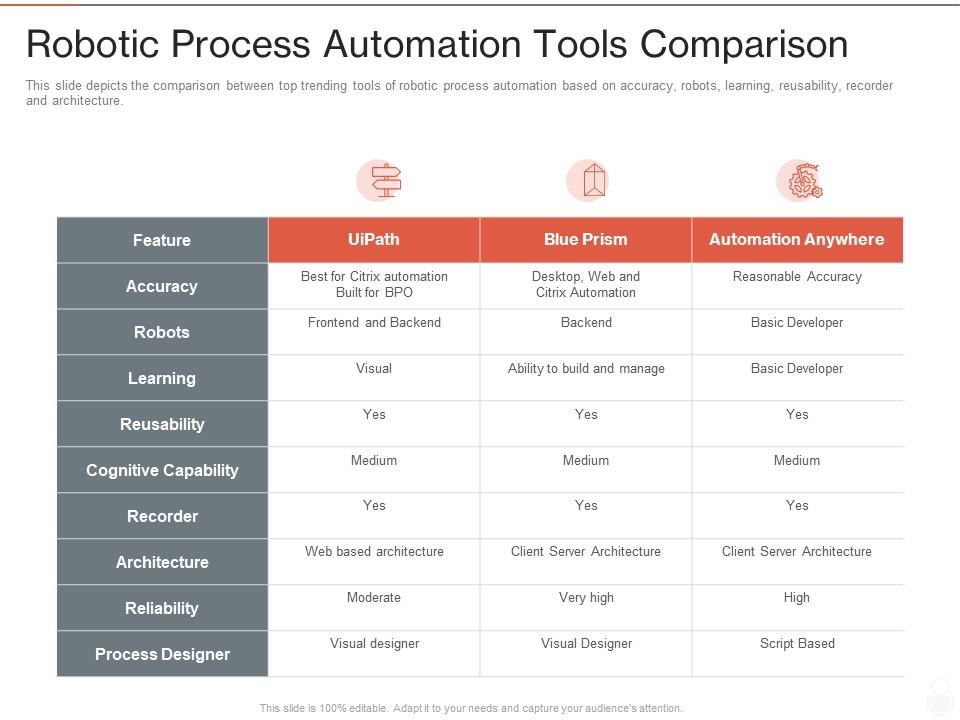
So you've got your big three: UiPath, Automation Anywhere, and Blue Prism. UiPath's super user-friendly with a huge community behind it. Blue Prism? That's more for big companies who need rock-solid security. Automation Anywhere falls somewhere between them with decent cloud features. Microsoft Power Automate is solid too if you're already using their stuff - though honestly, there are like a million options these days including newer ones like Robocorp. I'd just grab free trials of UiPath or Power Automate first. Get a feel for what works before you commit to anything expensive.
First thing - map out what you're doing now and find the boring, repetitive stuff that follows the same rules every time. Those are perfect for RPA. Your team might need some training to actually run these bots though, so factor that in. The weird part nobody talks about? People get really anxious about robots doing their work. Deal with that early or it'll bite you later. Make sure your IT setup can actually handle this integration without breaking everything. Oh, and definitely start small - pick something safe but noticeable so you can show it works before going crazy with it.
Look for stuff your team does over and over - data entry, processing invoices, generating reports, that kind of thing. High-volume tasks work best. You want the boring, manual stuff that follows the same steps every time. Honestly, anything that makes people zone out is probably perfect for RPA. It needs to be pretty straightforward though - structured data, clear rules, not much creativity required. Exception handling gets tricky fast. Start by writing down your most mind-numbing daily tasks and see which ones never really vary. Those are your goldmine.
Honestly, most companies mess up by going too complex right away instead of keeping it simple. Employee pushback is huge too - people freak out thinking they'll get replaced. Legacy system integration? Total nightmare, especially with older systems that hate talking to new tech. Oh, and don't get me started on governance headaches - you need solid rules for bot security and management or things get messy fast. My advice? Pick boring, high-volume stuff first. Get those easy wins under your belt. Save the fancy automation for later when you actually know what you're doing.
Honestly, RPA is pretty solid for security - way better than having people manually handle sensitive stuff all day. Bots don't get distracted or make those end-of-day mistakes we all do. They stick to their programming and track everything automatically, which auditors actually love (shocking, I know). The cool part is you get perfect audit trails showing exactly who did what and when. For compliance, they're great because the same process runs identically every time. I'd say start with your riskiest repetitive tasks first - that's where you'll notice the biggest difference right away.
Honestly, don't get distracted by all the flashy features - figure out what you actually need first. Map your current processes and where things are breaking down. UiPath is powerful but you'll need someone who can code, whereas other platforms are way more user-friendly. Compatibility with your existing systems is huge (learned this the hard way at my last job). Test everything with a small pilot project using your real data before you sign anything. Also check what their support is like and how much it'll cost when you want to scale up. The licensing fees can get pretty crazy if you're not careful about reading the fine print.
Look, RPA wins hands down for speed - you're seeing results in months, not years like traditional stuff. Most companies hit 200-300% ROI in year one since bots never sleep or need bathroom breaks (honestly wish I could say the same). Six Sigma and those lean projects? You're waiting over a year just to see if they worked. Here's the thing - RPA just automates what you already do, while other methods make you rebuild everything from scratch. My advice? Start with whatever boring, repetitive task your team hates most. That's your goldmine.
So basically AI turns your RPA bots from mindless button-clickers into something that can actually think. They can handle messy stuff like handwritten invoices or weird email formats instead of breaking when things don't match the template perfectly. It's like OCR but way smarter - reads context, makes decisions, learns from mistakes over time. Honestly, the learning part is pretty impressive. I'd start with document processing or routing customer emails, that's where you'll notice the difference immediately. Those are slam dunks for AI integration.
So RPA is pretty solid for customer service - it handles all the boring stuff your agents hate doing anyway. Password resets, ticket routing, data pulls from systems. Basic requests get resolved without anyone touching them. Your team can actually work on problems that matter instead of clicking through the same screens all day. Response times get way better too. I'd honestly start small though - just pick your most annoying manual process first and automate that. Once you see how much time it saves, you'll want to automate everything.
Track the basics first - time saved, cost cuts, error rates. But honestly? Employee happiness is where you'll see if it's really working. Are people actually doing better work now or just finding new ways to complain? Processing speed and volume matter too, obviously. Your bots better stay online though - nothing worse than automation that breaks constantly. I'd pick maybe 4 metrics max that match whatever you were trying to fix originally. Stick with those for 6 months at least. Oh, and don't forget maintenance costs because those can sneak up on you.
Look, most people worry RPA will kill jobs, but it's not that simple. Your team stops doing boring stuff like data entry and starts doing actual thinking work - analysis, talking to customers, solving real problems. Yeah, some positions might disappear, but honestly most folks just move to better roles. The trick is being upfront about changes from day one. Don't spring it on people. Figure out what you can automate first, then train your team for their new responsibilities. I've seen this go really well when companies aren't shady about it.
So first thing - figure out which data privacy laws you're dealing with. GDPR, CCPA, whatever's relevant to your industry. Your bots will touch sensitive stuff, so compliance around processing and storage is huge. Audit trails are another big one. Regulators are obsessed with tracking everything (honestly can't blame them). Make sure your RPA logs properly for reporting. Oh, and if you're automating jobs, check employment laws - some places require notifications before you replace people. Start by mapping what data the bots actually interact with, then work backwards to see which regulations apply.
Honestly, RPA is perfect for this. It handles all the boring, repetitive stuff your team probably hates doing anyway. You don't have to tear down your current systems either - it just sits on top and plays nice with everything. Quick wins right out of the gate, which is huge for getting buy-in from leadership. Your people can actually focus on interesting work instead of data entry hell. The automated processes give you solid data on what's working too, so you know where to go next. I'd pick one simple process first and see how it goes.
-
The Designed Graphic are very professional and classic.
-
Awesome use of colors and designs in product templates.
-
Use of different colors is good. It's simple and attractive.
-
Easily Understandable slides.
-
Amazing product with appealing content and design.
-
Thanks for all your great templates they have saved me lots of time and accelerate my presentations. Great product, keep them up!
-
Helpful product design for delivering presentation.
-
Presentation Design is very nice, good work with the content as well.