

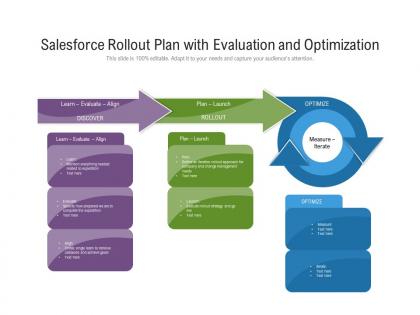
Salesforce rollout plan with evaluation and optimization




Try Before you Buy Download Free Sample Product
 Impress Your
 Audience
 100%
100% Editable
 Save Hours
 of Time


Our Salesforce Rollout Plan With Evaluation And Optimization are topically designed to provide an attractive backdrop to any subject. Use them to look like a presentation pro.
People who downloaded this PowerPoint presentation also viewed the following :
Salesforce rollout plan with evaluation and optimization with all 2 slides:
Use our Salesforce Rollout Plan With Evaluation And Optimization to effectively help you save your valuable time. They are readymade to fit into any presentation structure.
FAQs for Salesforce rollout plan with
So you've got discovery/planning first - mapping your current stuff and figuring out what you actually need. That part's gonna drag longer than you think, just warning you now. Next comes data migration and configuring Salesforce to work with your workflows. Don't forget thorough user training! Testing is huge - seriously, don't cut corners there. After go-live, budget time for support because people will definitely have questions. Oh, and get your end users involved early so they're not fighting you on changes later. Makes everything smoother.
Dude, first thing - map out what you're actually doing now and what you want Salesforce to handle. How many users? Need fancy automation or just basic stuff? What tools do you already use that need to connect? Here's the thing - most small teams go crazy and think they need Enterprise edition. Professional honestly works fine for most people. Budget matters too because those licenses get expensive real quick when you're growing. Start with a lower edition since upgrading is easy, but downgrading? Total nightmare. Oh, and definitely demo whatever you're considering first - don't just guess based on feature lists.
Oh man, data migration is going to kick your butt - it's always messier than you think. People hate changing how they work, so expect major pushback on adoption. Scope creep will try to destroy you too. Integration with your current tools? Nightmare fuel. Plus everyone and their mom will want custom features. Here's what actually works: clean up your data first (seriously, don't skip this), throw money at change management, and stay laser-focused on your original scope. I learned this the hard way on my last project - should've listened to my own advice!
Dude, you absolutely need stakeholders involved from the start. They know the actual business processes you're fixing. Skip them and you'll build something that works on paper but bombs in real life. I've watched so many IT teams crash because they built what *they* thought users wanted instead of asking. Get stakeholders in workshops, let them mess with prototypes. If they don't feel heard during design, they'll just refuse to use it later. Trust me - their buy-in makes or breaks everything.
Data migration makes or breaks everything, seriously. Map your current fields to Salesforce objects first, then hunt down all those duplicate contacts and messy data. Test everything with your actual users before you flip the switch - I learned this the hard way on my last project. The worst part? When people can't find their old client info after go-live. Start your data cleanup way earlier than you think, and honestly, have a backup plan ready. Companies always rush this step and regret it later.
Honestly, user adoption is all about confidence - people need to feel like the system actually helps them, not just creates more work. Training's huge but don't just show button-clicking. Demonstrate how Salesforce makes their actual jobs easier. Find your power users first and turn them into cheerleaders for everyone else. Quick reference cards are lifesavers too. Expect pushback though - it's totally normal. Celebrate small wins loudly, stay patient with complainers, and here's the key part: actually listen to feedback and make changes. When people see you're responsive to their gripes, they'll give it a real shot. I've watched too many rollouts crash because leadership ignored user input.
First thing - map out your data flows and figure out what actually needs to connect to Salesforce. Don't integrate everything just because you can (learned that the hard way). MuleSoft and Data Loader are solid for most stuff. APIs work great, but honestly? Document everything while you build it. You'll thank yourself later when you're staring at custom mappings wondering what the hell you were thinking. Test small first. Get the actual users involved early - they'll spot problems you totally missed. Oh, and plan for two-way sync if you need real-time updates.
Honestly, Salesforce's lead scoring is clutch - it'll automatically flag your hottest prospects so you're not wasting time on dead ends. The pipeline tools are solid too, gives you actual visibility into where your deals are at. Set up some automation workflows and they'll nurture leads while you sleep (seriously wish I'd done this sooner). Mobile app's decent for updating stuff on the road. Oh and the reporting catches bottlenecks you'd probably miss otherwise. Just don't go crazy trying to use every feature day one - pick like two things and get those dialed in first.
Honestly, Trailhead + actual practice in your real system works best. Trailhead's free and pretty decent for the basics. But people really get it when they're clicking around with your company's actual data - way better than generic examples. I'd train a couple power users first so they can help everyone else later. Saves you from being the only go-to person, which gets old fast. If you've got budget, maybe bring in a consultant for the kickoff training? Start with what everyone needs to know, then get specific based on what each team actually does day-to-day.
Dude, track the obvious stuff first - sales cycles, conversion rates, data quality vs. before Salesforce. But honestly? None of that matters if your team hates using it. Check login stats and whether people are actually filling out fields completely. I'd also ask around about what's annoying them - sometimes it's tiny things that are easy fixes. Oh, and see which features they're ignoring entirely. Set up monthly tracking so you can catch problems early. The best system is useless if nobody wants to touch it.
So you can totally customize Salesforce for whatever industry you're in. Healthcare folks add patient modules and HIPAA stuff. Financial services do loan tracking and regulatory reports - honestly that sounds boring but whatever works. Manufacturing loves the production scheduling features. Retail gets inventory and POS integration. The trick is figuring out your specific pain points first, then building around those instead of just cramming everything into the basic setup. Don't try to force standard Salesforce into your weird workflow. Make it work for you, not the other way around.
Honestly, Agile makes Salesforce implementations way faster. You break everything into 2-4 week sprints instead of one massive project. Your team gets working features right away to test and give feedback on - no waiting months just to find out something's completely wrong. Way less stressful than those old waterfall methods where you're basically flying blind until the end. The feedback happens constantly, so you catch problems early and fix them fast. Plus you go live sooner since you're already building real stuff. I'd say expect it to be like 20-30% faster than traditional approaches. My last project actually finished ahead of schedule for once.
Start with permissions and user roles - that's your base layer. MFA is non-negotiable, even when people whine about it. Field-level security matters for stuff like SSNs and salaries, plus encrypt whatever needs it. Sharing rules can bite you if they're sloppy, so double-check those. Connected apps are sneaky data leakers, audit them regularly. Honestly, I'd grab a security checklist and just work through it step by step during each phase. Way less overwhelming that way.
Honestly, just start by figuring out what you're actually doing now - what works and what's a total mess. Map it all out first. Don't jump straight into customizing everything because those custom builds will haunt you later (learned that the hard way). Use Salesforce's built-in stuff first - workflows, validation rules, all that. The trick is adapting your processes to work WITH Salesforce instead of fighting it. You'll still keep what makes your business special, just make it play nice with the platform. Oh, and document everything as you go. Future you will thank you when you're not trying to remember why you set something up a certain way.
So definitely track your sales cycle length, conversion rates, and user adoption - those three will tell you everything. Revenue per rep matters too, obviously. Data quality improvements are huge but everyone forgets to measure them upfront, which is annoying because then you can't prove the impact later. Time saved on admin stuff, customer retention, pipeline accuracy - all good indicators. Honestly though, you gotta baseline this stuff before launch or you won't know if it's actually working. Set up some basic dashboards early so you can watch the story play out over 6-12 months.
No Reviews