

SAP Analytics Cloud Dashboard For Product Sales Analysis Business Intelligence Strategy For Data Driven Decisions




Try Before you Buy Download Free Sample Product
 Impress Your
 Audience
 100%
100% Editable
 Save Hours
 of Time


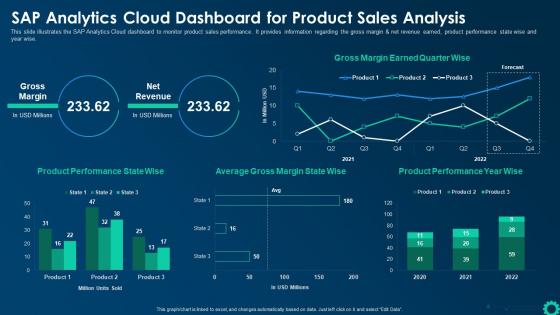
This slide illustrates the SAP Analytics Cloud dashboard to monitor product sales performance. It provides information regarding the gross margin and net revenue earned, product performance state wise and year wise.
People who downloaded this PowerPoint presentation also viewed the following :
SAP Analytics Cloud Dashboard For Product Sales Analysis Business Intelligence Strategy For Data Driven Decisions with all 7 slides:
Use our SAP Analytics Cloud Dashboard For Product Sales Analysis Business Intelligence Strategy For Data Driven Decisions to effectively help you save your valuable time. They are readymade to fit into any presentation structure.






FAQs for SAP Analytics Cloud Dashboard For Product Sales Analysis Business Intelligence Strategy For
So SAP Analytics Cloud basically smooshes BI, planning, and predictive stuff into one platform instead of making you deal with like 3 different tools. Works great with SAP obviously, but third-party connections are decent too. The planning features actually blow away most regular BI tools that just do basic reporting. Building dashboards is pretty user-friendly once you figure out the interface (which is... quirky at first, not gonna lie). I'd definitely try their free trial - see if having everything in one place actually makes your life easier or if you're better off with what you've got now.
Check out Smart Predict - it's SAC's forecasting tool that's surprisingly user-friendly. Upload your historical data and it automatically finds patterns to predict sales, demand, whatever you need. No data science background required, which is honestly a relief. The ML does most of the work for you. If you need something more sophisticated later, you can always connect to SAP's advanced analytics stuff. I'd start with the predictive scenarios in your planning models though. They're dead simple to configure and you'll see results right away.
SAC data integration is a total game changer - it pulls all your data sources together so you're not jumping between systems like a maniac. Real-time feeds keep everything current automatically. Once it's set up, creating reports becomes drag-and-drop instead of the usual spreadsheet nightmare. The key is starting with your most-used data sources first. Don't try to connect everything at once (learned that the hard way). Your dashboards will actually stay accurate without constant babysitting, which honestly makes the whole platform worth it.
Yeah so SAC pulls data straight from your sources like S/4HANA or BW through live connections and scheduled refreshes. Pretty solid refresh rates - not instant but honestly close enough for most stuff. Your dashboards update automatically when new data comes in, which is perfect for tracking KPIs or daily ops. Oh and definitely set up alerts for your key metrics! Way better than constantly refreshing dashboards like I used to do. You'll get pinged when something actually important changes instead of babysitting the screen all day.
First thing - get all your data in one place with solid governance rules. Otherwise you'll have chaos. Train your people properly because SAC has so many features that just sit there unused (drives me crazy honestly). Build reusable templates instead of letting everyone make their own random dashboards. Set up automated refreshes and optimize your models regularly. Oh, and definitely start with small pilot projects first - don't go crazy trying to do everything at once. Scale up based on what actually moves the needle for your business.
Honestly, the machine learning stuff in SAC is pretty sweet - it finds patterns you'd miss completely. Smart Predict and Smart Insights handle the technical work so you don't need to be some data wizard. It'll catch weird trends, predict next quarter's numbers, and actually explain why your metrics are acting up. The automated insights are clutch - super easy to turn on and they work right away. Oh, and the anomaly detection is solid too, flags anything unusual as soon as your data shifts. I'd definitely start there first.
Oh nice, SAC's collaboration stuff is actually pretty solid. You can share dashboards with specific people or whole teams, and there's this commenting feature where you can tag stuff right on the charts - super helpful for discussions. Multiple people can edit stories at once without breaking anything, which honestly surprised me the first time I tried it. Plus you can automate data refreshes and send reports on schedules so nobody's working with old info. I'd start by setting up shared folders for whatever dashboards your team uses most. Gets everyone used to the flow.
Start with data lineage docs and nail down who can access what right away. Naming conventions are clutch - you don't want to deal with "Sales_Report_Final_v2_ACTUAL_Final" nightmares later. Get data stewards for each area to validate stuff and handle access requests. SAC's quality features will catch problems early, which honestly saves so much headache. Set up approval workflows for new data connections. Oh, and don't try to govern everything at once - pick your most critical datasets first then expand from there. Way less overwhelming that way.
Honestly, SAP Analytics Cloud is pretty great for this. Your execs get real-time dashboards instead of waiting around for those monthly reports that are already outdated. The predictive stuff actually works well - helps you see what's coming so you're not constantly playing catch-up. Teams can collaborate right in the platform too, which cuts down on all those back-and-forth emails (thank god). Just focus on setting up dashboards with whatever KPIs your C-suite actually cares about. You'll be surprised how much faster they start making decisions when they can see live data and spot trends as they're happening.
So SAC's got these cool interactive widgets - drill-down charts, dynamic filters, input controls. Users can actually dig into the data themselves instead of staring at boring static stuff. Conditional formatting and tooltips help too. Honestly, I'm obsessed with clickable elements because people love poking around dashboards. Story builder creates nice flows between pages (definitely use that). Oh and mobile responsiveness is huge since everyone checks these things on their phone now. My advice? Figure out your audience's top 3 burning questions first, then build all the interactive bits around those. Makes the whole thing way more focused.
Honestly? Data integration is gonna be your worst nightmare - nothing connects as smoothly as those slick sales demos suggest. People hate learning new systems too, so you'll get pushback there. My advice: pick a small group to test it first. Training is huge - like, really invest in it upfront or people will just give up after five minutes of frustration. Make sure your IT team's ready to help with all the connection headaches. Oh, and don't be tempted to switch everything over at once. That's a recipe for disaster.
Yeah, SAP Analytics Cloud's security is actually pretty solid. They encrypt everything - data moving around and stored data. Role-based access is built in, so you control who sees what. Compliance-wise, they've got GDPR, SOX, HIPAA covered, which honestly saves you from those nightmare audit situations. The whole thing runs on certified cloud infrastructure with full audit trails. You can set up data governance policies and auto-mask sensitive stuff too. Definitely check their Trust Center docs though - certifications vary by region and I'd hate for you to assume something that doesn't apply to your setup.
Manufacturing and retail companies are seeing huge wins with SAC right now. Their supply chains are so complex they desperately need that real-time visibility - production schedules, inventory, all of it. Financial services loves it too, mainly for budgeting and risk planning stuff. Healthcare's getting into it for patient flow analytics, which makes sense I guess. Honestly though, it's pretty much everywhere at this point. If you're thinking about it, definitely check out what other companies in your industry are actually doing first. Way better than just going in blind.
Track both hard and soft benefits for SAP Analytics Cloud ROI. Start with the easy stuff - reduced reporting time, fewer manual processes, lower IT costs. Then look at productivity gains from faster decisions and better data access. Time-to-insight is honestly the metric executives care about most. User adoption rates matter too since they directly hit your bottom line. Oh, and don't skip data quality improvements - those add up fast. Set your baseline metrics before you start, then check progress quarterly. This builds a solid case for more analytics spending down the road.
Oh, the Stories feature is perfect for this! Instead of dumping a bunch of charts on people, you can walk them through your findings like you're telling an actual story. Start with your main point first - what do you want them to remember? Then build your visuals around that. It's way more engaging than the usual "here's 47 dashboards, good luck" approach. You can add context between each slide and guide people through your logic. Honestly, stakeholders actually pay attention when there's a clear narrative flow. Just think of it as making a slideshow that doesn't suck.
-
SlideTeam provides PPTs on every single topic. Their templates suit my job very well. I am very grateful!
-
Their professional templates are very impressive, even my manager was curious about the source. I am very grateful.