

SAP Analytics Cloud Dashboard For Financial Reporting Strategic Business Planning




Try Before you Buy Download Free Sample Product
 Impress Your
 Audience
 100%
100% Editable
 Save Hours
 of Time


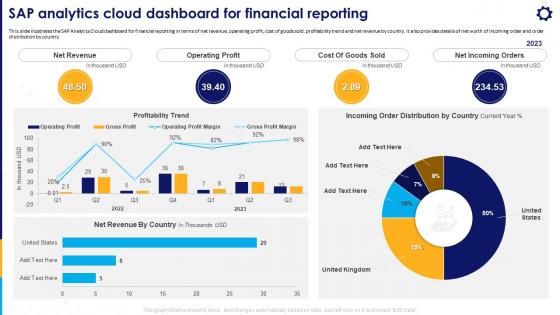
This slide illustrates the SAP Analytics Cloud dashboard for financial reporting in terms of net revenue, operating profit, cost of goods sold, profitability trend and net revenue by country. It also provides details of net worth of incoming order and order distribution by country.
People who downloaded this PowerPoint presentation also viewed the following :
SAP Analytics Cloud Dashboard For Financial Reporting Strategic Business Planning with all 7 slides:
Use our SAP Analytics Cloud Dashboard For Financial Reporting Strategic Business Planning to effectively help you save your valuable time. They are readymade to fit into any presentation structure.





FAQs for SAP Analytics Cloud Dashboard For Financial Reporting
Honestly, what makes SAP Analytics Cloud stand out is you get everything bundled together - planning, analytics, and predictive stuff all in one spot. No more switching between like five different tools. If you're already using SAP systems, the integration is actually really smooth. The collaborative planning thing is clutch though - your whole team can jump in and work on budgets together instead of passing Excel files around (thank god). Machine learning capabilities are baked right in too. Definitely play around with the planning features if you get a demo. That's where it crushes regular BI tools.
So SAP Analytics Cloud hooks up to your data in a few ways. Live connections work great for SAP stuff like S/4HANA and BW - super smooth. Non-SAP sources? Different story. You'll need connectors for things like Salesforce or SQL databases, or just import directly. Excel files work too, obviously. REST APIs and OData feeds are supported, which is nice when you're dealing with cloud apps. Oh, and you can mix data from multiple sources in one story. No more being stuck in those annoying data silos.
So SAP Analytics Cloud has this AI thing that's actually pretty handy. It'll catch weird patterns in your data automatically - stuff you'd probably miss otherwise. Smart Insights is my favorite feature, honestly. It's like having someone tap you on the shoulder saying "yo, check out these numbers from last month." You can just ask it questions in plain English too, like "show me sales by region" instead of navigating through a million menus. Oh, and definitely try Smart Discovery first when you're digging into new data. Sounds boring but it finds connections you wouldn't think to look for.
Build a solid dimensional model first - facts separate from dimensions, hierarchies that actually make sense. Calculated columns are performance killers, so go easy on those (trust me on this one). Your future self will thank you for using clear names instead of "Measure1" and "DimTable_Final_v3." Data refresh is tricky - you want it current but not so frequent that it bogs everything down. Oh, and definitely test with actual users before launch. They're weirdly good at breaking things in ways you'd never think of. Saves so much headache later.
So SAC basically fixes that whole mess where departments can't agree on numbers. Everyone works on the same dashboards together, you can comment right on charts and tag people for feedback. No more of those awful email threads with like 5 different Excel versions floating around - honestly such a time suck. Real-time collaboration means finance and sales are finally looking at identical data, so decisions happen way faster. The shared workspaces thing is pretty solid for cross-functional projects. Your teams will actually be aligned for once instead of constantly debating whose spreadsheet is correct.
Yeah, SAP Analytics Cloud's got decent security - enterprise encryption for data moving around and stored, plus role-based controls so you can restrict who sees what. They're compliant with SOC 2, ISO 27001, GDPR (thank god, because GDPR violations are expensive). Single sign-on works well, audit trails track everything users do, and you can choose where your data lives geographically. Most settings are automatic, which is nice. Only thing I'd watch out for - definitely check user permissions regularly because people tend to accumulate access they don't actually need anymore.
Honestly, just set up live data connections instead of importing static files - that's the game changer. SAP Analytics Cloud pulls directly from your databases, SAP systems, whatever cloud apps you're using. No more waiting for those overnight batch jobs or wondering if you're looking at yesterday's numbers (which is super annoying tbh). Your dashboards update in real-time, so when something changes, you'll see it immediately. The alert feature is clutch too - it pings you when metrics hit certain levels. Start with whatever data sources you check most often first.
So SAP Analytics Cloud actually has forecasting built right in - no need for extra tools. Start with their automated time series stuff for sales projections and basic predictions. Smart Predict is genuinely pretty cool, it'll auto-detect patterns and pick the best model for you. If you need more control later, you can build custom models with R or Python. Everything just plugs into your existing dashboards too, which is nice. Honestly, I'd just start with the automated features first - gets you results fast. You can always get fancier once you see what works.
Dude, SAP Analytics Cloud's storytelling stuff is actually pretty cool - you can take boring data and turn it into presentations that don't suck. It's like PowerPoint but way better because everything updates automatically when your data changes. You build these guided walkthroughs instead of just dumping charts on people. Honestly, execs love it because they're not drowning in random numbers anymore. The trick is figuring out your main point first, then building around that. Oh, and you can add notes and make it interactive too, which is clutch when you're presenting.
Dude, mobile accessibility in SAC is a total game changer. Your BI goes from being stuck at your desk to literally everywhere you go. Check dashboards on the train, drill into data from a coffee shop - honestly beats waiting until you're back at the office to see what happened over the weekend. The mobile app keeps your whole team plugged into key metrics. Real-time responses to business stuff? Yes please. Executives eat this up too - pulling performance data mid-meeting makes them look like wizards. Download the app and set up those push notifications for your important KPIs.
Honestly, the data integration stuff will probably drive you crazy - legacy systems just hate talking to SAC. Your team's gonna struggle at first too, especially anyone married to Excel. Performance gets pretty rough with huge datasets, which is annoying. And wow, those licensing costs can get out of hand fast if you're not careful. User adoption is always tricky since people resist change. I'd definitely start small though - pick a pilot project with your cleanest data first. Way easier to show wins that way before going full scale.
So SAP Analytics Cloud has these built-in governance features that are actually pretty solid for compliance stuff. Role-based access controls let you get super granular with permissions - people only see what they should see, which GDPR loves. The audit trails automatically track who accessed what data and when (seriously saved my butt during our last audit). You can also control where your data gets stored geographically for residency requirements. Oh, and data lineage tracking helps too. I'd start by figuring out how people currently access your data, then set up the security roles from there. Way easier than doing it backwards.
Hey! So SAP has some decent options for getting started with Analytics Cloud. The Learning Hub is probably your best bet - they've got structured courses that actually make sense. Their community portal has free tutorials too, which is nice since this stuff can get pricey. I'd definitely check out openSAP though, those hands-on courses are legit helpful. The forums are surprisingly active if you get stuck on something weird. Oh, and they do live webinars pretty regularly. Start with their Learning Journey paths since they're made for beginners - way less overwhelming than diving into random tutorials.
Honestly, SAP Analytics Cloud is pretty decent for most business stuff. The visualization options are solid - bar charts, line graphs, geo maps, all that. Drag-and-drop interface is intuitive once you get the hang of it, though it feels clunky at first (took me forever to figure out the custom viz stuff). Best part? It connects to SAP data automatically, so you won't pull your hair out setting up connections. Start with their story templates before going custom - trust me on this one. Way easier to learn that way.
So manufacturing, retail, and financial services are absolutely crushing it with SAP Analytics Cloud right now. Supply chain stuff and predictive maintenance are big wins for manufacturers. Retailers? They're obsessed with demand forecasting and inventory tracking. Financial firms love the real-time risk analytics - makes sense with all their compliance headaches. Healthcare and energy companies are starting to jump on board too, mostly because they've got tons of IoT data to deal with. Honestly, if you're in any of these industries, you should definitely look at some real examples of how companies are actually using it.
-
Great quality slides in rapid time.
-
The designs are super attractive. Me and my team love using SlideTeam’s presentations.