

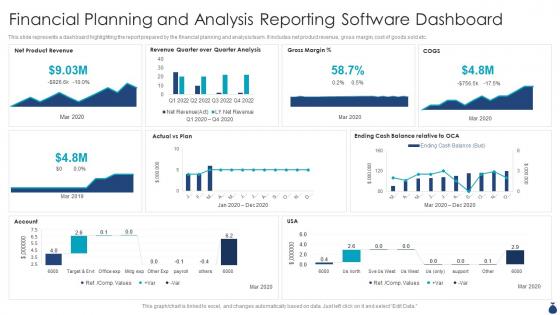
Financial Planning And Analysis Reporting Software Dashboard




Try Before you Buy Download Free Sample Product
 Impress Your
 Audience
 100%
100% Editable
 Save Hours
 of Time


This slide represents a dashboard highlighting the report prepared by the financial planning and analysis team. It includes net product revenue, gross margin, cost of goods sold etc.
People who downloaded this PowerPoint presentation also viewed the following :
Financial Planning And Analysis Reporting Software Dashboard with all 7 slides:
Use our Financial Planning And Analysis Reporting Software Dashboard to effectively help you save your valuable time. They are readymade to fit into any presentation structure.





FAQs for Financial Planning And Analysis
Start with cash flow - that's your money coming in vs going out. Net worth tracking is huge too, plus comparing your actual spending against what you budgeted. I'd throw in emergency fund status and debt-to-income ratio. Investment performance if you've got portfolios. Honestly, the burn rate thing is what shocked me most - seeing exactly how fast cash vanishes each month is brutal but necessary. Don't go crazy with like 15 different metrics though. These basics will tell you everything, and you can always add more weird charts later once you're obsessed.
Dude, visualizations are a game-changer for financial data. Charts and graphs show you patterns instantly instead of squinting at boring spreadsheets forever. You'll spot trends and weird outliers right away - like how your spending always goes crazy in December (wonder why lol). Interactive dashboards are the best because you can click around and dig deeper when something looks off. It's honestly night and day compared to just staring at numbers. Pick one thing you care about tracking and chart it over time. I bet you'll find patterns you never noticed before.
So personal dashboards are pretty straightforward - just your spending, budgets, maybe some savings goals. Corporate ones though? Total nightmare honestly. They're juggling revenue streams, cash flow predictions, department budgets, compliance stuff. Your data comes from like your bank and credit cards. Companies need to connect accounting software, CRM systems, all sorts of business tools. You might track 5-10 things that matter to you, but corporate dashboards can have 50+ metrics across different teams. Just pick whatever matches how complicated your situation actually is.
So basically it shows you in real-time where your cash is actually going vs your budget. Game changer because you'll catch those sneaky overspends right away instead of that lovely surprise at month-end when you're wondering where all your money went. The visual stuff really helps you see patterns you'd miss otherwise. Set up alerts when you're getting close to your limits in different categories. Oh and actually check it weekly - I swear most people set these things up then never look at them again. That's like buying a gym membership and never going, you know?
Excel or Google Sheets are honestly your best bet if you like tinkering around - I'm totally that person who gets way too into formatting spreadsheets lol. YNAB and Mint are solid for automated stuff though. Personal Capital's pretty good too. Business side? QuickBooks connects nicely with your accounting data. Don't bother with Tableau or Power BI unless you're drowning in crazy complex datasets. Just start with whatever you already know how to use. You can always switch later if it's not cutting it. No point overcomplicating things right off the bat.
Honestly, daily updates are the minimum you want for any decent financial dashboard. Real-time is even better if you're actively trading or watching cash flow like a hawk. Monthly? Way too slow unless you're just doing big picture strategy stuff - you'll miss all the good opportunities. I'd set up automated feeds for the core stuff: cash position, revenue, expenses. Then do weekly deep dives on budget variances and forecasting. Don't torture yourself updating spreadsheets manually every morning (been there, it sucks). Start daily and see if you need more frequent updates. Really depends how crazy your business gets.
Honestly, the worst thing you can do is jam everything onto one screen - total information overload. Nobody actually uses those cluttered messes. Make sure your most important stuff stands out first, don't treat every metric like it's equally critical. I swear, half the dashboards I see look fancy but are completely useless when you're trying to get actual work done. Sometimes boring numbers work better than those flashy charts anyway. Oh, and definitely test it out with real scenarios first! Start small with maybe 3-4 things you check every day, then add more later.
So basically you'll want to hook up some ML models to whatever data sources your dashboard is already using. Tableau and Power BI both have decent built-in stuff for this, or you could go with something like AWS SageMaker if you want more control. Start ridiculously simple though - maybe just forecast next quarter's revenue from your current pipeline. The real nightmare is always getting your historical data clean enough to actually train on (seriously, this part sucks). Once you nail one metric you trust, then you can get fancy with cash flow predictions and risk stuff. Don't try to boil the ocean right away.
Oh man, UX can make or break financial dashboards. I've watched people struggle with ones that look sleek but hide everything important behind multiple clicks - so frustrating. Your users need to spot trends and problems instantly, not hunt around for basic metrics. Put the most critical stuff right upfront where they can't miss it. Clear navigation is key too. Honestly, I'd start by figuring out what your users check first thing when they log in, then build around that. Complex financial data needs to feel simple at first glance, otherwise people just won't use it effectively.
So basically you'll want different views for different people. Executives just need the big picture stuff - ROI, budget variance, that kind of thing. They're busy and don't want details. Department managers though? They need the operational stuff plus ways to drill down into their team's numbers. Finance people are weird about wanting every cash flow detail and compliance tracking (probably because they have to report to someone too). Most tools let you set up role-based permissions which is pretty handy. Just ask each group what they actually decide on daily, then build around that.
Start with the big picture KPIs, then let people dig deeper if they want. Red for bad stuff, green for good - pretty standard. Charts beat tables for showing trends, but honestly? Most execs just want to know if they're hitting their numbers or not. Don't cram everything on one screen - it looks messy and nobody reads it anyway. Group similar metrics together and always add context like "vs last quarter" or whatever. Oh, and definitely test it with real users first. What seems obvious to you might totally confuse them. Include a summary section they can easily screenshot for their meetings.
Honestly, mobile access to your financial stuff is a total game changer. I check my budget while I'm at the grocery store all the time now – saves me from those "oh crap, did I already spend too much this week?" moments. Being able to see your investments during lunch or move money around when something unexpected pops up is clutch. We're all on our phones constantly anyway (probably too much, but whatever). The best part? You don't have to wait until you're home to make smart money choices. Definitely turn on those mobile notifications for your accounts and budget limits.
Dynamic dashboards pull in live data automatically - super helpful when you're trying to catch issues early. Static reports are just frozen snapshots, basically fancy PDFs that go stale instantly (though yeah, compliance teams still love those things for some reason). The cool part about dynamic ones is you can actually dig into the numbers - filter dates, drill down into weird spikes, change what you're looking at without generating new reports every time. I'd start with whatever metrics you find yourself checking obsessively each day. Those are your best candidates for building out something dynamic that actually saves you time.
Honestly, start with role-based permissions - saves you from those awkward "why does Sarah make more than me" conversations. Three things to nail down: access controls, data masking, and how you share stuff. People should only see what they actually need for their job. For sensitive client data, anonymize it. Skip screenshots and PDFs since you can't track where those end up. Use secure platforms with audit trails instead of just emailing attachments around. Oh, and review permissions regularly - people switch roles but somehow keep access to everything. I'd audit your current dashboard permissions this week if I were you.
Honestly, dashboards are game-changers for cutting through all that email chaos. No more "can you pull those numbers?" back-and-forth nonsense. During meetings, you'll have live data instead of those stale reports everyone pretends are still relevant. The visual stuff makes trends super obvious – way better than making executives squint at spreadsheets trying to figure out what's actually happening. Everyone stays on the same page about priorities. Oh, and set up alerts for important thresholds so your team can catch problems early instead of scrambling during monthly reviews.
-
World-class PowerPoint designs that are fully customizable!
-
I came across many PowerPoint presentations with excellent creatives and I believe they would be beneficial to my work.