


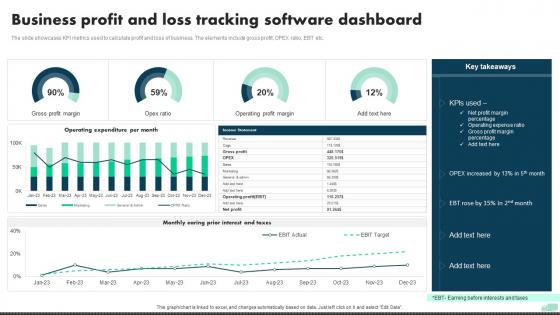
Business Profit And Loss Tracking Software Dashboard




Try Before you Buy Download Free Sample Product
 Impress Your
 Audience
 100%
100% Editable
 Save Hours
 of Time


The slide showcases KPI metrics used to calculate profit and loss of business. The elements include gross profit, OPEX ratio, EBT etc.
People who downloaded this PowerPoint presentation also viewed the following :
Business Profit And Loss Tracking Software Dashboard with all 7 slides:
Use our Business Profit And Loss Tracking Software Dashboard to effectively help you save your valuable time. They are readymade to fit into any presentation structure.





FAQs for Business Profit And Loss
Start with revenue trends and expense breakdowns - those are your bread and butter. Gross/net profit margins matter too, plus cash flow stuff. Year-over-year comparisons are clutch for spotting patterns. Honestly, ratios like profit margins and expense percentages probably matter more than fancy charts. Set up alerts when things hit certain thresholds so you're not constantly babysitting it. Oh, and make sure you can drill down when numbers look weird - trust me, they will. Keep it simple at first though. Your team won't use something complicated right off the bat.
Charts are a game-changer for P&L stuff - way better than squinting at endless spreadsheet rows. Your brain processes visuals so much faster than numbers. Bar charts are perfect for comparing different time periods or departments. Color coding helps too - red for the bad stuff, green for wins. Honestly, I spent way too much time last week trying to spot trends in raw data when a simple line chart would've shown everything in seconds. The trick is not getting fancy with it. Pick whatever chart type tells your story clearest and keep it simple so everyone gets it right away.
Start with the obvious ones - revenue, gross profit margin, net profit. That's your "am I actually making money" check. Break down operating expenses by category too (payroll, rent, marketing, whatever applies to you). Cash flow is honestly more important than most people realize - I've seen profitable businesses go under because they couldn't pay bills. If you're growing fast, track burn rate and runway. Oh, and don't go crazy with like 15 different metrics right away. Master these basics first, then you can get fancy later once tracking becomes second nature.
Monthly is fine for most small businesses - matches your accounting cycle anyway. But if you're moving fast or in a crazy industry, a whole month feels way too long. I do weekly now and it's a game changer for catching problems early. You can actually adjust pricing or cut spending before things get messy. Daily is probably overkill unless you're huge. Start monthly though, get used to reading the numbers first. Then bump it to weekly once you're not staring at the dashboard like it's written in hieroglyphics.
Honestly, cramming everything onto one screen is the worst thing you can do. People just get overwhelmed and tune out completely. Pick your top 5-6 metrics that actually drive profit - forget about showing every P&L line item. Also, please don't use tiny fonts or those rainbow color schemes that hurt your eyes. I swear some people think more colors = better dashboard. Keep your time periods consistent and add context like targets or last year's numbers so people know if they're winning or losing. You can always add more later once this works.
Honestly, just add some predictive trend lines right into your dashboard - most BI tools make this pretty straightforward. You'll see actual vs projected revenue side by side, which is way better than guessing. The what-if scenarios are where it gets interesting though - like modeling a 15% sales drop or sudden cost spikes. I'd definitely set up alerts when your actuals start drifting too far from forecasts. Oh, and create a simple toggle between current numbers and future projections. Beats the hell out of staring at last month's data and hoping for the best!
Look, real-time data is what makes your P&L dashboard actually useful. Instead of finding out about revenue drops weeks later, you'll catch them as they happen. Same with cost spikes - way better to spot those immediately. I mean, last month's numbers are fine for taxes but useless for day-to-day decisions. You want to see trends developing in real time so you can actually do something about them. Just make sure your data connections are solid and updating often enough to matter for your business. Nothing worse than "real-time" data that's actually three days old, you know?
Honestly, the coolest thing about P&L dashboards is how you can stack your numbers against industry benchmarks. Pull data from IBISWorld or trade associations - stuff like gross margin, operating margin, revenue growth. Then just layer it right into your dashboard. Super eye-opening when you see where you actually stand! I'd set up alerts for when your metrics drift too far from averages. The real magic happens tracking these comparisons over months - you'll spot exactly when you're killing it or falling behind competitors. Way better than just guessing how you're doing.
Power BI and Tableau are your best options if you want something that actually works well with real-time data from your accounting system. Excel with Power Query is solid too, especially if you're already using Microsoft stuff everywhere. Google Data Studio works fine for basic needs and it's free. I've honestly seen people do some pretty impressive things with just Google Sheets - depends how complex your data gets though. Whatever you pick, just make sure it plays nice with your current accounting software first. Trust me on that one, you'll thank yourself later when you're not manually importing CSV files every week.
So basically, you want different views for different people. Executives just want the big picture stuff - high-level trends and KPIs. Department heads need their specific breakdowns. Finance folks? They're gonna want everything - all the detailed data they can drill into. Honestly, they live for that stuff. Set up role-based access so people don't get overwhelmed with irrelevant metrics. Use charts for the C-suite types, tables for your analysts. Start by asking each group what decisions they're actually trying to make, then build views around that. Way easier than guessing what they want.
Honestly, these dashboards are game-changers for spotting what's actually profitable vs what's just bleeding money. You'll catch underperforming products or departments way faster - sometimes stuff you thought was doing great is actually tanking. The real magic happens when you find those unexpected profit drivers (seriously, the results can be wild) and then shift your budget toward those winners. Short bursts work best for checking trends. Oh, and definitely set up alerts for big changes so you're not caught off guard when something tanks overnight.
Start with clarity - put the most critical P&L stuff right up front where they can't miss it. Don't jam everything onto one screen though. Let people dig deeper when they actually need to. Red for losses, green for gains (duh), but seriously don't turn it into a Christmas tree with every color imaginable. Keep the navigation simple and match how your users already think about this financial stuff in their heads. Here's the thing - test it with the people who'll actually live in this thing daily, not the big shots who'll glance at it once a quarter. Focus on that 20% of data they're constantly checking instead of trying to surface everything at once.
Role-based permissions are huge here - sales folks can see revenue stuff but keep the full P&L for executives only. Don't email PDFs or screenshots around, that's asking for trouble. Your dashboard platform better have solid authentication too. Watermarking sensitive reports helps if something leaks (learned that one the hard way when our quarterly numbers spread like wildfire). Honestly, some people get way too trigger-happy with the share button. Treat this data like your bank info - restrict who gets in and stick to secure channels only.
Dude, you've gotta set up automated data feeds for your P&L dashboard. Manual entry is where everything goes wrong - formatting gets screwed up, someone forgets to update expenses, calculations get botched when you're copying between systems. Trust me on this one. Your dashboard will automatically pull from accounting software, CRM, whatever tools you're using. Real-time data instead of those crusty old spreadsheets we all hate updating. I literally set this up once for a client and their accuracy improved overnight. No more staying up wondering if the numbers are actually right - which honestly used to drive me crazy too.
Honestly, having your profit-loss dashboard on mobile is clutch. You can check revenue trends right in client meetings or catch expense spikes while you're traveling - no waiting around until you're back at the office. Your team gets instant access to financial data when they need it too. The best part? Problems get spotted way earlier. I used to find issues days later when I finally sat down at my computer, but now you can actually respond fast. Real-time financial visibility when you're not stuck at your desk just makes everything smoother.
-
Innovative and Colorful designs.
-
Unique design & color.