Sap Analytics Cloud Dashboard To Asses Digital Marketing Campaigns Performance
Try Before you Buy Download Free Sample Product
Audience
Editable
of Time
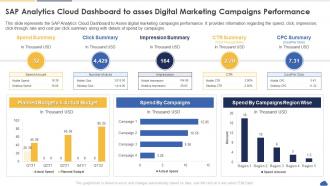
This slide represents the SAP Analytics Cloud Dashboard to Asses digital marketing campaigns performance. It provides information regarding the spend, click, impression, click through rate and cost per click summary along with details of spend by campaigns.
People who downloaded this PowerPoint presentation also viewed the following :
Sap Analytics Cloud Dashboard To Asses Digital Marketing Campaigns Performance with all 7 slides:
Use our Sap Analytics Cloud Dashboard To Asses Digital Marketing Campaigns Performance to effectively help you save your valuable time. They are readymade to fit into any presentation structure.
FAQs for Sap Analytics Cloud Dashboard To Asses Digital
Honestly, SAP Analytics Cloud is pretty solid - it bundles planning, analytics, and predictive stuff into one platform instead of making you bounce between different tools. Real-time connections to SAP systems work great (shocker), but it also plays nice with other data sources. The collaborative forecasting is actually really smooth - you can do budgeting right next to your dashboards. Oh, and the machine learning is already built in, which saves you from hunting down separate predictive tools. If you're already using SAP stuff, I'd definitely grab a demo. It'll probably clean up whatever messy workflow you've got going now.
Yeah so SAC can hook directly into your live data - no more waiting around for refreshes. It pulls from SAP systems, cloud stuff, whatever you've got running. Your dashboards update as things actually happen, which honestly beats stale reports any day. Skip the static imports and go straight for live connections instead. That way your team's working with current data, not yesterday's numbers. I'd start with whatever sources need the most up-to-date monitoring first, then build out from there. Way better for making real decisions.
Okay so for SAP stuff, definitely go with live data connections - way more efficient than importing tons of data. Non-SAP sources? Data Import Services and REST APIs are solid, though honestly the API setup is kinda annoying at first. You really want to map out your data model beforehand and use SAP's Data Integration to keep everything centralized. I learned this the hard way - winging it just creates chaos later. Get your security sorted early and think about refresh schedules too. My advice? Pick one main data source, nail that down completely, then build out from there.
So SAC has this Smart Predict feature that's actually pretty decent for forecasting stuff - revenue, customer churn, demand planning. You don't need to be a data scientist or anything. The data modeling works well too, connects to different sources and lets you create measures and hierarchies. Look, it's not gonna replace dedicated ML tools, but for regular business stuff? Totally works. I'd start with their predictive scenarios since they're basically templates - way easier to get going. Oh and the interface is way less intimidating than I expected.
So ML in SAC basically does the boring stuff for you automatically. Your dashboards start spotting weird patterns and anomalies without you having to hunt through everything. Plus it can predict future trends for planning - which honestly saves tons of time. You can even ask questions in regular English instead of learning complex query language. Oh, and it helps clean up your data by suggesting how to organize things. The cool part? Your reports actually become smart tools that don't just show what happened, but what's likely coming next.
Dude, SAP Analytics Cloud is pretty sweet for team stuff. Everyone jumps into the same workspace and can comment right on charts, tag people for input - way better than endless email threads. Reports get built together in real-time, which honestly saves so much headache. Your mobile team can jump in too, not just desk people. During meetings you're showing live data that updates itself. Oh, and set up shared folders for your main projects first - trust me on this one. Once you invite the right people, you'll actually see teams working together instead of silos.
Oh nice timing on this question - just dealt with SAP Analytics Cloud security stuff last month! So you've got encryption covered both ways (data moving around and stored), plus role-based controls which honestly work pretty well. Single sign-on integration makes life easier, and there's audit logging if you need to track who did what. IP restrictions are there too. The granular permissions are clutch though - you can literally lock down individual cells in reports. SOC 2 Type II certified, which your compliance team will love. Just don't forget to audit those user permissions regularly or things get messy fast.
Honestly, SAP Analytics Cloud isn't too bad for building dashboards without coding. You just drag charts and tables onto the canvas - super simple. The story designer takes a minute to figure out, but then it clicks. Connect your data sources first, then pick dimensions and measures from dropdowns to build your visuals. They've got loads of templates and chart types already built in. Oh, and there's this smart insights thing that'll suggest charts based on your data (though sometimes it's weirdly off). I'd mess around with their sample data first before you connect your real stuff - saves headaches later.
Honestly, SAP Analytics Cloud is pretty solid for FP&A stuff. Real-time data integration means you're not waiting around for IT to send reports anymore - connects straight to your ERP and whatever else you're using. The modeling tools let you build complex financial models and run different scenarios without much hassle. Your team can actually work on budgets together in real-time instead of passing Excel files back and forth forever. Fair warning though - there's a bit of a learning curve. I'd probably start small with like one department or something before going all-in company-wide. Way less risky that way.
So SAC basically pulls all your data into dashboards that business people can actually understand - which is huge. The forecasting stuff is honestly a game changer, saves me so much manual work. Teams can dig into their own metrics without bugging IT constantly, and everyone works from the same numbers during planning. I'd start with your most important KPIs first. Build focused dashboards around those. The predictive analytics are solid too, though that might be overkill depending on what you need. Collaborative workflows keep everything in sync.
Honestly, data integration is gonna be your biggest headache. Your systems probably won't talk to SAC right away, especially with legacy stuff. People hate change too - they're obsessed with their Excel sheets and will fight you on it. The interface feels pretty overwhelming at first, not gonna lie. Performance can get wonky if your data models are messy. Oh, and the learning curve is steep for most users. Start small with a pilot group, sort out your data governance early (boring but necessary), and train your power users first. They'll become your champions later.
Yeah, SAP Analytics Cloud's mobile stuff is actually pretty decent. They've got native apps for iPhone and Android that work way better than just using your browser. You can check dashboards, mess around with charts, even edit basic things. Honestly, I was surprised how smooth it runs on my phone. Since it's all cloud-based, you don't need to worry about VPNs or anything - just log in from wherever. Oh, and definitely set up that offline sync feature for your main dashboards. Trust me, you'll thank yourself when you're trying to pull up numbers during a meeting and the wifi decides to crap out.
You'll find SAP Analytics Cloud has pretty solid data connector options. Direct connections work with S/4HANA, BW, and SuccessFactors obviously. For non-SAP stuff, it connects to Salesforce, Google Analytics, Oracle, SQL Server - the usual suspects really. Oh and basic file uploads too if you're stuck with Excel or CSV files. The nice thing is you can mix data from different places without doing a bunch of ETL work first. Some refresh in real-time, others you can schedule. My advice? Pick your most important data source and start there. Don't try to connect everything at once or you'll drive yourself crazy building dashboards.
Track your hard savings first - consolidating BI tools, faster reports, less manual data work. But honestly? The real money's in how much quicker your team spots trends and reacts to stuff. Way harder to put a number on that though. Document what you're spending now on time, tools, and people before you start. Then check those same things 6-12 months later. That's your actual ROI right there. Oh, and don't forget about productivity gains - they add up faster than you'd think.
SAC's AI stuff is getting pretty crazy right now - they're automating insights and predictive analytics like mad. Real-time data processing is way better too. The hyperscaler integrations with AWS and Azure are tighter, which is nice I guess. What's really cool though? Augmented analytics where it literally tells you what to look at next and handles boring reports automatically. Honestly the update pace is insane lately. I'd definitely check out your SAP roadmap updates and maybe test some AI features. See what clicks with your workflows, you know?
-
“You have the structure in place that are easy to explore new opportunities.I will be recommending your services to other people.”
-
Crisp and neat slides. Makes it fun and easier to curate presentations.