

SD WAN IT Powerpoint Presentation Slides





Try Before you Buy Download Free Sample Product
 Impress Your
 Audience
 100%
100% Editable
 Save Hours
 of Time


Grab our insightfully designed template on SD WAN IT. It explains the SD WAN, its importance, adoption and implementation, implementation challenges and solutions, and training and cost. Our Software Defined Wide Area Network deck covers the introduction of SD WAN, its evolution, features, core capabilities, and importance. It exhibits the network challenges SD WAN addresses, why it is ideal for cloud computing, and its benefits. Moreover, our Managed WAN Services PPT contains how it can improve security, its relationship with SASE, and SD WAN as a Service, including its benefits and comparison with on premise and managed SD WAN services. It also includes the next generation SD WAN, the role of the SD branch in SD WAN, SD WAN architecture, and its working. It also consists of the various layers of SD WAN architecture, types of architecture, and working. Furthermore, our Hybrid WAN template caters to the SD WAN adoption and implementation, a checklist, adoption steps to consider, criteria to evaluate SD WAN deployment, implementation technologies, hub and spoke underlay, overlay, and SD WAN configuration types. Moreover, it comprises implementation challenges and solutions comparison of SD WAN with other technologies, training, and cost of adoption. Lastly, it contains a roadmap, a timeline, and an SD WAN network performance tracking dashboard. Get access now.
People who downloaded this PowerPoint presentation also viewed the following :
Content of this Powerpoint Presentation
Slide 1: This slide introduces SD-WAN (IT). Commence by stating Your Company Name.
Slide 2: This slide depicts the Agenda of the presentation.
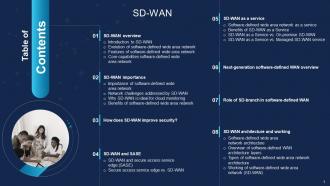
Slide 3: This slide includes the Table Of Contents.
Slide 4: This slide continues the Table of Contents.
Slide 5: This slide highlights the Title for the Topics to be discussed further.
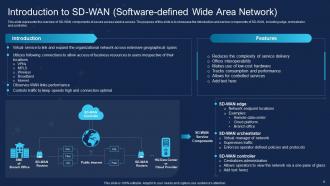
Slide 6: This slide represents the overview of SD-WAN components of secure access service access.
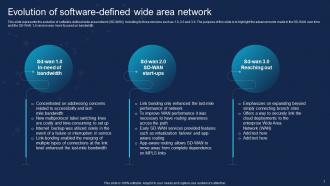
Slide 7: This slide shows the evolution of software-defined wide area network (SD-WAN).
Slide 8: This slide reveals the primary features of a software-defined wide-area network.
Slide 9: This slide portrays the Core capabilities software-defined wide area network.
Slide 10: This slide indicates the Heading for the Contents to be covered in the following template.
Slide 11: This slide talks about the need for SD-WAN by comparing traditional WAN with SD-WAN.
Slide 12: This slide outlines the various enterprise network challenges that the SD-WAN network can handle.
Slide 13: This slide describes the reasons why SD-WAN is best for cloud monitoring.
Slide 14: This slide outlines the various advantages of the software-defined wide-area network to businesses.
Slide 15: This slide includes the Title for the Ideas to be discussed in the upcoming template.
Slide 16: This slide depicts the various security benefits of the software-defined wide-area network.
Slide 17: This slide incorporates the Heading for the Ideas to be covered further.
Slide 18: This slide represents the relationship between secure access service edge and software-defined wide area network.
Slide 19: This slide compares secure access service edge and software-defined wide area network.
Slide 20: This slide depicts the Title for the Contents to be discussed in the upcoming template.
Slide 21: This slide talks about the software-defined wide area network as a service, including its structure.
Slide 22: This slide outlines the advantages of SD-WAN as a service.
Slide 23: This slide shows the difference between SD-WAN as a service and on-premise SD-WAN.
Slide 24: This slide represents the comparison between a software-defined WAN as a service and managed SD-WAN service.
Slide 25: This slide contains the Heading for the Topics to be covered in the following template.
Slide 26: This slide gives an overview of the next-generation software-defined wide area network.
Slide 27: This slide contains the Title for the Topics to be discussed next.
Slide 28: This slide talks about the SD-branch, which is a subset of SD-WAN.
Slide 29: This slide indicates the Heading for the Contents to be covered further.
Slide 30: This slide showcases the architecture of SD-WAN technology including various components.
Slide 31: This slide describes the overview of SD-WAN architectural layers.
Slide 32: This slide represents the architecture of a software-defined wide area network.
Slide 33: This slide outlines the working of a software-defined wide area network, including the basic SD-WAN operation.
Slide 34: This slide covers the Title for the Ideas to be discussed next.
Slide 35: This slide outlines the checklist to implement a software-defined wide area network in an organization.
Slide 36: This slide represents the steps to implement a software-defined wide-area network.
Slide 37: This slide shwocases the Criteria to evaluate software-defined WAN deployment.
Slide 38: This slide represents the various technologies used in the SD-WAN implementation process.
Slide 39: This slide highlights the hub-and-spoke underlay network deployment for SD-WAN.
Slide 40: This slide outlines the hub-and-spoke overlay network deployment for a software-defined wide-area network.
Slide 41: This slide talks about the overlay network topologies.
Slide 42: This slide represents the two main types of SD-WAN configuration.
Slide 43: This slide includes the Heading for the Ideas to be covered further.
Slide 44: This slide reveals the various challenges that organizations can experience while deploying SD-WAN.
Slide 45: This slide displays the Title for the Contents to be discussed in the forthcoming template.
Slide 46: This slide states the Difference between Wide Area Network and SD-WAN.
Slide 47: This slide talks about the SD-WAN vs. multiprotocol label switching (MPLS).
Slide 48: This slide outlines the comparison between software-defined wide-area network and virtual private network.
Slide 49: This slide outlines the comparison between software-defined wide-area network and software-defined networking.
Slide 50: This slide represents the comparison between basic SD-WAN and business-driven advanced SD-WAN.
Slide 51: This slide contains the Heading for the Topics to be covered next.
Slide 52: This slide depicts the SD-WAN training program for IT professionals.
Slide 53: This slide reveals the pricing for software-defined wide-area network adoption.
Slide 54: This slide exhibits the Title for the Topics to be discussed next.
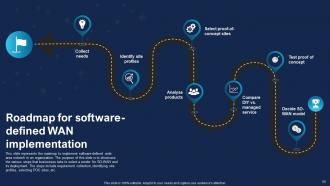
Slide 55: This slide showcases the roadmap to implement software-defined wide area network in an organization.
Slide 56: This slide indicates the Heading for the Contents to be covered in the upcoming template.
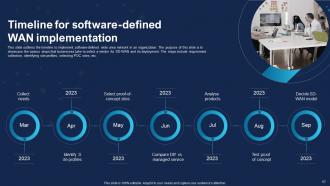
Slide 57: This slide outlines the timeline to implement software-defined wide area network in an organization.
Slide 58: This slide includes the Title for the Ideas to be discussed in the next template.
Slide 59: This slide represents the SD-WAN network performance tracking dashboard.
Slide 60: This slide shows the Heading for the Ideas to be covered next.
Slide 61: This slide reveals the primary use cases of a software-defined wide-area network.
Slide 62: This is the Icons slide containing all the Icons used in the plan.
Slide 63: This slide is used for showing some Additional information.
Slide 64: This is Our team slide for stating the inofmration related to the team members.
Slide 65: This is the Quotes slide for motivation.
Slide 66: This is the Idea generation slide for encouraging fresh ideas.
Slide 67: This is the 30,60,90 days plan slide for effective planning.
Slide 68: This is the About us slide for stating the company-related informtaion.
Slide 69: This slide contains the Post it notes for reminders and deadlines.
Slide 70: This slide elucidates information related to the Financial topic.
Slide 71: This slide displays the Mind map of the organization.
Slide 72: This slide depicts the Location of the firm across the globe.
Slide 73: This is the Venn diagram slide.
Slide 74: This is the Thank You slide for acknowledgement.
SD WAN IT Powerpoint Presentation Slides with all 79 slides:
Use our SD WAN IT Powerpoint Presentation Slides to effectively help you save your valuable time. They are readymade to fit into any presentation structure.
-

SD WAN IT
-

Agenda
-
SD WAN
-

SD WAN
-
SD WAN Table of Contents
-
Introduction to SD WAN Software defined Wide Area Network
-
Evolution of software defined wide area network
-
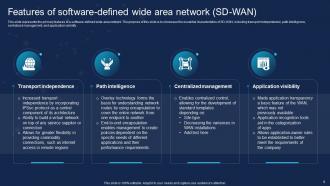
Features of software defined wide area network SD WAN
-
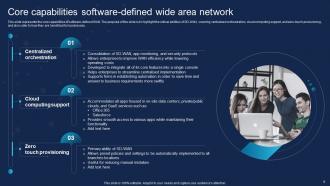
Core capabilities software defined wide area network
-
SD WAN Table of Contents
-
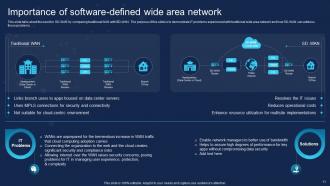
Importance of software defined wide area network
-
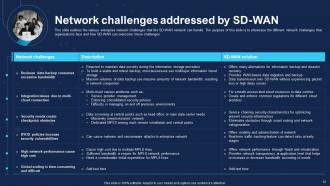
Network challenges addressed by SD WAN
-
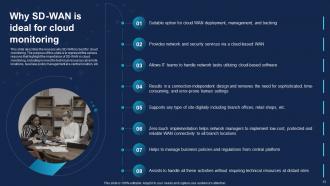
Why SD WAN is ideal for cloud monitoring
-

Benefits of software defined wide area network
-
SD WAN Table of Contents
-
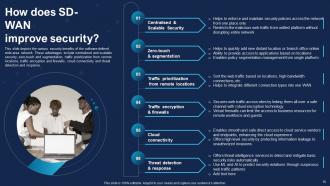
How does SD WAN improve security
-
SD WAN Table of Contents
-
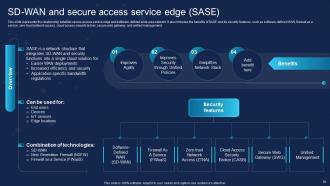
SD WAN and secure access service edge SASE
-

Secure access service edge vs SD WAN
-
SD WAN Table of Contents
-
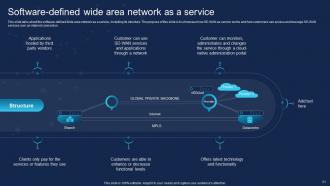
Software defined wide area network as a service
-
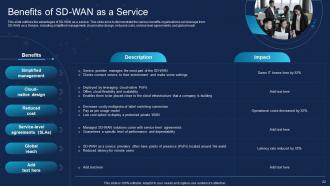
Benefits of SD WAN as a Service
-
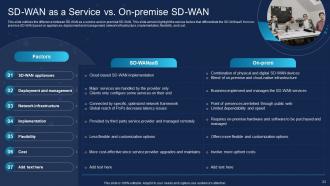
SD WAN as a Service vs On premise SD WAN
-
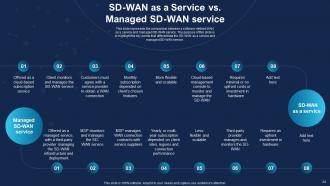
SD WAN as a Service vs Managed SD WAN service
-
SD WAN Table of Contents
-
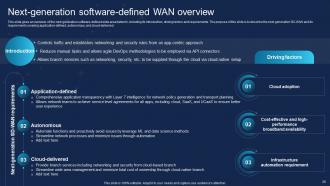
Next generation software defined WAN overview
-
SD WAN Table of Contents
-
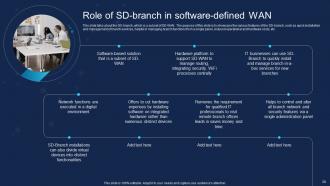
Role of SD branch in software defined WAN
-
SD WAN Table of Contents
-
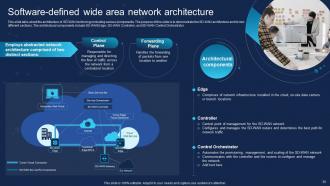
Software defined wide area network architecture
-
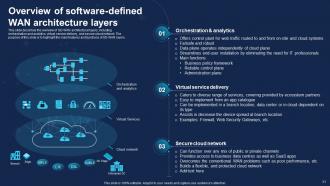
Overview of software defined WAN architecture layers
-
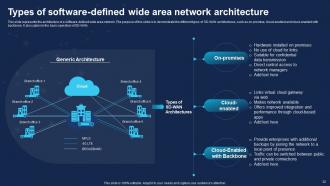
Types of software defined wide area network architecture
-
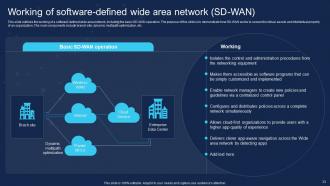
Working of software defined wide area network SD WAN
-
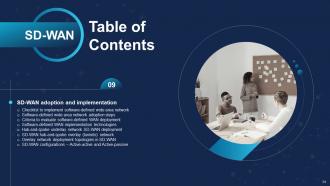
SD WAN Table of Contents
-

Checklist to implement software defined wide area network
-
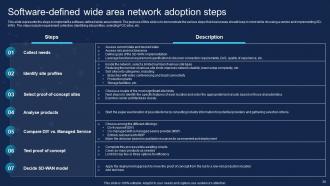
Software defined wide area network adoption steps
-
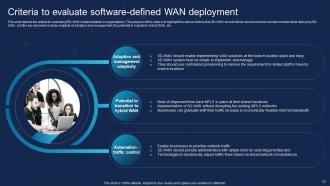
Criteria to evaluate software defined WAN deployment
-
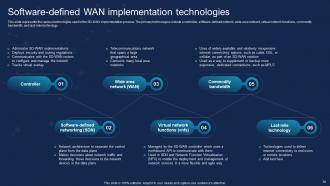
Software defined WAN implementation technologies
-
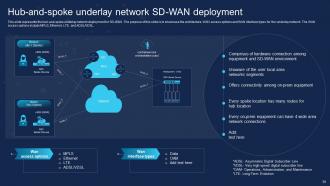
Hub and spoke underlay network SD WAN deployment
-
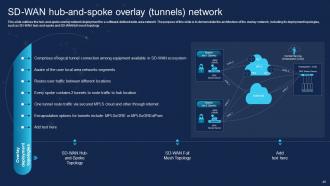
SD WAN hub and spoke overlay tunnels network
-
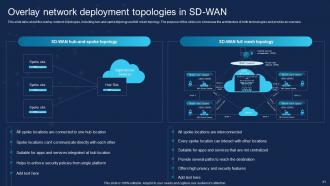
Overlay network deployment topologies in SD WAN
-
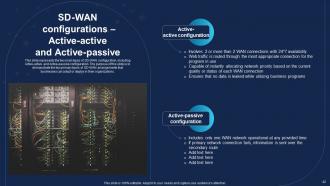
SD WAN configurations Active active and Active passive
-

SD WAN Table of Contents
-
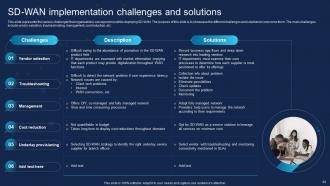
SD WAN implementation challenges and solutions
-
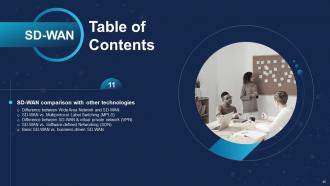
SD WAN Table of Contents
-
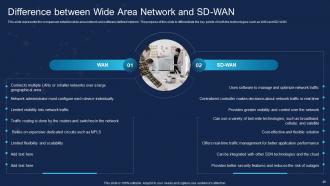
Difference between Wide Area Network and SD WAN
-
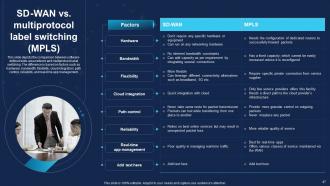
SD WAN vs multiprotocol label switching MPLS
-
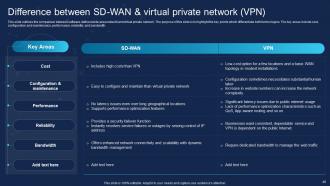
Difference between SD WAN virtual private network VPN
-

SD WAN vs Software defined Networking SDN
-
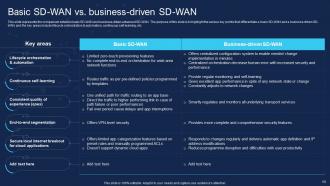
Basic SD WAN vs business driven SD WAN
-

SD WAN Table of Contents
-
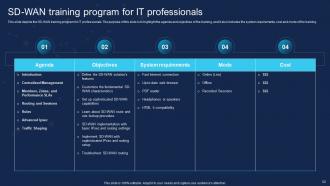
SD WAN training program for IT professionals
-
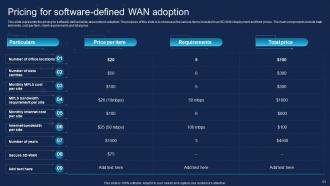
Pricing for software defined WAN adoption
-
SD WAN Table of Contents
-
Roadmap for software defined WAN implementation
-

SD WAN Table of Contents
-
Timeline for software defined WAN implementation
-
SD WAN Table of Contents
-
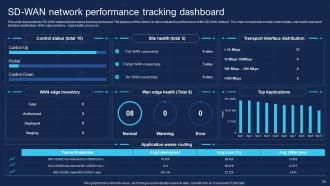
SD WAN network performance tracking dashboard
-
SD WAN Table of Contents
-
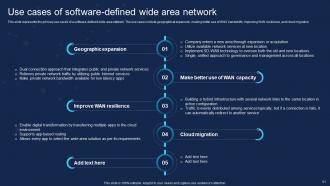
Use cases of software defined wide area network
-
Icons slide for SD WAN
-

Additional slides
-

Our team
-

Quotes
-

Idea generation
-
Sd Wan IT
-

About us
-
Post it notes
-

Financial
-

Mind map
-

Location
-
Venn
-

Thank for watching
-

-

-

-

-

FAQs for SD WAN IT
So SD-WAN basically gives you three big wins: better performance, cheaper costs, and management that doesn't suck. Your critical apps get priority, traffic routes smarter, and you can actually see what's happening on your network. Pretty night and day vs old school WANs. Cost-wise, you ditch those crazy expensive MPLS circuits for regular internet - still secure though with built-in encryption. Oh and the centralized thing is clutch, you just push changes from one spot to all your sites. I'd figure out where your network's being a pain right now, that'll help sell it internally.
So basically SD-WAN is way smarter than old-school networks - it can route your traffic across multiple connections instead of jamming everything through those pricey MPLS lines. When one path gets clogged up, it just switches to a better route automatically. Pretty cool, right? Your critical apps get priority treatment too. Traditional setups? They're stuck with whatever path they have, even if it sucks. I'd start by figuring out which apps need the lowest latency - those will benefit most. You'll definitely notice better performance and way more flexibility overall.
Most SD-WAN setups come with solid encryption - usually AES-256 - so your data stays protected between sites. IPsec tunneling is pretty standard too, which basically creates secure pathways over regular internet connections. You'll get firewall features and intrusion detection built in, plus URL filtering so you can actually control what goes where. The encryption kicks in automatically at each endpoint, which is nice because your IT folks don't have to set up security for every single connection manually. Oh, and definitely ask about zero-trust support when you're shopping around - some vendors are way better at that than others.
Yeah, SD-WAN is usually a money saver in the long run. The big win is swapping out those crazy expensive MPLS circuits for regular broadband and LTE connections - honestly the cost difference is nuts, like 80% cheaper in most cases. You'll also get way better visibility into where your network budget's actually going, which is nice. Downside is you're looking at higher upfront costs for the gear and licensing stuff. I'd crunch the numbers on what you're spending now vs. projected SD-WAN costs over maybe 3 years to see if it makes sense for your situation.
Honestly, SD-WAN is a game-changer if you've got multiple offices or remote people needing solid connections. Way better than old-school MPLS for that kind of setup. High WAN costs killing your budget? Performance issues between sites? It'll probably help. The thing I love most is how it handles cloud stuff - routes traffic based on what your apps actually need instead of forcing everything through your main data center like some kind of digital traffic jam. Oh, and if you're constantly fixing network problems or feeling stuck with a super rigid setup, definitely worth checking out.
Yeah, SD-WAN plays nice with most existing gear. It works as an overlay - basically sits on top of whatever you've got (MPLS, broadband, LTE) without making you throw everything away. Thank god, right? Your core switches and routers can usually stay. You'll probably need to drop in some SD-WAN boxes at branch sites though. I'd definitely audit your network first to spot any weird compatibility issues before you pick a vendor. Way better than finding out later something doesn't work.
So SD-WAN basically needs cloud computing to work properly. Your network gets managed from one central dashboard through cloud controllers - way easier than juggling multiple systems. Direct connections to AWS, Azure, whatever you're using means traffic doesn't have to bounce through your data center first. The cloud handles all the policy stuff and analytics automatically. Plus it'll switch traffic when something fails without you doing anything. Honestly, I learned this the hard way but treat your network and cloud as one project from the start. They work so much better together.
SD-WAN is honestly a lifesaver for remote work. You can connect securely to company stuff from anywhere - your home, coffee shop, wherever you've got decent internet. Instead of routing everything through one central location (which is slow as hell), it smartly picks the best path using broadband, LTE, whatever connection you have. The bandwidth thing makes video calls way less painful. Your IT people can manage security for everyone from one place without having to mess with each individual site. Also kind of nice that once it's set up, your team gets reliable access no matter where they're working from.
Network visibility gets messy fast - you'll miss that MPLS control more than you think. Training your team takes forever (seriously, budget like 3x what you expect) because the tools are completely different. Integration with your current security stuff? Total pain. Performance gets wonky during rollouts too. Honestly, just pilot it at one small site first. Get your monitoring sorted before you commit to the whole thing or you'll be flying blind. Oh, and troubleshooting becomes this whole new beast you gotta learn.
So basically SD-WAN lets you see everything happening on your network from one spot - no more guessing why things are slow. You can make your important apps like Zoom calls get priority while random updates wait their turn. Way better than old networks where you're just crossing your fingers. The cool part? Set your rules once and they work everywhere automatically. It'll even bounce traffic between different connections to keep things running smooth. Oh, and definitely start with whatever apps would make people lose their minds if they went down - those get first dibs on bandwidth.
So SD-WAN gives you multiple connection paths that automatically switch if one fails - nobody even notices the outage. Instead of paying crazy money for backup dedicated lines, you can use regular broadband connections (your CFO will love this). The whole thing's managed centrally, so during disasters you can spin up temp sites or reroute offices through cloud gateways remotely. No need to send techs out to places they might not even be able to reach. Honestly, the remote management piece is huge. I'd start by looking at where you've got single points of failure and figuring out how SD-WAN could add backup routes there.
Start with the basics - latency, packet loss, and bandwidth usage. Your users will notice uptime issues before anything else, so that's critical. Response times for your main apps like CRM and VoIP are huge indicators too. Cost savings is probably half the reason you went with SD-WAN anyway, so definitely track how much you're saving on MPLS. Security stuff like threat detection rates matter, but honestly I'd focus on the performance metrics first since those directly impact day-to-day operations. Dashboard everything so you can catch problems early - way easier than playing firefighter later.
So basically SD-WAN watches all your connections - MPLS, broadband, cellular, whatever - and automatically picks the best one for your voice and video calls. It's checking latency and packet loss constantly, then switches paths when one link starts sucking. Your Zoom calls just work better without you doing anything. The trick is setting up those app policies right from the start so it knows what needs priority. I mean, nobody wants their video cutting out mid-presentation, right? Pretty cool how it all happens behind the scenes.
AI network optimization is getting pretty standard now - automatically tweaks bandwidth and routing without you babysitting it. SASE is everywhere too, which bundles SD-WAN with cloud security. Makes sense with everyone working remotely these days. Edge computing's another big shift, processes data right where it's created instead of sending everything back to central servers. Oh, and definitely start planning for more automated, cloud-first setups now. I've seen too many companies scramble to catch up later. Look for vendors already building this stuff in rather than bolting it on afterward.
Look, the SD-WAN market has gotten pretty crowded. Cisco and VMware are still the big names but they'll cost you - think premium pricing for enterprise features. Companies like Versa and Silver Peak have really stepped up though, offering solid alternatives without breaking the bank. Most vendors now have the basics covered: app visibility, policy controls, multi-cloud stuff. Pricing's usually somewhere between $50-200 per site monthly, depends on your bandwidth needs obviously. Here's the thing - feature sets are so similar now that I'd just pick whoever plays nice with what you already have and actually answers the phone when something breaks.
-
Excellent template with unique design.
-
Thanks to SlideTeam, we have an ideal template to present all the info we need to cover. Their slides give our numbers and projections a more clear and enchanting look.