

Software Defined Networking IT Powerpoint Presentation Slides




Try Before you Buy Download Free Sample Product
 Impress Your
 Audience
 100%
100% Editable
 Save Hours
 of Time


This PowerPoint presentation gives a brief idea about the software defined network, including its introduction, features, benefits, importance, and how it differs from traditional networking. In this Software Defined Network PowerPoint Presentation, we have covered the architecture of SDN, its various layers and features, SDN components, models, and its working. In addition, this SDN Overview PPT contains the different development approaches for SDN, such as FORCES, 4D approach, and Ethane. It also covers how SDN plays an essential role in customer security. Also, the Importance of SDN PPT presentation includes the comparison between SDN and SD WAN, Virtualization in SDN, how it can help intent based networking IBN, and the role of SDN in Edge Computing, IoT, and remote access. Furthermore, this SDN Architecture template caters to the implementation plan for SDN, training program, and steps to create SDN. In addition, it also comprises factors influencing SDN adoption and its impact on business. Moreover, this SDN Controller deck comprises use cases of SDN, a timeline and a roadmap for a software defined network, and a performance tracking dashboard. Download our 100 percentage editable and customizable template, which is also compatible with Google Slides.
People who downloaded this PowerPoint presentation also viewed the following :
Content of this Powerpoint Presentation
Slide 1: This slide introduces Software Defined Networking (IT). Commence by stating Your Company Name.
Slide 2: This slide depicts the Agenda of the presentation.
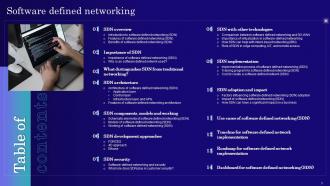
Slide 3: This slide incorporates the Table of contents.
Slide 4: This slide highlights the Title for the Topics to be discussed further.
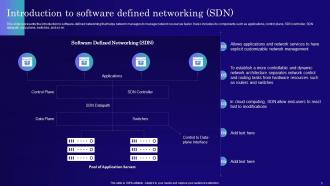
Slide 5: This slide represents the introduction to software-defined networking that helps network managers to manage network resources faster.
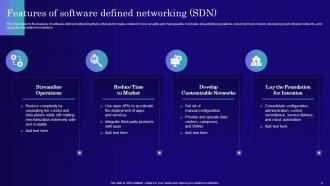
Slide 6: This slide depicts the features of software-defined networking that is intended to make a network more versatile and manageable.
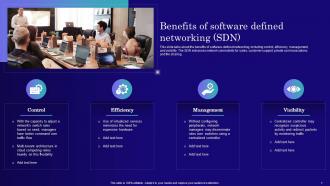
Slide 7: This slide talks about the benefits of software-defined networking, including control, efficiency, management, and visibility.
Slide 8: This slide shows the Heading for the Contents to be covered next.
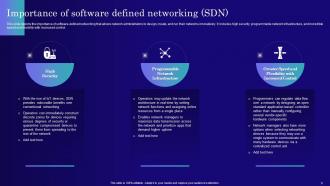
Slide 9: This slide displays the importance of software-defined networking that allows network administrators to design, create, and run their networks innovatively.
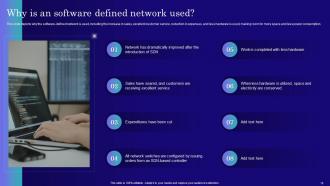
Slide 10: This slide states why the software-defined network is used, including the increase in sales, excellent customer service, etc.
Slide 11: This slide reveals the Title for the Ideas to be covered further.
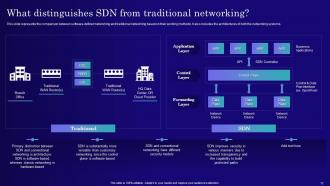
Slide 12: This slide represents the comparison between software-defined networking and traditional networking based on their working methods.
Slide 13: This slide showcases the Heading for the Ideas to be discussed in the following template.
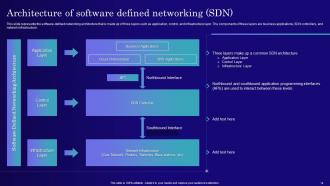
Slide 14: This slide elucidates the software-defined networking architecture that is made up of three layers such as application, control, and infrastructure layer.
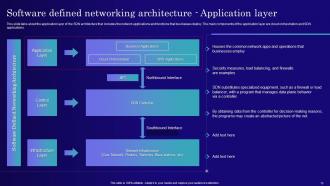
Slide 15: This slide talks about the application layer of the SDN architecture that includes the network applications and functions that businesses deploy.
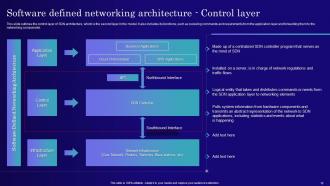
Slide 16: This slide outlines the control layer of SDN architecture, which is the second layer in the model.
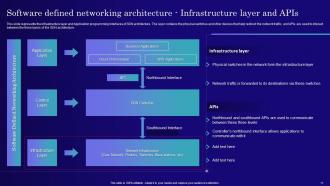
Slide 17: This slide represents the infrastructure layer and Application programming interfaces of SDN architecture.
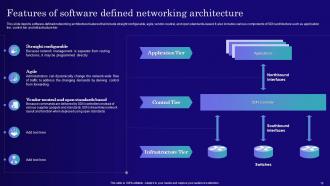
Slide 18: This slide depicts software-defined networking architecture features that include straight configurable, agile, vendor-neutral, etc.
Slide 19: This slide mentions the Title for the Components to be covered in the next template.
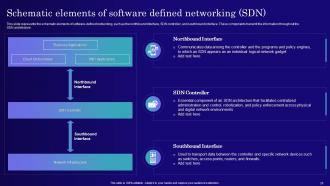
Slide 20: This slide presents the schematic elements of software-defined networking, such as the northbound interface, SDN controller, and southbound interface.
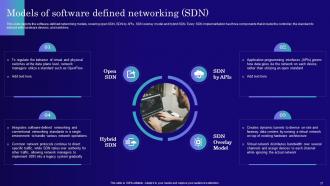
Slide 21: This slide shows the software-defined networking models, covering open SDN, SDN by APIs, SDN overlay model and hybrid SDN.
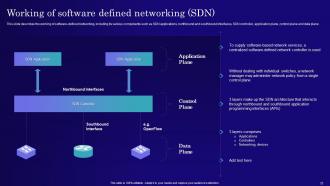
Slide 22: This slide describes the working of software-defined networking, including its various components.
Slide 23: This slide portrays the Heading for the Topics to be covered further.
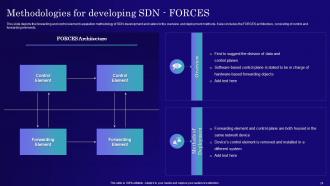
Slide 24: This slide displays the forwarding and control element separation methodology of SDN development and caters to the overview and deployment methods.
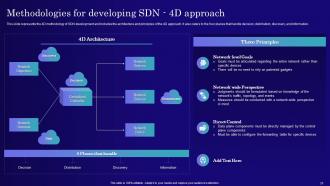
Slide 25: This slide reveals the 4D methodology of SDN development and includes the architecture and principles of the 4D approach.
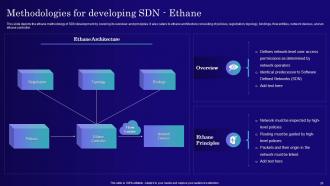
Slide 26: This slide discusses the ethane methodology of SDN development by covering its overview and principles.
Slide 27: This slide highlights the Title for the Ideas to be discussed next.
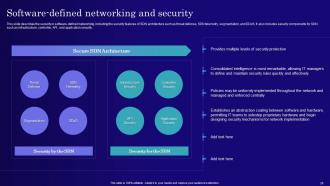
Slide 28: This slide describes the security in software-defined networking, including the security features of SDN architecture such as threat defense, SDN telemetry, segmentation, and DDoS.
Slide 29: This slide portrays the role of software-defined networking in customer security.
Slide 30: This slide highlights the Heading for the Ideas to be covered further.
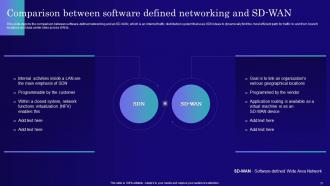
Slide 31: This slide depicts the comparison between software-defined networking and an SD-WAN.
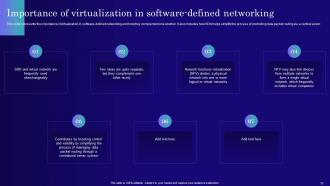
Slide 32: This slide represents the importance of virtualization in software-defined networking and how they complement one another.
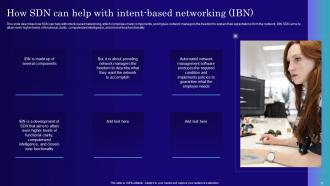
Slide 33: This slide describes how SDN can help with intent-based networking, which comprises many components.
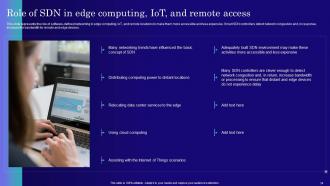
Slide 34: This slide mentions the role of software-defined networking in edge computing, IoT, and remote locations to make them more accessible and less expensive.
Slide 35: This slide reveals the Title for the Topics to be covered next.
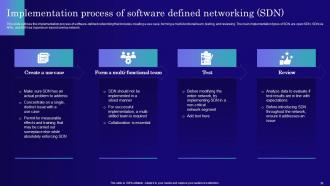
Slide 36: This slide outlines the implementation process of software-defined networking that includes creating a use case, forming a multi-functional team, etc.
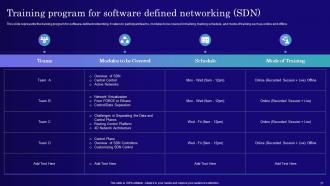
Slide 37: This slide illustrates the training program for software-defined networking.
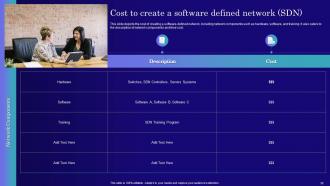
Slide 38: This slide depicts the cost of creating a software-defined network, including network components such as hardware, software, and training.
Slide 39: This sldie indicates the Heading for the Contents to be discussed in the following template.
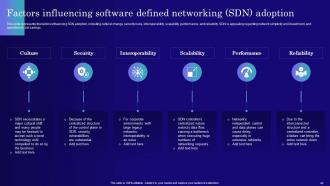
Slide 40: This slide exhibits the Factors influencing software defined networking (SDN) adoption.
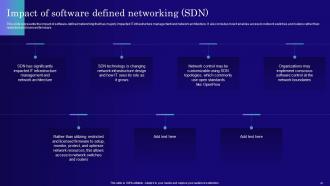
Slide 41: This slide elucidates the impact of software-defined networking that has majorly impacted IT infrastructure management and network architecture.
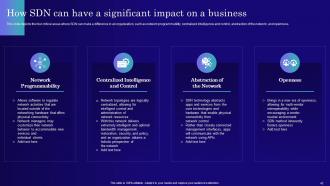
Slide 42: This slide displays the four critical areas where SDN can make a difference in an organization, such as network programmability, centralized intelligence and control, etc.
Slide 43: This slide incorporates the Title for the Components to be discussed further.
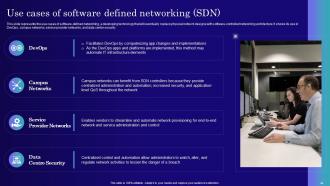
Slide 44: This slide showcases the use cases of software-defined networking.
Slide 45: This slide contains the Heading for the Topics to be covered in the forth-coming template.
Slide 46: This slide talks about the timeline for software-defined network implementation, including the steps to be performed.
Slide 47: This slide exhibits the Title for the Topics to be covered in the forth-coming template.
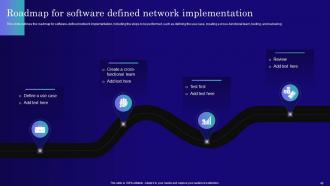
Slide 48: This slide outlines the roadmap for software-defined network implementation, including the steps to be performed.
Slide 49: This slide displays the Heading for the Contents to be discussed next.
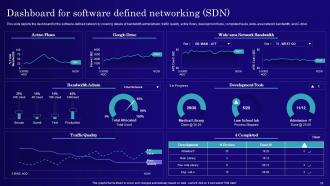
Slide 50: This slide illustrates the dashboard for the software-defined network by covering details of bandwidth administrator, traffic quality, active flows, etc.
Slide 51: This is the Icons slide containing all the Icons used in the plan.
Slide 52: This slide is used for showcasing some Additional information.
Slide 53: This is the About us slide. State your company-related information here.
Slide 54: This is Our mission slide. State your organization's mission, vision, and goals here.
Slide 55: This is Our team slide for depicting the information related to team members.
Slide 56: This is the Venn Diagram slide.
Slide 57: This is the 30-60-90 days plan slide for efficient planning.
Slide 58: This is the Puzzle sldie with related imagery.
Slide 59: This is the Thank You slide for acknowledgement
Software Defined Networking IT Powerpoint Presentation Slides with all 64 slides:
Use our Software Defined Networking IT Powerpoint Presentation Slides to effectively help you save your valuable time. They are readymade to fit into any presentation structure.














FAQs for Software Defined Networking IT
So basically SDN splits up the control stuff from the actual data moving around - you get one central brain controlling everything instead of babysitting each switch separately. Way better than old school networking where you're stuck configuring devices one by one. The controller can change routing and security on the fly, which honestly saves so much time. Plus you troubleshoot from one spot instead of digging through config files on like 20 different boxes. Makes the whole network way more flexible too. Oh and spinning up new services? Takes minutes instead of hours.
So SDN lets you control your whole network from one spot instead of logging into every single switch. Game changer honestly. You can push changes to hundreds of devices instantly - no more SSH hell. The automation piece is huge too, like setting up virtual networks on the fly or having the system react to traffic spikes automatically. Troubleshooting gets so much simpler when you've got that bird's eye view of everything. I'd say start with a small pilot first, maybe just one section of your network. You'll probably be kicking yourself for not doing it sooner once you see the time savings.
So OpenFlow is basically how your SDN controller talks to network switches. The controller pushes flow rules down to tell switches exactly what to do with different traffic types. It's like having a brain (controller) send signals through nerves (OpenFlow) to your hands and feet (switches). Pretty cool separation of control and data planes if you ask me. Most vendors support it these days - though honestly, some implementations are better than others. Just make sure your hardware can actually speak OpenFlow before you go all-in on SDN. Would suck to find out after the fact, you know?
So SDN gives you this central control hub for your whole network, which honestly makes security so much easier. Instead of manually configuring every single switch, you just push updates from one spot - way less room for screwups. The visibility is crazy good too; you'll catch weird traffic patterns super fast and can quarantine infected areas automatically. Oh, and microsegmentation becomes actually doable without buying a bunch of new gear. You can create these tight security zones around your important stuff. I'd start with whatever assets you absolutely can't afford to lose and build your segments there first.
So SDN basically splits up how networks work - the control plane gets separated from the data plane. You can program network behavior through centralized controllers instead of manually configuring every single switch and router (which honestly sucked). The controller sees your whole network topology and reacts instantly to changes or failures without you having to babysit it. Think of it like having an orchestrator that spins up VLANs and adjusts traffic flows automatically. Security policies get implemented on demand too. I'd start by looking at whatever network tasks you're doing over and over - that's where automation pays off first.
Honestly, the main pain points are vendor lock-in and your team needing to basically relearn networking from scratch. Legacy hardware won't play nice either. Security gets weird because you're putting all control in one place - creates some sketchy attack possibilities. Integration with existing stuff is a nightmare too, trust me on that one. Your network guys will hate life for a while since traditional skills don't really transfer over. Start with a small pilot first. Don't go full enterprise until everyone's actually trained up properly.
Dude, SDN is perfect for this stuff. You can reroute traffic and tweak bandwidth on the spot when everything goes nuts during peak times. No more being stuck with whatever setup you had from day one - the controller lets you see your whole network and make smart moves based on real traffic data. Automatically bump up resources, send traffic around jams, prioritize the apps that actually matter. Way better than traditional networking where you just pray nothing breaks. Oh, and definitely map out where your bottlenecks usually happen first. Then set up some automated rules to handle the common problems.
So SDN basically has three layers. Your data plane is at the bottom - that's just the actual switches and routers doing the packet forwarding stuff. Then you've got this centralized controller in the middle (the control plane) that's like the brain making all the decisions. The application plane sits on top where your network apps live. What makes it work are the APIs connecting everything - southbound ones link the controller to devices, northbound ones connect apps to the controller. Honestly, it's way cleaner than old-school networking once you get it. I'd start with understanding how those layers talk to each other if you're really gonna dig into this.
So basically SDN lets you slice up your network into totally separate virtual chunks for different tenants. Each one gets its own routing, IP space, security rules - the whole deal. Way more flexible than just using VLANs. The controller keeps everything organized so tenant A's stuff never bleeds into tenant B's network (yeah, that'd be a nightmare). You can spin up new tenant networks instantly through APIs too, which honestly beats manually configuring switches every single time. It's like having multiple networks running on the same hardware but they're completely isolated from each other.
Look, SDN is perfect when you're dealing with massive scale stuff - data centers spinning up VMs constantly, or multi-tenant setups where you absolutely need isolation. Traffic patterns are crazy unpredictable these days too. Service providers go nuts for it because they can automate provisioning instead of manually configuring everything (which honestly sounds like hell). Cloud migrations become way less painful, and you can roll out security policies across your whole network in minutes rather than babying each device individually. My advice? Figure out what's driving you crazy about your current setup - that's probably where you'll see the biggest wins with SDN.
SDN is a game changer for network monitoring - you go from guessing what's happening to actually seeing everything. The controller gives you this bird's eye view of your whole network with real-time data and traffic details you couldn't get before. What's cool is you can automatically tweak routing and prioritize apps based on actual performance instead of old static rules. Troubleshooting gets so much simpler too since everything's in one place. I'd say figure out what's driving you crazy about your current setup first, then see how SDN's flexibility can fix those specific headaches.
Don't rip everything out at once - that's just asking for trouble. Deploy SDN controllers next to your current switches and routers, then migrate one segment at a time. Most vendors have SDN-enabled versions of traditional gear now, so you might already be halfway there with some firmware updates. Run both systems in parallel while you're transitioning (basically like training wheels). I'd start with your less critical network segments first - gives you room to mess up while you're learning the automation stuff. Build your confidence on the small stuff before touching anything mission-critical.
You'll definitely need Python or Java for the controller stuff, plus solid networking basics - TCP/IP, VLANs, routing protocols, all that. OpenFlow is huge since that's how controllers talk to switches. REST APIs are literally everywhere in SDN so get comfortable with those fast. Linux is basically required too, most SDN runs on it anyway. Oh and don't skip automation tools like Ansible - SDN's whole thing is being programmable. Honestly I'd just set up a lab with OpenDaylight or ONOS and start messing around until stuff breaks. That's how I learned most of this stuff. Breaking things teaches you way more than any tutorial will.
So SD-WAN takes that whole SDN concept - you know, splitting control from data - and uses it for your WAN connections. Pretty cool stuff actually. You get one central controller managing all your links instead of each router doing its own thing. MPLS, broadband, LTE, whatever you're running. The controller sees everything happening across your network in real-time. Traffic getting backed up on your main MPLS? It'll automatically reroute critical stuff through a backup path. Plus you just set policies once centrally rather than touching every single device. Honestly saves you so much headache compared to the old way.
Dude, SDN is getting wild with AI automation - you literally just tell your network what you want and it handles the rest. Edge computing's pushing everything closer to devices, which honestly makes IoT stuff way more responsive. Security's baked right in now with microsegmentation and automatic threat responses. Short sentences work. But the real game-changer is how cloud-native everything's becoming with containers and Kubernetes doing the heavy lifting. Oh, and intent-based networking? Yeah, you should probably start messing around with that soon - it's becoming standard pretty fast.
-
Happy to incorporate such stunning templates in my presentation. Made my presentation look professional and engaging.
-
Fantastic and innovative graphics with useful content. The templates are the best and latest in the industry.