


Virtual Private Network VPN Powerpoint Presentation Slides




Try Before you Buy Download Free Sample Product
 Impress Your
 Audience
 100%
100% Editable
 Save Hours
 of Time


Grab our professionally designed Virtual Private Networks VPN PowerPoint presentation. It briefly explains the overview of virtual private network, its features, types, applications and benefits. It also includes the process phases of implementing virtual private network along with the market scope of VPN. In addition, this Internet Protocol Security PPT contains the types of virtual private networks which include remote access, site-to-site, cloud VPNs. Furthermore, the module includes comparison of different virtual private network protocols, VPN and proxy servers, and a summarized comparison of all VPN protocols. Also, this VPN Protocols PPT presentation includes the overview, benefits, and demerits of various virtual private network protocols such as OpenVPN, IKEv2 or IPsec, SSTP, WireGuard, L2TP or IPsec, and PPTP. Lastly, this Remote Access PowerPoint Presentation outlines best practices, a checklist, a training budget, a timeline, a roadmap, and the impact of virtual private network. Download our 100 percent editable and customizable template, also compatible with Google Slides.
People who downloaded this PowerPoint presentation also viewed the following :
Content of this Powerpoint Presentation
Slide 1: The slide introduces Virtual Private Network (VPN). State Your Company Name.
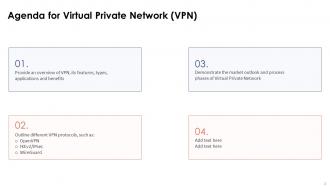
Slide 2: This is an Agenda slide. State your agendas here.
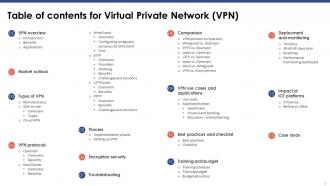
Slide 3: The slide displays Table of contents for the presentation.
Slide 4: The slide continues Title of contents.
Slide 5: This slide discusses the overview of virtual private network used for secure transfer of data through tunnelling protocols.
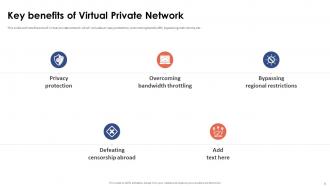
Slide 6: This slide outlines the pros of virtual private network which includes privacy protection, overcoming bandwidth, bypassing restrictions, etc.
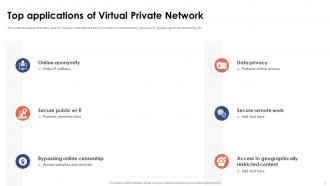
Slide 7: This slide shows the main uses of virtual private network which include online anonymity, secure wi-fi, bypassing online censorship, etc.
Slide 8: The slide renders Title of contents further.
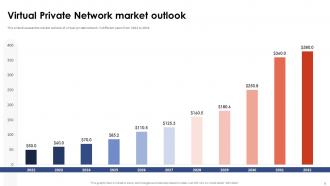
Slide 9: This slide discusses the market outlook of virtual private network in different years from 2022 to 2032.
Slide 10: The slide displays Title of contents further.
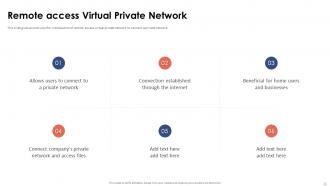
Slide 11: This slide gives an overview the introduction of remote access virtual private network to connect a private network.
Slide 12: The slide depicts Title of contents which is to be discussed further.
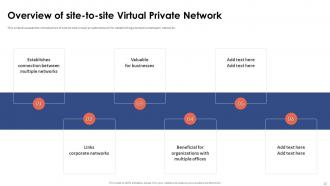
Slide 13: This slide discusses the introduction of site-to-site virtual private network for establishing connection between networks.
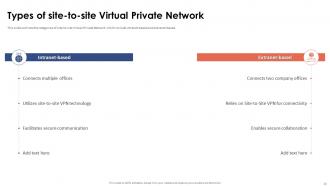
Slide 14: This slide outlines the categories of site-to-site Virtual Private Network which include intranet-based and extranet-based.
Slide 15: The slide displays another Title of contents.
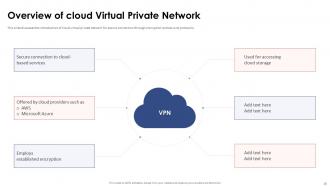
Slide 16: This slide discusses the introduction of cloud virtual private network for secure connection through encryption and security protocols.
Slide 17: The slide renders Title of contents further.
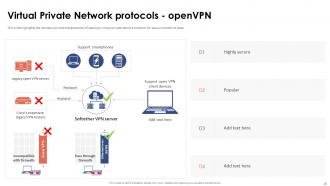
Slide 18: This slide highlights the introduction and replacements of openvpn virtual private network protocol for secure transfer of data.
Slide 19: This slide outlines the advantages of open VPN which include robust security, extensive backing, customization, etc.
Slide 20: The slide displays another Title of contents.
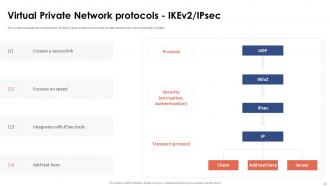
Slide 21: This slide discusses the introduction of ikev2/ipsec protocol of virtual private network for secure transfer of data.
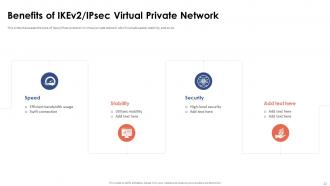
Slide 22: This slide showcases the pros of Ikev2/IPsec protocol in virtual private network which include speed, stability, and so on.
Slide 23: The slide again shows Title of contents.
Slide 24: This slide discusses the introduction of wireguard protocol in virtual private network for secure transfer of data.
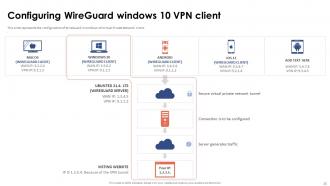
Slide 25: This slide represents the configuration of WireGuard in windows 10 Virtual Private Network client.
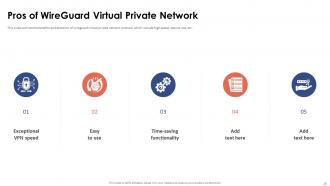
Slide 26: This slide outlines the benefits and demerits of wireguard virtual private network protocol which include high speed, easy to use, etc.
Slide 27: The slide also renders Title of contents.
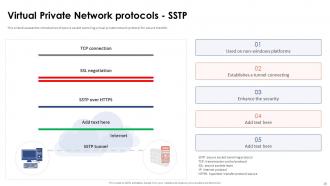
Slide 28: This slide discusses the introduction of secure socket tunneling virtual private network protocol for secure transfer.
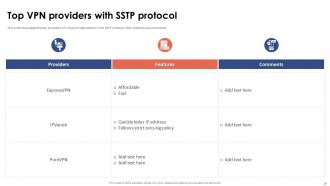
Slide 29: This slide showcases the top providers of virtual private network with SSTP protocol, their features and comments.
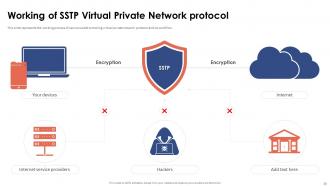
Slide 30: This slide represents the working process of secure socket tunneling virtual private network protocol and its workflow.
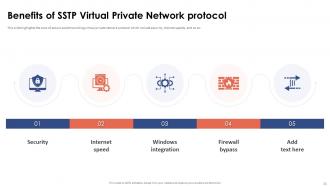
Slide 31: This slide highlights the cons of secure socket tunneling virtual private network protocol which include security, internet speeds, and so on.
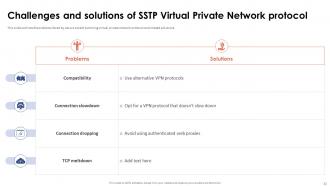
Slide 32: This slide outlines the problems faced by secure socket tunneling virtual private network protocol and related solutions.
Slide 33: The slide depicts Title of contents further.
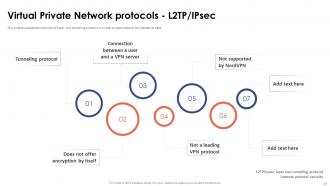
Slide 34: This slide discusses the overview of layer two tunneling protocol in virtual private network for transfer of data.
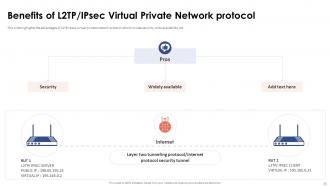
Slide 35: This slide highlights the advantages of L2TP/ipsec virtual private network protocol which include security, wide availability, etc.
Slide 36: The slide displays Title of contents further.
Slide 37: This slide showcases the introduction and workflow of point-to-point tunneling virtual private network protocol.
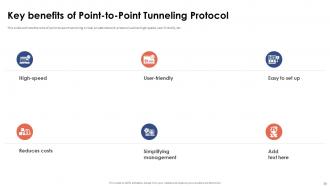
Slide 38: This slide outlines the cons of point-to-point tunneling virtual private network protocol such as high-speed, user-friendly, etc.
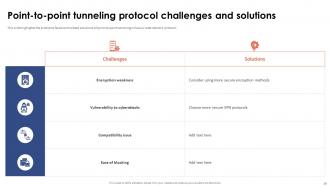
Slide 39: This slide highlights the problems faced and related solutions of point-to-point tunneling virtual private network protocol.
Slide 40: The slide displays Title of contents which is to be discussed further.
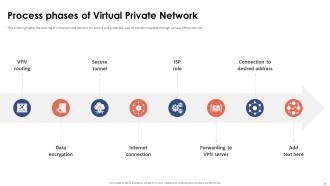
Slide 41: This slide shows the working of virtual private network for secure and protected way of transferring data through various VPN protocols.
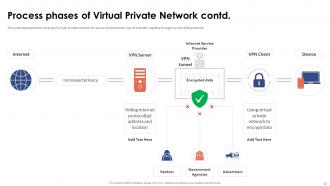
Slide 42: This slide represents the working of virtual private network for secure and protected way of transferring data through various VPN protocols.
Slide 43: The slide depicts another Title of contents.
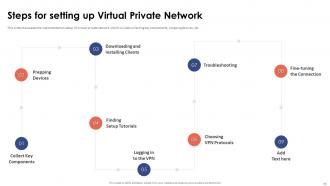
Slide 44: This slide showcases the implementation setup of virtual private network which include collecting key components, prepping devices, etc.
Slide 45: The slide shows Title of contents further.
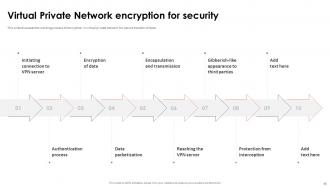
Slide 46: This slide discusses the working process of encryption in virtual private network for secure transfer of data.
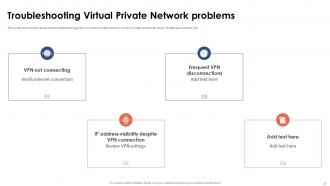
Slide 47: This slide outlines the issues and troubleshooting ways in virtual private network which include connection issue, IP address visibility, etc.
Slide 48: The slide presents Title of contents which is to be discussed further.
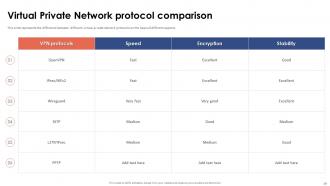
Slide 49: This slide represents the difference between different virtual private network protocols on the basis of different aspects.
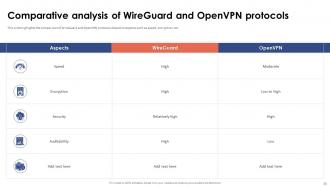
Slide 50: This slide highlights the comparison of WireGuard and OpenVPN protocols based on aspects such as speed, encryption, etc.
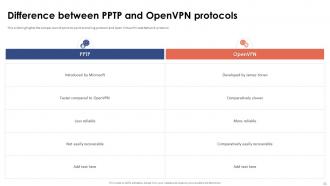
Slide 51: This slide renders the comparison of point-to-point tunneling protocol and Open Virtual Private Network protocol.
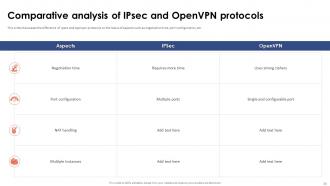
Slide 52: This slide outlines the difference between ipsec and open virtual private network protocols based on different factors.
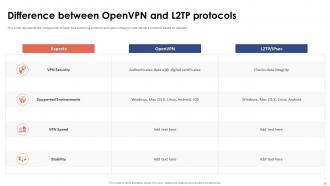
Slide 53: This slide presents the comparison of layer two tunneling protocol and open virtual private network protocol based on aspects.
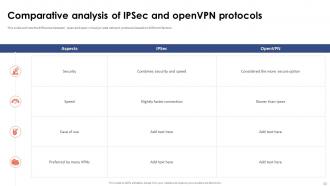
Slide 54: This slide showcases the difference of ipsec and openvpn protocols on the basis of aspects.
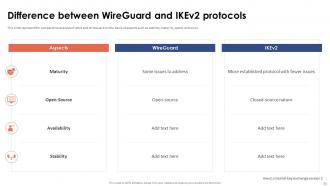
Slide 55: This slide represent the comparative analysis of IKEv2 and WireGuard on the basis of aspects such as stability, maturity, speed, and so on.
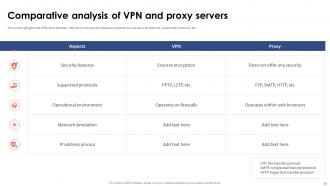
Slide 56: This slide highlights the difference between VPN and proxy servers based on aspects such as security features, supported protocols, etc.
Slide 57: The slide renders Title of contents further.
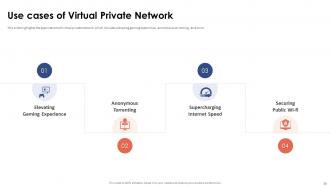
Slide 58: This slide provides the applications of virtual private network which includes elevating gaming experience, anonymous torrenting, and so on.
Slide 59: The slide also depicts Title of contents.
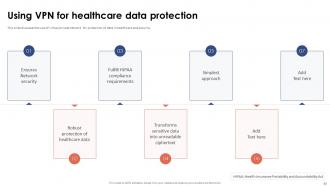
Slide 60: This slide contains the use of virtual private network for protection of data in healthcare and security.
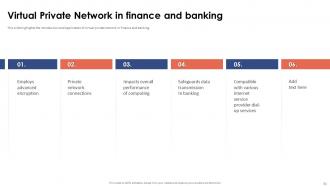
Slide 61: This slide highlights the introduction and application of virtual private network in finance and banking.
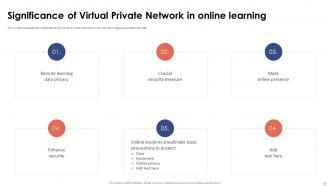
Slide 62: This slide discusses the importance of virtual private network in online learning secure data transfer.
Slide 63: The slide displays Title of contents further.
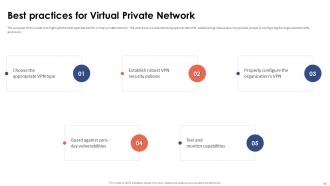
Slide 64: This slide is to highlight the best approaches for virtual private network.
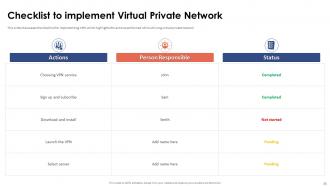
Slide 65: This slide showcases the checklist for implementing VPN which highlights the actions performed while utilizing virtual private network.
Slide 66: The slide displays Title of contents further.
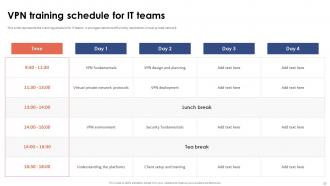
Slide 67: This slide represents the training schedule for IT teams in an organization to efficiently implement virtual private network.
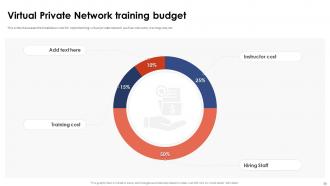
Slide 68: This slide showcases the breakdown cost for implementing virtual private network such as instructor, training cost, etc.
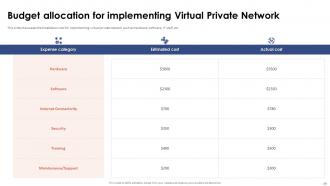
Slide 69: This slide continues the breakdown cost for implementing virtual private network such as hardware, software, IT staff, etc.
Slide 70: The slide represents Title of contents further.
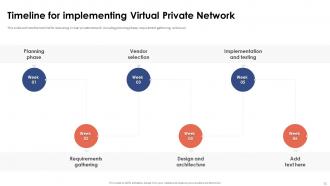
Slide 71: This slide outlines the timeline for executing virtual private network including planning phase, requirement gathering, and so on.
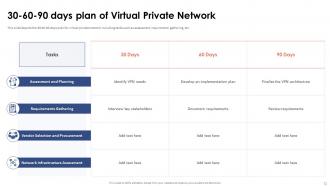
Slide 72: This slide depicts the 30 60 90 days plan for virtual private network including tasks such as assessment, requirement gathering, etc.
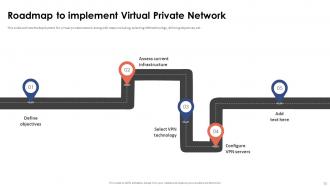
Slide 73: This slide outlines the deployment for virtual private network along with steps including, selecting VPN technology, defining objectives, etc.
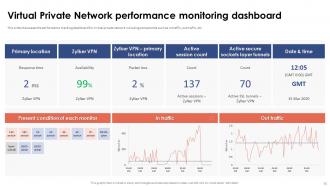
Slide 74: This slide showcases the performance tracking dashboard for virtual private network including components such as in traffic, out traffic, etc.
Slide 75: The slide renders Title of contents further.
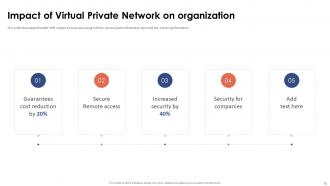
Slide 76: This slide showcases the after VPN impact on business along with the various factors that have improved the overall performance.
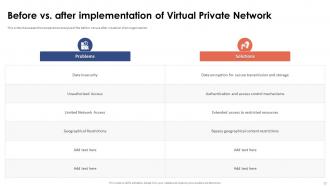
Slide 77: This slide highlights the comparative analysis of the before versus after situation of an organization.
Slide 78: The slide also displays Title of contents.
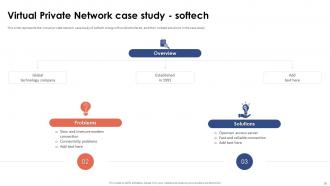
Slide 79: This slide represents the virtual private network case study of softech along with problems faced, and their related solutions in the case study.
Slide 80: This slide shows all the icons included in the presentation.
Slide 81: This slide is titled as Additional Slides for moving forward.
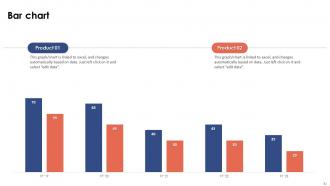
Slide 82: This slide presents Bar chart with two products comparison.
Slide 83: This is a Timeline slide. Show data related to time intervals here.
Slide 84: This slide depicts Venn diagram with text boxes.
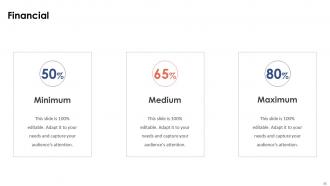
Slide 85: This is a Financial slide. Show your finance related stuff here.
Slide 86: This slide contains Puzzle with related icons and text.
Slide 87: This is Our Goal slide. State your firm's goals here.
Slide 88: This is an Idea Generation slide to state a new idea or highlight information, specifications etc.
Slide 89: This slide provides 30 60 90 Days Plan with text boxes.
Slide 90: This slide presents Roadmap with additional textboxes.
Slide 91: This slide shows Post It Notes. Post your important notes here.
Slide 92: This is a Thank You slide with address, contact numbers and email address.
Virtual Private Network VPN Powerpoint Presentation Slides with all 100 slides:
Use our Virtual Private Network VPN Powerpoint Presentation Slides to effectively help you save your valuable time. They are readymade to fit into any presentation structure.





















FAQs for Virtual Private Network VPN
So basically a VPN creates this encrypted tunnel between your device and their server, which hides your real IP address. Your internet traffic goes through that tunnel first before hitting any websites. Think of it like a secret pathway for your data - your ISP can't see what you're doing, and hackers on public wifi are screwed. The encryption makes it super hard for anyone to grab your personal stuff. Honestly, if you're working from coffee shops or using sketchy airport wifi regularly, you should probably get one. Worth the peace of mind.
Honestly, VPNs are pretty solid for privacy stuff - they encrypt everything so your ISP can't snoop on what you're doing. Great for public wifi too since those networks are sketchy as hell. You can also get around geo-blocks, which is clutch for Netflix shows that aren't available here (not that I'd know anything about that lol). Your real IP gets hidden so websites can't track you as easily. If you work from random places or just don't want companies building profiles on you, definitely worth it.
So VPNs basically create encrypted tunnels for your remote team - think of it like a secure pipeline straight to your company network. When someone's working from that sketchy Starbucks WiFi, all their traffic stays protected. They'll get access to your internal servers and apps just like they're in the office. Honestly, the hardest part is picking a business VPN that won't choke when everyone's on video calls. Start by figuring out what your team actually needs access to first, then set up proper login security. Oh, and don't cheap out - those consumer VPNs aren't gonna cut it for business use.
Honestly, paid VPNs are just way better. You get faster speeds and way more servers to choose from. Free ones seem great at first but they're usually painfully slow and have annoying data limits. The worst part? Some free VPN companies actually sell your browsing data to advertisers - which totally defeats the purpose, right? I tried a free one last year and it was constantly buffering. With paid services, you don't have to worry about sketchy business practices since they make money from subscriptions. Free ones are fine for quick testing, but don't rely on them for daily use.
So basically a VPN encrypts all your internet traffic - think of it like a secure tunnel. Your ISP can't see what you're browsing, and neither can sketchy people on public wifi. It also hides your real location by bouncing your connection through their servers first. Websites can't track you as easily or figure out where you actually are. Really handy for remote work too since you can access company stuff securely. Just don't go with some random free VPN that's probably selling your data anyway - stick with the reputable ones that don't keep logs.
Honestly, the biggest pain is how much it slows down your internet - all that routing through different servers adds up. Netflix and other streaming sites are pretty good at blocking VPNs too, which is annoying. You're looking at maybe $5-15 a month for anything decent. Don't even think about those free ones though, they're sketchy as hell and probably selling your data anyway. Some countries ban them completely. Also, they love to randomly disconnect right when you're in the middle of something important. I'd definitely try a free trial first - see if the slower speeds drive you crazy during normal stuff.
So VPNs work by routing your connection through servers in other countries, which makes Netflix think you're browsing from wherever that server is located. Connect to a UK server and boom - you're "in London" as far as they know. They see the VPN's IP instead of yours, so you get that country's content library. Pretty neat trick honestly. You'll want to pick a VPN with servers in countries that actually have the shows you want though - I learned that the hard way when I kept trying random locations that didn't help at all.
So encryption is what makes your VPN actually worth using - it scrambles your data so hackers just see garbage if they intercept it. Without decent encryption, you're basically just sending your stuff through some random company's servers, which is sketchy as hell. Look for AES-256 when you're comparing services. That's the good stuff. Any VPN that won't tell you their encryption details? Hard pass. I made that mistake once with a cheap service and regretted it. Your connection is only as secure as the encryption protecting it.
Honestly, VPN speed can make or break your whole experience. If it's too slow, you'll be sitting there waiting forever for pages to load, dealing with choppy video calls, and pulling your hair out over file uploads. Most people just give up at that point - can't blame them really. Your data has to bounce around more and get encrypted, so some slowdown is normal. Look for something that only drops your speed by 10-20% max. Beyond that and you'll hate using it. Oh, and definitely test your speeds before and after connecting to see what you're actually getting.
Honestly, the logging policy is probably the biggest thing to check - you want zero or minimal logs. Server locations are key too, especially if you're trying to watch Netflix from other countries or whatever. Speed varies wildly between providers, so definitely read reviews about performance before buying anything. Make sure they support OpenVPN or WireGuard for decent security. Don't just go with the cheapest option though - I learned that the hard way. Most have free trials anyway, so test it out first before you commit to like a year-long plan.
Yeah, your internet will definitely slow down with a VPN - you're basically making your data take a longer route to get anywhere. How much though? Depends on the service and which server you pick. Good VPN with a nearby server? You might barely notice. Cheap one routing you through like three different countries? Pretty annoying. I usually see around 10-25% speed drop. Honestly, just pick a decent provider and connect to something close to where you actually are. Makes a huge difference.
Oh yeah, VPN laws are actually pretty crazy in some places. China and Russia either ban them completely or regulate the hell out of them. Iran and UAE are similar - North Korea's basically a no-go obviously. Even countries that seem chill sometimes restrict what you can actually access through VPNs. The penalties aren't just slaps on the wrist either - you could face real fines or legal issues. Honestly, just spend like 10 minutes researching before you travel anywhere. Way better than dealing with that mess later.
So basically a VPN encrypts all your internet traffic - think of it like a secure tunnel. Really helpful when your team's working on public wifi or from home since hackers can't peek at your company data. It also hides your real IP address which is pretty neat. Even if someone does intercept your connection, the encryption makes it unreadable gibberish. Honestly, don't cheap out on the free VPNs though - get a proper business one. Make sure everyone on your team actually uses it when they're working remotely (you'd be surprised how many people forget).
So basically split tunneling lets you pick which apps use the VPN and which ones don't. Like your work stuff goes through the encrypted tunnel but Netflix just uses regular internet - way faster that way. Performance is obviously the big win since you're not slowing down everything. Plus it saves bandwidth costs and you can still access local network stuff. Honestly it's pretty clutch once you set it up right. I'd definitely use it for streaming and file sharing on your home network, but keep work apps tunneled for sure. Game changer for me tbh.
So basically a VPN scrambles all your data before it goes online - like putting everything in a locked box that only you have the key to. Even if someone grabs your info, they can't actually read it. Plus it hides your real location, which is honestly pretty nice for privacy. Public wifi is where this really matters since hackers love camping out on those networks. Your passwords, bank stuff, work files - all protected. Just don't go with those free VPN apps, most of them are garbage. Stick with the legit paid ones.
-
One-stop solution for all presentation needs. Great products with easy customization.
-
I am extremely pleased with these PPT slides that we used for our event. They were easy to modify and came out great in all aspects!