

IT Managed Service Providers Powerpoint Presentation Slides




Try Before you Buy Download Free Sample Product
 Impress Your
 Audience
 100%
100% Editable
 Save Hours
 of Time


The process of outsourcing various IT services to improve an organizations operational performance and decrease cost, in general, is called Managed Services. Check out our professionally designed IT Managed Service Providers PowerPoint presentation that focuses on these services pricing and growth strategies. This presentation is helpful for IT and Chief strategy managers intending to determine the appropriate pricing model for their organization. Our Capacity services management presentation analyses the global market scenario of the managed service industry by conducting in depth research of the overall market scenario and the global managed services market. This Business Model deck also presents a competitive analysis of the sector identifying the nature of competition in the market and significant market leaders. Also, these strategies reveal a new pricing model, utilize automated processes in managed services, and add various services to the organization. These pricing models can be Per User Pricing Model, Per Device Pricing Model, A LA Carte pricing model, and Tiered Pricing model. Furthermore, these models are then compared based on their scalability, cost, and technological advancement, and the best suitable business model is implemented and utilized. Lastly, the impact of implementing the pricing strategy and the effect of utilizing key strategies for managed services growth is identified, which can increase sales, decrease operational costs, and increase market share. Get access now.
People who downloaded this PowerPoint presentation also viewed the following :
Content of this Powerpoint Presentation
Slide 1: This slide displays the title IT Managed Service Providers.
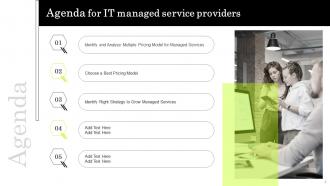
Slide 2: This slide displays the title Agenda for IT managed service providers.
Slide 3: This slide exhibit table of content.
Slide 4: This slide exhibit table of content that is to be discuss further.
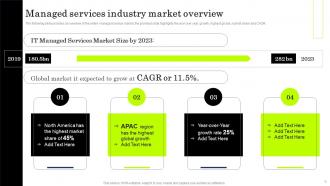
Slide 5: This slide provides an overview of the entire managed service market, the provided slide highlights the year over year growth, highest global ,market share and CAGR.
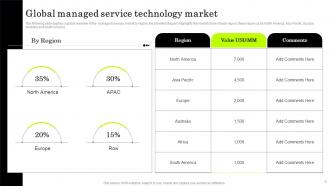
Slide 6: This slide displays a global overview of the managed services market by region, the provided diagram highlights the market share of each region.
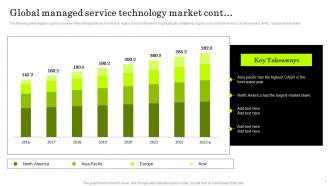
Slide 7: The following slide displays a global overview of the Managed Service market by region, the provided world map highlights multiple key regions.
Slide 8: This slide exhibit table of content that is to be discuss further.
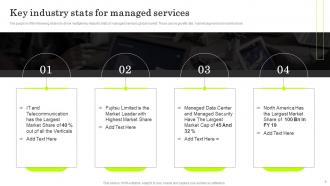
Slide 9: The purpose of the following slide is to show multiple Key Industry stats of managed services global market.
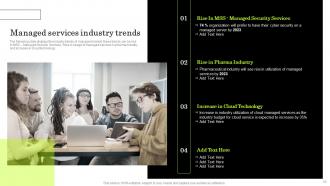
Slide 10: The following slide displays the industry trends of managed market, these trends can be rise in MSS – Managed Security Services, Rise in usage of managed services.
Slide 11: This slide exhibit table of content that is to be discuss further.
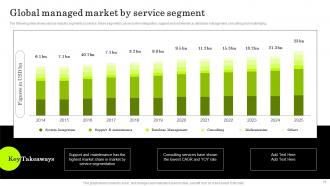
Slide 12: This slide slide shows various industry segments by service, these segments can be system integration, support and maintenance, database management.
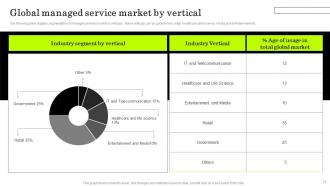
Slide 13: This slide displays segmentation of manages services market by verticals , these verticals can be government, retail, healthcare and science, media and entertainment
Slide 14: This slide exhibit table of content that is to be discuss further.
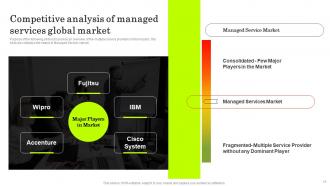
Slide 15: This slide is to provide an overview of the multiple service providers in the industry, this slide also displays the nature of Managed Service market.
Slide 16: The following slide provides a detailed analysis of the market share of our company in comparison to the competition.
Slide 17: This slide exhibit table of content that is to be discuss further.
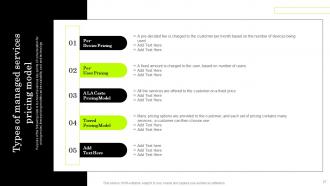
Slide 18: This slide covers the different managed services pricing model out of which our company will choose A la carte model and implement the same to grow managed services.
Slide 19: This slide covers the automation tools competitive landscape along with the its features and choosing the best software for the company.
Slide 20: This slide covers the current strategy used by the company which uses traditional ways of marketing such as fax, cold calling, face to face meetings, etc.
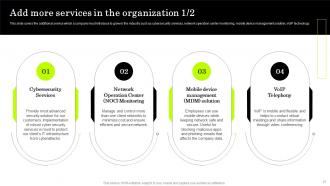
Slide 21: This slide covers the additional service which a company must introduce to grow in the industry.
Slide 22: This slide covers the additional service which a company must introduce to grow in the industry.
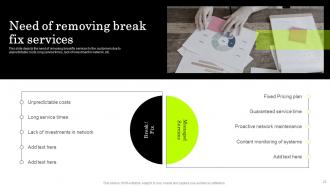
Slide 23: This slide depicts the need of removing break/fix services to the customers due to unpredictable costs, long service times, lack of investment in network, etc.
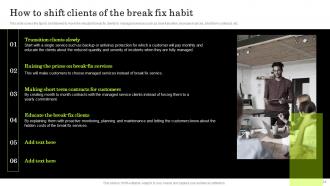
Slide 24: This slide covers the tips to be followed to move the reluctant break fix clients to managed services.
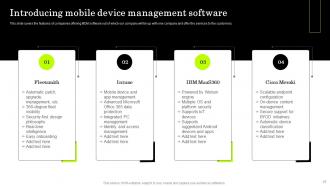
Slide 25: This slide covers the features of companies offering MDM software out of which our company will tie up with one company and offer the services to the customers.
Slide 26: This slide exhibit table of content that is to be discuss further.
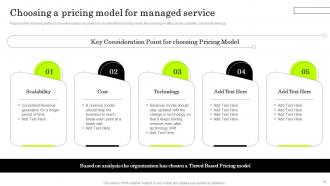
Slide 27: This slide is to show the various key points of consideration for pricing model, these pricing models can be scalability, cost and technology.
Slide 28: This slide exhibit table of content that is to be discuss further.
Slide 29: This slide is to provide an overview of the user-based pricing model or the per user pricing model.
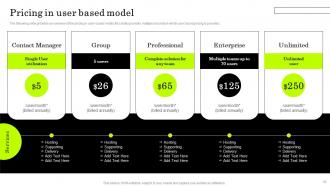
Slide 30: This slide provides an overview of the pricing in user-based model, this slides provides multiple brackets in which user based pricing is provided.
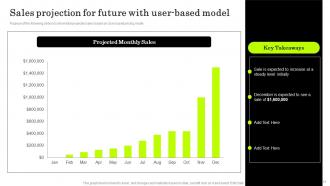
Slide 31: Purpose of the following slide is to show total projected sales based on User based pricing model
Slide 32: This slide exhibit table of content that is to be discuss further.
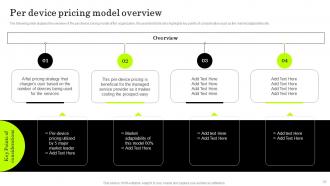
Slide 33: The following slide displays the overview of the per device pricing model of the organization.
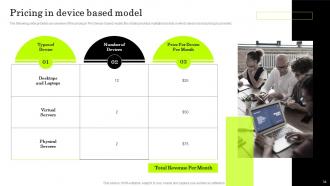
Slide 34: The following slide provides an overview of the pricing in Per Device-based model, this slides provides multiple brackets in which device based pricing is provided.
Slide 35: Purpose of the following slide is to show total projected sales based on devcie based pricing model
Slide 36: This slide exhibit table of content that is to be discuss further.
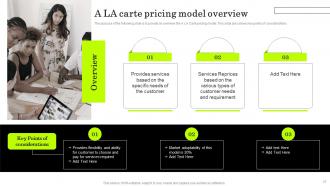
Slide 37: The purpose of the following slide is to provide an overview the A LA Carte pricing model.
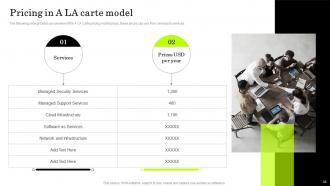
Slide 38: The following slide provides an overview of the A LA Carte pricing model prices, these prices can vary from services to services.
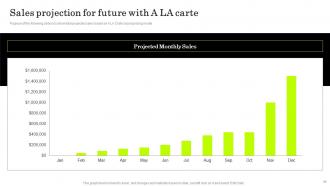
Slide 39: Purpose of the following slide is to show total projected sales based on A LA Crate based pricing model
Slide 40: This slide exhibit table of content that is to be discuss further.
Slide 41: This slide is to provide an overview of the Tier based pricing model or the per user pricing model.
Slide 42: The following slide provides pricing details of tiered pricing model for managed services, these pricing can be pro, most popular, standard and basic.
Slide 43: Purpose of the following slide is to show total projected sales based on Tiered based pricing model.
Slide 44: This slide exhibit table of content that is to be discuss further.
Slide 45: This slide is to show the various key points of consideration for pricing model, these pricing models can be scalability, cost and technology.
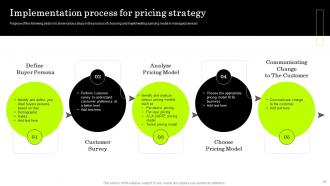
Slide 46: Purpose of the following slide is to show various steps in the process of choosing and implementing a pricing model in managed services
Slide 47: This slide exhibit table of content that is to be discuss further.
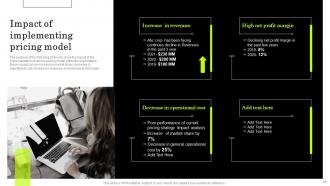
Slide 48: The purpose of the following slide is to show the impact of the implementation of various pricing model within the organization.
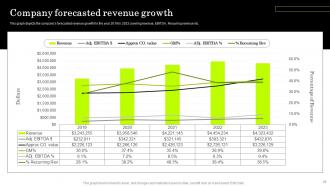
Slide 49: This graph depicts the company’s forecasted revenue growth for the year 2019 to 2023 covering revenue, EBITDA, Recurring revenue etc.
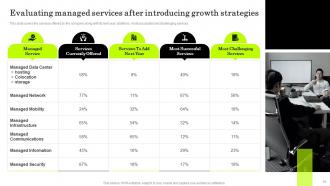
Slide 50: This slide covers the services offered by the company along with its next year additions, most successful and challenging services.
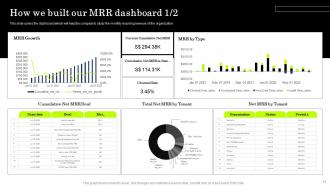
Slide 51: This slide covers the dashboard which will help the company to study the monthly recurring revenue of the organization.
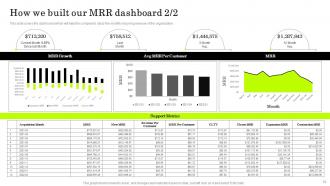
Slide 52: This slide covers the dashboard which will help the company to study the monthly recurring revenue of the organization.
Slide 53: This is the icons slide.
Slide 54: This slide presents title for additional slides.
Slide 55: This slide highlights multiple issues that the organization is facing for the past financial year, these issues can be low revenues, and other generals issues.
Slide 56: The purpose of the following slide is to analyze the financial performance of the organization.
Slide 57: This slide display Managed Cyber Security Services.
Slide 58: This slide is to define an ideal customer of the organization, various parameters are considered such as age, occupation , motivation, goals , pain points etc.
Slide 59: This slide display Factors determining the need of managed services.
Slide 60: This slide presents title for additional slides.
Slide 61: This slide display Benefits of managed services.
Slide 62: This slide display Best MRR and churn tracking tools.
Slide 63: This slide shows details of team members like name, designation, etc.
Slide 64: This slide depicts 30-60-90 days plan for projects.
Slide 65: This slide shows about your company, target audience and its client's values.
Slide 66: This slide exhibits ideas generated.
Slide 67: This slide display Quotes.
Slide 68: This is thank you slide & contains contact details of company like office address, phone no., etc.
IT Managed Service Providers Powerpoint Presentation Slides with all 73 slides:
Use our IT Managed Service Providers Powerpoint Presentation Slides to effectively help you save your valuable time. They are readymade to fit into any presentation structure.
-
IT Managed Service Providers
-
Agenda for IT managed service providers
-
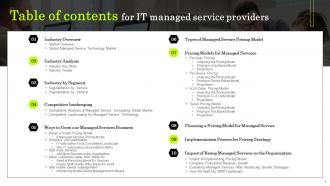
Table of contents for IT managed service providers
-
Table of contents for IT managed service providers
-
Managed services industry market overview
-
Global managed service technology market
-
Global managed service technology market cont
-
Table of contents for IT managed service providers
-
Key industry stats for managed services
-
Managed services industry trends
-
Table of contents for IT managed service providers
-
Global managed market by service segment
-
Global managed service market by vertical
-
Table of contents for IT managed service providers
-
Competitive analysis of managed services global market
-
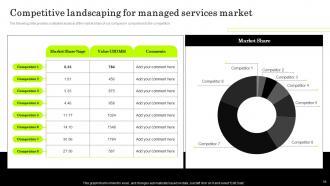
Competitive landscaping for managed services market
-
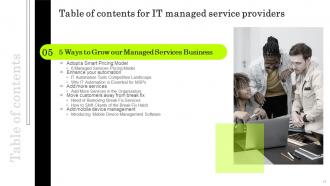
Table of contents for IT managed service providers
-

6 Managed Services Pricing Model
-
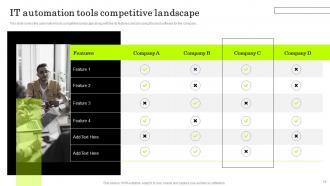
IT automation tools competitive landscape
-
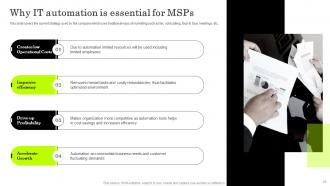
Why IT automation is essential for MSPs
-
Add more services in the organization 1 2
-

Add more services in the organization 2 2
-
Need of removing break fix services
-
How to shift clients of the break fix habit
-
Introducing mobile device management software
-
Table of contents for IT managed service providers
-
Types of managed services pricing model
-
Table of contents for IT managed service providers
-

Per user pricing model overview
-
Pricing in user based model
-
Sales projection for future with user based model
-
Table of contents for IT managed service providers
-
Per device pricing model overview
-
Pricing in device based model
-

Sales projection for future with device based model
-
Table of contents for IT managed service providers
-
A LA carte pricing model overview
-
Pricing in A LA carte model
-
Sales projection for future with A LA carte
-

Table of contents for IT managed service providers
-
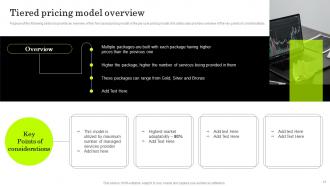
Tiered pricing model overview
-
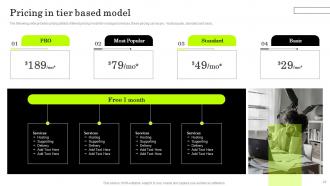
Pricing in tier based model
-
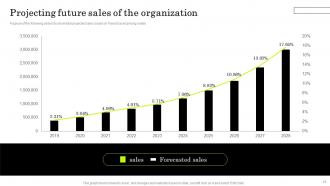
Projecting future sales of the organization
-
Table of contents for IT managed service providers
-
Choosing a pricing model for managed service
-
Implementation process for pricing strategy
-
Table of contents for IT managed service providers
-
Impact of implementing pricing model
-
Company forecasted revenue growth
-
Evaluating managed services after introducing growth strategies
-
How we built our MRR dashboard 1 2
-
How we built our MRR dashboard 2 2
-

IT managed service providers
-

IT Managed Service Providers
-
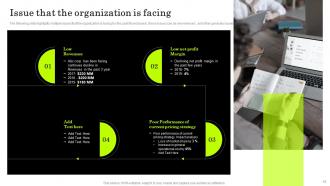
Issue that the organization is facing
-
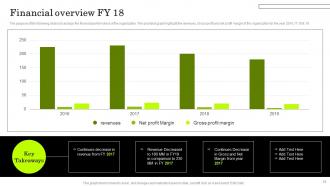
Financial overview FY 18
-
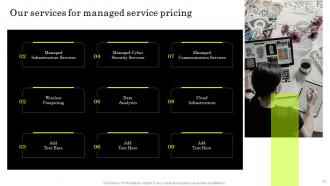
Our services for managed service pricing
-
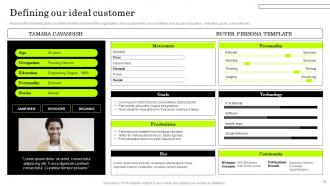
Defining our ideal customer
-
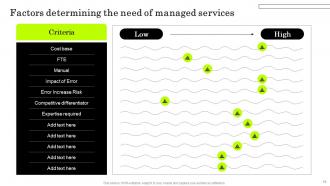
Factors determining the need for managed services
-
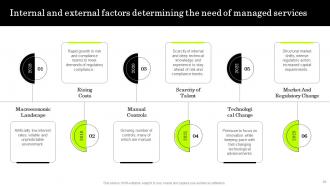
Internal and external factors determining the need for managed services
-
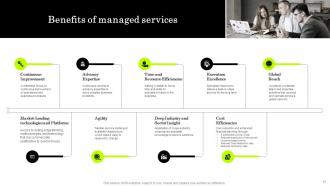
Benefits of managed services
-
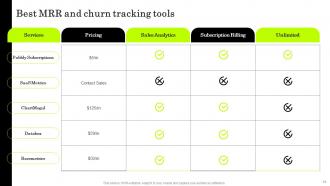
Best MRR and churn tracking tools
-

Our team
-
IT Managed Service Providers
-
About us
-

Idea generation
-

Quotes
-
Thanks for watching
-

-

-

-

-

FAQs for IT Managed Service Providers
Honestly, the money you'll save is huge - no more hiring expensive IT specialists full-time. Your team can actually focus on growing the business instead of dealing with random server crashes at ridiculous hours (trust me on this one). You get 24/7 monitoring and way better security too. Monthly costs become predictable rather than those awful surprise repair bills that always seem to hit at the worst time. These providers actually keep up with all the latest tech stuff and compliance requirements, which would take your team months to figure out. I'd say start by listing your biggest IT headaches first, then find someone who knows that space well.
Look, managed IT services are honestly a game-changer for security stuff. You get round-the-clock monitoring that your internal team probably can't pull off - like, who's watching for threats at 2am? They handle all the tedious patch updates and have access to crazy expensive security tools you'd never buy yourself. Plus the threat landscape is nuts right now, changes every week it seems. Regular assessments and compliance checks mean you're actually getting ahead of problems instead of scrambling after something bad happens. If you feel like you're constantly behind on security, definitely worth looking into.
Start with uptime - if your systems aren't running, nothing else matters. Response times are huge too, both for fixing tickets and how fast your apps actually load. Those user satisfaction surveys are annoying to send out but they'll tell you everything about what's really broken. Security incidents and backup success rates are obvious ones to track. Cost per user shows if you're bleeding money somewhere. The hardest metric? Business impact stuff - like figuring out what an hour of downtime actually costs vs. what you spend preventing it. But honestly, nail uptime and response times first, then worry about the fancy metrics later.
So basically these IT services become your backup plan when everything hits the fan. They're constantly monitoring your stuff 24/7 and can usually catch problems before you even notice. The disaster recovery piece is solid - they'll back up your data, set up redundant systems, document how to get back online fast. Most companies totally forget to actually test their recovery plans (rookie mistake), but managed services will do that for you. Oh, and when ransomware or server crashes happen, you won't be running around like a headless chicken. Just make sure they walk through what's actually covered in your current setup.
Honestly, managed services are a game-changer for remote work. They handle all the tech nightmare stuff - VPNs, cloud access, monitoring systems around the clock. Plus helpdesk support for when Karen can't figure out her WiFi again (happens every week, I swear). Without them you'd be constantly putting out fires. Security breaches, connection issues, servers crashing at the worst possible times. The best part? They actually prevent problems before they happen instead of just scrambling to fix everything after it's already broken. Your team stays productive and you don't lose your mind.
Honestly, don't rush this - give yourself like 30-60 days minimum depending on how complex your setup is. Map out everything first: your current systems, processes, all that stuff. Sounds boring but it'll save you major headaches later. Run both the old and new systems at the same time for a while (extra work, I know, but worth it). Your new provider should really dig into your existing setup before flipping any switches. Oh, and keep your team in the loop the whole time - nobody likes being blindsided by outages or weird glitches during the switch.
Honestly? Most people save like 30-50% switching to managed services vs hiring a whole IT team. Think about it - no salaries, benefits, training costs for multiple people. You get access to really good tech people without paying those crazy enterprise wages. Monthly fees are so much easier to budget than surprise hiring costs or emergency contractor rates (been there, it sucks). The downside is you don't control your IT folks directly anymore. I'd grab quotes from a few providers and compare to what you're spending now - don't forget all those hidden costs though.
Good MSPs handle compliance pretty systematically - they do regular risk assessments and implement frameworks like SOC 2 or ISO 27001. You'll get assigned a compliance officer who stays on top of whatever regulations hit your industry (GDPR, HIPAA, etc.). They also train employees and have incident response plans ready. The documentation side is honestly a nightmare if you try doing it yourself. Before signing anything, make sure they can show you their certifications upfront and walk you through exactly how they'll protect your business. Trust me, it's worth asking the hard questions early.
So the big thing right now is AI automation - MSPs are using it to catch problems before they even happen, which is pretty cool. Hybrid cloud management is huge too since everyone's got stuff scattered across different platforms. But honestly? The cybersecurity piece is what's really driving everything. Ransomware has people absolutely terrified, so zero-trust and 24/7 monitoring aren't fancy extras anymore - they're just standard now. You should definitely ask your MSP what they're doing with AI automation specifically. That's where you'll actually see your money working for you. Oh, and the proactive monitoring stuff is getting way more sophisticated than it used to be.
Look, managed services take care of all the annoying backend maintenance - monitoring, security patches, cost optimization, auto-scaling when traffic spikes. Your team won't have to babysit servers at 2am anymore. Trust me, I've watched companies waste months just trying to figure out their cloud bills (it's honestly ridiculous how complicated AWS pricing gets). These MSPs have specialists who actually know what they're doing and can catch problems before everything crashes. You'll get better uptime and save money. Best part? Your people can finally work on stuff that matters instead of playing IT janitor all day.
Find someone who gets your specific industry and won't bail when you grow. Make sure they do 24/7 support - trust me, servers don't crash during business hours. Their team should feel like your coworkers, not some random call center overseas (though honestly, some offshore teams are solid). Security certs and backup plans are non-negotiable. Here's what most people don't do: actually call their references. I can't stress this enough. Test them with something small first before handing over your entire IT infrastructure. Disaster recovery matters way more than you think.
So basically, managed IT services watch your network 24/7 and catch problems before they blow up. They handle bandwidth optimization, keep firmware updated, and set up backup systems so you don't go down. You get access to crazy expensive enterprise tools without buying them yourself. The coolest part? They can predict when stuff's about to fail and fix it early. Honestly beats hiring a whole IT department - way less headache. When you're shopping around, definitely ask about their monitoring setup and how fast they respond to issues.
Honestly, compatibility stuff will probably give you the biggest headaches. Your current systems might clash with whatever tools they use - especially if you're stuck with older infrastructure. Data security's another pain point. You'll have to sort out who gets access to what and double-check that you're still hitting all your compliance boxes. Oh, and legacy systems? Total nightmare to work with sometimes. Do your homework upfront though. Find providers who actually know your industry and tech setup. Makes everything way smoother down the road.
Dude, you'll actually get your team back to doing real work instead of fixing broken stuff all day. Most companies waste like 80% of their time on maintenance - it's nuts. These providers have seen everything across tons of businesses, so they know tricks your team probably doesn't. You get access to expensive enterprise tools without buying them outright, which is pretty sweet. It's basically like borrowing a whole department of specialists whenever you need them. Just make sure whoever you pick actually gets what your business is trying to do, not just the tech side of things.
So basically, it's all about different compliance stuff. Healthcare MSPs have to deal with HIPAA and keeping patient data locked down tight. Finance ones need SOX compliance plus all that banking regulation nonsense. Healthcare prioritizes uptime because imagine if the system crashes mid-surgery - yikes. Financial services care more about real-time transaction monitoring and fraud detection. The SLA expectations are different too. Healthcare wants 24/7 support for life-critical systems. Finance is obsessed with transaction speed and audit trails. Just make sure whoever you pick actually knows your industry's rules, not just generic IT management.
-
Loved the templates on SlideTeam, I believe I have found the go to place for my presentation needs!
-
“Excellent service from the customer support team when I wanted a slide that was a bit different from those on their standard menu. Super helpful.”