


Search engine optimization seo shape ppt slides




Try Before you Buy Download Free Sample Product
 Impress Your
 Audience
 100%
100% Editable
 Save Hours
 of Time


Optimize the visibility in search engines with our search engine optimization SEO shape PPT slides. This presentation layout of search engine marketing has been created by our professional team members and allows you to showcase how small modifications on your website may create incremental improvements over a period of time. With the help of this search marketing PPT template, you can outline right kind of strategies, techniques and tactics on your website can increase visitors to a website by obtaining a high ranking on search engines like Google, Bing, and Yahoo. Our website promotion optimization presentation template can be used to show that by performing actions such as keyword research, analyze keywords based on effectiveness and by building links you can increase the traffic on your site. Use this website optimization presentation template to showcase that the high-quality content pages, relevant information about the searcher’s query you create relevant content to optimize intent. Download this online marketing PowerPoint template and for more visit our website. Our Search Engine Optimization Seo Shape Ppt Slides are an asset for canvassing. Your cause will get the attention it deserves.
People who downloaded this PowerPoint presentation also viewed the following :
Content of this Powerpoint Presentation
Description:
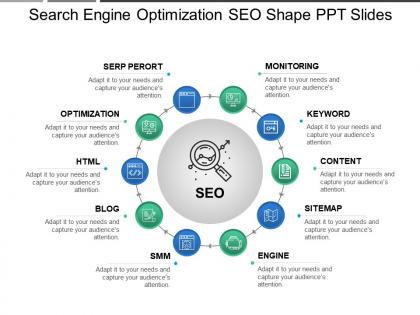
The image shows a PowerPoint slide titled "Search Engine Optimization SEO Shape PPT Slides." It's designed to illustrate various components of SEO strategy in a circular diagram format, centered around the SEO process.
Each element of the SEO process is labeled around the circle:
1. SERP PERORT:
Likely a typo, possibly meant to say "SERP REPORT," which would represent search engine results page reporting.
2. OPTIMIZATION:
Refers to the process of making a website more search engine friendly to improve rankings.
3. HTML:
Denotes the importance of well-structured HTML to SEO.
4. BLOG:
Suggests content creation as a means for improving SEO.
5. SMM:
Stands for Social Media Marketing, indicating its role in driving traffic and improving SEO.
6. ENGINE:
Implies the search engine itself, which is the target of optimization efforts.
7. SITEMAP:
Refers to a file where you provide information about the pages, videos, and other files on your site and the relationships between them.
8. CONTENT:
Highlights the creation of relevant and valuable content to attract and engage an audience.
9. KEYWORD:
Stresses the importance of targeted keywords in SEO strategy.
10. MONITORING:
Indicates the ongoing process of tracking SEO performance and results.
Use Cases:
This type of slide can be adapted for use in various industries to illustrate their SEO strategies:
1. E-commerce:
Use: Driving organic traffic to product listings.
Presenter: Digital Marketing Manager
Audience: Marketing Team, SEO Specialists
2. Healthcare:
Use: Enhancing visibility for medical services and information.
Presenter: Healthcare Marketing Strategist
Audience: Medical Practitioners, Hospital Marketing Staff
3. Real Estate:
Use: Attracting potential buyers or renters through optimized property listings.
Presenter: Real Estate Marketing Professional
Audience: Real Estate Agents, Brokers
4. Education:
Use: Improving the online presence of educational programs and institutions.
Presenter: Admissions Marketing Director
Audience: Administrative Staff, Faculty
5. Technology:
Use: Boosting software product discoverability via search engines.
Presenter: Tech Product SEO Analyst
Audience: Product Managers, Marketing Department
6. Hospitality:
Use: Increasing hotel and travel package visibility in search engine results.
Presenter: Hospitality Digital Marketing Expert
Audience: Hotel Managers, Travel Agents
7. Legal Services:
Use: Drawing in clients by optimizing for legal terms and services.
Presenter: Legal Marketing Consultant
Audience: Lawyers, Law Firm Partners
Search engine optimization seo shape ppt slides with all 5 slides:
Emphasize the importance of cleanliness with our Search Engine Optimization Seo Shape Ppt Slides. It helps create healthy conditions.
FAQs for Search engine optimization seo
Focus on your titles and meta descriptions first - pack them with keywords but keep it natural. Your headings need terms like "PowerPoint template" or whatever you're selling. Alt text is actually super important here since templates are all visual, so describe what's in each slide preview. Clean URLs help too. Honestly, page speed might be more crucial than you think - people get impatient when previews take forever to load. I'd start by looking at your current pages and see where you can add more searchable language. Just don't go overboard with keyword stuffing because that looks terrible.
Okay so you gotta think about what people actually type when they're hunting for templates. Like, nobody searches "presentation" - they get super specific with stuff like "business pitch deck template" or "minimalist investor presentation." Those long-tail keywords are gold because there's less competition. Google Keyword Planner will show you real search numbers, which is clutch. Then just work those terms into your titles and descriptions naturally. I learned this the hard way when my generic titles got zero traffic lol. People search way more specifically than you'd think!
Oh man, backlinks are actually HUGE for template sites. Think about it - you're competing against tons of other sites that look exactly like yours. Google can't tell you apart based on design, so those external links become your only way to stand out. Quality matters way more than quantity though. I learned this the hard way lol. You want links from sites in your actual niche, not some random blog farm. Focus on making content that's actually worth linking to. Google's pretty smart about catching fake link schemes these days, so don't even bother with that stuff. Just create something genuinely useful.
Google basically rewards sites that don't suck at keeping people around. Your template site needs to load fast - people downloading templates are usually in a rush and will bounce if it's slow. Make your search filters actually work properly so users can find what they're looking for. Short visits tell Google your site isn't helpful. Here's what actually moves the needle: get those preview images loading quickly and organize your categories better. Honestly, better user experience pretty much always leads to people staying longer, which helps your rankings.
Keep your images under 1MB each - nobody wants to wait forever for downloads. Name them properly too, like "marketing-strategy-chart.jpg" instead of random IMG files. People pull these images out later and descriptive names save everyone headaches. I'd honestly provide both high-res and web versions if you can swing it. Nothing kills a good template like massive uncompressed screenshots that crash PowerPoint. Your templates need to look sharp but actually work when people use them. Oh, and throw in alt text while you're at it - takes two seconds but makes a difference.
Think of meta descriptions like movie trailers - you've got 150-160 characters to hook people. Don't just say "professional design" because honestly, everyone claims that. Instead, get specific about what problem your template actually solves. Throw in your main keyword but make it sound natural, not forced. Action words help too. I always write mine like tiny ads that make people think "yeah, I need that." Oh and definitely check Search Console later to see which versions people actually click on - some will surprise you!
Start with Google Analytics 4 and Search Console - they're free and cover all the basics like traffic and keyword stuff. Then grab either Semrush or Ahrefs for competitor research (I personally like Ahrefs but honestly just pick whichever one doesn't annoy you). Since you're doing digital products, conversions are way more important than just getting tons of traffic. Make sure you set up goal tracking in GA4 for downloads and purchases - that's where the real money insights are. Oh, and track the full user journey, not just where people land. These four tools should cover everything without breaking the bank.
So basically you want to write stuff that shows off your templates without being super obvious about it. Blog posts work great - like "10 Pitch Deck Mistakes That Kill Deals" then sneak your templates in as examples. Tutorial videos are money too, especially the customization ones. People eat that up for some reason. Go for specific keywords though - "minimalist presentation templates for startups" beats just "templates" every time. The whole thing is about helping people first, then casually showing your templates doing their thing. Oh and definitely research what presentation problems people are actually googling. That's where the gold is.
Schema markup seriously helps search engines figure out what your content actually is. You'll start seeing those fancy rich snippets - like star ratings and event details - show up in search results instead of boring plain links. Click-through rates usually jump because your stuff looks way more interesting. It also helps with voice search, which is kinda huge now. Featured snippets become more likely too. Honestly, just start with basic Organization and WebPage schema on your templates. Way easier than it sounds and you'll see results pretty fast. I was skeptical at first but the difference is real.
So social media won't directly boost your SEO rankings, but it gets people finding your templates and clicking through to your site. Google notices that traffic. Plus when you post on Instagram, Pinterest, or Twitter, some viewers will link to your stuff from their own sites. Pinterest is honestly amazing for template creators - it's so visual. All that extra traffic tells Google your content's worth something, and you'll get more people searching your brand name too. Oh, and focus on wherever your ideal customers actually spend time online. Keep sharing your best designs with links back to your site.
Ugh, template sites mess up the same things every time. Duplicate content is killer - you're literally using the same stuff as thousands of other sites. People leave all the generic meta tags too, which is basically SEO suicide. Your URL structure probably sucks if you didn't customize it. Check your headers and image alt tags - bet there's still placeholder text everywhere. Template code is usually bloated as hell and makes your site super slow. Strip out the junk plugins first. Then rewrite everything - titles, descriptions, all that default content. Honestly, just doing these basics puts you ahead of most template sites out there.
Dude, yes - a blog will totally help your SEO. Your template pages are pretty static, so you can't really optimize them for stuff like "PowerPoint alternatives for Mac users" or "how to design slides for remote presentations." But blog posts? Perfect for that. Google eats up fresh content, and honestly, most people don't find templates by searching "premium PowerPoint templates" anyway. They're googling their specific problems first. You'll catch them at different stages - some are just researching, others are ready to buy. Oh, and definitely start with keyword research to see what your audience actually searches for. Makes a huge difference.
So basically, match your keywords to whoever's actually using your templates. Business folks search for stuff like "corporate slide deck" while teachers look for "classroom slides." Creative types? They want "modern pitch deck" or whatever sounds trendy. Here's the thing though - you gotta think like your users. A startup founder searches way differently than some marketing manager. Long-tail keywords are pretty solid too since people get super specific, like "free blue marketing template" (weirdly specific but it happens). Just research what people actually type when they're looking for this stuff. Way more effective than guessing.
Yeah, mobile optimization is huge for SEO. Google ranks sites based on their mobile performance now - has for years actually. So if your template looks terrible on phones or takes forever to load, your rankings are gonna tank. Most people browse on mobile anyway these days, so it's kinda a no-brainer. Good thing is, newer templates usually handle mobile pretty well automatically. But definitely test yours on real devices first - I've seen templates that claim to be "responsive" but look wonky on certain phones. Google's got this Mobile-Friendly Test tool that's super quick to use and shows you what's broken.
Yeah, page speed actually matters a ton for SEO now. Google straight up uses it as a ranking factor, so slow sites get buried. Users bail super quick too if they're waiting around - I swear people's attention spans are like 2 seconds these days. You should definitely check out Core Web Vitals since that's what Google's measuring. Run your site through PageSpeed Insights first to see how bad (or good) it is. Then start with the obvious stuff - compress your images and fix slow server response times. Those usually give you the biggest wins right away.
-
Wonderful templates design to use in business meetings.
-
Really like the color and design of the presentation.