


On page and off page seo activities ppt example file




Try Before you Buy Download Free Sample Product
 Impress Your
 Audience
 100%
100% Editable
 Save Hours
 of Time


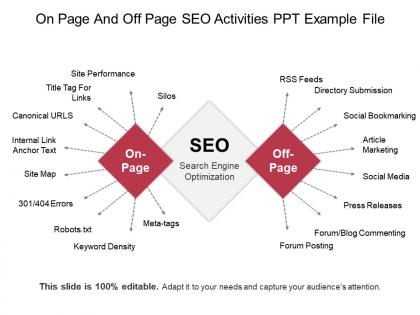
High on page and off page SEO optimization activities list with our content ready on page and off page SEO activities PPT example file. There is a list of various factors on your website that you can optimize, demonstrate those important factors with this on page and off page SEO PPT diagram. You can use this design template to discuss SEO strategies and techniques you need to implement in order to improve your website’s ranking on Google and other search engines. Various SEO on page and off page optimization strategies e.g. site maps, canonical URL’s, site performance, directory submission, social bookmarking, article marketing, blog commenting, forum posting can easily be explained with this PPT design. Let your audience understand the difference between on page and off page SEO with this confident PPT diagram. PPT is very much useful in modern days. So, download this off page SEO techniques PPT design and use it to display on page vs. off page optimization in social media age in a unique way. Advise folks to introspect with our On Page And Off Page Seo Activities Ppt Example File. Give them hints on how to improve.
People who downloaded this PowerPoint presentation also viewed the following :
On page and off page seo activities ppt example file with all 5 slides:
Elaborate on the facts of the issue with our On Page And Off Page Seo Activities Ppt Example File. Give the desired information to journalists.
FAQs for On page and off page seo activities
First thing - check your template titles. I bet most are generic garbage instead of stuff people actually search for. Use "business pitch deck template" not "blue slides." Your category pages are SEO gold mines, so don't waste them. Fast loading is non-negotiable since templates are visual and people bounce quick. Get those preview images crisp because they drive engagement. Oh, and chase backlinks from design blogs - they love template roundups. Honestly, most template sites just throw random keywords around instead of thinking like their users.
Here's the thing - keyword research shows you exactly what people actually type when hunting for presentation templates. Tools like Google Keyword Planner or Ubersuggest will be your best friends here. You'll discover whether folks search "business PowerPoint templates" vs "corporate slide designs" and honestly, the difference in visibility is wild. Don't go after super broad terms like "templates" - you'll get buried. Instead, target long-tail stuff like "minimalist pitch deck templates" since there's way less competition. Oh, and make sure there's decent search volume but not so much that you're competing with giants. Then just optimize your titles, descriptions, and tags around those golden keywords you found.
So on-page SEO is basically making your templates search-friendly from the ground up. You'll want to nail the title tags, meta descriptions, and header structure first. Content should flow naturally with keywords placed where they actually make sense - not just stuffed everywhere like some amateur hour move. Clean URLs are huge too (those messy parameter ones are honestly the worst). Fast loading times and mobile responsiveness need to be built right into the template. Oh, and make sure your HTML is clean. The whole point is that once you set this up properly, every page using that template automatically gets optimized without you having to think about it again.
Good content basically makes Google think you're worth recommending. Write stuff like "How to design killer sales presentations" - that's what people actually search for. Visitors will stick around longer when your content's helpful, and Google notices that. Other sites might even link to you (which is gold for SEO, btw). Don't just cram keywords everywhere though - that's so 2015. Focus on solving real problems your audience has. I'd start with maybe one solid guide per week about presentation tips or templates for specific industries. It's honestly not rocket science, just be genuinely useful.
Okay so here's what actually works for presentation template images. First, give your files real names - like "business-pitch-template-slide1.jpg" instead of those random IMG_001 things. Search engines literally read those filenames! Alt text matters too. Describe what's in the image and throw in some keywords naturally. File size is huge though - seriously, nobody waits for slow pages anymore. I try to keep mine under 100KB. Oh and if you're showing template previews, mention the style in both the filename and alt text. Makes a difference.
Google's watching how people use your site, and trust me, it's brutal. Bounce rate, time spent on pages, clicks - all that stuff feeds into your rankings. When people hit your template site and can't figure out where anything is, they bail immediately. Google sees that pattern and basically goes "this site sucks" and tanks your ranking. Page speed kills you too, especially mobile (which honestly makes sense since everyone's on their phones). Pretty templates mean nothing if they take forever to load or the navigation is a mess. So yeah, focus on making your template actually fast and easy to use. Test it like you're the most impatient user ever.
So there's four main things I track. Organic traffic shows if more people are finding you through search. Keyword rankings tell you how you're doing for your target terms. Then there's click-through rates - honestly, most people ignore this but it's huge for seeing if your titles actually make people want to click. Conversion rates are the real test though - like, is all that traffic actually doing anything for your business? I check mine monthly and just threw together a basic dashboard to watch the trends. Way easier than digging through analytics every time.
So backlinks are like votes of confidence - they show Google that other websites think your templates are worth linking to. Design blogs might feature your pitch decks, or teachers could share your educational slides on their resource sites. That stuff actually matters way more than you'd think. One solid link from a legit design publication beats like ten crappy spam links every time. The trick is making templates that are genuinely useful enough that people want to share them naturally. I mean, you can't really force it, but quality content tends to attract quality links from sites that make sense in your niche.
Start with keyword research - what are people actually typing when they hunt for templates like yours? Those main keywords need to go in your descriptions, especially the first 150 characters since that's what shows in search results. But honestly, don't go crazy stuffing keywords everywhere - write descriptions that actually explain what problems you're solving. Your title structure matters too, plus throw in some related terms Google connects to your main keyword. Oh, and use relevant tags obviously. I'd pick your best 5 templates and optimize those first rather than doing everything at once.
Dude, mobile optimization is HUGE for template sites - maybe even more than regular sites since people are constantly browsing templates on their phones. Google ranks based on your mobile version first now, so if it sucks on mobile, you're screwed. Most people downloading PowerPoint stuff are doing quick searches between meetings anyway. Your template previews need to look good on small screens. Make buttons big enough to actually tap without missing. Oh, and test the download process works smoothly - that's where things usually break. I literally check everything on my phone first now.
So basically when people share your templates on social media, it drives traffic back to your site which Google loves. Pinterest is honestly amazing for this - I've watched templates blow up there and their search rankings just skyrocket afterwards. The shares themselves don't directly help SEO, but they create this snowball effect. Bloggers see your stuff, link to it, more people discover it. Twitter and LinkedIn work too but Pinterest is where design templates really shine. Just make sure your previews look incredible because that's what gets people clicking and sharing in the first place.
Dude, the worst trap is leaving all that placeholder text in - Google indexes it and you look like every other site using that template. Definitely customize your meta descriptions and titles for each page. URL structure matters too, so don't keep whatever generic setup they give you. Stock images without alt text are another killer. Templates usually have tons of bloated code that makes everything load super slow, which tanks your rankings. Clean up unnecessary plugins and optimize your images. Honestly, half the battle is just making your site not look like template
-
Out of the box and creative design.
-
Great experience, I would definitely use your services further.