

Service Desk Management To Enhance Support Operations Powerpoint Presentation Slides




Try Before you Buy Download Free Sample Product
 Impress Your
 Audience
 100%
100% Editable
 Save Hours
 of Time


Service Desk is a ticket management framework that enables the business to implement strong and effective workflows for internal and customer-oriented support departments. Check out our professionally designed presentation on Service Desk Management to Enhance Support Operations. It provides a general overview, major trends, statistics, and best practices that service desk professionals or enterprises can refer to. This PowerPoint presentation offers access to multiple strategies that can help businesses optimize their service desk operations these include automation, knowledge management, incident management, ticket management, and service request escalation management. Also, the module covers self-service portal deployment, utilization of service desk management tools, customer experience management, etc. Furthermore, the complete deck includes slides that can help the support teams through the RACI matrix, training program, and communication plan, assisting in re-organizing and streamlining workflows. Moreover, it also provides details related to costs and software selection relating to service desk management. Lastly, the PPT deck can help assess the performance of the above strategies through impact analysis, KPIs, and dashboards. Customize this 100 percent editable template through assistance from our highly-skilled research or design team. Get access now.
People who downloaded this PowerPoint presentation also viewed the following :
Content of this Powerpoint Presentation
Slide 1: This slide introduces Service Desk Management to Enhance Support Operations. State your company name and begin.
Slide 2: This slide states Agenda of the presentation.
Slide 3: This slide shows Table of Content for the presentation.
Slide 4: This slide highlights title for topics that are to be covered next in the template.
Slide 5: This slide presents Global statistics highlighting service desk scenario.
Slide 6: This slide displays Statistics highlighting key priorities of service desk professionals.
Slide 7: This slide represents IT service desk best practices.
Slide 8: This slide highlights title for topics that are to be covered next in the template.
Slide 9: This slide showcases Gap analysis showing present service desk scenario.
Slide 10: This slide shows Process flow of service desk management.
Slide 11: This slide presents Organizational framework for handling service desks.
Slide 12: This slide displays Comparison of traditional and intelligent service desks.
Slide 13: This slide highlights title for topics that are to be covered next in the template.
Slide 14: This slide represents Planning and defining key tasks of service desk.
Slide 15: This slide showcases Service desk automation deployment timeline.
Slide 16: This slide shows Service desk knowledge management process flow.
Slide 17: This slide presents Service desk knowledge management methods.
Slide 18: This slide displays Running service desk in hybrid and remote scenarios.
Slide 19: This slide highlights title for topics that are to be covered next in the template.
Slide 20: This slide represents Service desk incident management flowchart.
Slide 21: This slide showcases Service desk incident management framework.
Slide 22: This slide shows Incident request tracking flowchart.
Slide 23: This slide presents Incident request closure management flowchart.
Slide 24: This slide highlights title for topics that are to be covered next in the template.
Slide 25: This slide displays IT service desk ticket management process flow.
Slide 26: This slide represents Action plan to handle numerous types of service desk tickets.
Slide 27: This slide showcases Improving key service desk areas for enhanced customer satisfaction.
Slide 28: This slide shows Enhancing operations of managed service providers.
Slide 29: This slide depicts strategies to optimize information technology (IT) service requests.
Slide 30: This slide presents Tracking and assigning service desk tickets.
Slide 31: This slide displays Reviewing quality of agent ticket resolution.
Slide 32: This slide represents Ticket prioritization matrix with impact assessment.
Slide 33: This slide highlights title for topics that are to be covered next in the template.
Slide 34: This slide showcases Service requests ticket escalation plan.
Slide 35: This slide shows Service requests notification escalation plan.
Slide 36: This slide presents Service requests resolution and response plan.
Slide 37: This slide displays Thresholds for multiple types of service requests.
Slide 38: This slide represents Service level objectives escalation matrix.
Slide 39: This slide highlights title for topics that are to be covered next in the template.
Slide 40: This slide showcases Self service portal implementation plan.
Slide 41: This slide shows Functionalities required in IT self service portal.
Slide 42: This slide presents Self service portal software deployment and selection.
Slide 43: This slide displays Self service portal integration workflow.
Slide 44: This slide highlights title for topics that are to be covered next in the template.
Slide 45: This slide represents Pre deployment audit checklist for service desk tool.
Slide 46: This slide showcases Impact of service desk tool on key operations.
Slide 47: This slide highlights title for topics that are to be covered next in the template.
Slide 48: This slide shows Key steps for improving service desk customer experience.
Slide 49: This slide presents Techniques to improve customer experience management.
Slide 50: This slide highlights title for topics that are to be covered next in the template.
Slide 51: This slide displays Key roles and responsibilities of service desk department.
Slide 52: This is another slide continuing Key roles and responsibilities of service desk department.
Slide 53: This slide represents Training program for service desk teams.
Slide 54: This slide showcases Service desk team communication plan.
Slide 55: This slide shows RACI matrix of service desk team.
Slide 56: This slide highlights title for topics that are to be covered next in the template.
Slide 57: This slide presents Measuring overall costs for remodeling service desk.
Slide 58: This slide displays Selecting suitable solution for service desk management.
Slide 59: This slide highlights title for topics that are to be covered next in the template.
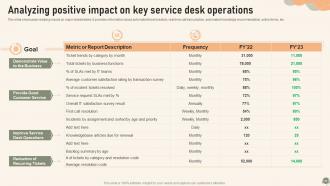
Slide 60: This slide represents Analyzing positive impact on key service desk operations.
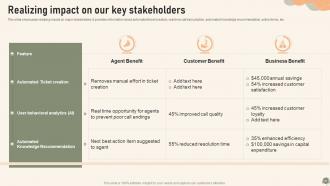
Slide 61: This slide showcases Realizing impact on our key stakeholders.
Slide 62: This slide highlights title for topics that are to be covered next in the template.
Slide 63: This slide shows Service desk dashboard for monitoring IT infrastructure.
Slide 64: This slide presents ITSM ticketing tool dashboard with activity status.
Slide 65: This slide displays Dashboard highlighting CRM ticketing tool operations.
Slide 66: This slide contains all the icons used in this presentation.
Slide 67: This slide is titled as Additional Slides for moving forward.
Slide 68: This is Our Target slide. State your targets here.
Slide 69: This slide depicts Venn diagram with text boxes.
Slide 70: This is About Us slide to show company specifications etc.
Slide 71: This slide contains Puzzle with related icons and text.
Slide 72: This is an Idea Generation slide to state a new idea or highlight information, specifications etc.
Slide 73: This slide shows Post It Notes. Post your important notes here.
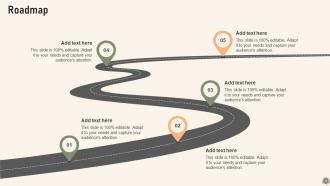
Slide 74: This slide presents Roadmap with additional textboxes.
Slide 75: This slide provides 30 60 90 Days Plan with text boxes.
Slide 76: This is a Thank You slide with address, contact numbers and email address.
Service Desk Management To Enhance Support Operations Powerpoint Presentation Slides with all 81 slides:
Use our Service Desk Management To Enhance Support Operations Powerpoint Presentation Slides to effectively help you save your valuable time. They are readymade to fit into any presentation structure.
-

Service Desk Management to Enhance Support Operations
-
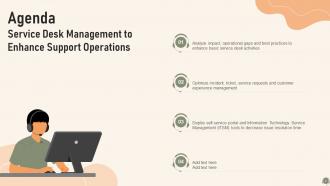
Agenda Service Desk Management to Enhance Support Operations
-
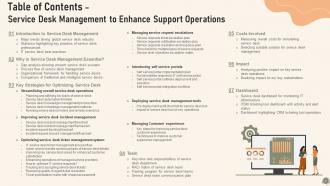
Table of Contents Service Desk Management to Enhance Support Operations
-
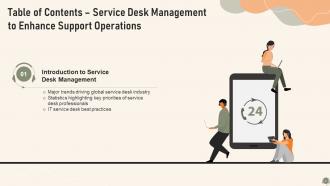
Table of Contents Service Desk Management to Enhance Support Operations
-
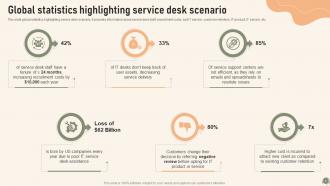
Global statistics highlighting service desk scenario
-
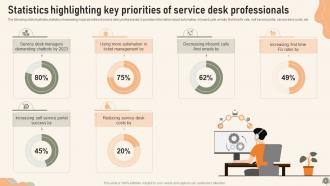
Statistics highlighting key priorities of service desk professionals
-
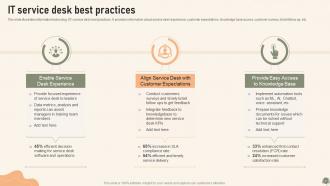
IT service desk best practices
-
Table of Contents Service Desk Management to Enhance Support Operations
-
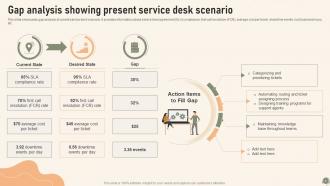
Gap analysis showing present service desk scenario
-
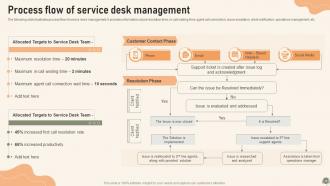
Process flow of service desk management
-
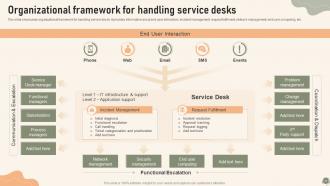
Organizational framework for handling service desks
-
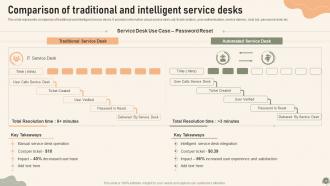
Comparison of traditional and intelligent service desks
-
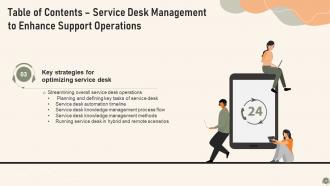
Table of Contents Service Desk Management to Enhance Support Operations
-
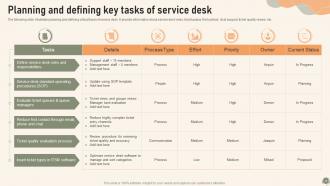
Planning and defining key tasks of service desk
-

Service desk automation deployment timeline
-
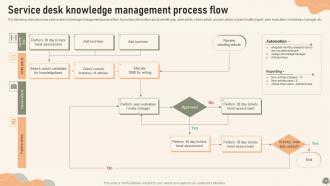
Service desk knowledge management process flow
-
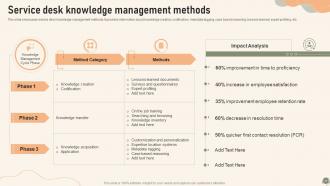
Service desk knowledge management methods
-
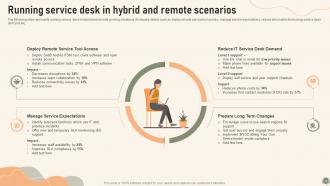
Running service desk in hybrid and remote scenarios
-
Table of Contents Service Desk Management to Enhance Support Operations
-
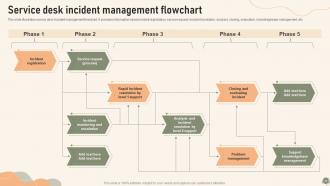
Service desk incident management flowchart
-
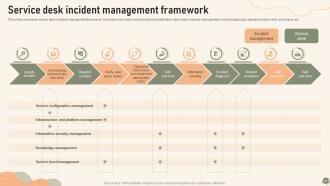
Service desk incident management framework
-
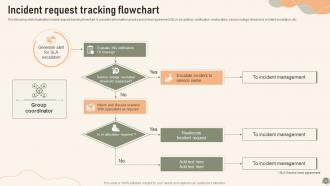
Incident request tracking flowchart
-
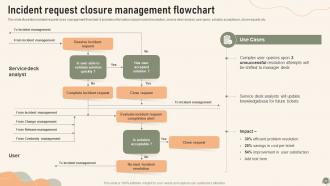
Incident request closure management flowchart
-
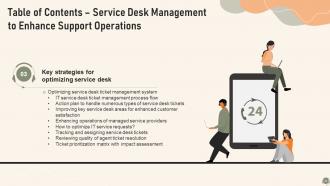
Table of Contents Service Desk Management to Enhance Support Operations
-
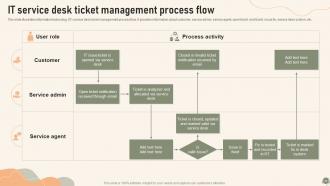
IT service desk ticket management process flow
-
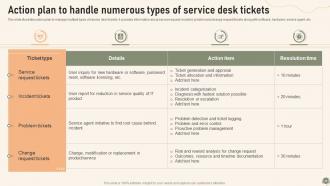
Action plan to handle numerous types of service desk tickets
-
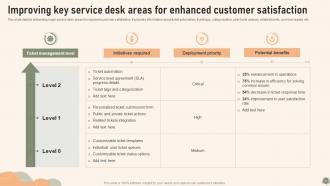
Improving key service desk areas for enhanced customer satisfaction
-
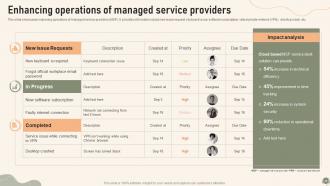
Enhancing operations of managed service providers
-
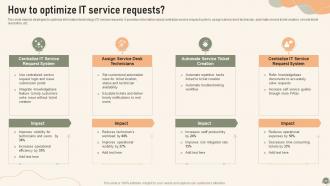
How to optimize IT service requests
-
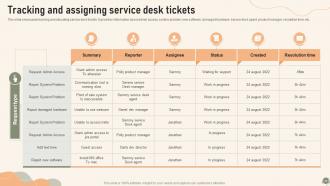
Tracking and assigning service desk tickets
-
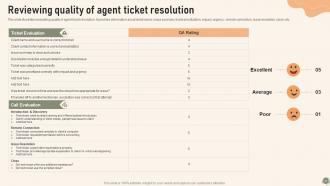
Reviewing quality of agent ticket resolution
-
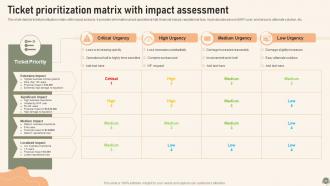
Ticket prioritization matrix with impact assessment
-
Table of Contents Service Desk Management to Enhance Support Operations
-
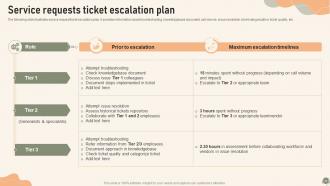
Service requests ticket escalation plan
-
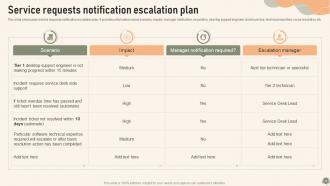
Service requests notification escalation plan
-
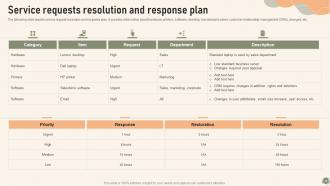
Service requests resolution and response plan
-
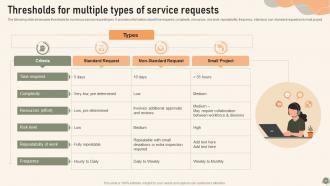
Thresholds for multiple types of service requests
-
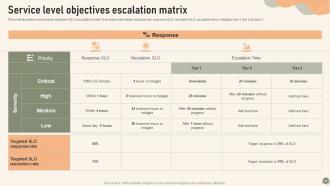
Service level objectives escalation matrix
-
Table of Contents Service Desk Management to Enhance Support Operations
-
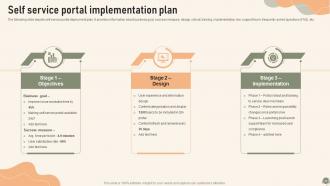
Self service portal implementation plan
-
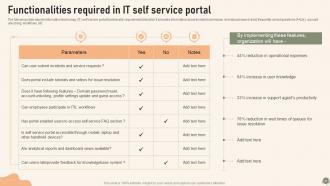
Functionalities required in IT self service portal
-
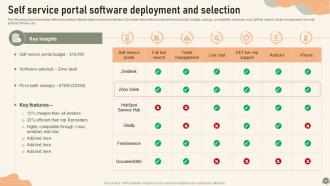
Self service portal software deployment and selection
-
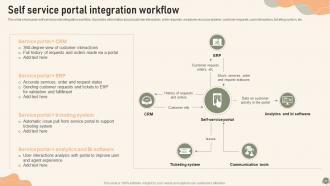
Self service portal integration workflow
-
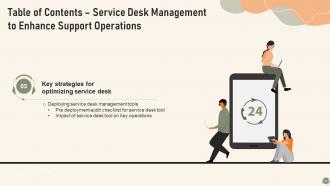
Table of Contents Service Desk Management to Enhance Support Operations
-
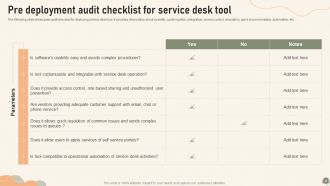
Pre deployment audit checklist for service desk tool
-
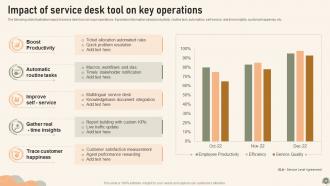
Impact of service desk tool on key operations
-
Table of Contents Service Desk Management to Enhance Support Operations
-
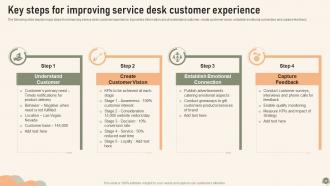
Key steps for improving service desk customer experience
-
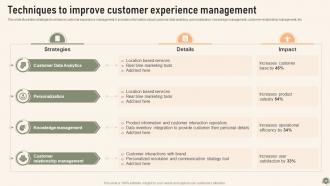
Techniques to improve customer experience management
-
Table of Contents Service Desk Management to Enhance Support Operations
-

Key roles and responsibilities of service desk department
-
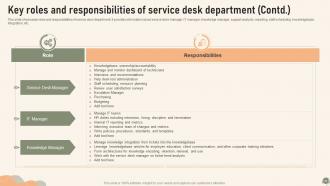
Key roles and responsibilities of service desk department Contd
-
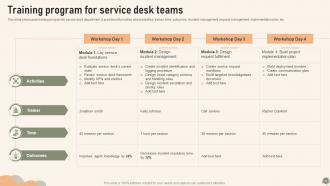
Training program for service desk teams
-
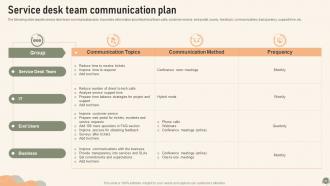
Service desk team communication plan
-
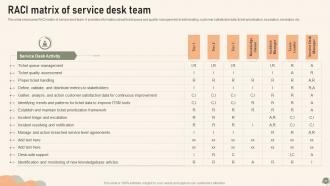
RACI matrix of service desk team
-
Table of Contents Service Desk Management to Enhance Support Operations
-
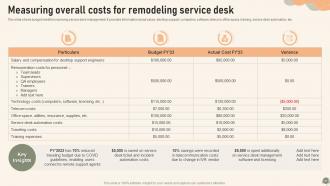
Measuring overall costs for remodeling service desk
-
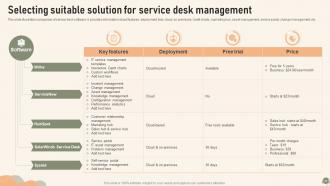
Selecting suitable solution for service desk management
-
Service Desk Management to Enhance Support Operations
-
Analyzing positive impact on key service desk operations
-
Realizing impact on our key stakeholders
-
Table of Contents Service Desk Management to Enhance Support Operations
-
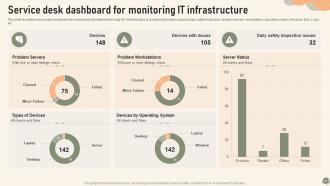
Service desk dashboard for monitoring IT infrastructure
-
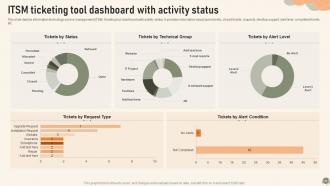
ITSM ticketing tool dashboard with activity status
-
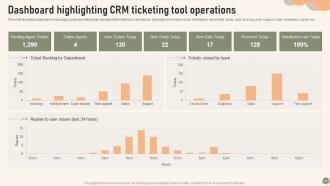
Dashboard highlighting CRM ticketing tool operations
-
Icons slide service desk management to enhance support operations
-

Additional slides
-
Our Target
-
Venn diagram
-
About us
-
Puzzle
-
Idea generation
-
Post it Notes
-
Roadmap
-
Service Desk Management to Enhance Support Operations
-

Thank you for watching
-

-

-

-

-

FAQs for Service Desk Management To Enhance Support Operations
So you'll definitely want incident management first - that's your bread and butter for tracking problems. A knowledge base helps people solve stuff themselves, which honestly saves you tons of headaches later. SLA monitoring keeps your response times decent, and reporting shows you where things are breaking down. Change management and asset tracking sound boring but they'll bite you if you skip them. Get a ticketing system that doesn't suck (I've seen some real disasters). Set up clear escalation rules so tickets don't just sit there forever. The whole thing needs to be transparent - nobody likes being in the dark about their issues. Start with nailing your incident process, then add the rest.
So automation is honestly a game-changer for service desks. Your team can set up bots to handle the boring stuff - ticket routing, password resets, basic status updates. Frees everyone up for the tricky problems that actually matter. Chatbots work great for that first contact triage, plus automated escalations save so much time. Oh, and users absolutely love self-service portals - they'd rather fix things themselves than wait around for help anyway. My advice? Pick one simple process first, get that working smoothly, then build from there.
Honestly, I'd focus on four main things: first call resolution, response times, customer satisfaction, and ticket volume patterns. FCR is huge - it shows whether your team actually fixes stuff or just shuffles problems around (which drives everyone crazy). Response time's pretty straightforward, and CSAT gives you the real story from customers. Ticket volume helps you see what's coming and staff accordingly. Oh, and definitely set up some kind of weekly dashboard - doesn't have to be fancy, but you'll catch issues way earlier that way.
ITIL's like having a cheat sheet for your service desk - it standardizes incident handling and gives you proper escalation procedures. Your ticket resolution times will improve because everything gets categorized correctly instead of just throwing stuff at the wall. The continuous improvement aspect is actually pretty solid too. You're making changes based on real data rather than gut feelings. Focus on customer satisfaction metrics and SLAs so your team doesn't lose sight of what matters. Honestly, start with their incident management process first. It's the lowest hanging fruit and you'll see tickets flow way better almost immediately.
Honestly, these tools are total game-changers for support teams. All your tickets get dumped into one system so you don't lose track of anything. You can set up automatic workflows for boring repetitive stuff, plus track how fast you're responding to people. The customer history thing is clutch - saves me from asking "what's your issue again?" every single time. Self-service portals are solid too since customers can fix basic problems without bugging you. Oh and the reporting helps you figure out what's actually broken in your process. I'd start with ticket prioritization rules first though - that's where you'll see the biggest difference right away.
Honestly, knowledge management is a game changer for service desks. Your agents stop wasting time digging around for answers when you've got a decent knowledge base set up. Document your common issues first - that's where you'll see the biggest impact. Make it searchable (obviously) and keep it updated or it becomes useless fast. What's cool is everyone starts giving consistent answers instead of just making stuff up on the spot. First-call resolution goes up, escalations go down. I've seen teams cut their average handle time in half just by getting this right.
Okay so first thing - get a priority matrix going. Impact vs urgency, you know the drill. Critical outages (P1) get handled first, then major stuff (P2), and so on. Each level needs its own SLA timeline. The real game changer though? Having crystal clear escalation paths. When shit hits the fan, everyone should know exactly who to call without thinking twice. Track everything in a ticketing system - seriously, don't wing it. Set up alerts when you're about to miss SLAs and do weekly reviews to catch patterns. Oh, and keep stakeholders in the loop with regular updates. They hate being left in the dark more than anything.
Build a multi-week program mixing hands-on training with shadowing. Get them comfortable with your ITSM tools and processes first - no touching tickets yet! The buddy system is crucial for at least a month (seriously, I've seen too many new hires crash without it). Week two they should handle basic ticket types, with regular check-ins to catch issues early. Gradual complexity beats throwing them in the deep end every time. Oh, and document the whole process so you're not reinventing this every hire.
Yeah, it totally depends on your industry. Healthcare's all about HIPAA stuff and keeping patient data locked down. Financial places are obsessed with fraud prevention - makes sense though. Manufacturing is probably the most intense because when their equipment goes down, they're bleeding money fast. Government work? Good luck getting anything approved quickly lol. Tech companies want everything yesterday and prefer fixing things themselves. I'd look up what compliance rules your sector has first, then figure out what response times people actually expect. That'll give you a solid starting point for setting everything up.
High ticket volumes will crush you if you're not ready. Staff burnout happens fast when workload distribution sucks - trust me on this one. Your knowledge base needs constant updates or resolution times go to hell. Cross-train everyone on different issue types so you're not scrambling when someone's out sick. Self-service options cut down routine stuff dramatically. Good ticketing system with automation is non-negotiable. Don't forget regular training and clear SLAs for your team. Oh, and track everything obsessively - those metrics help you fight for more resources later.
Honestly, feedback loops are like gold for service desk stuff. Users will tell you everything - through surveys, tickets, even just random hallway complaints. My old team used to ignore all that until we started actually paying attention to what people were saying about our slow response times. Total game changer. You'll start seeing patterns everywhere once you look for them. Plus it helps you figure out where your team needs more training or what processes are just straight up broken. Oh, and here's the easiest way to start - just add a quick rating thing when you close tickets. Actually read those responses every week though, don't just collect them.
Honestly, connecting your service desk to other ITSM stuff is a game changer. You'll get tickets routing themselves automatically, way faster fixes, and actually see what's happening across incidents and changes. No more bouncing between five different tools (your team will thank you). The cool part? When incident data feeds straight into problem management without anyone manually copying things over. I'd say start small though - maybe just the incident-to-problem flow first. Once you see how much smoother things run, you can add more integrations. Trust me, that single source of truth thing isn't just buzzword nonsense.
Start tracking your resolution times, first-call fixes, and customer satisfaction scores - you'll be shocked how much this reveals about what's actually broken in your process. Look for patterns in ticket types and figure out why certain issues keep coming back. Also, pay attention to which agents are crushing it so you can steal their techniques (in a good way). Set up some basic dashboards to check weekly trends. The root cause analysis part is where you really find gold though. Then just meet with your team regularly to go through the data and actually fix what's not working.
Honestly, active listening is probably the biggest thing - you've gotta actually hear what people are saying before jumping into solutions. Clear communication and empathy matter too. Patience is clutch because some users will absolutely lose it over the smallest glitches lol. Being able to break down tech stuff into normal words helps a ton, plus you need solid problem-solving skills to give realistic timelines. Don't leave people hanging either - update them regularly even if there's no progress. Practice by focusing hard on one conversation at a time and always double-check you understand their actual problem first.
Multi-channel support means customers can hit you up however they want - phone, email, chat, social media, whatever works for them. Super convenient for users, obviously. But here's the thing: it can turn into a nightmare if you're not organized about it. Like, someone starts on email then jumps to chat mid-issue and suddenly your team's lost. You need everything connected so agents can see the whole conversation history. Otherwise you're just playing catch-up constantly. The trick is getting one system that tracks everything - trust me, your sanity depends on it.
-
The designs are super attractive. Me and my team love using SlideTeam’s presentations.
-
SlideTeam provides PPTs on every single topic. Their templates suit my job very well. I am very grateful!