


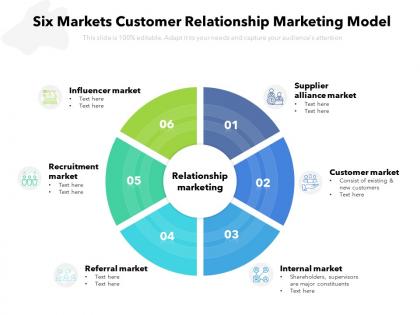
Six markets customer relationship marketing model




Try Before you Buy Download Free Sample Product
 Impress Your
Audience
 100%
Editable
 Save Hours
of Time


Our Six Markets Customer Relationship Marketing Model are topically designed to provide an attractive backdrop to any subject. Use them to look like a presentation pro.
People who downloaded this PowerPoint presentation also viewed the following :
Six markets customer relationship marketing model with all 2 slides:
Use our Six Markets Customer Relationship Marketing Model to effectively help you save your valuable time. They are readymade to fit into any presentation structure.


FAQs for Six markets customer
Contact management and pipeline tracking are your must-haves, obviously. Get something that plays nice with your email and calendar - seriously, switching between apps all day is a nightmare. Mobile access is clutch since you're probably not chained to your desk. I'd also grab something with decent reporting so you can see what's actually moving the needle. Oh, and customization matters because your workflow is probably weird in its own special way. Demo a few with real data before committing. You'll know pretty quick which one clicks.
Honestly, CRM is a game-changer for keeping customers around. It tracks everything - their history, what they like, complaints they've made. So when someone starts going quiet or flooding support with issues, you'll catch it before they bail. The automated stuff is clutch too because who has time to manually follow up with everyone? You can also group customers by where they are in their journey and customize your approach. Oh, and definitely set up those at-risk alerts first - I swear that feature alone has probably saved more accounts than anything else.
So CRM analytics basically shows you where to actually spend your time instead of just guessing. Look at your buying patterns first - you'll see which leads convert and what's really making money (vs what just looks good on paper). Honestly, the data can be pretty surprising. Like you'll find products that always sell together or figure out when customers buy again. Different sales approaches work for different people too, which is obvious but... you know what I mean. Pull reports on your best 20% of customers first. See what they share and go after similar prospects.
Look, CRM is basically where all your customer info lives in one spot. Purchase history, support calls, emails - everything's right there so you actually know who you're talking to. No more of that "hold on, let me look that up" nonsense that drives everyone crazy. You can see what they bought last month and jump ahead of problems before they even call. Your whole team stays on the same page too. Here's the thing though - it only works if people actually USE it consistently. Half the companies I know set up fancy CRMs then nobody updates them. Such a waste.
Just grab HubSpot's free version or maybe Zoho to start - way cheaper than the fancy stuff. Don't go crazy trying to set up everything at once though. Pick your biggest headache (probably lead tracking?) and automate that first. My buddy's company was literally using Excel spreadsheets until last year, so trust me, even basic CRM will feel like you're living in the future. Train your team on whatever you pick, then actually start logging customer stuff properly. You can always upgrade later when you're making more money and need the bells and whistles.
Oh man, user adoption is gonna be your biggest headache - way worse than any tech issues. Sales people hate changing their routine, so good luck with that. Data migration from old spreadsheets? Total nightmare, always way messier than you think. Then you've got integration problems with your existing tools, plus everyone and their mom will suddenly want custom features added. Honestly though, just start basic. Get the core stuff working first, show some quick wins, then slowly roll out the fancy features. Don't try to boil the ocean right away.
So most CRMs today connect pretty easily with whatever you're already using - Gmail, Outlook, QuickBooks, that kind of stuff. APIs and built-in integrations handle most of it. Zapier's clutch for the weird random apps that don't play well together (seriously, that thing saves so much time). Here's what I'd do: write down your top 5 tools you can't live without, then check if your CRM options actually work with them before you sign up. Don't get stuck with something that makes you do everything twice.
Customer acquisition cost and lifetime value are your bread and butter - gotta track those first. Retention rates matter too, obviously. Your sales conversion rates will show if the CRM's actually helping close deals or just creating busy work. I'm big on watching customer satisfaction scores since what's the point if people hate dealing with you? Support ticket times, churn rate, pipeline velocity - all that stuff gives you the real picture. Honestly though, start simple with these basics then add whatever makes sense for your specific situation. You can always get fancier later.
Honestly, CRMs are a game-changer for this stuff. They pull in data from everywhere - your website, emails, social, phone calls, whatever. So you get the full picture of how customers interact with you. No more sending someone a discount code right after they already bought something (so embarrassing). You can see which channels actually work for different types of customers too. The timing coordination alone is worth it - I learned that the hard way when I was running overlapping campaigns that confused everyone. Just make sure all your channels are actually feeding into the system properly first.
So the big CRM stuff right now? AI's doing all the boring work - lead scoring, follow-ups, that kind of thing. Voice and chat are everywhere too since nobody wants to type anymore (guilty). Your system will start predicting what customers might do next, which is honestly pretty cool. Oh and everything connects to social media now - integration's gone crazy. Real-time collaboration features are blowing up. Pick something that actually fixes your day-to-day headaches though, not just whatever looks fancy.
Honestly, you want your CRM to actually fit how your business works instead of forcing everyone into some cookie-cutter system. Real estate folks need property tracking, doctors need patient histories - totally different stuff. I mean, what works for manufacturing isn't gonna help a law firm at all. Custom fields are huge for this. You can set up dashboards showing metrics that actually matter to you, not just generic sales numbers. Oh, and automating your specific processes saves so much time. I'd start by writing down what data and workflows are unique to your industry, then find a CRM that'll let you customize those things.
Oh dude, mobile CRM access changes everything. Reps can update leads, log calls, check customer history - all from their phone while out in the field. Way better than waiting to get back to the office (let's be real, that data entry never happens anyway lol). Real-time updates mean way more accurate info and faster follow-ups. Your team can hit back prospects immediately instead of making them wait hours. Just make sure whatever mobile app you pick doesn't suck to use. I've seen too many teams ignore clunky interfaces and go back to scribbling notes on napkins.
Okay so here's the thing - people will resist at first, that's just how it goes. Training is huge though, not just a one-time thing but like ongoing help when they get stuck. Get your key users involved in setting it up so they actually feel like they own it. And honestly? Your managers need to be using it too or forget about it, nobody else will bother. Show people how it'll make their lives easier, not add more work to their plate. Oh and find your tech-savvy people first - they'll become your cheerleaders once they see it works. The whole thing really depends on making it feel necessary instead of just another stupid system they have to deal with.
Oh man, start with validation rules and required fields right away - saves you from wanting to pull your hair out later. Make sure everyone uses the same naming system for accounts and contacts (good luck enforcing that one). Duplicates will destroy your reports, so clean those up regularly. Don't let people just create random custom fields whenever they feel like it. Set up some automated stuff to keep everything current. Have someone check it monthly too. I know it sounds boring but honestly, when your data's actually clean you'll thank yourself.
So basically, your CRM tracks every single thing prospects do - what emails they opened, which pages they visited, all that stuff. Pretty handy when you're trying to figure out your next move. The cool part is seeing exactly how someone found you and what got them interested in the first place. You can set up lead scoring so the system automatically flags your hottest prospects. Then it'll send the right follow-up at the perfect time without you lifting a finger. Honestly, it's like having a crystal ball for sales. Start with scoring rules that match your best customers, then build some automated workflows around that.
No Reviews