

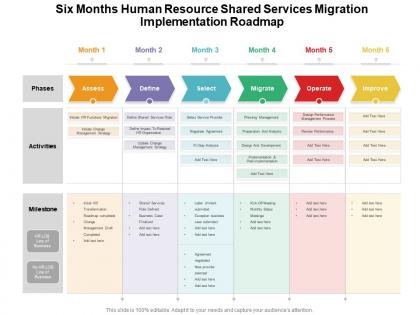
Six months human resource shared services migration implementation roadmap




Try Before you Buy Download Free Sample Product
 Impress Your
 Audience
 100%
100% Editable
 Save Hours
 of Time


A cohesive work plan is essential for achieving the desired target. Communicate your vision and lay a firm ground in front of your audience with our PowerPoint layout. Align your project milestones, budgets, deliverables, deadlines, and all the requisite information for a dynamic presentation by employing this amazingly designed Six Months Human Resource Shared Services Migration Implementation Roadmap. Maximize team efficiency and streamline a work plan efficiently by introducing our ready made roadmap PowerPoint theme. You can quickly establish coordination between different activities across the organization and present an insight to your colleagues by utilizing this useful business tool. Color code specific tasks, prioritize, and keep a close eye on the deadlines with the help of our eye catchy PowerPoint template. Download our Six Months Human Resource Shared Services Migration Implementation Roadmap for excelling at productive management.
People who downloaded this PowerPoint presentation also viewed the following :
Six months human resource shared services migration implementation roadmap with all 2 slides:
Use our Six Months Human Resource Shared Services Migration Implementation Roadmap to effectively help you save your valuable time. They are readymade to fit into any presentation structure.
FAQs for Six months human resource shared services
So there are basically four main phases for HR shared services migration. You start with Assessment & Design - figuring out where you are now and mapping out the target model. Build & Configure comes next, which is honestly where all the heavy lifting happens with systems and processes. Testing & Training is phase three (pro tip: this ALWAYS takes way longer than anyone plans for). Finally there's Go-Live & Stabilization where you actually launch and put out fires. Definitely pad your timeline for each phase, but especially testing. Trust me on this one - you don't want angry stakeholders breathing down your neck because something broke on day one.
Start by mapping out all your current HR stuff - onboarding, payroll, reviews, the whole mess. Document who handles what and when. Yeah, it's boring but you'll thank yourself later. Talk to your HR people about what's driving them crazy day-to-day. Those conversations are gold, honestly. Run some quick numbers on how long things take and where errors keep popping up. You need that baseline before changing anything. The stakeholder interviews should be your first move - that's where the real problems hide.
Okay so there are basically four things you need to figure out. How much volume are you dealing with and how complex is it? Like payroll stuff is easy but employee drama gets messy fast. Geographic spread is huge too - some models just don't work if your team's all over the place. Cost matters but honestly don't just pick the cheapest option upfront, it'll bite you later. Be real about whether your team can actually handle managing vendors or running shared service centers. Also think about compliance and how much risk you're cool with. Once you map that out, you can see which approach fits - outsourcing, captive centers, whatever.
So your stakeholders start off super involved - they're making decisions and telling you what they need. Then during testing and launch, they flip to focusing on getting users ready for the change (which honestly gets chaotic if you haven't prepped them). After everything's live, they step back into more of a watching role - checking how things are running and spotting ways to make stuff better. The key is telling everyone upfront that their job's gonna change throughout the project. Otherwise people get confused about what they're supposed to be doing when.
Honestly, data security during the transfer is your biggest headache - stuff can get messy fast. Your employees will probably hate the new processes at first, which is totally normal but still a pain. Service disruptions are almost inevitable, so expect some payroll hiccups. Technical integration is where things get really fun (not) - systems rarely talk to each other smoothly right away. Budget-wise, add like 20% to whatever you're thinking because costs always creep up. Run a pilot group first to catch the worst problems. Keep your old system running alongside the new one for a while, and definitely have a backup plan ready.
Definitely set up validation at every step - before, during, and after the migration. Encrypt all the data moving around, and lock down access so only the right people can touch employee info. Here's the thing though: so many teams mess up by not properly testing their backups first. Run both systems side by side for a couple weeks minimum. That way you'll catch weird discrepancies before switching over completely. Oh, and automate alerts for any funky data patterns. Trust me, you don't want to find out something's broken after you've already flipped the switch.
Talk to your people early and be straight with them about what's happening. Honestly, I've watched so many of these projects crash because execs think employees will just roll with it (they absolutely won't). Tell them why you're doing this - better systems, smoother workflows, whatever the real benefits are. Get some champions from different departments who can sell the idea internally. Set up ways for feedback so people don't feel steamrolled. Training needs to happen way before launch day, not during. Oh, and definitely address the job security fears head-on - that elephant will stomp your project if you ignore it.
So we're basically looking at cost savings (shooting for 15-20% cuts), plus how fast stuff like onboarding and payroll actually gets done. Employee satisfaction scores matter too, obviously. The real test though? Whether people are getting better, faster support than the old system - that's what actually counts. System uptime and error rates are huge since delayed paychecks make everyone cranky. Monthly dashboards will show your team all this data so you can spot problems early and fix them before things go sideways.
So the main ones worth checking out are Workday, SuccessFactors, and BambooHR. If you're dealing with international stuff, Workday's reporting is pretty solid for that. SuccessFactors plays nice with SAP if that's what you're already using - though honestly their interface feels like it's from 2015. BambooHR's way more user-friendly, especially for smaller teams. Oh, and definitely think about what you're already using tech-wise before you pick anything. I'd probably test drive your top two first - saves you from buyer's remorse later.
Honestly, just map what you're doing now against typical shared services - the gaps will jump out at you. Figure out what actually needs special handling vs "we've always done it this way" (spoiler: most companies overthink this). Worth customizing for employee experience stuff and regulatory requirements, obviously. Everything else? Eh, probably not as crucial as you think. Try adapting their delivery model to match how your team actually works. Oh and definitely pilot with just one business unit first - way easier to fix things when you're not dealing with the entire company freaking out at once.
Honestly, you're looking at three big things: getting everyone trained on the new platform, relearning all your processes (because trust me, everything's gonna change), and helping people deal with the transition. The tech part? That's actually the easiest. People always struggle more with the new workflows. I'd plan on 2-3 weeks of solid training per person, then expect to do lots of hand-holding those first few months. You'll probably need outside help too since your team will be drowning. Oh, and start figuring out who your go-to people are now - the ones who pick things up fast and can help train everyone else later.
Start your communication plan way before the migration kicks off - emails, team meetings, intranet posts, the whole thing. People are gonna ask the same stuff over and over no matter what, so just roll with it. Brief managers first so they're not caught off guard when their teams come asking. Focus on the practical stuff: what's changing, when it happens, how it messes with their daily routine. Oh, and definitely set up an FAQ page. Update it weekly based on whatever questions keep coming up - saves you from repeating yourself constantly.
Honestly, you need to track both the nuts-and-bolts stuff and whether people are actually happy. Start with the obvious ones - resolution times, first-call resolution, SLA compliance. That's where your credibility lives. Then add cost per transaction and employee satisfaction surveys (people forget about that one). Process accuracy matters too, plus volume metrics since executives always want those big numbers to brag about. Here's the thing though - don't go crazy with tracking everything. Pick maybe 5-7 metrics that actually tell you what's working and what isn't. And definitely measure everything before you switch over, otherwise you'll never prove it was worth it.
Start by mapping out every compliance requirement you're dealing with right now - data protection, employment stuff, audit requirements, all of it. Build those into each phase instead of scrambling later. Your legal team needs to review system changes before you roll them out (trust me on this one). Document everything for audit trails. The overwhelming part? Creating that initial compliance checklist, but you've gotta do it. Set up regular checkpoints during migration so you can spot problems early and pivot if something's not working. Don't save compliance thinking for the end - that's where people mess up.
Automation is honestly a game-changer once you migrate your HR shared services. I'd start with the boring stuff everyone hates - onboarding workflows, payroll, benefits enrollment. The time you'll save is wild. Your team gets to do actual strategic work instead of drowning in paperwork all day. Look for your highest-volume processes first since those give you quick wins. Automated stuff also cuts down on human error, which is huge for consistency. Oh, and don't try to automate everything at once - that's a recipe for chaos.
No Reviews