

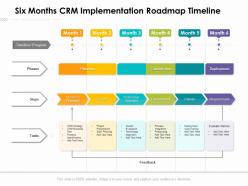
Six months crm implementation roadmap timeline





Try Before you Buy Download Free Sample Product
 Impress Your
 Audience
 100%
100% Editable
 Save Hours
 of Time


Utilize our pre build Six Months CRM Implementation Roadmap Timeline to present your plan of action in the most effective way. Reduce the paperwork and showcase how different activities are linked to each other by incorporating this attention grabbing PowerPoint theme. This completely editable roadmap PPT layout is suitable to fit all your needs and to have a structured outline of the entire process flow using color coding. Provide guidelines to your teammates about the progression process by employing our PPT theme. Team members can easily be designated into teams by accessing the work milestones to be accomplished within the timeframe. You can easily modify the PowerPoint slide according to real time situations. Download our stunning Six Months CRM Implementation Roadmap Timeline, and you are good to go to prove your expertise in strategic planning.
People who downloaded this PowerPoint presentation also viewed the following :
Six months crm implementation roadmap timeline with all 2 slides:
Use our Six Months CRM Implementation Roadmap Timeline to effectively help you save your valuable time. They are readymade to fit into any presentation structure.
FAQs for Six months crm
Honestly, don't even touch the software yet. First figure out what problems you're actually trying to solve and who's gonna use this thing day-to-day. Map out what success looks like with real numbers you can track. I learned this the hard way on my last project - skipping this stuff just leads to a mess later. Also decide which customer data you're migrating and from what systems. Sounds boring but trust me, get everyone on the same page first. Maybe spend a week documenting everything? Your future self will thank you when you're not dealing with scope creep and a CRM that nobody wants to use.
First thing - audit what you've got right now. Map out how leads move through your system and where stuff gets lost or slows down. Your sales team will have STRONG opinions about this, so definitely talk to them plus customer service folks. They deal with the messy reality daily. Check your current tools too - what's actually working vs what's just taking up space. Document the whole mess: workflows, team size, where data comes from, what reports you need. This becomes your roadmap for figuring out what your CRM actually needs to fix instead of just buying something shiny.
Honestly, start with what you actually need vs what sounds cool - saved me tons of headaches. Figure out your budget and timeline first. Then check if it plays nice with your current tools because dealing with data stuck in different systems is the worst. Get demos from maybe 3-4 options and test them with real stuff your team does every day, not their perfect little examples. Read reviews, talk to people actually using it if you can. Also think about how hard it'll be to set up and what their support is like after. Pro tip: make a must-have list or you'll overthink forever.
Honestly, get people involved from day one - that's huge. Find your cheerleaders in each department and show them exactly how this thing will solve their daily headaches. Skip the boring "efficiency" talk because literally no one cares about that vague stuff. Demo the system based on what actually bugs them at work. Let them play around with it and don't brush off their complaints. I'd probably set up weekly check-ins too so everyone stays in the loop. Share the wins, tackle problems head-on, and keep people feeling like they're part of it instead of having change forced on them.
Oh man, data migration will make or break your whole CRM project - I've seen it go sideways so many times. You're basically moving all your customer info from whatever mess of spreadsheets and old systems you have now into the new one. Here's the thing though: garbage in, garbage out. Clean up duplicates first, get your formats consistent, and test everything before you actually migrate. Seriously, start planning this part early because it always takes longer than you think. Don't skip the test runs or you'll hate yourself later.
Map out your different user types first - sales vs customer service teams need totally different approaches. Build role-based training with real scenarios they'll actually face. Honestly? Those vendor training videos are garbage and everyone zones out anyway. Create bite-sized modules for core stuff, then add advanced features later. Find your power users early - they're gold for peer training. Oh, and definitely do practice runs before launch, plus refresher sessions a few weeks after. People forget everything otherwise.
Okay so first thing - talk to people early about why you're doing this and what they'll actually get out of it. Find your workplace influencers and get them excited first. They'll basically sell it for you. Rolling out the simple stuff first creates quick wins, then you build from there. Small training groups work way better than those awful all-hands sessions everyone hates. You'll definitely hit resistance no matter what, so don't stress about it. Get some super users who can help with random daily questions. Oh and this is huge - actually listen when people give feedback and do something about it. Nothing pisses people off more than asking for input then ignoring it completely.
So first things first - check if people are actually using the damn thing or just working around it. Track your adoption rates because that tells you everything. Then dig into the business stuff: conversion rates, how long sales cycles take, customer retention numbers. Revenue per customer too. Honestly though? User satisfaction surveys might be the most important part - if your team absolutely hates using it, you're screwed no matter what the numbers say. Set up some monthly dashboards comparing everything to how things were before the CRM. Give it at least 6-12 months of consistent tracking to see real patterns instead of just those initial "learning curve" problems.
Oh man, don't rush the setup - I learned that one the hard way. Clean your data first or you'll hate yourself later when there's duplicate contacts everywhere. Your team needs training too, otherwise they'll just ignore the whole system (which honestly happens way more than companies admit). Start with like 5-10 people as a test group instead of throwing everyone in at once. Get their feedback first. Also resist going crazy with customizations right away - keep it simple initially. You can always add fancy features later once people actually know how to use the basics.
Honestly, don't even touch the CRM settings until you map out your current workflows first. Document how leads flow through your pipeline and who handles what data - trust me, this saves massive headaches later. Once you've got that down, configure the CRM to match YOUR processes instead of forcing your team into some cookie-cutter setup. Customize the fields, stages, and automation to fit how you actually work. Oh and definitely test with a small group first - there's always some weird gap you didn't think about between what you planned and how the system behaves.
Honestly, CRM integration is what separates the pros from people still drowning in spreadsheets. You connect it to email, accounting, marketing tools - suddenly you're not clicking through ten tabs to understand one customer. Leads from your site automatically enter campaigns. Sales numbers sync with invoicing. Support can see purchase history instantly. It's like having everything actually talk to each other for once. I'd start by listing what tools you use now, then tackle the integrations that'll kill your biggest time-wasters first. Trust me, you'll wonder why you waited so long.
Look at what's actually broken in your current setup first - those become your must-haves for phase 1. I'd map out features based on what people will actually use daily vs. business impact. Honestly, demos can be super misleading with all their shiny features that nobody touches after month one. Contact management, deal tracking, basic reports - nail those basics first. You can always add automation and fancy analytics later once everyone's comfortable. Rolling it out slowly keeps people from freaking out and actually abandoning the whole thing.
Honestly, just set up monthly health checks - trust me on this one. Run duplicate cleanup quarterly and toss outdated records or your CRM becomes a total mess. Back up everything regularly, but here's what people forget - actually test if those backups work! Update software during slow hours and sandbox new features first. Your users will catch problems you never see from the backend, so ask for their input every few months. Oh, and set those calendar reminders now because you'll definitely forget otherwise. I've watched too many teams let their systems turn into digital junkyards.
Honestly, just ask your users what sucks - they'll tell you! Set up surveys and do quick user interviews. Support tickets are goldmine for spotting patterns too. I'd start with your power users first, maybe monthly check-ins? They're usually pretty vocal about what's broken. Throw together a simple feedback form or even a Slack channel if that's easier. Track adoption rates and see which features people actually use. But here's the thing - you gotta close the loop. When you fix something based on their feedback, tell them! People love knowing their complaints actually mattered. Start small and expand from there.
Track adoption first - is your team actually using the thing daily? Then check if contact records are complete and opportunities get updated regularly. Business metrics matter more though IMO. Look at lead conversion rates, sales cycle length, customer retention. Revenue per customer is obviously huge. Also measure time savings - how much less admin work is your sales team doing now? I'd set up a monthly dashboard to catch trends early. Way easier to fix issues when you spot them fast instead of waiting till quarterly reviews or whatever.
-
Excellent design and quick turnaround.