

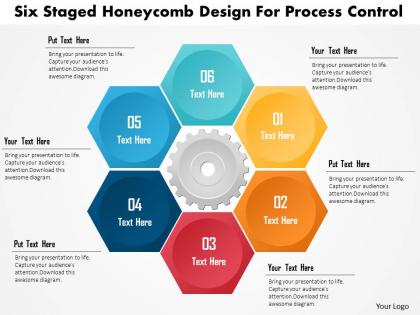
Six staged honeycomb design for process control powerpoint template




Try Before you Buy Download Free Sample Product
 Impress Your
 Audience
 100%
100% Editable
 Save Hours
 of Time


When you want to communicate your vision for a business PowerPoint is a good tool. However it becomes even better when you make use of pre-prepared Six Staged Honeycomb Design For Process Control Powerpoint Template.
People who downloaded this PowerPoint presentation also viewed the following :
Six staged honeycomb design for process control powerpoint template with all 5 slides:
You will discover our Six Staged Honeycomb Design For Process Control Powerpoint Template to be an excellent choice. Be enamored by all the attention you will get.
FAQs for Six staged honeycomb design for process
So basically the Six Staged Honeycomb thing works like this - people go through awareness, interest, consideration, trial, adoption, then advocacy. But here's what's cool about it: users don't follow some straight line like those old-school funnels suggest. They bounce around between stages, which honestly just reflects how messy real life actually is. Picture a honeycomb where each stage connects to several others - that's your web of touchpoints right there. Oh, and definitely create content that works no matter where someone jumps in first.
So basically you map each development phase to a honeycomb cell - put your main concept in the center, then branch out to ideation, prototyping, testing, refinement, launch. The cool part is how everything connects. When you get stuck in one area, you can just hop to a neighboring cell instead of being trapped in some rigid timeline. Adjacent cells share resources and feedback naturally. Way more flexible than those linear processes everyone uses. Honestly, I'd sketch your project as a honeycomb first just to visualize all the connections - it's pretty eye-opening once you see it laid out.
Aerospace and automotive companies go crazy for Six Staged Honeycomb because of that amazing strength-to-weight combo. Construction uses it tons for lightweight panels. Packaging companies swear by it when they need impact protection without the extra weight - honestly makes perfect sense if you think about it. Boat hulls are another big one since the design spreads stress really well while staying light. My buddy in marine engineering won't shut up about it actually. Basically any industry where weight is your enemy but you still need durability. I'd start by looking at your heaviest parts first.
So the Honeycomb thing basically splits big projects into six stages that connect to each other. Each stage has clear handoff points, which is clutch because you know exactly when to pass work along. What I love about it is how it shows dependencies - like you can actually see where things might get bottlenecked. Plus there are built-in checkpoints where different people jump in to review or add their piece. No more confusion about who's supposed to do what (we've all been there, right?). Just map out your next project using those six stages and you'll spot collaboration gaps before they bite you.
Honestly, start with sketching on paper first - saves so much hassle later. You want clean hexagonal shapes with good spacing between them, plus arrows or numbers showing the flow. Color-wise, go with a gradient or complementary colors that won't hurt people's eyes. I'm terrible at picking colors but gradients usually work. Each stage needs readable text, though keep it short since hexagons are cramped. White space around everything is clutch so it doesn't look messy. The flow between all six stages should make sense logically - that's probably the most important part.
Yeah, it works great for digital stuff! Actually better than physical projects in my experience. Map each honeycomb stage to your workflow phases - app dev, web design, whatever you're building. The hex shape helps you spot where things connect and where you'll hit roadblocks. Teams I know use it for UX research, sprint planning, all that. Digital moves way faster though, so you might squish some stages together. Oh and start by just sketching your six main phases first. Once you see how they link up, it clicks pretty quickly.
Biggest thing is don't cram too much text in each hexagon - one concept max or people will zone out. Test it on a projector first because tiny honeycombs are unreadable from the back (trust me on this one). Make the flow super obvious with arrows or numbers, otherwise your audience will be randomly jumping around trying to follow along. Oh and skip those flashy transition animations between stages - they look cool but just waste time. Keep it simple and readable. Actually, now that I think about it, maybe do a quick run-through with a friend beforehand to catch any confusing parts.
So the Honeycomb thing is pretty clever - you break down complicated stuff into six chunks that connect to each other. Way better than info-dumping everything at once and watching people's eyes glaze over. Each section flows into the next one naturally, so nobody gets completely lost. I've seen it work really well for technical presentations (you know how those usually go...). People actually retain more because their brains dig the pattern structure. It's like taking stairs instead of trying to jump up a cliff face. Worth trying on your next messy topic - just map it onto those six stages and see what happens.
So basically you want different metrics for each stage. Early on, just track stuff like completion rates and how long people actually spend on it. Then move to assessments and practical scores to see if they're actually retaining anything. The fun part comes later though - that's when you measure real behavior changes and whether they're actually performing better at work. Honestly, most companies skip this last part but it's where you see if the training was worth it. Each stage builds off the last one, so pick like 2-3 key metrics per stage that match your main goals. Don't overcomplicate it.
Honestly, PowerPoint's your best bet for honeycomb stuff - the hexagon shapes are super easy to work with and you can arrange all six stages without wanting to throw your laptop. Canva's pretty solid too if you want templates to mess around with. Figma's where it's at though if you're doing this with other people, since everyone can edit at once. I made the mistake of trying Word once... yeah, don't do that to yourself lol. PowerPoint first, then maybe try Figma later when you've got the hang of it.
The Honeycomb model is honestly a game-changer for making things less overwhelming. You're basically walking people through six stages instead of dumping everything on them at once. Way better than the "throw them in the deep end" approach most people use. Users actually know where they stand and what's happening next, which makes them way less anxious about the whole thing. Communication stops feeling so all over the place too. I'd definitely map your current setup against those six stages - bet you'll find some obvious spots where people are getting confused or just bouncing.
Oh yeah, there's definitely some good examples! Airbus crushed it with their A380 wing panels - got 30% weight reduction without losing strength. Boeing did something similar on 787 cargo floors. BMW's been testing it too on their i-series doors, cut vehicle weight by like 15%. Pretty cool honestly. NASA's using it for satellite stuff but I can't remember the exact numbers off the top of my head. If you're presenting this, I'd go with the Airbus numbers first since they really went all-out on testing. Their data's rock solid.
So basically, the Six Staged Honeycomb thing makes you bounce between different ways of thinking instead of getting stuck doing the same approach forever. Each stage is like a different perspective - analysis, creative stuff, actually doing the work, whatever. When you're totally blocked in one area, you just move to the next stage, and honestly that usually sparks something new that helps with what you were stuck on before. It's way better than just staring at the same problem for hours. Map out where you're spending too much time vs. where you're probably rushing through. The whole point is avoiding tunnel vision.
Honestly, the honeycomb thing is pretty cool because it forces your brain to think in all directions instead of just straight lines. Each problem branches out to different "cells" and you start connecting random pieces of info. That's usually when the good ideas hit. I love how visual it is too - you'll catch patterns that totally fly under the radar with normal methods. You can bounce between stages however you want, but here's the crazy part: solutions from one hexagon often fix completely unrelated problems in another area. Definitely try mapping out your next messy problem this way.
So basically you put the main concept in the middle hexagon, then build six connected stages around it. Students work through each one progressively - think of it like a visual map for tough topics. I'd assign different teams to tackle each hexagon, maybe give them 15 minutes per section? Then they present back to everyone else. The whole interconnected thing really clicks with kids way better than those dreaded linear worksheets we all remember hating. Each hexagon can be a different skill or perspective. Honestly works great for group discussions too since everything connects back to that center concept.
-
Topic best represented with attractive design.
-
Helpful product design for delivering presentation.